
1. Úvod
This manual provides essential information for operating your Canon EOS 100D Digital Camera. The Canon EOS 100D is a compact and lightweight DSLR camera, featuring an 18.4 Megapixel CMOS sensor, designed for both beginner and enthusiast photographers. Please read this manual thoroughly before using the camera to ensure proper operation and to maximize its capabilities.

Obrázek 1.1: Přední strana view of the Canon EOS 100D camera body with the lens cap attached, showcasinjeho kompaktní design.
2. Nastavení
2.1. Nabíjení baterie
Before first use, fully charge the supplied battery pack. Insert the battery into the charger and plug the charger into a power outlet. The charging indicator light will show the charging status.
2.2. Vložení baterie a paměťové karty
Open the battery compartment cover located at the bottom of the camera. Insert the charged battery pack firmly until it clicks into place. Insert an SD, SDHC, or SDXC memory card into the card slot with the label facing the correct direction. Close the cover securely.

Obrázek 2.1: Spodní část view of the Canon EOS 100D, illustrating the battery and memory card compartment for easy access during setup.
2.3. Nasazení objektivu
Align the red or white index mark on the lens with the corresponding mark on the camera body. Rotate the lens clockwise until it clicks into place. To detach, press the lens release button and rotate the lens counter-clockwise. The camera supports Canon EF and EF-S lenses.
3. Ovládání fotoaparátu
3.1. Zapnutí/vypnutí
To turn the camera on, slide the power switch to the ON position. To turn it off, slide the switch to VYPNUTO.
3.2. Základní režimy snímání
Volič režimů na horní straně fotoaparátu umožňuje vybrat různé režimy snímání:
- Scene Intelligent Auto (Green Square): Plně automatický režim pro běžné fotografování.
- Program AE (P): Fotoaparát nastavuje clonu a rychlost závěrky, ostatní nastavení ovládáte vy.
- AE s prioritou času (Tv): Vy nastavíte rychlost závěrky, fotoaparát nastaví clonu.
- AE s prioritou clony (Av): Vy nastavíte clonu, fotoaparát nastaví rychlost závěrky.
- Manuální expozice (M): Nastavujete clonu i rychlost závěrky.
- Creative Auto (CA): Simplified control over background blur and other settings.
- Special Scene Modes (SCN): Includes Portrait, Landscape, Close-up, Sports, Night Portrait, Handheld Night Scene, HDR Backlight Control.

Obrázek 3.2: Strana view of the Canon EOS 100D, illustrating the comfortable grip and the mode dial on top for quick setting adjustments.
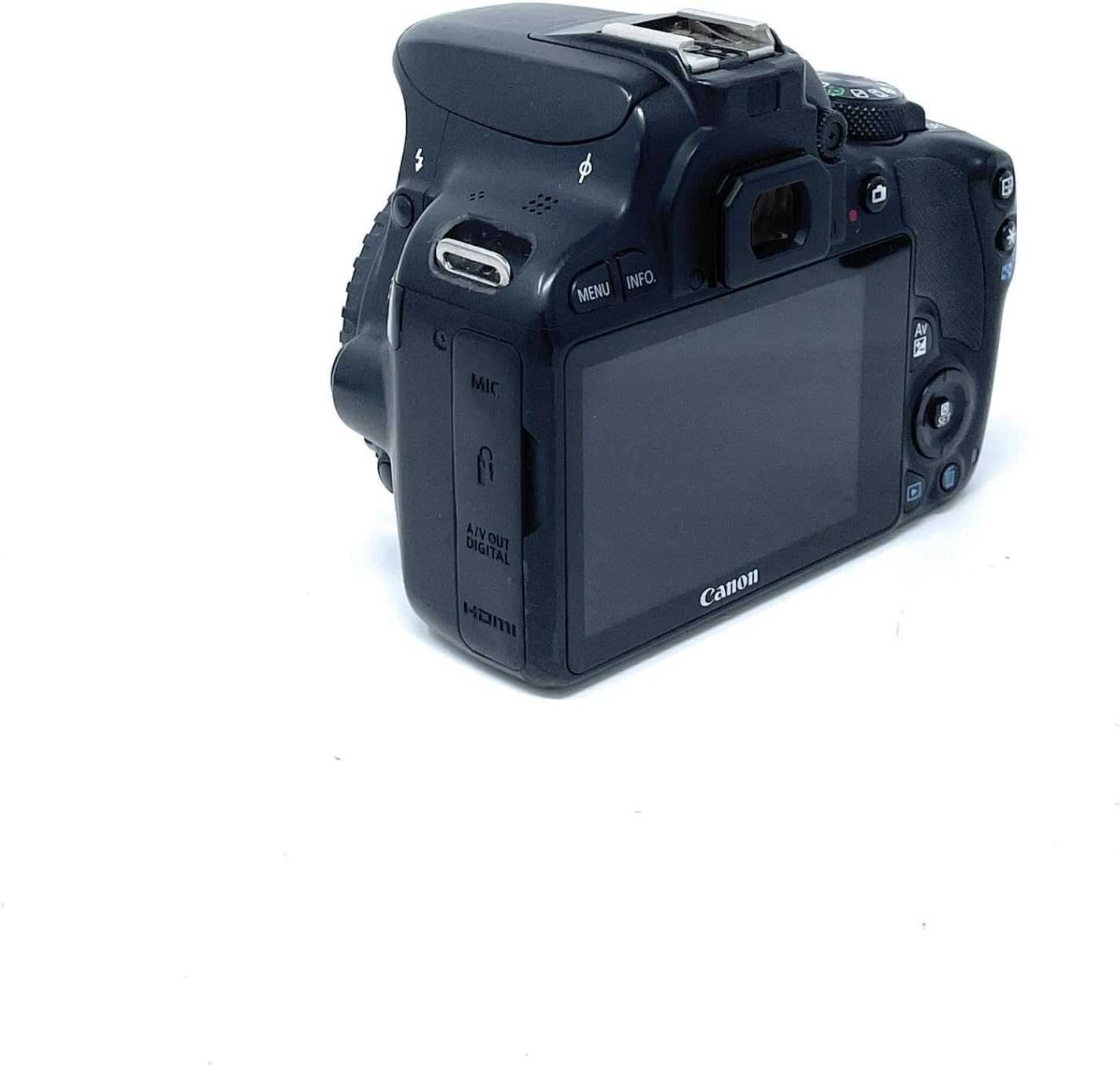
Obrázek 3.3: Zkosená zadní část view of the Canon EOS 100D, highlighting the LCD touchscreen and various control buttons for mode selection and menu navigation.
3.3. Zaostřování
The EOS 100D features a 9-point autofocus system. You can select between Jednorázový AF for still subjects, AI Servo AF for moving subjects, and AI Focus AF which automatically switches between One-Shot and AI Servo. The camera also supports Face Detection AF and Multi Point Auto Focus.
3.4. Pořízení snímku
- Set the mode dial to your desired shooting mode.
- Podívejte se skrz viewfinder or use the Live View na obrazovce LCD.
- Namáčknutím tlačítka spouště zaostřete.
- Stiskněte tlačítko spouště až na doraz pro pořízení snímku.
3.5. Nahrávání videa
To record video, set the mode dial to the movie shooting mode. Press the Live View shooting/Movie shooting button to start and stop recording. The camera supports 1080p and 2160p video resolution.
4. Údržba
4.1. Čištění fotoaparátu
- K odstranění prachu z objektivu a těla fotoaparátu použijte ofukovací kartáč.
- For stubborn smudges on the lens, use a lens cleaning cloth and lens cleaning fluid.
- Tělo fotoaparátu otřete měkkým, suchým hadříkem. Nepoužívejte organická rozpouštědla.
- For sensor cleaning, it is recommended to use the camera's built-in sensor cleaning function or consult a professional service.
4.2. Skladování
When not in use for extended periods, remove the battery from the camera. Store the camera in a cool, dry, well-ventilated area, away from direct sunlight and high humidity. Use desiccant packets if storing in humid environments.
5. Řešení problémů
| Problém | Možná příčina / řešení |
|---|---|
| Fotoaparát se nezapne. | Battery is not charged or not inserted correctly. Ensure battery is charged and inserted properly. |
| Nelze fotografovat. | Memory card is full, locked, or not inserted. Check card status, replace or format if necessary. Lens not attached correctly. |
| Obrázky jsou rozmazané. | Incorrect focus mode, camera shake, or dirty lens. Check focus settings, use a tripod, clean lens. |
| Blesk se nespouští. | Flash is disabled, or subject is too far. Enable flash or move closer to subject. |
| "Card Error" message. | Memory card is corrupted or incompatible. Try a different card or format the current one (data will be lost). |
6. Specifikace
- Model: EOS 100D (8576B014)
- Typ senzoru: CMOS
- Efektivní pixely: 18.4 megapixelů
- Držák objektivu: Canon EF, Canon EF-S
- Obrazovka: 3palcový dotykový LCD displej
- Citlivost ISO: 100–6400 (rozšiřitelné na 25600)
- Body automatického ostření: 9
- Rychlost závěrky: 1/4000 až 30 sekund
- Rychlost souvislého fotografování: 10 snímků za sekundu
- Rozlišení videa: 1080p, 2160p
- Compatible Storage: SD, SDHC, SDXC
- Rozměry (Š x V x H): 11.68 x 6.94 x 9.07 cm
- Hmotnost: 370 Grams (body only)
7. Záruka a podpora
For warranty information and technical support, please refer to the official Canon website or contact your local Canon service center. Keep your proof of purchase for warranty claims.
Online zdroje: Visit the official Canon support page for drivers, software, and additional manuals.