
Zavedení
The Soundstream VIR-7830B is a versatile single-DIN in-dash receiver designed to enhance your vehicle's audio and video capabilities. Featuring a convenient flip-out 7-inch LCD touchscreen, built-in Bluetooth for hands-free communication and audio streaming, and comprehensive media playback options, this unit provides a modern entertainment experience on the go. This manual provides essential information for setup, operation, and maintenance of your new car stereo system.
Klíčové vlastnosti
- Flip-out 7-inch touchscreen LCD display for intuitive control and video playback.
- Built-in Bluetooth technology for wireless audio streaming (A2DP) and hands-free calling with an integrated microphone.
- Detachable face plate for security.
- Součástí je dálkové ovládání pro pohodlné ovládání.
- Supports playback of various media formats including CD, CD-R, CD-RW, DVD, MP3, and WMA.
- Front USB input for connecting flash drives (up to 32GB) for MP3 audio and MP4 video playback.
- Front 3.5mm Auxiliary Input for connecting external audio devices.
- iPod and iPhone Ready for direct connectivity and control.
- 3-band parametric equalizer for audio customization.
Co je v krabici
Po otevření balení se prosím ujistěte, že jsou přítomny všechny komponenty:
- Soundstream VIR-7830B Receiver Unit
- Dálkové ovládání
- Installation Hardware (mounting screws, brackets)
- Kabelový svazek
- Uživatelská příručka (tento dokument)
Nastavení a instalace
Installation of the VIR-7830B requires careful attention to wiring and mounting. It is highly recommended that installation be performed by a qualified professional to ensure proper functionality and to prevent damage to your vehicle or the unit.
Montáž
The unit is designed for single-DIN dashboard openings. Ensure adequate space for the flip-out screen mechanism. Refer to your vehicle's specific dashboard dimensions and the unit's product dimensions (11.1 x 9 x 4.6 inches) to confirm compatibility.
Připojení vodičů
Connect the provided wiring harness to your vehicle's electrical system. Key connections include power (constant and accessory), ground, speaker outputs, and antenna. Additional connections may be required for features like reverse camera input or steering wheel controls. A detailed wiring diagram is provided in the full user manual (PDF) for precise connections.
Důležité: Incorrect wiring can cause damage to the unit or your vehicle's electrical system. Always disconnect the vehicle's battery before beginning installation.
Návod k obsluze
Obecný provoz
Pro zapnutí jednotky stiskněte MODE button. Adjust volume using the rotary encoder. Press the MODE button repeatedly to cycle through available audio sources (Radio, Disc, USB, SD, Bluetooth, AV IN).
Rozhraní dotykové obrazovky
The 7-inch LCD touchscreen provides intuitive control over all functions. The main menu allows access to various modes and settings.
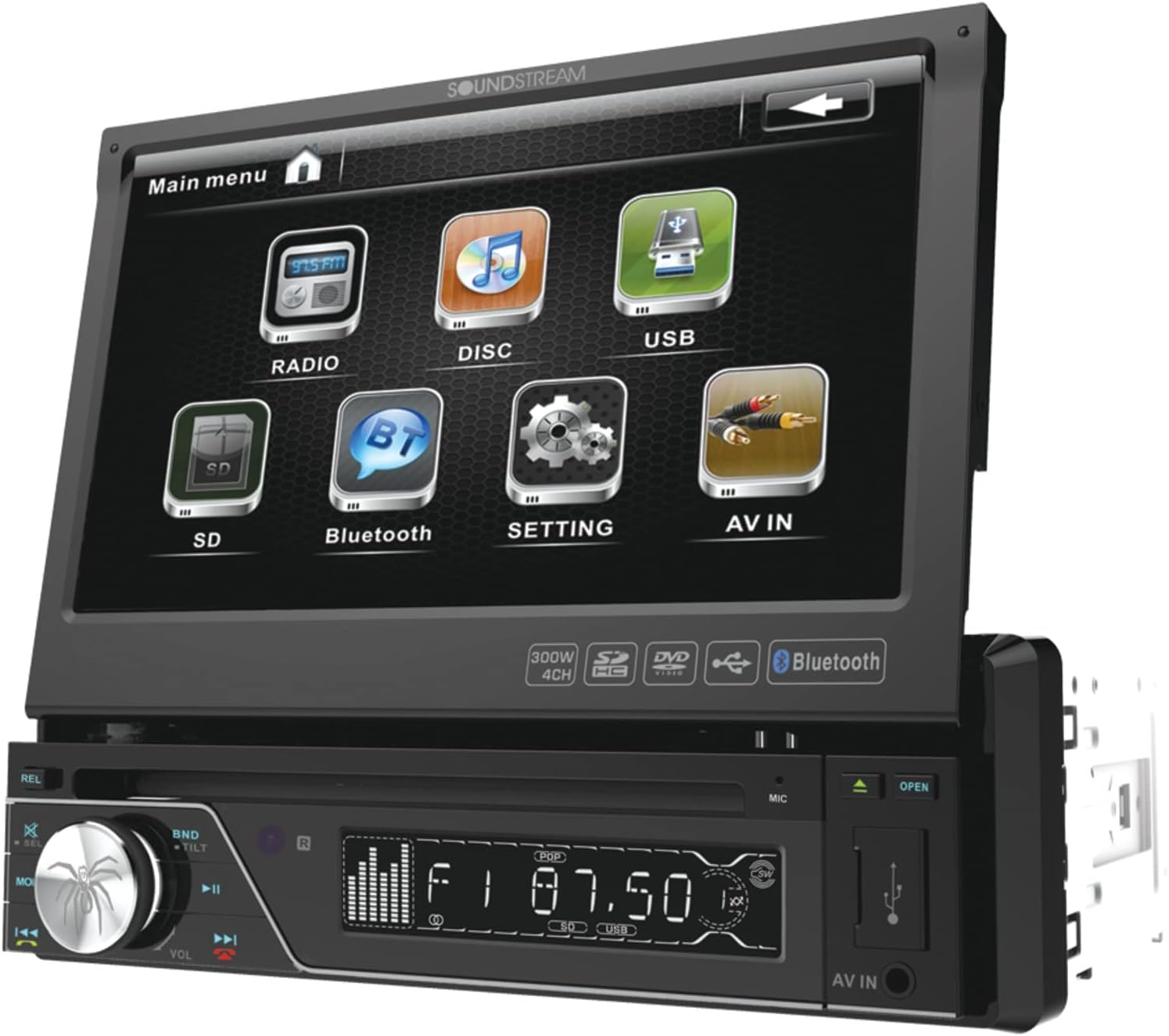
Figure 1: Main menu screen displaying icons for Radio, Disc, USB, SD, Bluetooth, Setting, and AV IN.
Tap the desired icon to select a function. Swipe gestures may be used for navigation within certain menus.
Provoz Bluetooth
The built-in Bluetooth allows for hands-free calling and wireless audio streaming from compatible devices.
- Párování: Enable Bluetooth on your mobile device. On the VIR-7830B, select the Bluetooth mode. Hledat available devices on your phone and select "Soundstream" or "VIR-7830B". Enter the default PIN (usually "0000") if prompted.
- Hands-free volání: Once paired, you can dial numbers directly from the touchscreen, access your phonebook, or view call history. The built-in microphone ensures clear communication.
- Streamování zvuku (A2DP): Play music from your paired device wirelessly. Control playback (play/pause, skip tracks) directly from the VIR-7830B's touchscreen.

Figure 2: Bluetooth calling screen with a numeric keypad for dialing, and options for Music, History, and Phone Book.
Přehrávání DVD/CD
Insert a disc into the disc slot. The unit will automatically switch to Disc mode and begin playback. Use the on-screen controls or remote control for playback functions (play, pause, stop, skip, fast forward/rewind).
USB and Auxiliary Input
Connect a USB flash drive to the front USB port for MP3 audio or MP4 video playback. Connect external audio devices (e.g., MP3 players) to the front 3.5mm auxiliary input using a stereo audio cable. Select the corresponding source mode to access content.
Rádiový tuner
Select the Radio mode to access AM/FM tuning. Use the seek/scan functions to find stations or manually tune. You can save your favorite stations as presets for quick access.

Figure 3: Radio tuning screen showing frequency display and preset buttons, alongside the included remote control.
Údržba
- Čištění obrazovky: Dotykovou obrazovku jemně otřete měkkým hadříkem, který nepouští vlákna. V případě odolných šmouh lehceampOtřete hadřík vodou nebo čisticím prostředkem vhodným pro obrazovky. Vyhněte se abrazivním materiálům nebo agresivním chemikáliím.
- Čištění jednotky: Vnější povrch jednotky otřete suchým, měkkým hadříkem. Nepoužívejte tekuté čisticí prostředky přímo na jednotku.
- Péče o disky: Handle discs by their edges. Keep them clean and free of scratches to ensure optimal playback.
- Detachable Face Plate: When detaching the face plate, store it in the provided protective case to prevent damage.
Odstraňování problémů
If you encounter issues with your VIR-7830B, refer to the following common problems and solutions:
| Problém | Možná příčina | Řešení |
|---|---|---|
| Žádná síla | Nesprávné zapojení; Spálená pojistka; Problém s baterií vozidla. | Zkontrolujte připojení napájení a uzemnění. Zkontrolujte pojistkovou skříňku vozidla a pojistku jednotky. Ujistěte se, že je baterie nabitá. |
| Žádný zvuk | Odpojené kabely reproduktoru; Příliš nízká hlasitost; Funkce ztlumení je aktivní; Nesprávný zdroj zvuku. | Zkontrolujte připojení reproduktorů. Zvyšte hlasitost. Deaktivujte ztlumení. Vyberte správný zdroj zvuku. |
| Bluetooth se nepřipojuje | Zařízení není v režimu párování; Nesprávný PIN; Rušení. | Ensure both devices are in pairing mode. Re-enter PIN. Move closer to the unit. Restart both devices. |
| Chyba disku | Dirty or scratched disc; Incompatible disc format. | Clean the disc. Try a different disc. Ensure disc format is supported (CD, CD-R, CD-RW, DVD). |
For more detailed troubleshooting or persistent issues, please consult the comprehensive user manual (PDF) or contact Soundstream customer support.
Specifikace
- Číslo modelu: VIR-7830B
- Rozměry produktu: 11.1 x 9 x 4.6 palce
- Hmotnost položky: 5.22 libry
- Velikost obrazovky: 7 palce
- Typ displeje: LCD (Touchscreen)
- Podporované typy médií: MP3, DVD-R, CD-R, CD, CD-RW, WMA, MP4 (via USB)
- Bezdrátová komunikace: Bluetooth (A2DP)
- Technologie připojení: Bluetooth, Auxiliary (3.5 mm), USB
- Barva: Černý
- Výrobce: Zvukový proud
- Speciální vlastnosti: Flip-out Touchscreen, Detachable Face Plate, Remote Control
Záruka a podpora
Soundstream products are covered by a limited warranty. Please refer to the warranty card included with your product for specific terms, conditions, and duration. For technical support, service, or warranty claims, please contact Soundstream customer service directly.
Návrh 65 Varování: Tento produkt obsahuje chemikálie, o kterých je ve státě Kalifornie známo, že způsobují rakovinu a vrozené vady nebo jiná poškození reprodukce.