


Arthur
Guida di Start-Up
Prutegge è monitorizza tuttu ciò chì amate è valore 
Cuminciate
Inserite Arthur in una presa di rete. I luci LED verdi si accenderanu è lampeggianu rapidamente 
Chì significanu e luci lampanti?
Scarica l'App
Scaricate l'App "Clan in casa" in iOS App Store o Google Play Store.
Registrate


Add Arthur - Bluetooth
Aghjunghje Arthur cù Bluetooth
Passu 1
In A mo casa, cliccate nantu à l'icona (+) in l'angulu in alto à destra di u schermu 
Aghjunghje Arthur cù Bluetooth
Assicuratevi chì Bluetooth hè attivatu nantu à u vostru dispositivu è selezziunate "aghjunghje" in a tabulazione "discovering devices".
U plug intelligente Arthur cumincerà avà à accoppià, questu pò piglià finu à 2 minuti.
Aghjunghje Arthur cù Bluetooth 
Una volta chì u vostru dispositivu hà accoppiatu cù successu, vi vede un tick cumparisce. Cliccate "Next" per cuntinuà.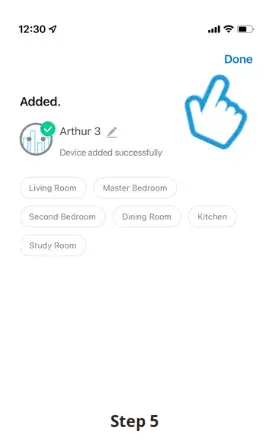 Se avete accoppiatu cù successu u vostru smart plug Arthur, cliccate "fattu" per cumincià à aduprà u vostru pruduttu.
Features

Basta toccà nantu à u buttone nantu à u schermu per accende è spinghje a presa
Timer & Schedule

Per aghjunghje un schedariu, basta à stabilisce l'ora è u ghjornu chì vulete chì Arthur si accenda è si spegne automaticamente
Monitoraghju di l'energia

Cliccate nantu à l'Energia in u fondu induve pudete monitorà u cunsumu d'energia storicu in l'angulu drittu in tempu reale
Resetta Arthur
Se avete prublemi di cunnessione cù Arthur, pudete avè bisognu di fà un reset.
Cumu resetta Arthur Press è mantene premutu u buttone di putenza à u fronte di u socket.
U LED cumminciarà à lampà in verde quandu hè pronta per a stallazione.
 Stricchendu per leghje?
View sta start-up una guida in linea à
time2technology.com/manuals
Documenti / Risorse
 |
time2 Arthur WiFi Smart Plug Socket cun monitoraghju energeticu [pdfGuida di l'utente Arthur, Presa Smart Plug WiFi cù Monitoraghju di l'Energia, Arthur WiFi Smart Plug Socket cun Monitoraghju Energeticu, Presa Smart Plug, Monitoramentu Energeticu, Monitoraghju |


