
1. Introduzione
The KETOTEK DC 6.5-100V 20A Voltmeter Ammeter is a versatile 4-in-1 digital multimeter designed for measuring voltage, current, active power, and energy consumption in DC electrical systems. This device is suitable for indoor use and can monitor batteries, solar systems, electric bike generators, and other DC applications. It features a large LCD with backlight, voltage alarm function, energy reset, and power-off data storage. An integrated shunt simplifies installation.
2. Cuntenutu di u pacchettu
Verificate chì tutti l'articuli sò presenti in u pacchettu:
- 1 x KETOTEK DC Voltmeter Ammeter (Model: KT-D132)
- 1 x Manuale d'utilizatore
3. Caratteristiche di u produttu
- Misurazione 4 in 1: Simultaneously displays voltage, current, active power, and energy.
- Ampia gamma di misurazione: DC 6.5-100V voltage, 0-20A current, 0-2kW active power, and 0-9999kWh energy.
- Display LCD: Large, clear LCD with blue backlight for easy readability.
- Voltage Alarma: User-configurable voltage alarm threshold with flashing display.
- Energy Reset Function: Allows resetting accumulated energy data.
- Storage di dati: Automatically saves data when power is off.
- Integrated Shunt: No external shunt required for current measurement up to 20A.

Image 1: The KETOTEK DC Voltmeter Ammeter displaying its four measurement parameters: voltage, current, power, and energy, along with their respective ranges.

Image 2: Visual representation of the meter's key functions: backlight control, voltage alarm, energy reset, and power-off data saving.
4. Specificazioni
| Parametru | Valore |
|---|---|
| Marca | KETOTEK |
| Mudellu | KT-D132 |
| Stile | DC 20 A |
| Voltage Gamma di misura | CC 6.5V - 100V |
| Range di misurazione attuale | 0A - 20A |
| Active Power Measurement Range | 0W - 2kW |
| Energy Measurement Range | 0kWh - 9999kWh |
| Vol. Operativu Minimutage | 6.5 Volts DC |
| Volu Operativu Massimutage | 100 Volts DC |
| Fonte d'energia | Battery Powered (from measured circuit) |
| Tipu di visualizazione | LCD cun retroilluminazione |
| Dimensioni (L x W x H) | 8.5 x 5 x 2.4 cm |
| Pesu di l'articulu | 100 grammi |
| Culore | Neru |
| Cunfurmità | CE, 3C, FCC |
| UPC | 723260104911 |
| Numero di parte di u fabricatore | KT-0132 |
Nota: The 20A current rating is for short-term loads. For continuous operation exceeding 15A, consider a higher amperage version (e.g., 50A or 100A) to prevent damage to the device.

Image 3: Detailed dimensions of the KETOTEK DC Voltmeter Ammeter (Model KT-D132).
5. Precauzioni di sicurità
- Stu dispusitivu hè pensatu per solu usu di l'internu. Do not use it outdoors.
- Ensure the load does not exceed the rated voltage and current of the device (DC 6.5-100V, 20A).
- Always connect the device according to the provided wiring diagram. Incorrect wiring can lead to product damage or malfunction.
- If you intend to use a different connection method, consult with a qualified professional or contact customer support first.
- Mantene u dispusitivu luntanu da l'acqua, l'umidità è e temperature estreme.
- Ùn pruvate micca di disassemble o mudificà u dispusitivu.
6. Installazione è Wiring
The KETOTEK DC Voltmeter Ammeter features an integrated shunt, simplifying the wiring process. Follow the diagram below for correct installation.
Schema di cablaggio
Connect the power supply and load as shown in the diagram. The device measures voltage across its input terminals and current through the integrated shunt.

Image 4: Wiring diagram for the KETOTEK DC Voltmeter Ammeter (Model KT-D132). Connect the positive and negative terminals of the DC input to the power supply, and the load in series with the current measurement path.
- Connect the positive terminal of your DC power supply to the '+' (DC input) terminal of the meter.
- Connect the negative terminal of your DC power supply to the '-' (DC input) terminal of the meter.
- Connect the positive terminal of your load to the '+' (Load) terminal of the meter.
- Connect the negative terminal of your load to the '-' (Load) terminal of the meter.
- Assicuratevi chì tutte e cunnessione sianu sicure è currette prima di applicà l'alimentazione.
7. Operating Instructions
The device operates automatically once connected to a DC power source within its specified voltage range. The LCD will display voltage, current, power, and energy simultaneously.
Funzioni di u buttone
The meter features a single button on the right side of the display for various functions:
- Pressa corta: Toggles the backlight ON/OFF.
- Pressu longu (3 seconde): Resets the accumulated energy (kWh) data. The energy value will flash, then reset to 0.
- Pressu longu (5 seconde): Enters the voltage alarm setting mode.
Voltage Paramètrage d'alarme
Per stabilisce u voltage alarm threshold:
- Press and hold the button for 5 seconds until the voltage value on the display starts flashing. This indicates you are in alarm setting mode.
- Short press the button to adjust the voltage alarm threshold. Each short press will increment the value.
- Once the desired threshold is set, press and hold the button again for 3 seconds to save the setting and exit the alarm mode.
- Se u volu misuratutage falls below the set alarm threshold, the display will flash to indicate a low voltage cundizione.
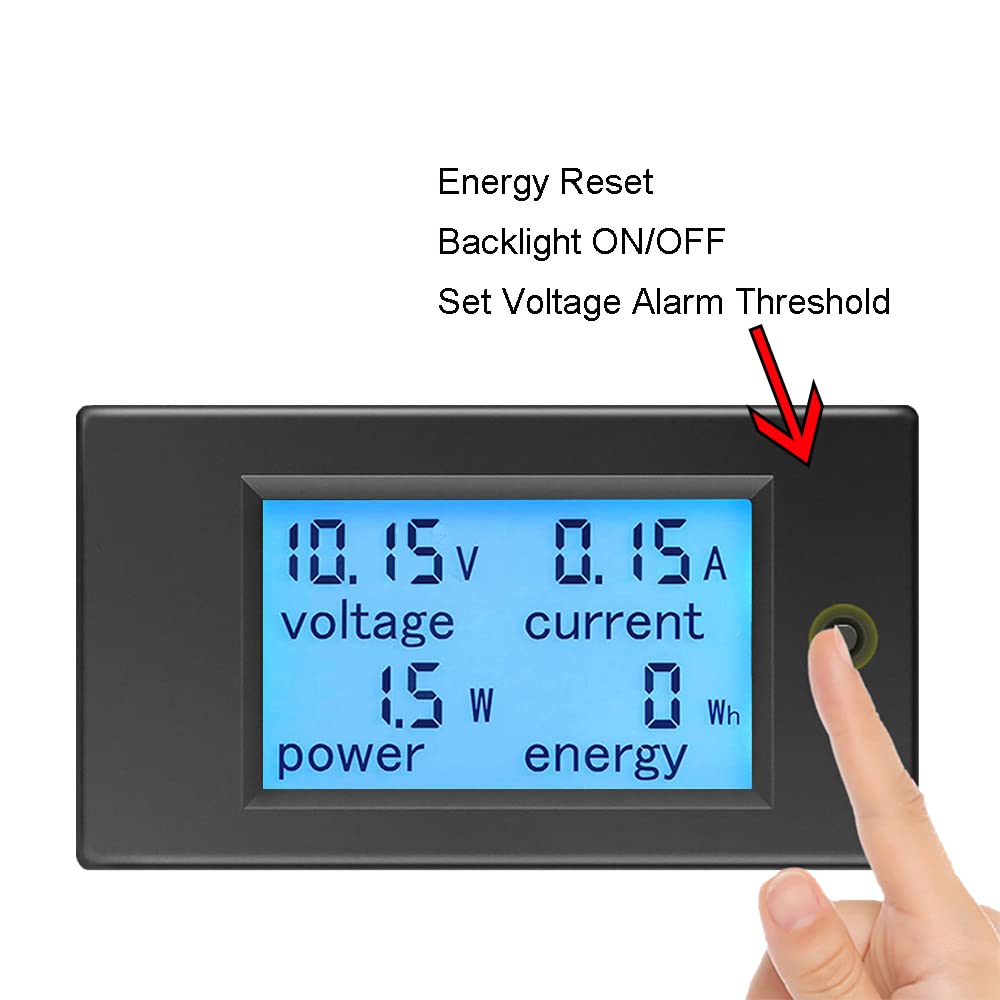
Image 5: Demonstrates the interaction with the control button for backlight, energy reset, and voltage alarm settings.
8. Mantenimentu
- Keep the device clean and dry. Use a soft, dry cloth to wipe the display and casing.
- Evite l'usu di detergenti abrasivi o solventi.
- Mantene u dispusitivu in un locu frescu è seccu quandu ùn hè micca in usu.
- Verificate regularmente i cunnessione di i fili per a tenuta è i segni di usura.
9. Risoluzione di prublemi
- No Display:
- Check if the DC input voltage is within the 6.5V-100V range. The device requires at least 6.5V to power on.
- Verificate chì tutti i cunnessione di i fili sianu curretti è sicuri.
- Ensure the power supply is active.
- Letture incorrette:
- Confirm the wiring matches the diagram precisely. Incorrect current path can lead to inaccurate readings.
- Ensure the load current does not exceed 20A for continuous operation. Overloading can affect accuracy or damage the device.
- Verificate per e cunnessione allentate o fili danneggiati.
- Energy (kWh) Not Resetting:
- Ensure you are pressing and holding the button for approximately 3 seconds until the energy value flashes and resets.
- Voltage Alarm Not Working:
- Verify the alarm threshold is set correctly by entering the alarm setting mode (long press for 5 seconds).
- Assicuratevi u vulume misuratutage is actually below the set threshold.
10. Garanzia è Support
KETOTEK products are manufactured to high-quality standards. For warranty information, please refer to the terms and conditions provided at the time of purchase or contact your retailer. If you encounter any issues or require technical assistance, please contact KETOTEK customer support through the official website or your purchase platform. Provide your product model (KT-D132) and a detailed description of the issue for efficient support.