
1. Introducció
This manual provides essential information for setting up, operating, maintaining, and troubleshooting your Lenovo IdeaCentre AIO 27 All-in-One Desktop PC. Please read this manual thoroughly before using your device to ensure proper functionality and to maximize its lifespan.

Figure 1: Lenovo IdeaCentre AIO 27 All-in-One Desktop PC
2. Contingut del paquet
Verifiqueu que tots els elements estiguin presents a l'embalatge del producte:
- Lenovo IdeaCentre AIO 27 Desktop PC
- Adaptador de corrent (90 W)
- Teclat (pot ser amb cable o sense fil, segons la configuració)
- Ratolí (pot ser amb cable o sense fil, segons la configuració)
- Documentació (Guia d'inici ràpid, Informació de garantia)
3. Producte acabatview
3.1 Components clau
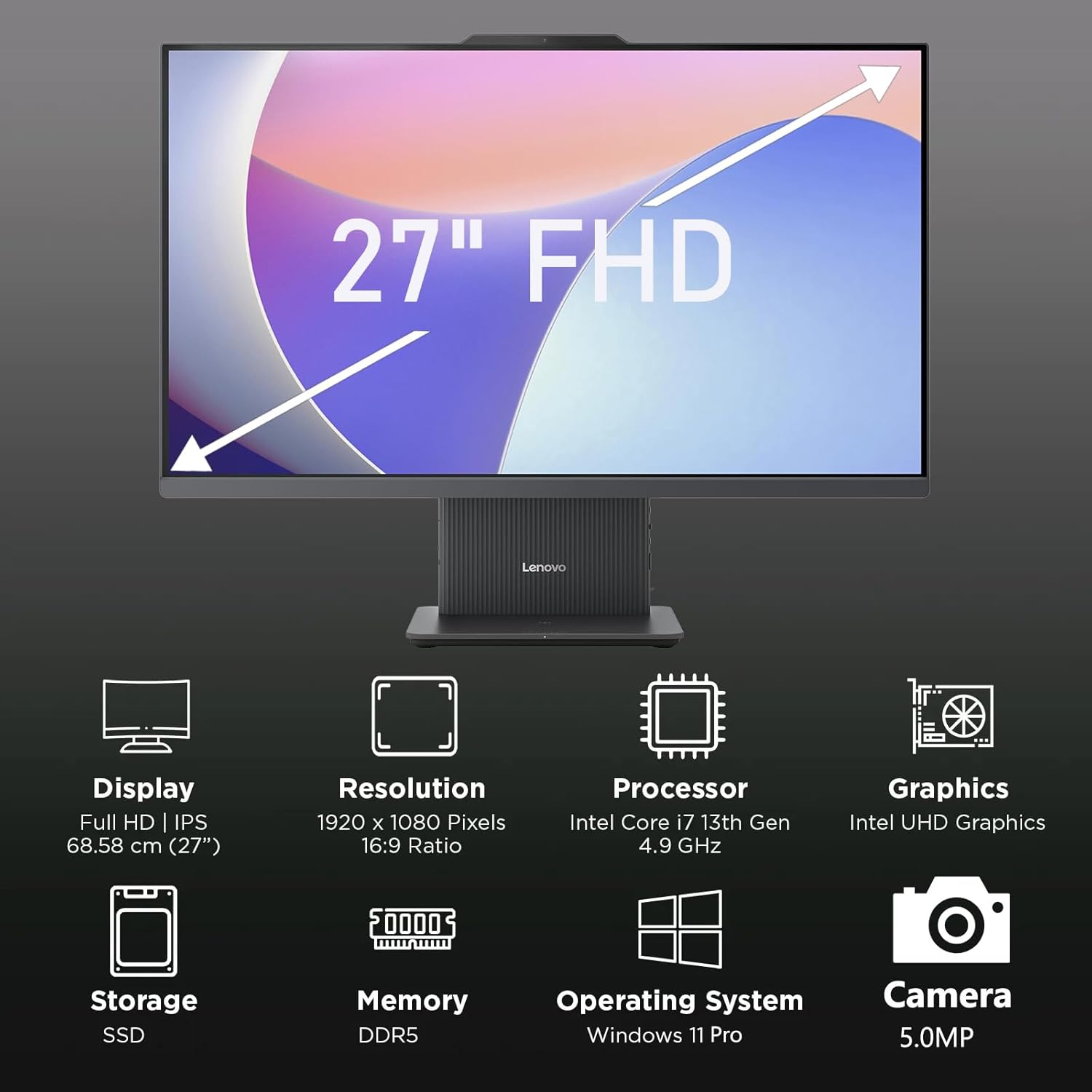
Figura 2: Mésview of key features including Display, Resolution, Processor, Graphics, Storage, Memory, Operating System, and Camera.
- Visualització: 27-inch Full HD (1920x1080) IPS, 300 nits, anti-glare.
- Weblleva: Integrated 5.0MP webcam with dual microphones.
- Ponents: Integrated 3W x2 HARMAN speakers.
- Processador: Intel Core i7-13620H.
- Memòria: Memòria RAM DDR5.
- Emmagatzematge: PCIe NVMe SSD.
3.2 Ports i connectors

Figure 3: Detailed diagram of ports and connectors on the Lenovo IdeaCentre AIO 27.
- E-shutter (for webprivacitat de la càmera)
- Botó d'encesa
- Entrada HDMI 1.4
- Entrada de corrent continu
- USB-A 480Mbps (USB 2.0)
- Ethernet (RJ-45)
- USB-A 480Mbps (USB 2.0)
- USB-A 10 Gbps (USB 3.2 Gen 2)
- Sortida HDMI 2.1 TMDS
- USB-C 10Gbps (data transfer only)
- Headphone / microphone combo jack
4. Configuració
4.1 Desembalatge i col·locació
- Carefully remove the AIO PC and all accessories from the packaging.
- Place the AIO PC on a stable, flat surface with adequate ventilation around the device.
4.2 Connexió de potència
- Connect the power adapter cable to the DC-in port (4) on the rear of the AIO PC.
- Connecteu l'adaptador d'alimentació a una presa de corrent amb connexió a terra.
4.3 Connexió de perifèrics
- Connect your keyboard and mouse to the available USB-A ports (5, 7, 8) on the rear of the AIO PC.
- If using wired Ethernet, connect the cable to the RJ-45 port (6).
- For external displays, use the HDMI-out port (9). To use the AIO as a display for another device, use the HDMI-in port (3).
4.4 Arrencada inicial i configuració de Windows
- Press the power button (2) to turn on the PC.
- Seguiu les instruccions que apareixen a la pantalla per completar la configuració inicial del Windows 11 Pro, incloent-hi l'idioma, la regió, la connexió de xarxa i la creació del compte d'usuari.
4.5 Ajust del suport

Figure 4: The AIO stand allows for ergonomic tilt adjustment.
The integrated stand allows for tilt adjustment from -5° to 15° to optimize your viewing angle and posture. Gently adjust the display to your preferred position.
5. Com fer funcionar l'ordinador
5.1 Funcionament bàsic
- Encès/apagat: Press the power button (2) to turn on. To shut down, click Start > Power > Shut down in Windows.
- Mode de repòs: Press the power button briefly or select Sleep from the Start menu.
5.2 Utilitzant el Webcàmera i àudio

Figure 5: The 5MP webcam and Harman audio enhance video conferencing.
- Weblleva: La càmera integrada de 5.0 MP webcam is ideal for video conferencing and online communication. Use the E-shutter (1) to physically block the camera for privacy.
- Micròfons: Dual microphones provide clear audio input.
- Ponents: HARMAN speakers deliver high-quality audio output.
5.3 Connectivitat
- Wi-Fi 6: Connecteu-vos a xarxes sense fil per accedir a Internet d'alta velocitat.
- Bluetooth 5.2: Pair with Bluetooth-enabled devices such as headphones, speakers, or mobile phones.
- Ports USB: Utilize the various USB-A and USB-C ports for connecting external drives, printers, and other peripherals.
5.4 Característiques del Windows 11 Pro
Your AIO PC comes pre-installed with Windows 11 Pro, offering advanced features for productivity and security:
- BitLocker: For advanced data encryption.
- Escriptori remot: Access your PC from another device.
- Uneix-te al domini: Integrate into corporate networks.
- Hola de Windows: Secure and fast login using facial recognition (if IR camera is present) or PIN.
6. Manteniment
6.1 Cleaning Your PC
- Visualització: Utilitzeu un drap suau i sense pelusa lleugerament dampNetegeu amb aigua o un netejador de pantalles no abrasiu. No ruixeu líquid directament sobre la pantalla.
- Xassís: Wipe with a soft, dry cloth. Avoid harsh chemicals or abrasive materials.
- Ventilació: Ensure ventilation openings are clear of dust and obstructions to prevent overheating.
6.2 Actualitzacions de programari
Regularly check for and install Windows updates and driver updates to ensure optimal performance and security. Go to Settings > Windows Update to check for updates.
6.3 Còpia de seguretat de dades
Fes còpies de seguretat periòdiques de les teves dades importants en un disc dur extern o en un emmagatzematge al núvol per evitar la pèrdua de dades.
7. Solució De Problemes
This section addresses common issues you might encounter with your IdeaCentre AIO 27.
| Problema | Possible solució |
|---|---|
| L'ordinador no s'encén | Ensure the power adapter is securely connected to both the PC and a working electrical outlet. Test the outlet with another device. |
| No es mostra a la pantalla | Check power connection. Ensure the PC is powered on. If using HDMI-in, verify the external device is on and correctly connected. |
| Sense connexió a Internet (Wi-Fi) | Check if Wi-Fi is enabled in Windows settings. Verify your router is working. Reconnect to the Wi-Fi network. |
| Sense àudio | Check volume levels in Windows. Ensure speakers are not muted. Verify audio drivers are up to date. |
| Webla càmera no funciona | Ensure the E-shutter (1) is open. Check privacy settings in Windows. Verify webcam drivers are installed and up to date. |
8. Especificacions

Figure 6: Details of the Intel Core i7-13620H processor.

Figure 7: The 27-inch FHD display offers comfortable viewing.
| Característica | Especificació |
|---|---|
| Marca | Lenovo |
| Nom del model | IdeaCentre AIO 27 |
| Sistema operatiu | Windows 11 Pro |
| Processador | Intel Core i7-13620H (10 nuclis, 16 fils, fins a 4.9 GHz) |
| Gràfics | Gràfics Intel UHD integrats |
| Mostra | 27-inch FHD (1920x1080) IPS, 300 nits, Anti-glare, 99% sRGB |
| Memòria | 32GB DDR5 RAM (5200 MT/s) |
| Emmagatzematge | 1TB M.2 PCIe 4.0x4 NVMe SSD |
| Àudio | High Definition (HD) Audio, Realtek ALC233-CG codec, 3W x2 HARMAN speakers |
| Weblleva | 5.0MP with Dual Microphones |
| Connectivitat sense fil | Wi-Fi 6 (802.11ax 2x2), Bluetooth 5.2 |
| Ports (posteriors) | 1x USB-A 10Gbps, 2x USB-A 480Mbps, 1x HDMI-in 1.4, 1x HDMI-out 2.1 TMDS, 1x RJ-45, 1x Power Connector |
| Ports (esquerra) | 1x USB-C 10Gbps (data transfer only), 1x 3.5mm combo audio jack |
| Xip de seguretat | Firmware TPM 2.0 |
| Adaptador d'alimentació | 90W 89% adapter |
| Dimensions (L x P x A) | 611.72 x 192 x 473.16 mm (24.08 x 7.55 x 18.62 polzades) |
| Pes | Uns 7.1 kg (15.65 lliures) |
9. Informació de la garantia
Your Lenovo IdeaCentre AIO 27 PC comes with a standard manufacturer's warranty. The specific terms and duration of your warranty may vary by region and purchase agreement. Please refer to the warranty documentation included in your product packaging or visit the official Lenovo support weblloc per obtenir informació detallada.
Typically, the warranty covers defects in materials and workmanship under normal use. It does not cover damage caused by misuse, accidents, unauthorized modifications, or external factors.
10. Suport i informació de contacte
For technical support, service, or additional information, please contact Lenovo customer support through the following channels:
- Suport de Lenovo Weblloc: Visita support.lenovo.com per a controladors, manuals i guies de resolució de problemes.
- Suport telefònic: Refer to your warranty card or the Lenovo support weblloc per als números de contacte regionals.
- Xat en línia: Available on the Lenovo support website for real-time assistance.
Please have your product's serial number ready when contacting support. The serial number is typically located on a label on the back or bottom of your AIO PC.