
1. Introducció
This manual provides essential information for setting up, operating, and maintaining your HP OmniDesk Slim Desktop PC, Model S03-0006. This desktop PC is designed for daily tasks, offering an Intel Core i3-14100 processor, ample memory, and various connectivity options for productivity and entertainment.
2. Contingut del paquet
Verifiqueu que tots els elements siguin presents al paquet:
- HP S03-000 OmniDesk Slim Desktop PC
- Font d'alimentació
- USB Black Wired Keyboard (if included with specific bundle)
- USB Wired Mouse (if included with specific bundle)
Nota: Els accessoris addicionals es poden vendre per separat.
3. Producte acabatview
The HP OmniDesk Slim Desktop PC features a compact design with essential components for efficient computing.

Figura 3.1: HP OmniDesk Slim Desktop PC showcasing és Slim Profile, Intel Core i3-14100 processor, 8GB DDR5 RAM, 256GB SSD, Intel UHD Graphics 710, Wi-Fi 6, Bluetooth 5.4, Windows 11, and dual display support.
3.1. Ports i connectors
Familiarize yourself with the various ports on your desktop PC for connecting peripherals and displays.
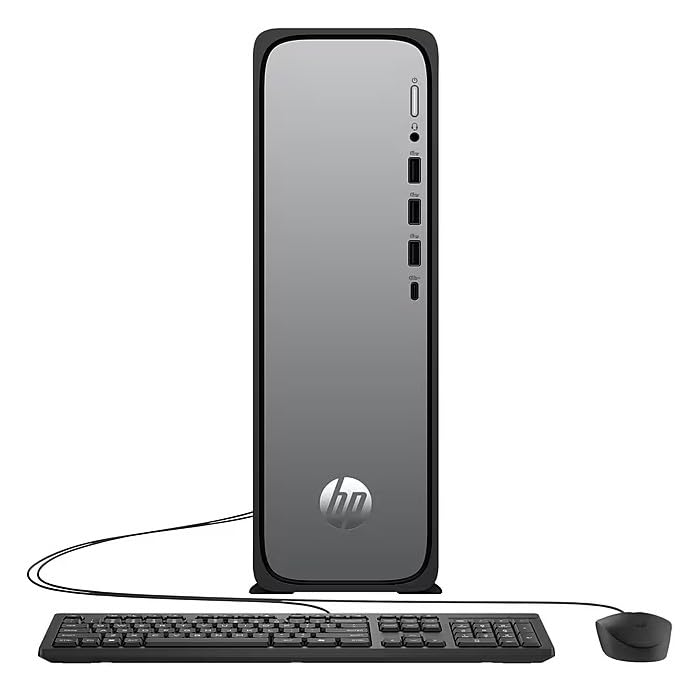
Figura 3.2: Front and rear port layout of the HP OmniDesk Slim Desktop PC. Front ports include a headphone/microphone combo jack, USB Type-A 5Gbps ports, and a USB Type-C 10Gbps port. Additional ports (typically rear) include 4 USB 2.0 Type-A, 1 RJ-45 (Ethernet), 1 HDMI Out, and 1 DisplayPort 1.4.
- Ports frontals:
- Combinació d'auriculars/micròfon
- USB Type-A 5Gbps signaling rate (3 ports)
- USB Type-C 10Gbps signaling rate (1 port)
- Ports posteriors:
- USB 2.0 Type-A (4 ports)
- RJ-45 (Ethernet)
- HDMI 1.4b (1 port)
- DisplayPort 1.4a (1 port)
4. Guia de configuració
Follow these steps to set up your HP OmniDesk Slim Desktop PC:
- Connecta el monitor: Connect your monitor to the PC using an HDMI or DisplayPort cable. Ensure the cable is securely plugged into both the PC and the monitor.
- Connecteu els perifèrics: Plug in your USB keyboard and mouse into the available USB ports on the PC.
- Connectar l'alimentació: Connect the power supply cable to the PC's power input, then plug the other end into a wall outlet or surge protector.
- Encès: Press the power button on the front of the PC. The system will boot up, and you will see the Windows 11 setup screen.
- Configuració inicial de Windows: Seguiu les instruccions que apareixen a la pantalla per completar la configuració del Windows 11, incloent-hi l'idioma, la regió, la connexió de xarxa i la creació del compte d'usuari.
5. Instruccions de funcionament
5.1. Funcionament bàsic
- Encès/apagat: Press the power button to turn on the PC. To shut down, click the Start button, then Power > Shut down.
- Reinicia: Feu clic al botó Inici i, a continuació, a Energia > Reinicia.
- Mode de repòs: Feu clic al botó Inici i, a continuació, a Engegada > Suspensió.
5.2. Connexió a una xarxa
Your PC supports both wired (Ethernet) and wireless (Wi-Fi) network connections.
- Connexió per cable: Connect an Ethernet cable from your router or modem to the RJ-45 port on the back of the PC.
- Connexió sense fil (Wi-Fi 6):
- Feu clic a la icona Wi-Fi de la barra de tasques.
- Seleccioneu la xarxa Wi-Fi que vulgueu de la llista.
- Introduïu la clau de seguretat de xarxa (contrasenya) si se us demana i, a continuació, feu clic a Connecta't.
5.3. Dual Display Support
To extend your desktop to a second monitor:
- Connect the second monitor to an available video output port (HDMI or DisplayPort) on your PC.
- Feu clic amb el botó dret a l'escriptori i seleccioneu Configuració de visualització.
- Under "Multiple displays," select how you want the displays to behave (e.g., Extend these displays, Duplicate these displays).
6. Manteniment
- Actualitzacions de programari: Comproveu i instal·leu regularment si hi ha actualitzacions de Windows per garantir l'estabilitat i la seguretat del sistema. Aneu a Configuració > Actualització de Windows.
- Actualitzacions de controladors: Keep your device drivers updated. HP Support Assistant (MyHP) can help manage these updates.
- Neteja: Use a soft, dry cloth to clean the exterior of the PC. Avoid liquid cleaners directly on components. Ensure ventilation openings are clear of dust.
- Dades de còpia de seguretat: És important fer còpies de seguretat regularment filea una unitat externa o a un emmagatzematge al núvol per evitar la pèrdua de dades.
7. Solució De Problemes
| Problema | Possible solució |
|---|---|
| El PC no s'encén. |
|
| No es mostra cap imatge al monitor. |
|
| Sense connexió a Internet. |
|
| Peripherals (keyboard/mouse) not working. |
|
8. Especificacions
| Nom del model | HP OmniDesk Desktop HP S03-000 PC |
| Número de model | OmniDesk Slim S03-0006 |
| Processador | Intel Core i3-14100 (3.5 GHz, 6 MB Cache) |
| Gràfics | Intel UHD Graphics 710 (integrat) |
| RAM | 8 GB DDR5 (4800 MT/s), Max 64 GB |
| Emmagatzematge | SSD de 256 GB (unitat d'estat sòlid) |
| Sistema operatiu | Windows 11 Home |
| Connectivitat | Realtek Wi-Fi 6 (2x2), Bluetooth 5.4, Gigabit Ethernet (RJ-45) |
| Ports |
|
| Dimensions (A x A x P) | 11.61 x 3.94 x 11.97 polzades |
| Pes | 8.38 lliures |
| Certificacions | ENERGY STAR certified, EPEAT Gold with Climate+ |
9. Garantia i Suport
9.1. Informació de la garantia
This HP OmniDesk Slim Desktop PC comes with a Garantia limitada de 90 diesConsulteu la documentació de garantia inclosa amb el producte per conèixer els termes i condicions específics.
9.2. Suport tècnic
Per obtenir assistència tècnica, descàrregues de controladors o més informació, visiteu el lloc web oficial de suport d'HP. website. You can also utilize the pre-installed MyHP application for device customization, optimization, and access to helpful messages and settings.
Always provide your product model number (S03-0006) and serial number when contacting support.