
1. Acabatview
The Xiaomi Redmi Note 15 Pro 5G is a high-performance smartphone designed for robust daily use. It features a massive 6580 mAh battery, IP66/IP68 dust and water resistance, a 200 MP camera, and a 6.83-inch 1.5K AMOLED display. This manual provides essential information for setting up, operating, and maintaining your device.

Imatge: Múltiple views of the Xiaomi Redmi Note 15 Pro 5G smartphone, showcasinel seu disseny i el mòdul de càmera.
2. Què hi ha a la caixa
En desempaquetar el Xiaomi Redmi Note 15 Pro 5G, hauríeu de trobar els elements següents:
- Telèfon intel·ligent Xiaomi Redmi Note 15 Pro 5G
- USB Cable (USB Type-C)
- Eina d'expulsió de SIM
- Funda protectora
- Holding Ring (Keyring)
Note: A power adapter is not included with this device.
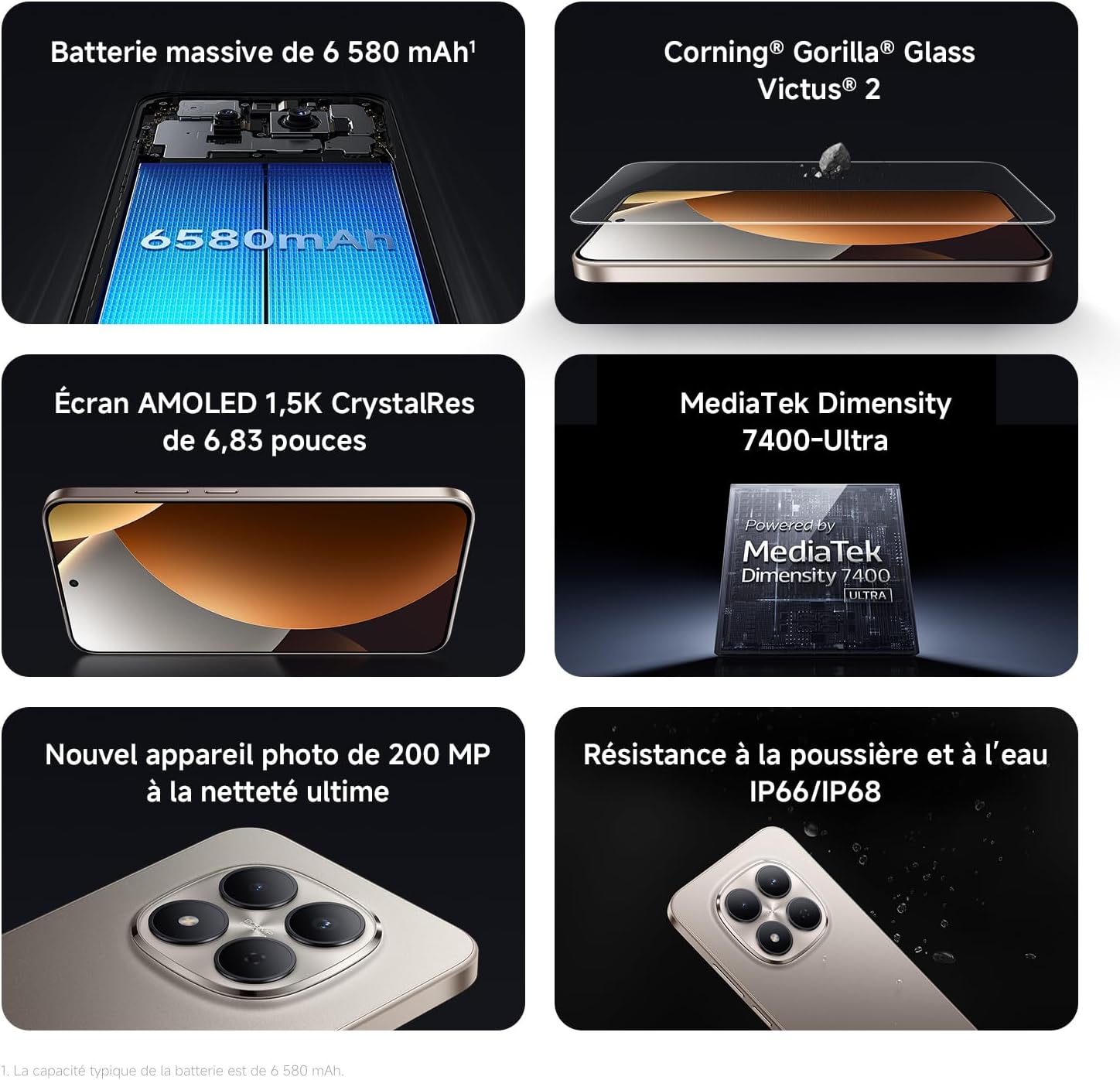
Image: Contents of the Xiaomi Redmi Note 15 Pro 5G box, showing the smartphone, USB-C cable, SIM ejection tool, protective case, and holding ring.
3. Característiques clau
- Massive 6580 mAh Battery with 45W Turbo Charging: Equipped with an ultra-large silicon-carbon battery for extended usage while maintaining a slim and light design. Supports 45W turbo charging and up to 22.5W reverse charging.
- IP66 / IP68 Dust and Water Resistance: The device has successfully passed 2-meter water resistance tests for 24 hours. It is designed to withstand daily splashes, accidental immersion, or drops in water without affecting performance.
- New 200 MP Ultra-Clear Camera System: Features a 4th generation 200 MP main sensor combined with a large 1/1.4-inch sensor, offering unprecedented image detail.
- Immersive 6.83-inch 1.5K Eye-Care AMOLED Display: Utilizes flagship-level luminous materials for reduced power consumption and a peak brightness of 3200 nits, ensuring clear visibility even in bright sunlight.
- Assistent d'IA: Intelligent optimization with a single gesture, enhancing imaging capabilities and creative efficiency.
- Corning Gorilla Glass Victus 2: Reinforced front glass for enhanced shock and scratch resistance, ensuring long-term durability.
- Processador MediaTek Dimensionity 7400-Ultra: Built on a 4nm TSMC process with an octa-core architecture up to 2.6 GHz, providing powerful multitasking, smooth gaming, and stable performance.
- Xiaomi HyperOS 2: Offers a faster, smarter, and smoother user experience with 6 years of security updates.

Image: Diagram illustrating the 6580 mAh battery capacity of the Redmi Note 15 Pro 5G.

Image: The Redmi Note 15 Pro 5G with water droplets, demonstrating its IP66/IP68 dust and water resistance.

Imatge: Primer pla view of the 200 MP camera module on the Redmi Note 15 Pro 5G.

Image: The 6.83-inch 1.5K AMOLED display of the Redmi Note 15 Pro 5G with its specifications.

Image: Before and after images demonstrating AI photo optimization on the Redmi Note 15 Pro 5G.

Image: Illustration of Corning Gorilla Glass Victus 2 durability on the Redmi Note 15 Pro 5G.

Image: Technical image showing RAM chips, indicating up to 24GB RAM with memory extension on the Redmi Note 15 Pro 5G.

Image: Screenshot of the Xiaomi HyperOS 2 interface on the Redmi Note 15 Pro 5G.
4. Configuració
4.1. Inserció de la targeta SIM
- Localitza la safata de la targeta SIM al lateral del dispositiu.
- Introduïu l'eina d'expulsió de la SIM al forat petit que hi ha al costat de la safata i premeu fermament fins que la safata surti.
- Place your Nano-SIM card(s) into the tray with the gold contacts facing down. Ensure they are correctly aligned.
- Carefully push the SIM card tray back into the device until it clicks into place.
4.2. Engegada i configuració inicials
- Premeu i manteniu premut el botó d'engegada (normalment al costat dret) fins que aparegui el logotip de Xiaomi.
- Segueix les instruccions que apareixen a la pantalla per seleccionar l'idioma i la regió i connectar-te a una xarxa Wi-Fi.
- Inicia la sessió amb el teu compte de Google o crea'n un de nou per accedir als serveis de Google i a Play Store.
- Set up your screen lock (PIN, pattern, password, fingerprint, or face unlock) for security.
- Review i accepta els termes i condicions per completar el procés de configuració.
5. Instruccions de funcionament
5.1. Navegació bàsica
- Pantalla d'inici: Llisca cap a l'esquerra o la dreta per navegar entre les pantalles d'inici.
- Calaix d'aplicacions: Llisca cap amunt des de la part inferior de la pantalla per accedir a totes les aplicacions instal·lades.
- Notificacions i configuració ràpida: Feu lliscar el dit cap avall des de la part superior de la pantalla fins a view notificacions i accedir a la configuració ràpida.
- Aplicacions recents: Swipe up from the bottom and hold, or tap the square navigation button (if enabled) to see recently used applications.
5.2. Ús de la càmera
The 200 MP camera system offers various modes for capturing photos and videos.
- Obre l'aplicació Càmera des de la pantalla d'inici o des del calaix d'aplicacions.
- Swipe left or right on the screen to switch between modes like Photo, Video, Portrait, Pro, and more.
- Toqueu el botó de l'obturador per fer una foto o el botó de gravació per iniciar/aturar la gravació de vídeo.
- Use the zoom options (e.g., 0.6x, 1x, 2x) or pinch to zoom for different perspectives.
- Access settings (gear icon) for advanced options like resolution, aspect ratio, and AI enhancements.

Image: A hand holding the Redmi Note 15 Pro 5G, displaying the camera interface with various modes and controls.
5.3. Configuració de la pantalla
Personalitza la teva pantalla per a una òptima viewing i comoditat.
- Vés a Configuració > Pantalla.
- Adjust brightness, enable Adaptive brightness, or activate Reading mode for eye comfort.
- Change the Refresh rate (up to 120Hz) for smoother scrolling and animations.
- Select Color scheme and adjust color temperature to your preference.
5.4. Gestió de la bateria
Optimize your battery life and utilize charging features.
- Accés Configuració > Bateria a view usage statistics and enable Battery Saver modes.
- Use the provided USB Type-C cable with a compatible 45W charger for turbo charging.
- To use reverse charging, connect a compatible device to your smartphone via a USB-C to USB-C cable.
6. Integració de mitjans
6.1. Producte acabatview Vídeo
Video: A seller-provided overview of the Redmi Note 15 Pro, showcasing its design, interface, and camera features. This video highlights the device's smooth operation and aesthetic appeal.
7. Manteniment
7.1. Neteja del dispositiu
- Use a soft, lint-free cloth to clean the screen and body of your phone.
- Eviteu utilitzar productes químics o materials abrasius.
- For speaker and port cleaning, the device features a function to expel water and dust. Access this feature through the settings or a dedicated app.

Image: Screenshot of the Redmi Note 15 Pro 5G showing a speaker cleaning function on the screen, which uses high-frequency vibration to expel residual water and dust.
7.2. Actualitzacions de programari
Comproveu i instal·leu regularment si hi ha actualitzacions de programari per garantir un rendiment òptim, seguretat i accés a noves funcions.
- Vés a Configuració > Quant al telèfon > Versió MIUI (or HyperOS version) to check for updates.
8. Solució De Problemes
8.1. El dispositiu no respon
- Premeu i manteniu premut el botó d'engegada durant uns 10-15 segons per forçar un reinici.
- If the issue persists, ensure the device is charged. Connect it to a charger and wait a few minutes before attempting to power it on again.
8.2. Problemes de connectivitat de xarxa
- Toggle Airplane mode on and off from Quick Settings.
- Reinicieu el vostre dispositiu.
- Comproveu si la targeta SIM està inserida correctament.
- Vés a Configuració > Targetes SIM i xarxes mòbils to ensure your mobile data is enabled and the correct network type is selected.
8.3. Les aplicacions es bloquegen o es bloquegen
- Esborra la memòria cau i les dades de l'aplicació problemàtica (Settings > Apps > Manage apps > [App Name] > Clear data).
- Desinstal·leu i torneu a instal·lar l'aplicació.
- Assegureu-vos que el programari del vostre dispositiu estigui actualitzat.
8.4. Restabliment de fàbrica
If you encounter persistent issues, a factory reset may be necessary. Avís: Això esborrarà totes les dades del dispositiu. Fes una còpia de seguretat de les dades importants abans de continuar.
- Vés a Configuració > Quant al telèfon > Restabliment de fàbrica.
- Seguiu les instruccions que apareixen a la pantalla per confirmar el restabliment.
9. Especificacions
| Característica | Detall |
|---|---|
| Marca | XIAOMI |
| Nom del model | Redmi Note 15 Pro 5G |
| Sistema operatiu | HyperOS |
| RAM | 12 GB |
| Capacitat d'emmagatzematge | 512 GB |
| Model de CPU | Mediatek Dimensity 7400 |
| Mida de la pantalla | 6.83 polzades |
| Resolució de visualització | 1560 x 720 |
| Freqüència d'actualització | 120 Hz |
| Tipus de visualització | AMOLED |
| Operador sense fil | Desbloquejat |
| Color | Negre |
| Ranures per a targetes SIM | Doble SIM |
| Interfície d'entrada | USB tipus C |
| Nivell de resistència a l'aigua | Waterproof (IP66/IP68) |
| Resolució de la càmera frontal | 20 MP |
| Resolució de la càmera posterior | 200 megapíxels |
| Capacitat de la bateria | 6580 mAh |
| Tecnologia cel·lular | 5G |
| Tecnologia de connectivitat | Bluetooth, NFC, USB, Wi-Fi |
| Any model | 2026 |

Image: Technical specifications and feature legends for the Redmi Note 15 Pro 5G.
10. Garantia i Suport
Your Xiaomi Redmi Note 15 Pro 5G comes with a Garantia del fabricant de 2 anys. Aquesta garantia cobreix els defectes de materials i de mà d'obra en ús normal.
For warranty claims, technical support, or service inquiries, please contact Xiaomi customer service or visit the official Xiaomi support weblloc web. Conserveu el comprovant de compra per validar la garantia.