
IPRO IPRO P1
Manual d'usuari del telèfon mòbil IPRO P1 GSM 2G
Model: IPRO P1
Introducció
This manual provides comprehensive instructions for the IPRO P1 GSM 2G Mobile Phone. Designed for ease of use, particularly for seniors, this phone features large buttons, a clear display, and essential functions. Please read this manual carefully before using your device to ensure proper operation and maintenance.
Què hi ha a la caixa
En desempaquetar, comproveu que hi hagi tots els elements següents:
- 1 x IPRO P1 Mobile Phone
- 1 x Micro-USB Charger
- 1 x bateria
- 1 x Manual d'usuari
Configuració
1. Inserció de la targeta SIM i la bateria
- Traieu amb cura la tapa posterior del telèfon.
- Insert your 2G GSM SIM card(s) into the designated SIM card slot(s). This phone supports Dual SIM.
- Insert the battery into the battery compartment, ensuring the gold contacts align with the phone's terminals.
- Torneu a col·locar la coberta posterior fins que sentiu un clic i que quedi ben fixada al seu lloc.
2. Carregant la bateria
Abans del primer ús, carregueu completament la bateria del telèfon.
- Connect the Micro-USB charger cable to the charging port on the phone.
- Connecteu el carregador a una presa de corrent.
- The charging indicator on the phone will show the charging status. Once fully charged, disconnect the charger.

Figura 1: Davant i darrere view of the IPRO P1 mobile phone, showcasing its compact design and textured back cover.
Instruccions de funcionament
1. Encendre/apagar
- To power on: Press and hold the Power/End Call button (usually red) until the screen lights up.
- To power off: Press and hold the Power/End Call button until the power off options appear, then select "Power off".
2. Realització de trucades
- Introduïu el número de telèfon amb el teclat.
- Press the Call button (usually green) to initiate the call.
- To end a call, press the Power/End Call button.
3. Sending SMS Messages
- Navegueu fins al menú "Missatges" des de la pantalla principal.
- Select "Write message" or "New SMS".
- Introduïu el vostre missatge amb el teclat numèric.
- Introduïu el número de telèfon del destinatari o seleccioneu-lo dels contactes.
- Seleccioneu "Envia".
4. Using Key Features

Figura 2: The IPRO P1 phone with visual representations of its core functionalities, including communication, settings, multimedia, and utility features.
- Ràdio FM: Plug in headphones (not included) to use as an antenna, then navigate to the FM Radio application.
- Càmera: Access the camera application from the menu to take photos. The phone has a basic camera.
- Bluetooth: Enable Bluetooth in the settings menu to connect to compatible devices like headsets.
- Llanterna: The phone features a powerful LED flashlight. It can usually be activated by a dedicated button or a long press of a specific key (refer to quick guide or on-screen prompts).
- Despertador: Set alarms through the "Clock" or "Alarm" application.
- Calendar & Calculator: Basic utility applications are available in the menu.

Figura 3: The IPRO P1 phone demonstrating its powerful LED flashlight feature, illuminating a dark path.
Manteniment
- Neteja: Feu servir un drap suau i sec per netejar la superfície del telèfon. Eviteu netejadors líquids o materials abrasius.
- Cura de la bateria: Do not expose the battery to extreme temperatures. If the phone will not be used for an extended period, charge it periodically to maintain battery health.
- Emmagatzematge: Guardeu el telèfon en un lloc fresc i sec, allunyat de la llum solar directa i de la humitat.
- Eviteu les gotes: While durable, avoid dropping the phone to prevent damage to internal components or the screen.
Resolució de problemes
| Problema | Causa possible | Solució |
|---|---|---|
| El telèfon no s'encén | Battery is low or not inserted correctly. | Carregueu la bateria. Assegureu-vos que la bateria estigui inserida correctament. |
| No puc fer ni rebre trucades | No SIM card, SIM card not active, or out of network coverage. | Ensure SIM card is inserted and active. Check network signal strength. Contact your service provider. |
| Poca qualitat de trucada | Weak network signal or interference. | Move to an area with better signal. Avoid using near other electronic devices. |
| La bateria s'esgota ràpidament | Frequent use, background applications, or old battery. | Redueix la brillantor de la pantalla. Tanca les aplicacions que no fas servir. Considera substituir la bateria si és antiga. |
| La pantalla no respon | Error de programari. | Traieu i torneu a inserir la bateria per reiniciar el telèfon. |
Especificacions
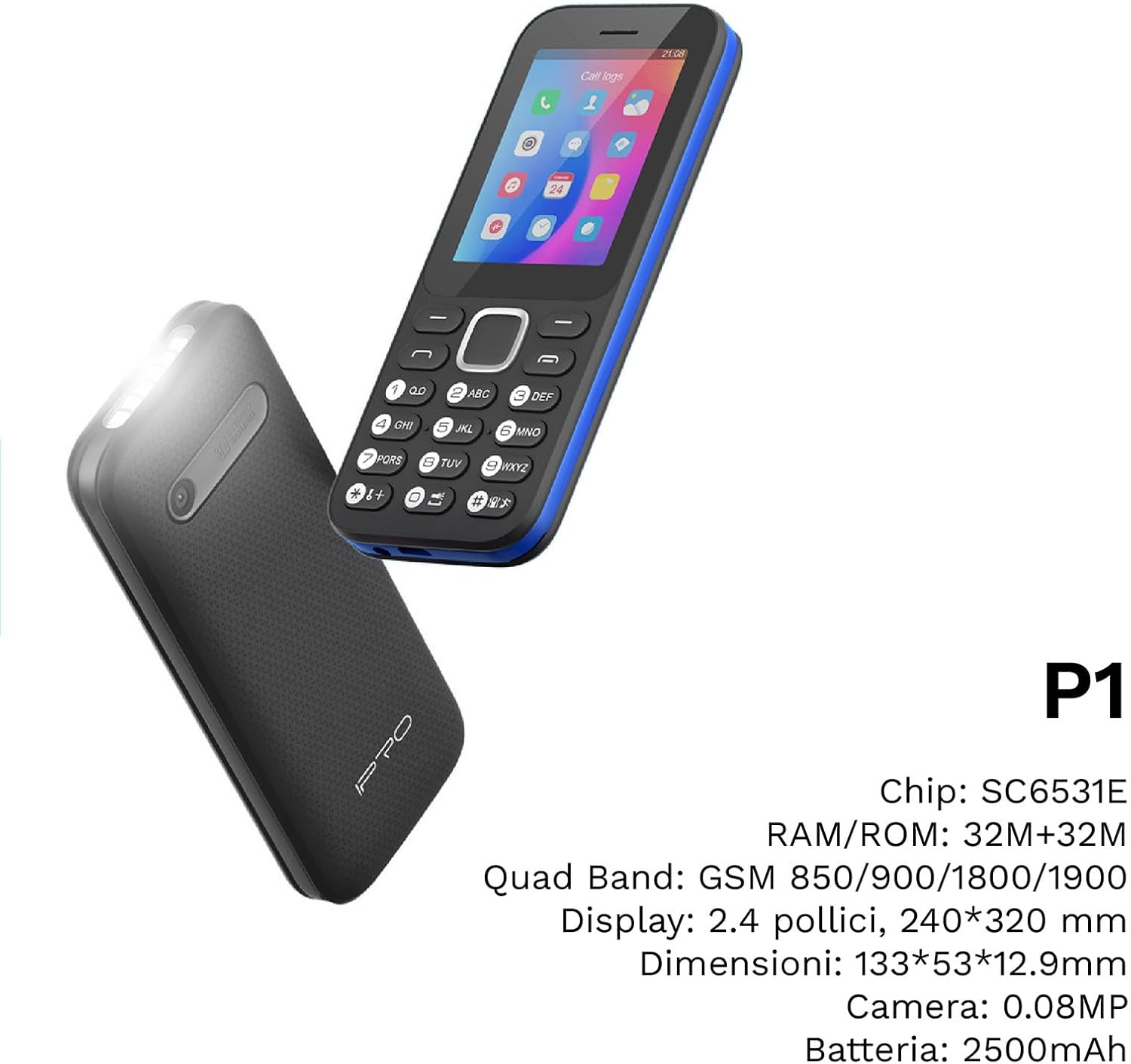
Figura 4: Un angle view of the IPRO P1 phone, accompanied by a summary of its technical specifications.
- Xarxa: 2G GSM Quad Band (850/900/1800/1900 MHz)
- Chipset: SC6531E
- Visualització: 2.4-inch Color Display (240 x 320 resolution)
- RAM: 4 MB
- ROM: 4 MB
- Memòria ampliable: Supports up to 16 GB (MicroSD card not included)
- SIM: Suport Dual SIM
- Connectivitat: Bluetooth
- Característiques: Camera, FM Radio, MP3, MP4, Alarm Clock, Calendar, Calculator, Integrated Games, LED Flashlight
- Bateria: 2500 mAh de ions de liti
- Idiomes: Spanish, English, French, Italian, Portuguese
- Color: Negre
- Dimensions del producte: 133 x 53 x 12.9 mm
- Pes: Aproximadament 200 grams

Figura 5: A close-up of the IPRO P1's screen, illustrating its 2.4-inch display size for clear viewing.
Garantia i Suport
IPRO offers technical service and customer support for two years from the date of purchase. This warranty covers manufacturing defects but does not include artificial damage.
For support, please contact IPRO customer service through the details provided on the product packaging or the official IPRO website. When contacting support, please have your product model number (IPRO P1) and purchase details ready.

Figura 6: A visual representation of the IPRO P1 phone's target audience, showing various seniors comfortably interacting with mobile devices, highlighting its user-friendly design.

Figura 7: Display of the IPRO P1 phone in two color variants: classic black and a version with a distinctive blue trim.
Ask a question about this manual
Ask about setup, troubleshooting, compatibility, parts, safety, or missing instructions. Manuals+ will review the question and use this page’s manual context to help answer it.