
1. Introducció
This manual provides comprehensive instructions for the Maxcom Fit FW55 Aurum Pro Smartwatch. It covers essential information regarding product setup, operation, maintenance, and troubleshooting to ensure optimal performance and user experience. Please read this manual carefully before using your device.
2. Contingut del paquet
Si us plau, verifiqueu que tots els elements que s'enumeren a continuació siguin presents al paquet del producte:
- Maxcom Fit FW55 Aurum Pro Smartwatch
- Cable de càrrega
- Manual d'usuari (aquest document)
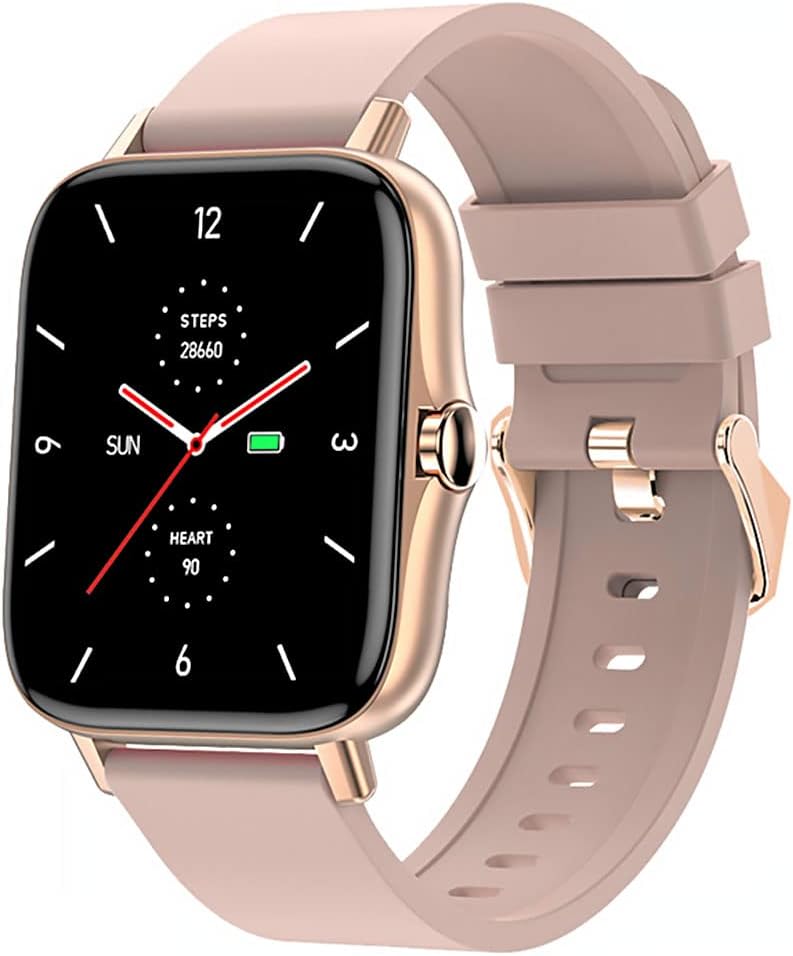
Image 1: Maxcom Fit FW55 Aurum Pro Smartwatch with a pink silicone band. The watch face displays steps, heart rate, and time.
3. Configuració
3.1. Càrrega del rellotge intel·ligent
Before initial use, fully charge your Maxcom Fit FW55 Aurum Pro Smartwatch. Connect the provided charging cable to the charging port on the back of the smartwatch and plug the other end into a standard USB power adapter (not included) or a computer's USB port. The watch display will indicate charging status.
- Ensure the charging pins are clean and properly aligned with the watch's charging contacts.
- Una càrrega completa sol trigar aproximadament 2 hores.
3.2. Emparellament amb el telèfon intel·ligent
To unlock the full functionality of your smartwatch, you need to pair it with your smartphone via Bluetooth.
- Descarrega l'aplicació: Cerca the official Maxcom Fit application in your smartphone's app store (iOS App Store or Google Play Store) and install it.
- Activa el Bluetooth: Assegureu-vos que el Bluetooth estigui habilitat al vostre telèfon intel·ligent.
- Obriu l'aplicació: Launch the Maxcom Fit application on your smartphone.
- Afegeix un dispositiu: Follow the in-app instructions to add a new device. Select "FW55 Aurum Pro" from the list of available devices.
- Confirmeu l'aparellament: A pairing request may appear on both your smartphone and the smartwatch. Confirm the pairing on both devices.
Once successfully paired, the smartwatch will synchronize data with your phone, and you can customize settings through the app.
4. Funcionament del rellotge intel·ligent
4.1. Encendre/apagar
- Encès: Press and hold the side button for a few seconds until the Maxcom logo appears.
- Apagar: From the watch face, swipe down to access quick settings, or navigate to the 'Settings' menu. Select 'Power Off' and confirm. Alternatively, press and hold the side button and select 'Power Off'.
4.2. Navegació bàsica
- Pantalla tàctil: The FW55 Aurum Pro features a 1.7-inch touch screen for intuitive interaction.
- Llisca cap amunt/avall: Scroll through notifications, menus, or quick settings.
- Llisca cap a l'esquerra/dreta: Access different widgets or main functions (e.g., heart rate, activity data).
- Toca: Selecciona un element o confirma una acció.
- Botó lateral: Press to return to the watch face or wake the screen. A long press may access power options.
4.3. Característiques clau
The Maxcom Fit FW55 Aurum Pro Smartwatch offers a range of features to support your daily activities and health monitoring:
- Seguiment de l'activitat: Monitors steps taken, distance covered, and calories burned.
- Monitorització de la freqüència cardíaca: Proporciona dades de freqüència cardíaca en temps real.
- Monitorització del son: Fa un seguiment dels patrons i la qualitat del son.
- Notificacions: Rep alertes de trucades, missatges i notificacions d'aplicacions del telèfon intel·ligent emparellat.
- GPS: Integrated GPS for accurate outdoor activity tracking.
- Esferes de rellotge personalitzables: Personalize your watch face through the companion app.

Image 2: Maxcom Fit FW55 Aurum Pro Smartwatch featuring a gold metal mesh band. The watch face displays digital time, steps, and heart rate.
5. Manteniment
Proper care and maintenance will extend the lifespan of your smartwatch.
- Neteja: Regularly wipe the watch screen and body with a soft, dry, lint-free cloth. For stubborn dirt, slightly dampRenta el drap amb aigua. Evita utilitzar productes químics agressius o materials abrasius.
- Cura de la corretja: Clean the watch strap according to its material. Silicone straps can be washed with mild soap and water. Metal straps may require specific cleaning agents.
- Eviteu condicions extremes: Do not expose the smartwatch to extreme temperatures, direct sunlight for prolonged periods, or corrosive liquids.
- Resistència a l'aigua: While the watch may have some water resistance, it is not suitable for diving or high-pressure water activities. Refer to the product specifications for detailed water resistance ratings.
6. Solució De Problemes
If you encounter issues with your Maxcom Fit FW55 Aurum Pro Smartwatch, try the following solutions:
- El rellotge no s'encén: Assegura't que el rellotge estigui completament carregat. Connecta'l al carregador durant almenys 30 minuts.
- No es pot emparellar amb el telèfon intel·ligent:
- Assegura't que el Bluetooth estigui activat al telèfon i al rellotge.
- Assegureu-vos que el rellotge estigui dins de l'abast del Bluetooth del telèfon.
- Reinicieu tant el telèfon com el rellotge intel·ligent.
- Prova de desvincular i tornar a vincular el dispositiu a través de l'aplicació.
- Dades inexactes (passos, freqüència cardíaca):
- Assegureu-vos de portar el rellotge ben ajustat al canell, aproximadament un dit per sobre de l'os del canell.
- Netegeu el sensor de la part posterior del rellotge.
- Actualitza l'aplicació complementària a la versió més recent.
- Notificacions no rebudes:
- Check notification settings in the Maxcom Fit app.
- Assegura't que els permisos de notificacions del teu telèfon estiguin concedits a l'aplicació.
- Verify that the watch is successfully paired and connected to your phone.
If problems persist, consult the Maxcom support weblloc o contacteu amb el servei d'atenció al client.
7. Especificacions
Below are the technical specifications for the Maxcom Fit FW55 Aurum Pro Smartwatch:
| Característica | Detall |
|---|---|
| Marca | Maxcom |
| Número de model | FW55 Aurum Pro |
| Mida de la pantalla | 1.7 polzades |
| Tecnologia de connectivitat | Bluetooth |
| Comunicació sense fils estàndard | Bluetooth |
| Dispositius compatibles | Smartphone |
| GPS | GPS integrat |
| Forma | Plaçada |
| Públic objectiu | Adult Unisex |
| Components inclosos | Carregador |

Imatge 3: Frontal view of the Maxcom Fit FW55 Aurum Pro Smartwatch with a pink silicone band, highlighting the square display.
8. Garantia i Suport
For warranty information and customer support, please refer to the documentation included with your purchase or visit the official Maxcom weblloc web. Conserveu el comprovant de compra per a reclamacions de garantia.
For technical assistance or further inquiries, please contact Maxcom customer service through their official channels.