
R-MUSIC Booster S (RM301891)
R-MUSIC High Power Wireless Bluetooth Speaker - Booster S
Model: RM301891
1. Introducció
Thank you for choosing the R-MUSIC Booster S High Power Wireless Bluetooth Speaker. This manual provides important information regarding the setup, operation, and maintenance of your new speaker. Please read this manual thoroughly before using the product to ensure proper function and to prevent damage.
2. Contingut del paquet
Si us plau, comproveu el contingut del paquet en desembalar-lo. Si falta algun article o hi ha algun dany, poseu-vos en contacte amb el vostre distribuïdor.
- R-MUSIC Booster S Speaker Unit
- Adaptador de corrent/cable de càrrega
- Wired Microphone (if included with your model)
- Manual d'usuari

Image: Wired Microphone. This microphone is typically included for karaoke or public address functions.
3. Característiques del producte
The R-MUSIC Booster S speaker is designed for powerful and versatile audio playback. Key features include:
- High Power Audio Output (40 Watts Max)
- Connectivitat Bluetooth sense fil
- USB Port for MP3 Playback
- MicroSD Card Reader for MP3 Playback
- 3.5mm AUX Input for Wired Connections
- Microphone Input with Echo Control
- Integrated LED Display
- Espectacle de llums LED dinàmic
- Portable Design with Integrated Handle

Imatge: Frontal view of the R-MUSIC Booster S speaker, highlighting the speaker grille and LED lighting.

Imatge: Anglesa view del parlant, espectacleasing its compact yet powerful design.
4. Controls i connexions
Familiarize yourself with the control panel located on the rear of the speaker.
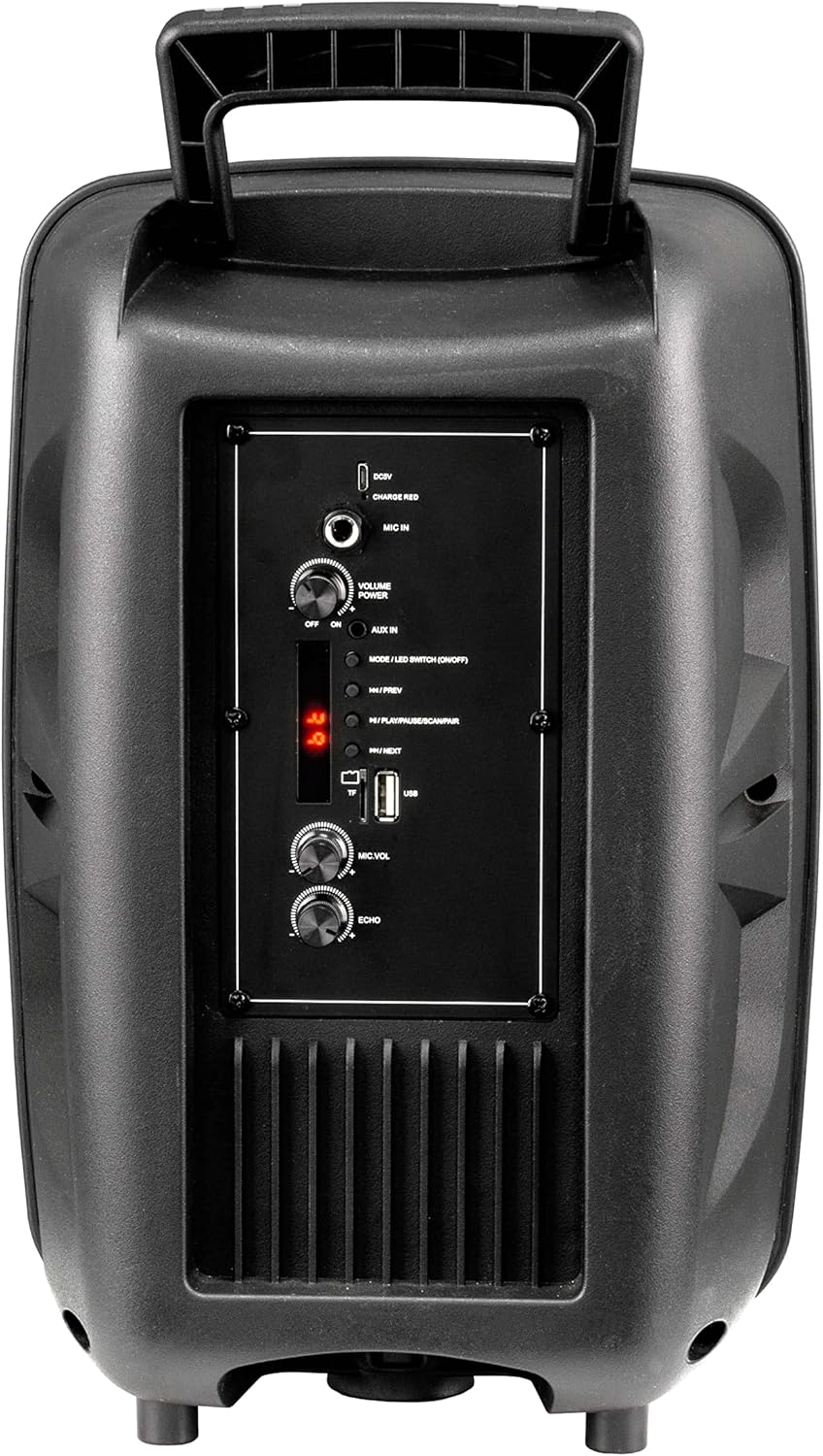
Image: Rear Control Panel Overview.
- Entrada DC 5V: Entrada d'alimentació per carregar l'altaveu.
- CHARGE RED Indicator: Lights up red when charging.
- MIC IN: 6.35mm jack for connecting a wired microphone.
- VOLUME POWER (OFF/ON): Rotary knob to turn the speaker ON/OFF and adjust the master volume.
- AUX IN: 3.5mm audio input for connecting external audio devices.
- MODE / LED SWITCH (ON/OFF): Press to switch between input modes (Bluetooth, USB, MicroSD, AUX). Press and hold to turn the LED light show ON/OFF.
- |<< / PREV: Premeu per anar a la pista anterior.
- >>| / NEXT: Premeu per anar a la pista següent.
- >|| / PLAY/PAUSE / SCAN/PAIR: Press to play or pause audio. In FM mode, press and hold to scan for stations. In Bluetooth mode, press and hold to initiate pairing.
- Ranura per a targetes TF (MicroSD): Insert a MicroSD card for MP3 playback.
- Port USB: Inseriu una unitat flash USB per reproduir MP3.
- MIC.VOL: Rotary knob to adjust the microphone volume.
- ECO: Rotary knob to adjust the microphone echo effect.
5. Configuració
5.1. Carregant l’altaveu
Before first use, fully charge the speaker. Connect the provided charging cable to the DC 5V input on the rear panel and plug the other end into a suitable USB power source (e.g., USB wall adapter, computer USB port). The "CHARGE RED" indicator will light up during charging and turn off when fully charged.
5.2. Encès / apagat
Rotate the "VOLUME POWER" knob clockwise to turn the speaker ON. Rotate it counter-clockwise until it clicks to turn the speaker OFF.
6. Instruccions de funcionament
6.1. Mode Bluetooth
- Turn on the speaker. It will automatically enter Bluetooth pairing mode, indicated by a flashing "BLUE" on the LED display.
- Enable Bluetooth on your mobile device (smartphone, tablet, computer).
- Cerca "R-MUSIC BOOSTER S" (or similar name) in your device's Bluetooth list and select it to pair.
- Once successfully paired, the speaker will emit a confirmation tone, and the "BLUE" indicator will stop flashing.
- You can now play audio from your device through the speaker. Use the speaker's control buttons or your device to control playback.
6.2. USB / MicroSD Card Playback
- Insert a USB flash drive or MicroSD card (pre-loaded with MP3 audio files) al port respectiu.
- The speaker will automatically switch to USB or TF (MicroSD) mode and begin playing the first compatible audio file.
- Use the "|<<" and ">>|" buttons to navigate between tracks. Use the ">||" button to play or pause.
6.3. Mode d'entrada AUX
- Connecteu un extrem d'un cable d'àudio de 3.5 mm (no inclòs) al port AUX IN de l'altaveu.
- Connecteu l'altre extrem a la presa d'auriculars o a la sortida d'àudio del vostre dispositiu extern (per exemple, reproductor MP3, ordinador portàtil).
- Press the "MODE" button until "AUX" is displayed on the LED screen.
- Play audio from your external device. Volume can be controlled via the speaker's master volume knob or your external device.
6.4. Ús del micròfon
- Connect a wired microphone to the "MIC IN" jack.
- Adjust the microphone volume using the "MIC.VOL" knob.
- Adjust the echo effect using the "ECHO" knob.
6.5. Espectacle de llums LED
Press and hold the "MODE / LED SWITCH" button to toggle the dynamic LED light show ON or OFF.
7. Manteniment
- Netegeu l'altaveu amb un drap suau i sec. No utilitzeu productes de neteja abrasius ni dissolvents.
- Mantingueu l'altaveu allunyat de l'aigua, la humitat i les temperatures extremes.
- No obstruïu les obertures de ventilació.
- Guardeu l'altaveu en un lloc fresc i sec quan no l'utilitzeu durant períodes prolongats.
8. Solució De Problemes
| Problema | Causa possible | Solució |
|---|---|---|
| Sense poder | Battery is depleted; Power knob is off. | Charge the speaker; Rotate the VOLUME POWER knob clockwise to turn on. |
| Sense so | Volume too low; Incorrect mode selected; Device not paired (Bluetooth); Cable not connected (AUX). | Increase volume; Press MODE button to select correct input; Re-pair Bluetooth device; Check AUX cable connection. |
| S'ha produït un error en l'aparellament de Bluetooth | Altaveu no en mode d'emparellament; Dispositiu massa lluny; Interferències. | Ensure speaker is in Bluetooth mode (flashing BLUE); Move device closer; Turn off other Bluetooth devices. |
| L'USB/MicroSD no es reprodueix | Sense suport file format; Corromput files; Card/drive not inserted correctly. | Assegureu-vos files are MP3 format; Try another USB/MicroSD; Re-insert card/drive. |
9. Especificacions
- Model: RM301891 (Booster S)
- Marca: R-MÚSICA
- Connectivitat: Bluetooth, USB, MicroSD, 3.5mm AUX
- Potència de sortida màxima: 40 watts
- Tipus d'altaveu: Subwoofer (as per product data, likely refers to bass capability)
- Tipus de muntatge: Terra de peu
- Dimensions (embalatge): 44.4 x 30.1 x 22.6 cm (aprox. 17.5 x 11.8 x 8.9 polzades)
- Pes (embalatge): 1.9 quilograms (aprox. 4.2 lliures)
- Entrada d'alimentació: DC 5V
10. Informació de seguretat
- Do not disassemble or modify the speaker. This may cause electric shock, fire, or product damage.
- No exposeu l'altaveu a la pluja, la humitat ni a temperatures extremes.
- Eviteu deixar caure o sotmetre l'altaveu a forts impactes.
- Mantenir fora de l'abast dels nens.
- Feu servir només el cable de càrrega i l'adaptador de corrent especificats.
- L'escolta prolongada a nivells de volum elevats pot causar danys auditius.
11. Garantia i Suport
R-MUSIC products are designed and manufactured to the highest quality standards. For warranty information and technical support, please refer to the warranty card included with your product or contact your local retailer. Keep your purchase receipt as proof of purchase.
For further assistance, you may visit the official R-MUSIC weblloc o poseu-vos en contacte amb el seu departament d'atenció al client.