
EONCHARM 1315
Universal Remote Control User Manual
Model: 1315
Brand: EONCHARM
Introducció
This manual provides comprehensive instructions for the EONCHARM Universal Remote Control, designed to be compatible with a wide range of Samsung televisions. This remote offers a straightforward, plug-and-play experience, requiring no complex setup or programming. It is an ideal replacement for your original Samsung TV remote, restoring full functionality and convenience.
Característiques del producte
- Infrared replacement remote compatible with all Samsung Smart TV, LED, LCD, HDTV, and 3D Series TVs.
- Compatible with all Samsung series TVs, including models from 2017 to 2024.
- Simple, compact, and ergonomic design for easy grip and handling.
- No programming or setup required; ready to use out of the box.
- Offers stable performance and farther transmitting distance.
- Includes dedicated shortcut buttons for NETFLIX, Prime Video, and Hulu for quick access to streaming services.
- Replaces various Samsung remote models, including BN59-01315A, BN59-01315J, BN59-01301A, BN59-01175N, BN59-01199F, AA59-00741A, AA59-00786A, AA59-00602A, BN59-01247A, AA59-00743A, BN59-01175B, AA59-00818A, AA59-00603A, BN59-01199G, and others.
Contingut del paquet
- 1 x EONCHARM Universal Remote Control (Model 1315)
Nota: Les piles AAA no estan incloses i s'han de comprar per separat.
Configuració
Instal·lació de la bateria
- Localitzeu el compartiment de la bateria a la part posterior del comandament a distància.
- Feu lliscar la tapa de la bateria cap avall o en la direcció indicada per una fletxa per obrir-la.
- Introduïu dues (2) piles AAA, assegurant-vos que els terminals positiu (+) i negatiu (-) s'alineïn correctament amb les marques de l'interior del compartiment.
- Torneu a col·locar la tapa de la bateria fent-la lliscar fins que faci clic de manera segura.
Once batteries are installed, the remote is ready for immediate use with compatible Samsung TVs. No pairing or programming is required.

Instruccions de funcionament
The EONCHARM Universal Remote Control features a standard layout with clearly labeled buttons for intuitive operation. Below is a guide to the primary functions of each button.
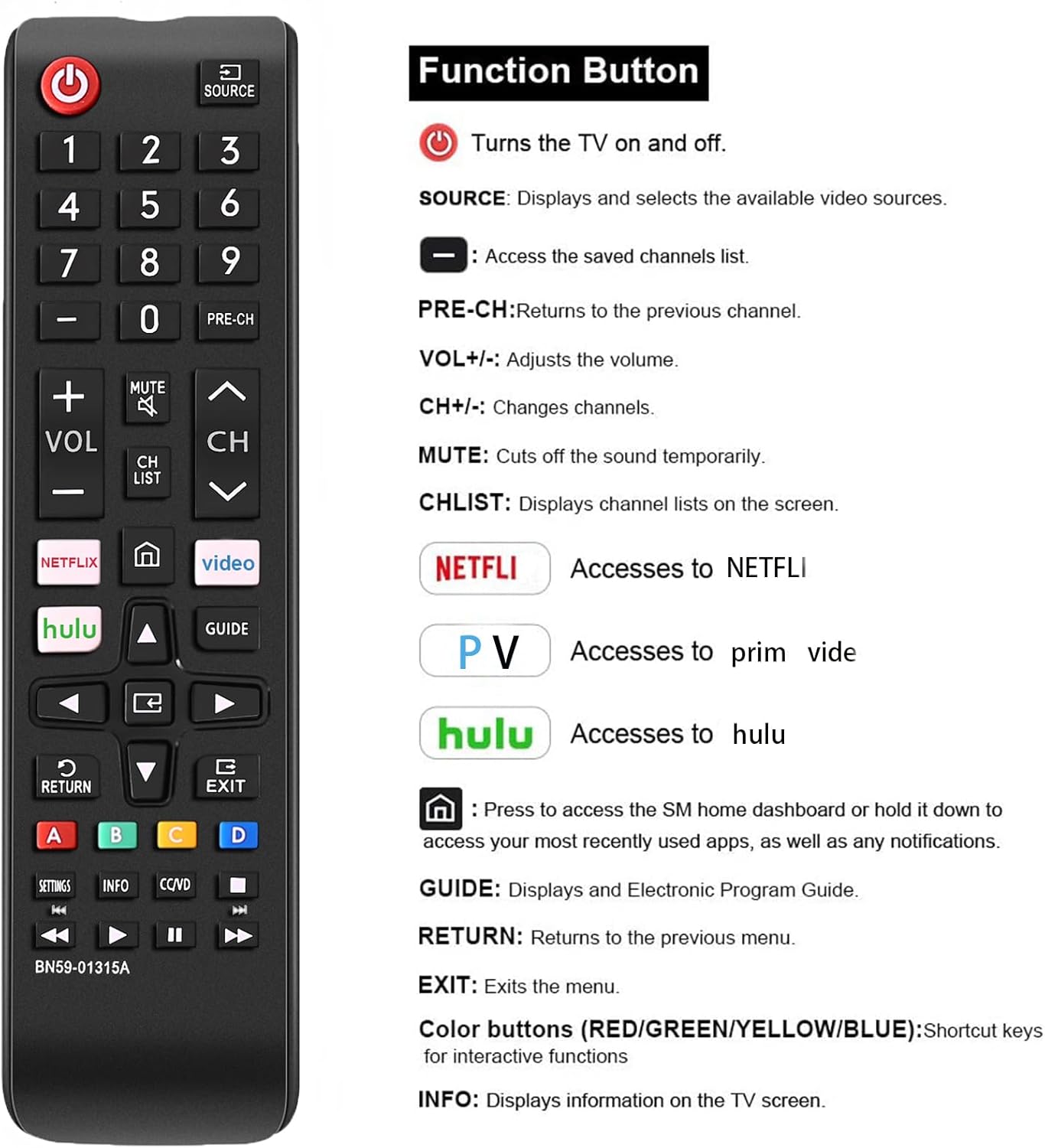
| Botó | Funció |
|---|---|
| PODER (⏻) | Encén i apaga el televisor. |
| FONT | Displays and selects available video sources (e.g., HDMI 1, AV, TV). |
| Botons numèrics (0-9) | Introduïu directament els números de canal. |
| PRE-CH | Torna al canal anterior. |
| VOL +/- | Ajusta el nivell de volum. |
| CH ^/v | Canvia de canal amunt o avall. |
| MUT | Cuts the sound temporarily. |
| LLISTA CH | Displays channel lists on the screen. |
| NETFLIX | Directly accesses the NETFLIX application. |
| Prime Video | Directly accesses the Prime Video application. |
| Hulu | Directly accesses the Hulu application. |
| Inici (⌂) | Press to access the Smart Hub home dashboard or hold it down to access your most recently used apps, as well as any notifications. |
| Fletxes de navegació (amunt, avall, esquerra, dreta) | Navegueu pels menús i opcions. |
| ENTRAR | Confirma les seleccions. |
| GUIA | Displays the Electronic Program Guide (EPG). |
| TORNAR | Torna al menú o pantalla anterior. |
| Sortida | Surt del menú o de l'aplicació actual. |
| Botons de color (A, B, C, D) | Shortcut keys for interactive functions, specific to TV content or applications. |
| CONFIGURACIÓ | Accesses TV settings menu. |
| INFO | Mostra informació sobre el programa o contingut actual. |
| CC/VD | Activates Closed Captions/Video Description. |
| Botons de control multimèdia (Reproduir, Pausa, Aturar, Rebobinar, Avançar ràpidament) | Controla la reproducció de suports. |

Compatibilitat
This EONCHARM Universal Remote Control is designed for broad compatibility with Samsung televisions. It supports:
- All Samsung Smart TV models.
- Samsung LCD, LED, HDTV, and 3D Series TVs.
- Samsung TVs from various years, including 2017, 2018, 2019, 2020, 2021, 2022, 2023, and 2024 series.
- Common screen sizes such as 43, 50, 55, 58, 65, and 75 inches.
It is a direct replacement for many original Samsung remote models, ensuring seamless integration without the need for complex setup procedures.


Manteniment
Canvi de bateria
When the remote control's performance degrades (e.g., reduced range, unresponsive buttons), it is likely time to replace the batteries. Follow the battery installation steps outlined in the Setup section.
Neteja
Per netejar el comandament a distància, utilitzeu un drap suau i sec. Per a la brutícia resistent, netegeu lleugerament.ampen the cloth with water or a mild, non-abrasive cleaner. Do not use harsh chemicals or abrasive materials, as these can damage the remote's surface or internal components. Avoid getting moisture into the battery compartment or any openings.
Emmagatzematge
Store the remote control in a cool, dry place away from direct sunlight, extreme temperatures, and high humidity. If the remote will not be used for an extended period, it is advisable to remove the batteries to prevent leakage and potential damage.
Resolució de problemes
- El comandament a distància no respon:
- Assegureu-vos que les piles estiguin inserides correctament amb la polaritat correcta.
- Substitueix les piles velles o gastades per piles AAA noves.
- Assegureu-vos que no hi hagi obstacles entre el comandament a distància i el sensor d'infrarojos del televisor.
- Point the remote directly at the TV's sensor.
- Els botons són enganxosos o no responen:
- Netegeu el comandament a distància tal com es descriu a la secció Manteniment.
- If the issue persists after cleaning and battery replacement, the remote may be damaged and require replacement.
- Remote controls some functions but not others:
- Verify that your TV model is a Samsung TV. This remote is specifically designed for Samsung TVs.
- Ensure the TV's firmware is up to date, as some older TVs might have limited compatibility with newer remote features.
Especificacions
| Característica | Detall |
|---|---|
| Dimensions del producte | 2.36 x 1.97 x 3.1 polzades |
| Pes de l'article | 2.11 unces |
| Número de model | 1315 |
| Piles necessàries | 2 piles AAA (no incloses) |
| Marca | EONCHARM |
| Característica especial | Disseny ergonòmic |
| Color | Negre |
| Nombre màxim de dispositius compatibles | 50 (refers to internal capability, designed for Samsung TVs) |
| Dispositius compatibles | Television (Samsung TVs) |
Garantia i Suport
For information regarding warranty coverage or technical support, please refer to the product packaging or contact the retailer from whom you purchased the EONCHARM Universal Remote Control. Keep your proof of purchase for any warranty claims.
Ask a question about this manual
Ask about setup, troubleshooting, compatibility, parts, safety, or missing instructions. Manuals+ will review the question and use this page’s manual context to help answer it.