
Maxcom MM471
Maxcom MM471 Senior Portable Phone User Manual
1. Introducció
This manual provides detailed instructions for the safe and efficient use of your Maxcom MM471 Senior Portable Phone. Designed with ease of use in mind, this device features large characters, big buttons, and an ergonomic design, making it ideal for seniors. Please read this manual thoroughly before operating your phone.

Figura 1: Frontal view of the Maxcom MM471 Senior Portable Phone.
2. Configuració
2.1 Contingut del paquet
Assegureu-vos que tots els elements siguin presents al paquet:
- Maxcom MM471 Senior Portable Phone
- Bateria
- Adaptador de càrrega
- Manual d'usuari
2.2 Inserció de la targeta SIM i la bateria
The Maxcom MM471 supports dual SIM cards. Follow these steps to install your SIM card(s) and battery:
- Turn off the phone and disconnect it from any power source.
- Traieu amb cura la tapa posterior del telèfon.
- Inseriu la targeta o targetes SIM a la ranura o ranures designades amb els contactes daurats cap avall.
- Inseriu la bateria, assegurant-vos que els contactes estiguin correctament alineats.
- Torneu a col·locar la coberta posterior fins que sentiu un clic i que quedi ben fixada al seu lloc.

Figura 2: Esquena view with battery and SIM card area.
2.3 Càrrega de la bateria
Before first use, fully charge the phone's battery:
- Connect the charging adapter to the phone's charging port or place the phone in its charging dock.
- Connecteu l'adaptador a una presa de corrent.
- L'indicador de bateria a la pantalla mostrarà l'estat de càrrega.
- Un cop estigui completament carregat, desconnecteu el carregador.
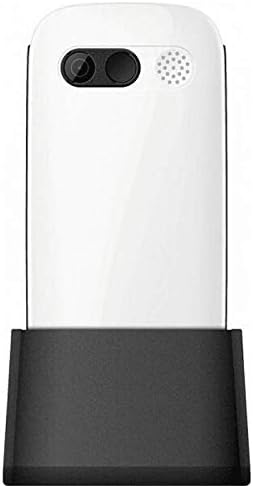
Figure 3: Phone in charging dock.
3. Instruccions de funcionament
3.1 Engegada/apagada
- Per encendre: Manteniu premut el botó Engegar/Finalitzar trucada botó fins que la pantalla s'il·lumini.
- Per apagar: Manteniu premut el botó Engegar/Finalitzar trucada button until the power-off options appear, then select 'Power Off'.
3.2 Fer trucades
- Des de la pantalla d'inici, introduïu el número de telèfon amb el teclat numèric.
- Premeu el botó Truca button (green button) to initiate the call.
- Per finalitzar la trucada, premeu el botó Engegar/Finalitzar trucada button (red button).
3.3 Rebre trucades
- When a call comes in, the phone will ring and display the caller's number or name.
- Premeu el botó Truca button (green button) to answer.
- Per rebutjar la trucada, premeu el botó Engegar/Finalitzar trucada button (red button).
3.4 Enviament i recepció de missatges
- Navegueu fins al menú "Missatges" des de la pantalla principal.
- Select 'New Message' to compose a text message.
- Enter the recipient's number and your message.
- Premeu "Envia".
- Received messages will appear in your 'Inbox'.
3.5 Gestió de contactes
The phonebook can store up to 300 names.
- Go to the 'Contacts' or 'Phonebook' menu.
- Select 'Add New Contact' to save a new number.
- Introduïu el nom i el número de telèfon i, a continuació, deseu.
- To call a contact, select their name from the list and press the Truca botó.
3.6 Ús del Bluetooth
Per connectar-se a dispositius Bluetooth:
- Aneu a "Configuració" > "Bluetooth".
- Activa el Bluetooth.
- Selecciona 'Cerca devices' to find available Bluetooth accessories.
- Select the desired device and pair them.
3.7 Ús de la llanterna
The phone includes a built-in flashlight for convenience.
- To turn on the flashlight, locate the dedicated flashlight button (if available) or access it through the 'Tools' menu.
- Press the button or select the option again to turn it off.
4. Manteniment i cura
To ensure the longevity and optimal performance of your Maxcom MM471 phone, follow these maintenance guidelines:
- Neteja: Feu servir un drap suau i sec per netejar la superfície del telèfon. Eviteu netejadors líquids o materials abrasius.
- Temperatura: Do not expose the phone to extreme temperatures (hot or cold) or direct sunlight for extended periods.
- Humitat: Keep the phone dry. Do not immerse it in water or expose it to high humidity.
- Emmagatzematge: When not in use for a long time, store the phone in a cool, dry place with the battery partially charged.
- Impacte: Eviteu deixar caure el telèfon o sotmetre'l a impactes forts.
5. Solució De Problemes
If you encounter issues with your phone, refer to the table below for common problems and solutions:
| Problema | Causa possible | Solució |
|---|---|---|
| El telèfon no s'encén | La bateria està esgotada o no està inserida correctament. | Carregueu la bateria. Assegureu-vos que la bateria estigui inserida correctament. |
| No puc fer ni rebre trucades | No network signal, SIM card not inserted, or SIM card faulty. | Check network coverage. Reinsert SIM card(s). Contact your service provider. |
| Poca qualitat de trucada | Weak network signal, interference. | Mou-te a una zona amb millor senyal. Evita els obstacles. |
| La bateria s'esgota ràpidament | Excessive usage, background applications, old battery. | Redueix la brillantor de la pantalla. Tanca les aplicacions que no fas servir. Considera substituir la bateria si és antiga. |
| El teclat no respon | Error de programari, danys físics. | Restart the phone. If the problem persists, contact support. |
6. Especificacions tècniques
Key technical details of the Maxcom MM471 Senior Portable Phone:
- Model: MM471
- Marca: Maxcom
- Color: Blanc
- Connectivitat: Bluetooth
- Compatibilitat amb SIM: Doble SIM
- Capacitat de l'agenda: 300 names
- Temps de conversa: Fins a 14 hores
- Interfície: Botons físics
- Característiques especials: Large characters, Big buttons, Ergonomic design, Speaker, Flashlight
7. Informació sobre garantia i assistència
For detailed warranty information, please refer to the warranty card included with your product or visit the official Maxcom website. For technical support or service inquiries, please contact your retailer or the manufacturer's customer service department.
Ask a question about this manual
Ask about setup, troubleshooting, compatibility, parts, safety, or missing instructions. Manuals+ will review the question and use this page’s manual context to help answer it.