
1. Introducció
Welcome to the user manual for your Google Pixel 4 XL smartphone. This guide provides essential information to help you get started, understand its features, and maintain your device. The Google Pixel 4 XL is designed to offer a seamless Android experience with advanced camera capabilities, intuitive gesture controls, and the integrated Google Assistant.

Figure 1.1: Google Pixel 4 XL (Oh So Orange)
2. Configuració
2.1 Què hi ha a la caixa
- Google Pixel 4 XL Smartphone
- Adaptador de CA
- Cable USB (USB-C a USB-C)
- OTG Dongle (USB-A to USB-C adapter)
- Eina d'expulsió de la safata SIM
- Guia d'inici ràpid
2.2 Inserció de la targeta SIM
- Locate the SIM card tray on the side of your Pixel 4 XL.
- Introduïu l'eina d'expulsió de la safata de la SIM al forat petit que hi ha al costat de la safata i premeu fermament fins que la safata surti.
- Place your Nano SIM card into the tray with the gold contacts facing down. Ensure it fits securely.
- Empenyeu amb cura la safata de la SIM cap al telèfon fins que encaixi al seu lloc.

Figure 2.1: SIM Card Tray Location
2.3 Engegada i configuració inicials
- Press and hold the Power button (located on the right side) until the Google logo appears.
- Follow the on-screen instructions to select your language, connect to Wi-Fi, and transfer data from an old device if desired.
- Inicia la sessió amb el teu compte de Google o crea'n un de nou.
- Set up security features such as Face Unlock.
2.4 Càrrega del dispositiu
Connect the USB cable to the AC adapter and plug it into a power outlet. Connect the other end of the USB cable to the USB-C port at the bottom of your Pixel 4 XL. The device supports fast charging. For optimal battery health, avoid fully discharging the battery frequently.
3. Instruccions de funcionament
3.1 Navegació bàsica
The Pixel 4 XL uses a touchscreen interface for navigation. Swipe up from the bottom to go to the home screen, swipe from the left or right edge to go back, and swipe up and hold to view aplicacions recents.

Figure 3.1: Pixel 4 XL Front Display
3.2 Assistent de Google
The new Google Assistant is integrated into the Pixel 4 XL. You can activate it by squeezing the sides of your phone or by saying "Hey Google." Use your voice to send texts, share photos, get directions, and more.
3.3 Característiques de la càmera
The Pixel 4 XL camera offers advanced photography capabilities:
- Point and Shoot: Capture brilliant color and control exposure balance.
- Visió nocturna: Take clear photos in low-light conditions, including astrophotography for capturing the Milky Way.
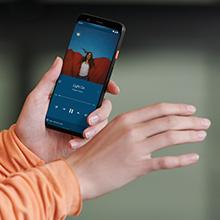
Figure 3.2: Using the Pixel 4 XL Camera
3.4 Motion Sense (Quick Gestures)
Utilize Quick Gestures to control your phone without touching it. Wave your hand above the screen to skip songs, silence calls, and more. Motion Sense functionality is available in specific regions including the US, Canada, Singapore, Australia, Taiwan, and most European countries.
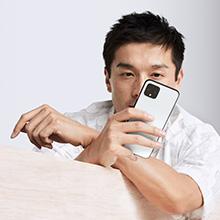
Figure 3.3: Motion Sense in Action
3.5 Call Screen
The Google Assistant's Call Screen feature helps filter out spam calls. It can proactively screen unknown callers and provide a transcript of the conversation, allowing you to decide whether to answer.
3.6 Vídeo oficial del producte
Video 3.1: An official video from Google Inc showcasing the features of the Google Pixel 4, including Google Assistant and Motion Sense. This video provides a visual overview of key functionalities.
4. Manteniment
4.1 Neteja del vostre dispositiu
To clean your Pixel 4 XL, use a soft, lint-free cloth. Avoid abrasive materials, solvents, or aerosol sprays. For stubborn marks, slightly dampen the cloth with water. Do not submerge the device in water.
4.2 Actualitzacions de programari
Google regularly releases software updates to improve performance, add features, and enhance security. Ensure your device is connected to Wi-Fi and has sufficient battery life before installing updates. You can check for updates in Settings > System > System update.
4.3 Cura de la bateria
Per allargar la durada de la bateria:
- Eviteu temperatures extremes.
- Use the provided charger or a compatible Qi-certified wireless charger.
- Enable Adaptive Battery in settings to optimize app usage.
- Disable features like Motion Sense and Always-on Display if not actively needed to conserve power.
4.4 Còpia de seguretat de dades
Regularly back up your data to your Google Account. This includes photos, videos, contacts, and app data. Go to Settings > System > Backup to manage your backup settings.
5. Solució De Problemes
5.1 Problemes comuns i solucions
- El dispositiu no respon: Premeu i manteniu premut el botó d'engegada durant uns 30 segons per forçar un reinici.
- Les aplicacions es bloquegen: Clear the cache and data for the problematic app in Settings > Apps & notifications > See all apps > [App Name] > Storage & cache.
- Problemes de connectivitat (Wi-Fi/Bluetooth): Try toggling Wi-Fi or Bluetooth off and on. If the issue persists, reset network settings in Settings > System > Reset options > Reset Wi-Fi, mobile & Bluetooth.
- Poca durada de la bateria: Review battery usage in Settings > Battery to identify apps consuming excessive power. Adjust screen brightness and disable unnecessary features.
5.2 Restabliment de fàbrica
Un restabliment de fàbrica esborrarà totes les dades del telèfon i el restaurarà a la configuració original de fàbrica. Això pot resoldre problemes de programari persistents. Warning: Back up all important data before proceeding.
- Aneu a Configuració > Sistema > Opcions de restabliment.
- Toca "Esborra totes les dades (restabliment de fàbrica)".
- Confirma la teva decisió i segueix les instruccions que apareixen a la pantalla.
6. Especificacions
Key technical specifications for the Google Pixel 4 XL:
| Característica | Especificació |
|---|---|
| Marca | |
| Nom del model | Pixel 4 XL |
| Sistema operatiu | Android |
| Capacitat d'emmagatzematge de memòria | 64 GB |
| Mida instal·lada de la memòria RAM | 6 GB |
| Mida de la pantalla | 6.3 polzades |
| Resolució | 1440 x 2960 |
| Freqüència d'actualització | 120 Hz |
| Model de CPU | Snapdragon S3 |
| Velocitat de la CPU | 2.84 GHz |
| Color | Oh So Orange |
| Nombre de ranures per a targetes SIM | SIM única |
| Tipus de connector | USB tipus C |
| Funció de seguretat biomètrica | Reconeixement facial |
| Nivell de resistència a l'aigua | Resistent a l'aigua |
| Conector d'auriculars | Sense presa per a auriculars |
| Front Photo Sensor Resolution | 8 MP |
| Resolució de captura de vídeo | 4k (30fps) |
| Tipus de visualització | OLED |
| Proveïdor de sense fil | Desbloquejat |
| Durada mitjana de la bateria | 12 hores |
7. Informació de la garantia
Your Google Pixel 4 XL comes with a Garantia del fabricant de 2 anys. This warranty covers defects in materials and workmanship under normal use. It does not cover damage caused by accidents, misuse, unauthorized repairs, or normal wear and tear.
For detailed terms and conditions, please refer to the warranty card included with your product or visit the official Google support weblloc.
8. Suport
If you require further assistance or encounter issues not covered in this manual, please utilize the following resources:
- Ajuda en línia: Visit the official Google Pixel Help Center for comprehensive articles, FAQs, and troubleshooting guides.
- Fòrums de la comunitat: Engage with other Pixel users and experts in Google's official product forums.
- Contacte amb l'assistència: Access direct support options (chat, phone, email) through the Google Pixel Help Center.
Always ensure you are referring to official Google support channels for accurate and up-to-date information.