
Introducció
This manual provides detailed instructions for the installation, operation, and maintenance of your Grohe Essence E Electronic Washbasin Mixer Tap, model 36445000. This touchless faucet features an infrared sensor for hygienic and convenient use, powered by a 6V lithium battery. Please read these instructions carefully before installation and use to ensure proper function and longevity of your product.
Configuració i instal·lació
The Grohe Essence E is designed for deck mount, single-hole installation. Ensure that the mounting surface is clean and stable before proceeding. Flexible connection hoses and an integrated solenoid valve are included for quick installation. For UK installations, specific UK Compression Adaptors 15 mm x 3/8 Inch (Grohe 46914000) are required and must be acquired separately.
Refer to the dimension drawing below for precise measurements and installation requirements, including the maximum deck thickness and hole diameter.
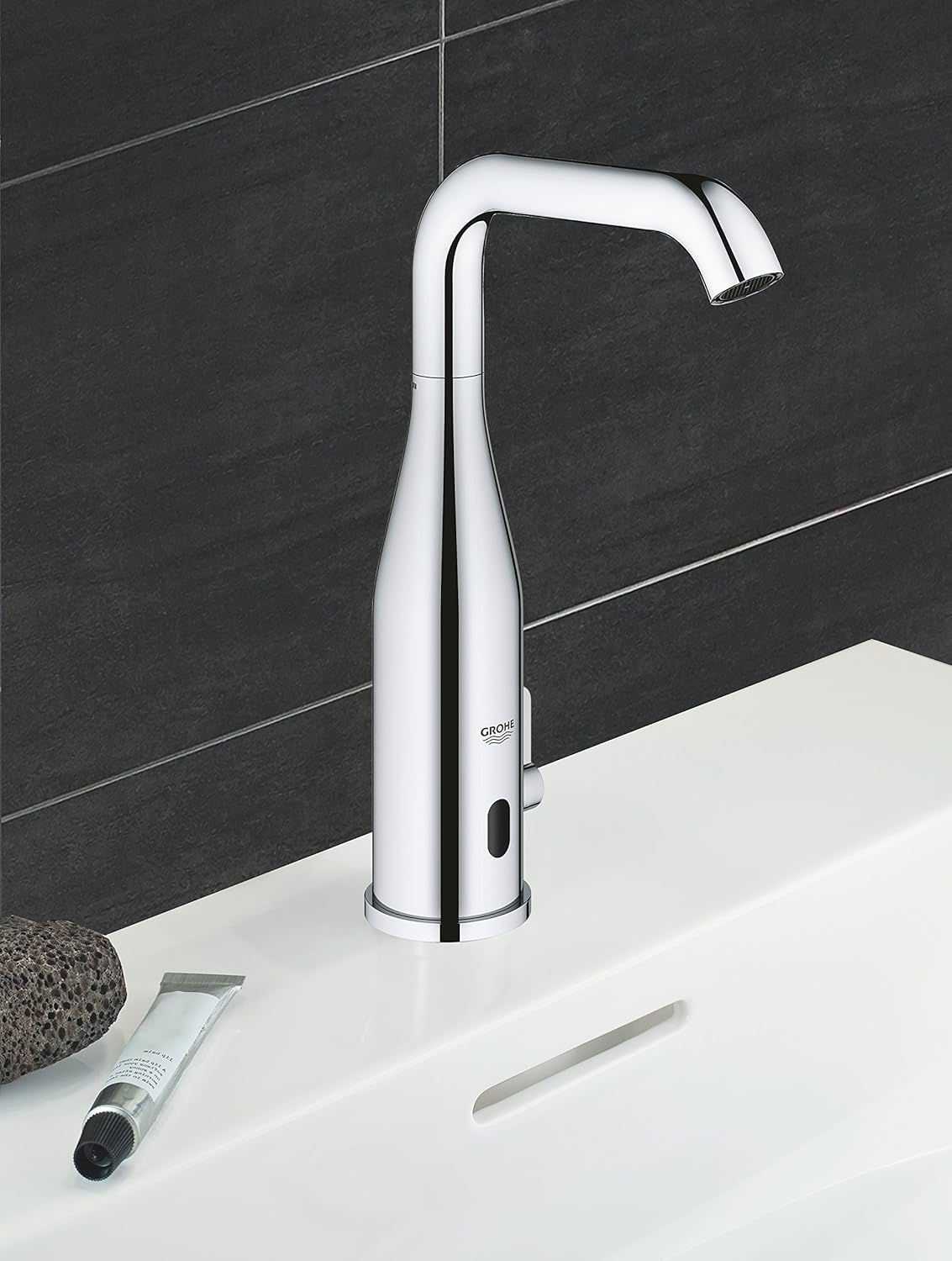
Figura 1: Dimension drawing for the Grohe Essence E Electronic Washbasin Mixer Tap, showing all critical measurements for installation. This includes spout height, reach, mounting hole diameter, and overall dimensions.
Ensure all connections are secure and watertight. The external quick installation system facilitates a straightforward setup process. After installation, check for leaks and proper water flow.
Instruccions de funcionament
The Grohe Essence E faucet operates via an infrared sensor, enabling touchless water flow for enhanced hygiene and convenience. Simply place your hands within the sensor's detection range to activate the water.
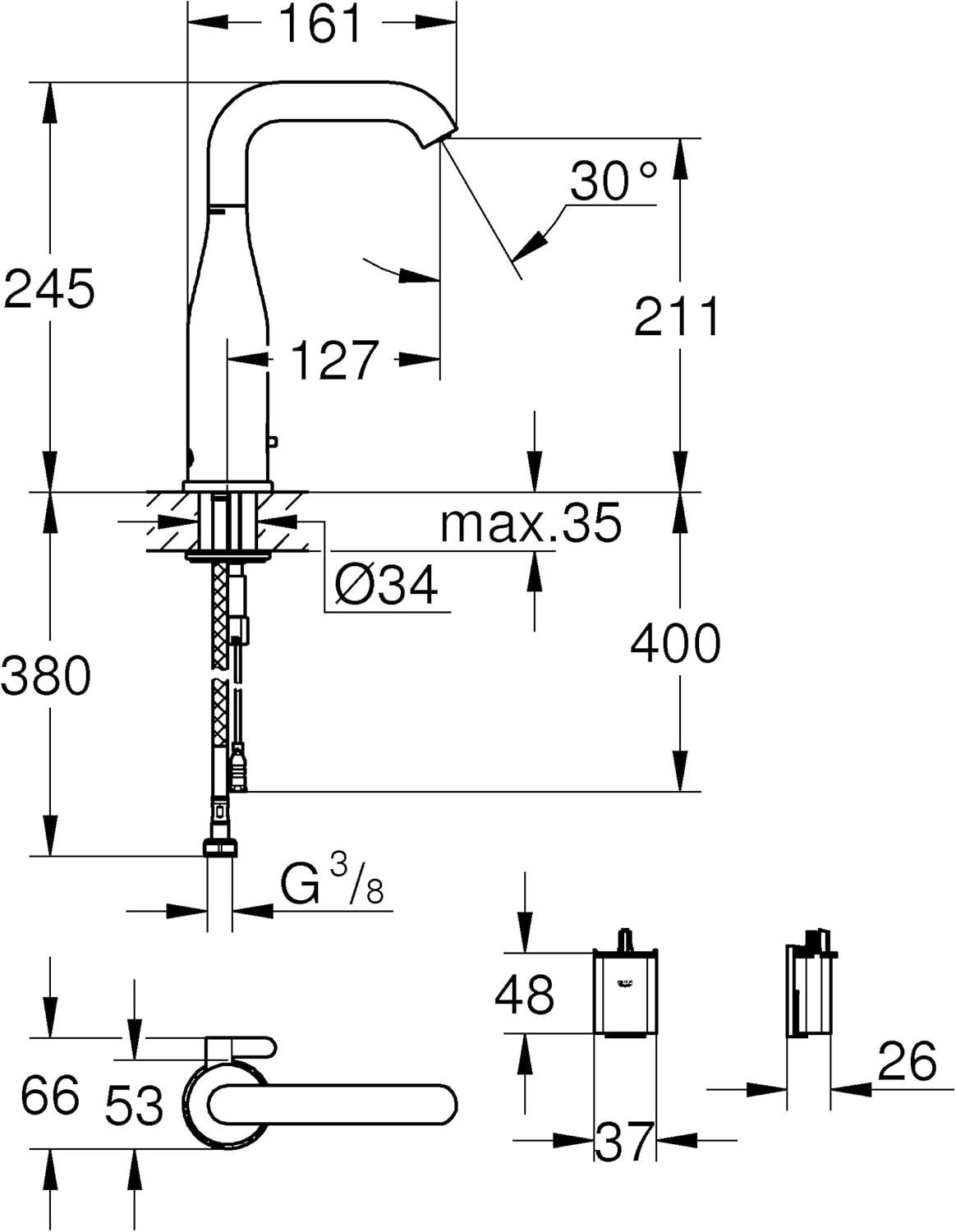
Figura 2: The Grohe Essence E Electronic Washbasin Mixer Tap installed on a basin, demonstrating its sleek design and touchless operation.
- Touchless Activation: Water flows automatically when hands are detected by the infrared sensor and stops when hands are removed.
- Adjustable Swivel Spout: The spout can be adjusted to swivel angles of 0°, 150°, or 360° to suit various basin sizes and user preferences.
- Laminar Flow Regulator: The integrated 5.0 l/min laminar flow regulator ensures a consistent and splash-free water stream.
- Durada de la bateria: The 6V lithium battery (type CR-P2) provides an approximate life of 7 years, based on 150 uses per day. A multi-level battery life indicator provides status updates.
- Programes integrats: The faucet features 7 built-in programs, including an auto conditioner, thermal disinfection, and a cleaning mode.
- Comandament a distància (opcional): Additional features and settings, such as adjusting sensor sensitivity or activating specific programs, can be accessed using the Grohe remote control 36 407 (sold separately).
Manteniment
Proper maintenance ensures the longevity and optimal performance of your Grohe Essence E faucet.
- Neteja: Regularly clean the faucet surface with a soft cloth and mild, non-abrasive cleaning agents. Avoid harsh chemicals, abrasive sponges, or acidic cleaners, as these can damage the finish.
- Dirt Filters: The faucet is equipped with dirt filters. Periodically inspect and clean these filters to prevent blockages and maintain consistent water flow. Refer to the installation diagram for filter locations.
- Mode de neteja: To clean the basin or faucet without accidental activation, engage the cleaning mode. This temporarily deactivates the sensor. Consult your remote control manual (if applicable) or the Grohe website for specific instructions on activating cleaning mode.
- Substitució de la bateria: When the multi-level battery life indicator signals low power, replace the 6V CR-P2 lithium battery. Ensure the power supply is disconnected before replacing the battery and observe correct polarity.
Resolució de problemes
If you encounter issues with your Grohe Essence E faucet, refer to the following common troubleshooting steps:
| Problema | Causa possible | Solució |
|---|---|---|
| Sense flux d'aigua | Water supply off; Clogged dirt filters; Low or dead battery; Sensor malfunction. | Check water supply valves; Clean dirt filters; Replace battery; Clean sensor window. |
| El sensor no respon | Sensor window dirty or obstructed; Low battery; Incorrect sensor settings. | Clean sensor window; Replace battery; Adjust sensor settings using remote control (if applicable). |
| Flux d'aigua continu | Sensor obstruction; Sensor malfunction; Cleaning mode not disengaged. | Remove any objects near sensor; Activate and then deactivate cleaning mode to reset; Contact support if issue persists. |
| Baix cabal | Clogged dirt filters; Clogged laminar flow regulator. | Inspect and clean dirt filters; Inspect and clean laminar flow regulator. |
| Water quality issues | Backflow preventer issue. | The integrated backflow preventer helps maintain water quality. If issues persist, consult a qualified plumber. |
If these steps do not resolve the issue, please contact Grohe customer support or a qualified plumber.
Especificacions
| Característica | Detall |
|---|---|
| Marca | GROHE |
| Nom del model | Essence E |
| Número de model | 36445000 |
| Tipus de muntatge | Muntatge de coberta, forat únic |
| Material | Brass (Body), Metal (Handle) |
| Tipus d'acabat | Polit |
| Tipus de mànec | Sensor (Touchless) |
| Caudal | 5.0 Liters Per Minute (Laminar Flow Regulator) |
| Alçada del bec | 245 mil·límetres |
| Abast del bec | 20 centímetres |
| Pes de l'article | 0.88 quilos |
| Font d'alimentació | 6V Lithium Battery (Type CR-P2) |
| Característiques especials | Touchless, Adjustable Swivel Spout, Integrated Solenoid Valve, Dirt Filters, Backflow Preventer, 7 Built-in Programs |
| Required Adaptors (UK) | 15 mm x 3/8 Inch (Grohe 46914000) |
Garantia i Suport
For detailed warranty information, product registration, or technical assistance, please refer to the official GROHE website or contact GROHE customer service directly. Keep your purchase receipt as proof of purchase for any warranty claims.

Figura 3: The official GROHE logo, representing the brand's commitment to quality and innovation.