
1. Introducció
The Sony SBH54 is a versatile Stereo Bluetooth Headset designed for wireless communication and audio playback. It offers both handset and headset functionalities, allowing you to take and make calls, view messages, listen to music, and tune into FM radio directly from its display. Crafted from premium metal with a splash-proof design, it combines elegance with durability.
Key features include Bluetooth Wireless 3.0, NFC technology for easy pairing, an OLED display, and built-in noise cancellation for clear audio during calls. The headset supports A2DP profile and can connect to two devices simultaneously.
2. Producte acabatview
The SBH54 features a compact design that fits comfortably in your hand. It includes an OLED display for information at a glance and physical controls for media and call management.
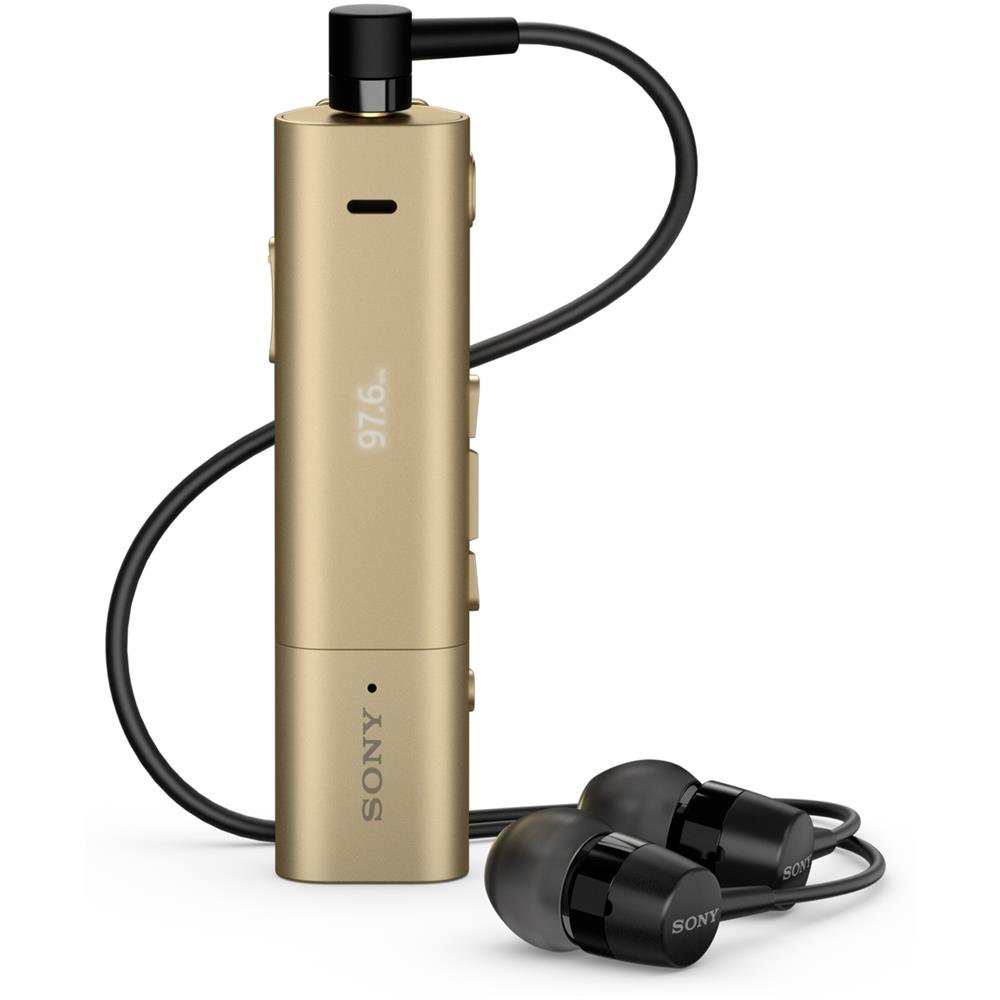
Image: Sony SBH54 Gold Stereo Bluetooth Headset. This image displays the compact, gold-colored headset with its integrated clip and display screen.
Controls i indicadors:
- Pantalla OLED: Shows caller ID, messages, music track information, and FM radio frequency.
- Botó multifunció: For call answering/ending, play/pause music.
- Botons de volum: Ajusta el volum de l'àudio.
- Botons de navegació: For menu navigation and track skipping.
- Micròfon: Integrated for voice calls.
- Auriculars Jack: 3.5mm port for connecting the included premium headphones.
- Port de càrrega: Micro USB port for charging the device.
3. Configuració
3.1 Càrrega dels auriculars
- Connect the supplied USB cable to the headset's charging port and to a USB power adapter or a computer's USB port.
- L'indicador de bateria a la pantalla mostrarà l'estat de càrrega.
- Carregueu els auriculars completament abans del primer ús.
3.2 Pairing with a Device (Bluetooth)
- Assegureu-vos que els auriculars estiguin carregats i apagats.
- Press and hold the power button until the headset enters pairing mode (indicated by a specific light pattern or message on the display).
- Al telèfon intel·ligent o a un altre dispositiu amb Bluetooth, activeu el Bluetooth i cerqueu els dispositius disponibles.
- Seleccioneu "SBH54" de la llista de dispositius trobats.
- Si se us demana, introduïu el codi d'accés "0000" (quatre zeros).
- Once paired, the headset will indicate a successful connection.
3.3 Pairing with a Device (NFC)
For devices with NFC (Near Field Communication):
- Assegureu-vos que l'NFC estigui activat al telèfon intel·ligent i que la pantalla estigui desbloquejada.
- Touch the NFC detection area of your smartphone to the NFC detection area on the SBH54 headset.
- Seguiu les indicacions de la pantalla per completar el procés de vinculació.
4. Funcionament dels auriculars
4.1 Encès/Apagat
- Per encendre: Manteniu premut el botó d'engegada fins que la pantalla s'il·lumini.
- Per apagar: Premeu i manteniu premut el botó d'engegada fins que la pantalla s'apagui.
4.2 Fer i rebre trucades
- Respondre una trucada: When a call comes in, press the multi-function button.
- Finalització d'una trucada: During a call, press the multi-function button.
- Rebutjar una trucada: Press and hold the multi-function button when a call comes in.
- Fer una trucada: Dial the number on your phone. The call will automatically route to the headset. You can also use voice commands if supported by your phone.
- Handset Function: The compact SBH54 can be used as an unobtrusive handset for calls.
- Cancel·lació de soroll: The headset features echo, wind, and noise cancellation for clear voice transmission.
- Veu HD: Enhances voice clarity for both parties during a call.
4.3 Reproducció de música
- Reproduir/pausa: Press the multi-function button.
- Pista següent: Press the forward navigation button.
- Pista anterior: Press the backward navigation button.
- Control de volum: Feu servir els botons de pujar/baixar el volum.
4.4 Ràdio FM
- Activa la ràdio FM: Navigate through the headset menu to select the FM Radio function.
- Emissores de sintonització: Use the navigation buttons to scan or manually tune to FM frequencies.
- Desa els valors predefinits: The headset may allow saving favorite stations (refer to on-screen prompts).
5. Manteniment
- Neteja: Netegeu els auriculars amb un drap suau i sec. Eviteu utilitzar productes químics agressius o materials abrasius.
- Resistència a l'aigua: The SBH54 has a splash-proof design. This means it can withstand light splashes of water but should not be submerged or exposed to heavy rain. Ensure the charging port cover is securely closed.
- Emmagatzematge: Guardeu els auriculars en un lloc fresc i sec, allunyat de la llum solar directa i de temperatures extremes.
- Cura de la bateria: Per allargar la durada de la bateria, eviteu descarregar-la completament amb freqüència. Carregueu-la regularment.
6. Solució De Problemes
Problemes comuns i solucions:
- Els auriculars no s'encén: Assegureu-vos que la bateria estigui carregada. Connecteu-la a una font d'alimentació i torneu-ho a provar.
- No es pot emparellar amb un dispositiu:
- Assegureu-vos que els auriculars estiguin en mode d'emparellament.
- Assegureu-vos que el Bluetooth estigui habilitat al vostre dispositiu.
- Apropa els auriculars al dispositiu.
- Reinicieu els auriculars i el dispositiu.
- Esborra les connexions Bluetooth anteriors del dispositiu i torna a intentar l'emparellament.
- Sense àudio o mala qualitat d'àudio:
- Comproveu els nivells de volum tant dels auriculars com del dispositiu connectat.
- Ensure the headset is within range of your device.
- Desconnecteu i torneu a connectar la connexió Bluetooth.
- Ensure the headphones are properly plugged into the 3.5mm jack.
- La ràdio FM no funciona: Ensure you are in an area with good FM signal reception.
7. Especificacions
| Característica | Detall |
|---|---|
| Marca | Sony |
| Número de model | SBH54GD |
| Color | Or |
| Col·locació de l'orella | A l'orella |
| Factor de forma | A l'orella |
| Control de soroll | Cancel·lació activa del soroll |
| Pes de l'article | 0.1 quilos |
| Tipus de controlador d'àudio | Conductor dinàmic |
| Interval de freqüència | 20 Hz - 20,000 Hz |
| Material de tancament | Metall |
| Dispositius compatibles | Smartphones, Laptops, Tablets, Bluetooth-enabled Devices |
| Nivell de resistència a l'aigua | Resistent a l'aigua (a prova d'esquitxades) |
| Tecnologia de connectivitat | Bluetooth, NFC |
| Tecnologia sense fils | Bluetooth, NFC |
| Versió Bluetooth | 3.0 |
| Tipus de control | Control de suports |
| Mètode de control | Remot |
8. Garantia i Suport
Per obtenir informació sobre la garantia i l'assistència al client, consulteu la documentació inclosa amb la compra o visiteu el lloc web oficial d'assistència de Sony. weblloc web. Els termes de garantia específics poden variar segons la regió i el distribuïdor.
Assistència en línia: www.sony.com/electronics/support