
Manual d'usuari del comandament a distància DIRECTV RC71
Model: RC71
Introducció
The DIRECTV RC71 Remote Control is designed for efficient access to functions for your DIRECTV system. This remote is compatible with various DIRECTV receivers and can also control your television's volume and power functions. It supports both Infrared (IR) and Radio Frequency (RF) communication modes.
In IR mode, the RC71 is compatible with all legacy and current DIRECTV receivers. In RF mode, it is specifically designed to work with the DIRECTV HR44 Genie and Genie clients C41 and C41W. When operating in RF mode, the remote utilizes the RF4CE protocol for enhanced speed and accuracy, confirming each button press to reduce missed inputs. For TV and AV functions, the remote will still use IR communication even when in RF mode for the receiver.
Configuració
1. Instal·lació de la bateria
The RC71 remote control requires two (2) AA alkaline batteries for operation.
- Localitzeu la tapa del compartiment de la bateria a la part posterior del comandament a distància.
- Feu lliscar la coberta cap avall i aixequeu-la.
- Introduïu dues piles AA, assegurant-vos que els terminals positiu (+) i negatiu (-) estiguin alineats amb els indicadors de l'interior del compartiment.
- Torneu a col·locar la tapa del compartiment de la bateria fent-la lliscar fins que faci clic de manera segura.
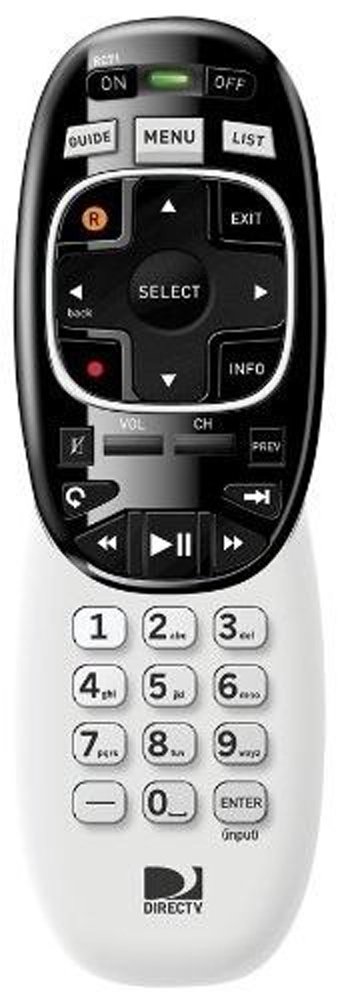
Image: The DIRECTV RC71 Remote Control, showing its ergonomic design and button layout.
2. Pairing with DIRECTV Receiver
The RC71 remote can operate in two modes: Infrared (IR) and Radio Frequency (RF).
IR Mode (for all DIRECTV receivers)
In IR mode, the remote requires a direct line of sight to the receiver. No special pairing is typically required; the remote should function immediately after battery installation.
RF Mode (for HR44 Genie, C41, C41W clients)
For RF mode functionality with compatible receivers, follow these steps:
- Ensure your DIRECTV receiver (HR44 Genie or C41/C41W client) is powered on.
- Point the RC71 remote at the receiver.
- Manteniu premut el botó MUT i ENTRAR botons simultàniament fins que la llum verda de la part superior del comandament a distància parpellegi dues vegades.
- Release the buttons. The remote is now attempting to pair in RF mode.
- Follow any on-screen prompts that may appear on your television to confirm the pairing.
3. Programming for TV/AV Functions
To control your television's volume and power, the remote needs to be programmed with your TV's code. This process typically involves using the receiver's on-screen menu.
- Premeu el botó MENÚ button on your RC71 remote.
- Navega a Settings & Help, doncs Configuració, i finalment Control remot.
- Seleccioneu Programa remot or a similar option.
- Follow the on-screen instructions to select your television brand and program the remote.
- Test the volume and power buttons to ensure successful programming.
Funcionament del comandament a distància
The RC71 remote control features a streamlined button layout for intuitive operation.
- Botó d'encesa: Toggles power for the DIRECTV receiver and, once programmed, for the television.
- Guia: Mostra la guia del programa.
- Llista: Accedeix als teus programes gravats.
- Canal amunt/avall: Canvi de canals.
- Pujar/baixar el volum: Adjusts television volume (after programming).
- Silenciar: Mutes television audio (after programming).
- Directional Pad (Arrows) and SELECT: Navega pels menús i selecciona opcions.
- REW, PLAY, FWD, PAUSE, STOP, RECORD: Controls playback of recorded content.
- Numbers (0-9): Introdueix directament els números de canal.
- INFORMACIÓ: Mostra informació del programa.
- SORTIDA: Surt dels menús o torna a la televisió en directe.
The ergonomic design of the RC71 is intended for comfortable handling during extended use.
Manteniment
Canvi de bateria
Replace batteries when the remote's response becomes sluggish or the indicator light fails to flash. Always replace both AA batteries simultaneously with new ones to ensure optimal performance.
Neteja
To clean the remote, gently wipe its surface with a soft, dry cloth. For stubborn dirt, a slightly damp cloth can be used, followed by immediate drying. Avoid using harsh chemicals or abrasive cleaners, as these can damage the remote's finish or internal components.
Resolució de problemes
- El comandament a distància no respon:
- Comproveu la instal·lació de la bateria i substituïu-la si cal.
- Ensure a clear line of sight between the remote and the receiver/TV for IR functions.
- If in RF mode, ensure the remote is properly paired with the receiver. Repeat the pairing steps if needed.
- TV/AV functions not working:
- Verify that the remote has been correctly programmed for your television model. Re-program if unsure.
- Ensure the remote is pointed directly at the TV's IR sensor.
- Remote feels sluggish or inconsistent:
- Substituïu les piles per unes de noves.
- Consider resetting the remote to factory settings (consult your DIRECTV receiver's on-screen help or DIRECTV support for specific instructions, as this process can vary).
Especificacions
| Marca | DIRECTV |
| Nom del model | RC71 |
| Número de model | RC71 |
| Color | Blanc |
| Tecnologia de connectivitat | Infrarojos, Radiofreqüència |
| Dispositius compatibles | DIRECTV Receivers (all in IR, HR44 Genie/C41/C41W in RF), Television |
| Maximum Number of Supported Devices | 1 (DIRECTV Receiver) + 1 (Television) |
| Quantitat de botons | 20 |
| Tipus de controlador | Control de botons |
| Interval màxim | 10 Meters (RF) |
| Tipus de bateria | 2 piles alcalines AA |
| Pes de l'article | 3.52 unces |
| Característica especial | Disseny ergonòmic |
Informació de la garantia
The DIRECTV RC71 Remote Control comes with a manufacturer warranty for 90 days from the date of purchase. Please retain your proof of purchase for warranty claims. For detailed terms and conditions, refer to the warranty documentation provided with your product or contact DIRECTV customer support.
Suport
For further assistance, technical support, or to inquire about specific programming codes for your television, please contact DIRECTV customer support. You can find contact information on the official DIRECTV website or through your DIRECTV service provider.