
Introducció
This manual provides detailed instructions for the operation and maintenance of your Samsung HT-TZ225 remote control. This remote is specifically designed to control compatible Samsung Home Cinema DVD Players, offering convenient access to various functions from a distance.
Informació de seguretat
Seguretat de la bateria: Always insert batteries with the correct polarity (+/-). Do not mix old and new batteries, or different types of batteries. Remove batteries if the remote will not be used for an extended period to prevent leakage.
Eliminació: Elimineu les piles usades d'acord amb la normativa local. No llenceu les piles al foc.
Medi ambient: Keep the remote control away from direct sunlight, heat sources, and moisture. Avoid dropping the remote or subjecting it to strong impacts.
Contingut del paquet
Please check that the following item is included in your package:
Samsung HT-TZ225 Remote Control (1 unit)
Nota: Les piles no solen estar incloses i s'han de comprar per separat.
Producte acabatview
The Samsung HT-TZ225 remote control features an ergonomic design for comfortable handling and intuitive button placement for easy operation of your Home Cinema DVD Player.
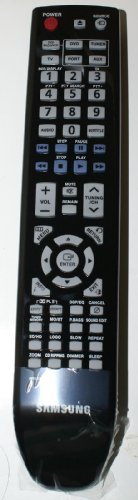
Imatge: Frontal view of the Samsung HT-TZ225 remote control, showing various function buttons.
Funcions del botó
While the exact layout may vary slightly, typical buttons on the HT-TZ225 remote control include:
Botó d'encesa: Turns the Home Cinema system on or off.
Source/Function Button: Selects input sources (e.g., DVD, AUX, TV).
Pujar/baixar el volum: Ajusta el volum d'àudio.
Botó de silenci: Silencia la sortida d'àudio.
Teclat numèric (0-9): For direct track selection or inputting numbers.
Botons de navegació (amunt, avall, esquerra, dreta): Used to navigate menus and selections.
Enter/OK Button: Confirms a selection or enters a menu option.
Return/Exit Button: Torna al menú anterior o surt del menú actual.
Playback Controls (Play, Pause, Stop, Fast Forward, Rewind, Skip): Controls DVD playback.
Menu/Title Button: Accesses the DVD menu or title menu.
Audio/Subtitle Button: Selects audio tracks or subtitle languages.
Configuració
Instal·lació de la bateria
Localitzeu la tapa del compartiment de la bateria a la part posterior del comandament a distància.
Feu lliscar la tapa cap avall o premeu el pestell i aixequeu-la per obrir el compartiment.
Insert two AA batteries (not included) into the compartment, ensuring the positive (+) and negative (-) terminals align correctly with the indicators inside the compartment.
Torneu a col·locar la tapa del compartiment de la bateria fent-la lliscar fins que faci clic de manera segura.
Note: For optimal performance, use high-quality alkaline batteries.
Instruccions de funcionament
Ensure your Samsung Home Cinema DVD Player is powered on and connected to your display device before using the remote control.
Funcions bàsiques
Encès/apagat: Point the remote at the Home Cinema system and press the Poder button once to turn it on or off.
Selecció d'una font: Premeu el botó Font or Funció button repeatedly to cycle through available input sources (e.g., DVD, AUX, TV).
Ajust de volum: Premeu el botó Puja el volum or Baixa el volum buttons to increase or decrease the sound level.
Muting Audio: Premeu el botó Silenciar button to temporarily silence the audio. Press it again to restore sound.
DVD Playback Functions
Jugar: Premeu el botó Jugar button to start DVD playback.
Pausa: Premeu el botó Pausa button to temporarily stop playback. Press Jugar de nou per reprendre.
Atura: Premeu el botó Atureu-vos button to end playback and return to the DVD menu or beginning.
Avançar/rebobinar ràpid: Premeu el botó Avança ràpida or Rebobinar buttons to scan through the content. Press Jugar to resume normal speed.
Skip Track/Chapter: Utilitza el Saltar endavant or Saltar enrere buttons to jump to the next or previous track/chapter.
Navegació del menú: Utilitza el Up, Avall, Esquerra, D'acord arrow buttons to navigate through DVD menus. Press Introduïu/D'acord per fer una selecció.
Accessing DVD Menu: Premeu el botó Menú or Títol button to access the main DVD menu.
Manteniment
Neteja del comandament a distància
Wipe the surface with a soft, dry cloth. For stubborn dirt, slightly dampal drap amb aigua o un netejador suau i no abrasiu.
No utilitzeu productes químics agressius, dissolvents ni esponges de neteja abrasives, ja que poden danyar l'acabat del comandament a distància o els components interns.
Ensure no liquid enters the remote control through button gaps or the battery compartment.
Canvi de bateria
Replace the batteries when the remote control's range decreases significantly or if it stops responding. Follow the battery installation steps outlined in the "Setup" section.
Resolució de problemes
| Problema | Causa possible | Solució |
|---|---|---|
| El control remot no funciona. | Batteries are depleted or inserted incorrectly. Obstruction between remote and Home Cinema system. Remote is out of range. | Replace batteries with new ones, ensuring correct polarity. Remove any objects blocking the signal path. Move closer to the Home Cinema system (within 10 meters). |
| El comandament a distància funciona de manera intermitent. | Weak batteries. Infrared sensor on Home Cinema system is dirty or obstructed. | Replace batteries. Clean the infrared sensor on your Home Cinema system. Ensure no strong light sources are interfering with the signal. |
| Specific buttons do not respond. | El botó pot estar enganxat o danyat. | Gently press the button multiple times. If the issue persists, the remote may require service or replacement. |
Especificacions
Nom del model: HT-TZ225
Marca: Samsung
Dispositius compatibles: Home Cinema DVD Player
Tecnologia de connectivitat: infrarojos
Tipus de controlador: Control de botons
Interval màxim: 10 metres
Descripció de la bateria: AA (x2, not included)
Color: Negre
Garantia i Suport
This remote control is an authentic Samsung part. For specific warranty information, please refer to the documentation provided with your original Samsung Home Cinema DVD Player or visit the official Samsung support weblloc.
For technical assistance or further inquiries, please contact Samsung customer support through their official channels.
Note: Warranty terms may vary by region and retailer. Keep your purchase receipt for warranty claims.


