
1. Uvod
This manual provides comprehensive instructions for the VECHTEL Android 15 Car Radio, model 4 Core 4G+128G. This advanced multimedia system is designed to enhance your driving experience with features such as a 9-inch Incell HD touchscreen, wireless CarPlay and Android Auto, GPS navigation, Bluetooth, Wi-Fi, and FM/RDS radio. Please read this manual carefully before installation and operation to ensure proper use and to maximize the product's capabilities.
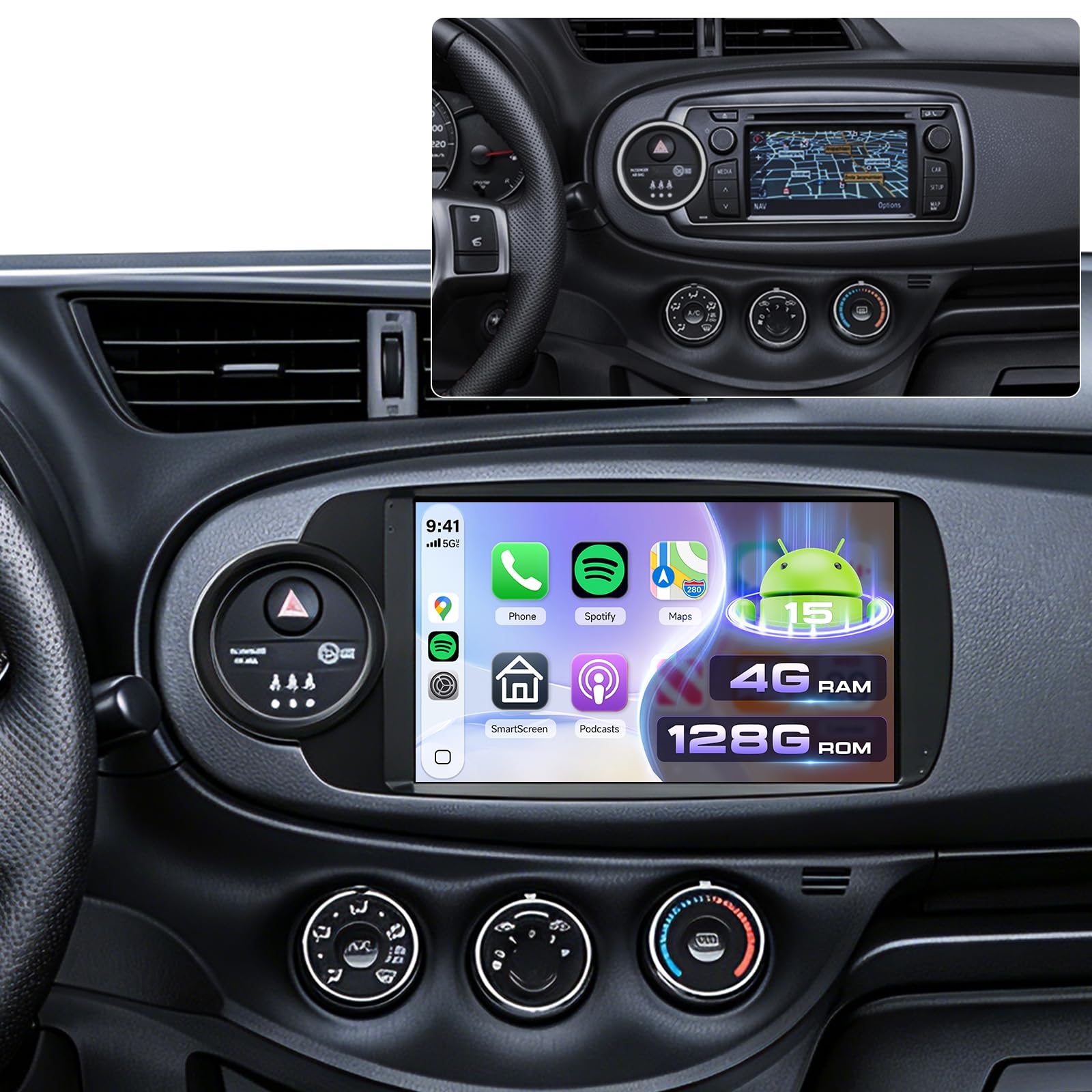
Image 1.1: VECHTEL Android 15 Car Radio main unit. This image shows the front view of the car radio with its 9-inch Incell HD touchscreen display.
2. Kompatibilnost vozila
This car radio is specifically designed for Toyota Yaris models manufactured between 2012 and 2017. It is compatible with vehicles equipped with a silver climate knob ring as standard, including versions with a factory CD radio and small screen, as well as those with large touchscreens. This unit is not suitable for vehicles that do not have the silver climate knob ring.
Prije kupovineasing or installing, verify your vehicle's model year and dashboard configuration. It is recommended to send a photo of your central dashboard to the seller for confirmation if unsure.
3. Sigurnosne informacije
- Preporučena profesionalna instalacija: Zbog složenosti automobilskih električnih sistema, preporučuje se profesionalna ugradnja kako bi se spriječilo oštećenje uređaja ili vašeg vozila.
- Napajanje: Uređaj priključite samo na napajanje od 12 V DC s negativnim uzemljenjem.
- Ožičenje: Ensure all wiring connections are secure and correctly matched to avoid short circuits or malfunctions. Refer to the wiring diagram provided with the product.
- Sigurnost u vožnji: Do not operate the unit's complex functions or watch videos while driving. Always prioritize road safety.
- temperatura: Izbjegavajte izlaganje uređaja ekstremnim temperaturama ili direktnoj sunčevoj svjetlosti tokom dužeg perioda.
- čišćenje: Za čišćenje ekrana i uređaja koristite meku, suhu krpu. Izbjegavajte abrazivna sredstva za čišćenje ili rastvarače.
4. Postavljanje i instalacija
This section provides general guidance for installation. Specific wiring diagrams and mounting instructions are typically included in a separate guide or with the product packaging. Always consult those specific documents for detailed steps.
4.1. Provjere prije instalacije
- Isključite bateriju: Before starting any electrical work, disconnect the vehicle's negative battery terminal to prevent electrical shorts.
- Provjerite komponente: Ensure all components listed in your product's packing list are present.
- Dashboard Removal: Carefully remove the existing car radio and dashboard trim panels according to your vehicle's service manual.
4.2. Ožičenje
Connect the wiring harness from the VECHTEL unit to your vehicle's wiring. Pay close attention to:
- Strujne žice: Constant 12V (yellow), Accessory 12V (red), Ground (black).
- Žice zvučnika: Match positive and negative terminals for each speaker.
- antena: Povežite radio antenu.
- GPS antena: Postavite GPS antenu na mjesto sa čistim view neba (npr. kontrolna ploča, ispod vjetrobranskog stakla).
- USB portovi: Route the USB extension cables to an accessible location.
- Ulaz za zadnju kameru: Connect the rear camera video input and trigger wire if installing a camera.
- Steering Wheel Control Wires: Connect SWC wires if your vehicle supports them.
4.3. Montaža jedinice
Secure the VECHTEL unit into the dashboard opening using the provided mounting brackets and screws. Ensure it is firmly seated and does not obstruct any vehicle controls.
4.4. Početno uključivanje i konfiguracija
- Ponovo spojite akumulator vozila.
- Turn on the vehicle's ignition. The unit should power on automatically.
- Follow the on-screen prompts for initial setup, including language selection, time zone, and Wi-Fi connection.
- Test all functions: radio, Bluetooth, GPS, USB, and steering wheel controls.
5. Uputstvo za upotrebu
5.1. Touchscreen and Android 15 Interface
The unit features a responsive 9-inch Incell HD touchscreen. Navigate the Android 15 operating system by tapping, swiping, and pinching. The home screen provides access to frequently used applications and widgets. You can customize the home page display with optional layouts.
5.2. Bežični CarPlay i Android Auto
This unit supports wireless connections for both Apple CarPlay and Android Auto, allowing seamless integration of your smartphone's features.
- Provjerite jesu li Bluetooth i Wi-Fi omogućeni na vašem pametnom telefonu.
- On the car radio, open the "CarPlay" or "Android Auto" application.
- Follow the on-screen instructions to pair your phone via Bluetooth. Once paired, the system will automatically establish a Wi-Fi connection for CarPlay/Android Auto.
- You can now access navigation, music, calls, and messages directly from the car radio's screen, often with advanced voice control via Siri or Google Assistant.
5.3. GPS navigacija
The integrated GPS module allows for both offline and online navigation.
- Offline mape: Pre-installed maps or maps downloaded via Wi-Fi can be used without an internet connection. Access them through the designated "Navigation" app.
- Online karte: Connect to Wi-Fi or a mobile hotspot to use online navigation applications (e.g., Google Maps, Waze) downloaded from the Play Store.
5.4. Bluetooth povezivanje
Use Bluetooth for hands-free calling and audio streaming.
- Go to the "Bluetooth" application on the car radio.
- Omogućite Bluetooth na telefonu i potražite dostupne uređaje.
- Select the car radio's Bluetooth name (e.g., "VECHTEL Car Radio") from your phone's list and pair.
- Potvrdite kod za uparivanje na oba uređaja.
- Nakon povezivanja, možete bežično upućivati/primati pozive i reproducirati muziku.
5.5. Wi-Fi and App Installation
Connect the unit to a Wi-Fi network or mobile hotspot to access the internet and download applications.
- Navigate to "Settings" > "Network & Internet" > "Wi-Fi".
- Odaberite željenu Wi-Fi mrežu i unesite lozinku.
- Once connected, open the "Play Store" app to download and install various applications (e.g., streaming services, utility apps).
5.6. FM/RDS radio
Access local radio stations with clear audio quality.
- Otvorite aplikaciju "Radio".
- Use the scan function to automatically find and save available stations.
- Tune manually or select from your saved presets. RDS (Radio Data System) provides additional information like station name and traffic updates where available.
5.7. USB povezivanje
The unit includes dual USB ports for media playback and device charging.
- Connect USB drives containing audio or video files.
- Pristup files through the "File Manager" or a dedicated media player app.
5.8. Prikaz zadnje kamere
If a compatible rear camera is installed and connected, the display will automatically switch to the camera view kada se vozilo stavi u brzinu za kretanje unazad.
5.9. Steering Wheel Controls (SWC)
The unit supports integration with your vehicle's existing steering wheel controls. Configuration may be required:
- Go to "Settings" > "Steering Wheel Controls" (or similar).
- Follow the on-screen instructions to map your vehicle's steering wheel buttons to the corresponding functions on the car radio.
5.10. Funkcija podijeljenog ekrana
The split-screen feature allows you to run two applications simultaneously on the 9-inch display.
- Otvorite prvu aplikaciju koju želite koristiti.
- Press and hold the "Recent Apps" button (or swipe up from the bottom and hold, depending on Android version) to enter split-screen mode.
- Select the second application from the recent apps list or app drawer.
5.11. EQ postavke
Adjust audio output to your preference using the Equalizer (EQ) settings.
- Access the "EQ" or "Sound Settings" application.
- Choose from preset sound modes or manually adjust frequency bands to customize the audio profile.
6. Održavanje
- Čišćenje ekrana: Koristite meku krpu koja ne ostavlja dlačice, laganoampened with water or a screen cleaner, to gently wipe the touchscreen. Avoid excessive pressure.
- Ažuriranja softvera: Periodically check for software updates via the unit's settings menu or the manufacturer's webstranicu kako bi se osigurale optimalne performanse i pristup novim funkcijama.
- Opšta njega: Uređaj držite čistim od prašine i ostataka. Izbjegavajte prosipanje tekućina po uređaju.
7. Otkrivanje problema
Ovaj odjeljak se bavi uobičajenim problemima na koje možete naići. Za složenije probleme obratite se korisničkoj podršci.
- Nema napajanja:
- Check all power connections (12V constant, accessory, ground).
- Verify vehicle's fuse for the radio.
- Ensure the vehicle battery is connected and charged.
- Nema zvuka:
- Check volume level and mute settings.
- Verify speaker wire connections.
- Provjerite je li odabran ispravan audio izvor.
- GPS signal izgubljen/netačan:
- Provjerite je li GPS antena pravilno povezana i ima li jasan signal view neba.
- Premjestite vozilo na otvoreni prostor, dalje od visokih zgrada ili gustog lišća.
- Problemi sa Bluetooth vezom:
- Ensure Bluetooth is enabled on both the car radio and your phone.
- Izbrišite prethodna uparivanja na oba uređaja i pokušajte ponovo upariti.
- Ponovo pokrenite oba uređaja.
- CarPlay/Android Auto se ne povezuje:
- Verify Wi-Fi and Bluetooth are active on your phone.
- Provjerite da li je operativni sistem vašeg telefona ažuriran.
- Check app permissions for CarPlay/Android Auto on your phone.
8. Specifikacije
| Brand | VECHTEL |
| Model | 4 Core 4G+128G |
| Operativni sistem | Android 15 |
| RAM | 4 GB |
| ROM (Interna memorija) | 128 GB |
| Veličina ekrana | 9 inches Incell HD Touchscreen |
| Tehnologija povezivanja | Bluetooth, USB, Wi-Fi |
| Posebne karakteristike | Integrated Bluetooth, Wireless CarPlay, Wireless Android Auto, GPS Navigation, Touchscreen, Integrated Wi-Fi |
| Način audio izlaza | Stereo |
| Konfiguracija kanala surround zvuka | 4.1 |
| Video Encoding | H.264, H.265/HEVC |
| Dimenzije proizvoda | 6.4D x 19.9Š x 11.6V cm |
| Izlazna snaga | 45 Watts |
| Broj kanala | 4 |
9. Garancija i podrška
For warranty information, please refer to the documentation included with your product or contact the retailer where the product was purchased. VECHTEL provides customer support for technical assistance and troubleshooting.
If you encounter issues not covered in this manual, or require further assistance, please contact VECHTEL customer service through the platform of purchase or visit the official VECHTEL store page for contact details.
Online podrška: Visit the VECHTEL Store on Amazon