
1. Uvod
Thank you for choosing the Vieta Pro Easy 2 Portable Bluetooth Speaker. This manual provides essential information for setting up, operating, and maintaining your speaker. Please read it carefully before use to ensure optimal performance and longevity of your device.
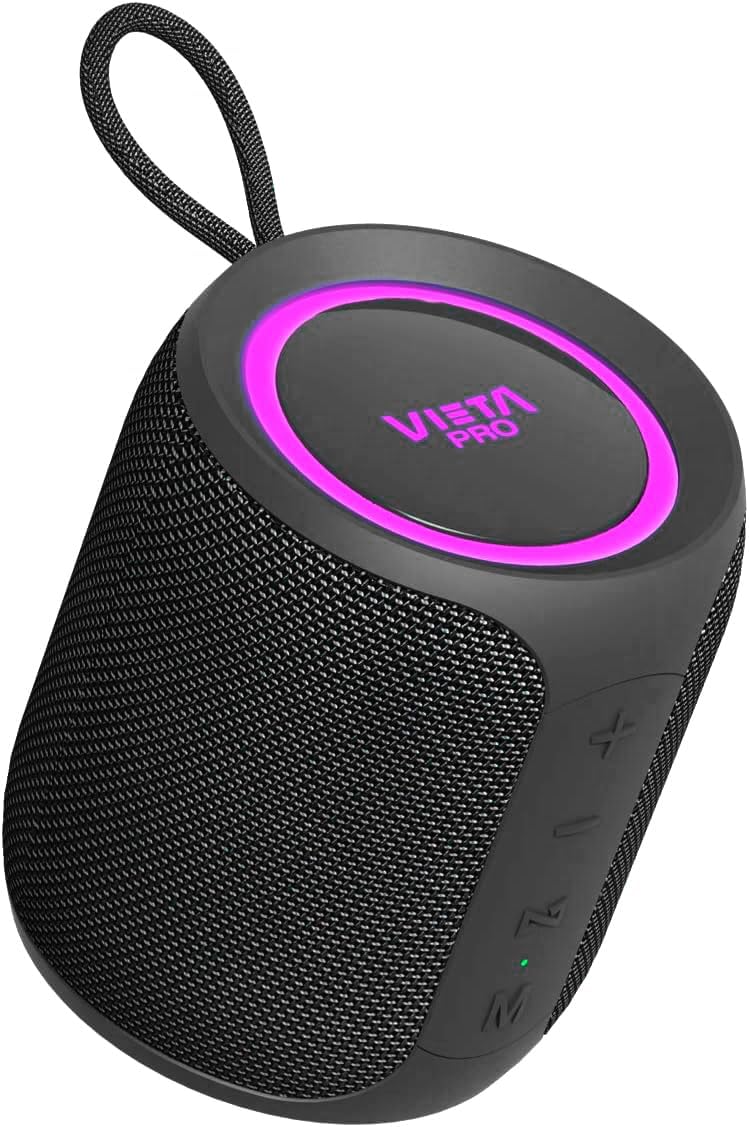
Image 1.1: Vieta Pro Easy 2 Portable Bluetooth Speaker
The Vieta Pro Easy 2 is a versatile portable speaker designed for high-quality audio on the go. It features 20W powerful sound, FM Radio, IPX7 water resistance, a 12-hour battery life, a built-in microphone for hands-free calls, stereo sound capabilities, USB-C charging, and True Wireless Stereo (TWS) functionality.
2. Sadržaj paketa
Molimo označite kućicu za sljedeće stavke:
- 1x Vieta Pro Easy 2 Portable Bluetooth Speaker
- 1x USB-C kabl za punjenje
- 1x 3.5mm Jack Audio Cable
- 1x Korisnički priručnik (ovaj dokument)
3. Proizvod je gotovview
3.1. Komponente zvučnika

Slika 3.1: Pozadi view of the speaker with controls
- Dugme za napajanje: Long press to power on/off. Short press to change playback mode.
- Pojačavanje zvuka (+) / Sljedeća pjesma: Kratki pritisak za sljedeću pjesmu. Dugi pritisak za povećanje jačine zvuka.
- Smanjivanje jačine zvuka (-) / Prethodna pjesma: Kratki pritisak za prethodnu pjesmu. Dugi pritisak za smanjenje jačine zvuka.
- Play/Pause / Call / Voice Assistant (M): Short press to play/pause music or answer/end calls. Long press to activate voice assistant.
- Dugme za način rada (M): Short press to switch between Bluetooth, FM Radio, USB, and Aux-In modes.
- LED indikator: Shows charging status, Bluetooth pairing status, and mode.
3.2. Portovi
- USB-C priključak: Za punjenje zvučnika.
- USB port: Za reprodukciju muzike sa USB fleš diska.
- Aux-In Port (3.5mm): Za povezivanje eksternih audio uređaja putem kabla.
4. Podešavanje
4.1. Punjenje zvučnika
Before first use, fully charge the speaker. Connect the supplied USB-C cable to the speaker's USB-C port and the other end to a USB power adapter (not included) or a computer's USB port. The LED indicator will show charging status and turn off when fully charged.
4.2. Uključivanje/isključivanje
- To power on: Long press the Power button. The speaker will emit an audible prompt and the LED indicator will light up.
- To power off: Long press the Power button again. The speaker will emit an audible prompt and the LED indicator will turn off.
4.3. Bluetooth uparivanje
Da biste povezali zvučnik s uređajem koji podržava Bluetooth:
- Ensure the speaker is powered on and in Bluetooth mode. If not, short press the Mode button until you hear the "Bluetooth mode" prompt. The LED indicator will flash, indicating it's in pairing mode.
- Omogućite Bluetooth na svom pametnom telefonu, tabletu ili nekom drugom uređaju.
- Traži available Bluetooth devices and select "Vieta Pro Easy 2" from the list.
- Once connected, the speaker will confirm with an audible prompt, and the LED indicator will stop flashing and remain solid.
4.4. Uparivanje putem pravog bežičnog stereo sistema (TWS)
TWS allows you to connect two Vieta Pro Easy 2 speakers for a stereo sound experience.
- Ensure both Easy 2 speakers are powered on and not connected to any Bluetooth device.
- On one speaker (this will be the primary speaker), long press the Play/Pause button until you hear a pairing tone.
- Dva zvučnika će se automatski povezati jedan s drugim. Nakon povezivanja, čut ćete zvučni signal potvrde.
- Now, connect your Bluetooth device to the primary speaker as described in section 4.3. Both speakers will play audio in stereo.
5. Uputstvo za upotrebu
5.1. Music Playback (Bluetooth/USB/Aux-In)
- Pusti/pauza: Kratko pritisnite dugme Play/Pause.
- Sljedeća pjesma: Kratko pritisnite dugme za pojačavanje zvuka (+).
- Prethodni zapis: Kratko pritisnite dugme za smanjenje jačine zvuka (-).
- Kontrola jačine zvuka: Long press the Volume Up (+) button to increase volume. Long press the Volume Down (-) button to decrease volume.
5.2. FM radio
Da biste koristili funkciju FM radija:
- Kratkim pritiskom na dugme Mode prebacite se na FM radio.
- Dugo pritisnite dugme Reprodukuj/Pauziraj da biste automatski skenirali i sačuvali dostupne FM stanice.
- Short press the Volume Up (+) or Volume Down (-) buttons to switch between saved stations.
Note: The FM radio functionality is basic and does not display the frequency. Station selection is sequential through saved channels.
5.3. USB reprodukcija
Umetnite USB fleš disk koji sadrži MP3 audio zapis files into the USB port. The speaker will automatically switch to USB mode and begin playback. Use the music playback controls as described in section 5.1.
5.4. Aux-In način rada
Connect an external audio device (e.g., MP3 player, computer) to the speaker's 3.5mm Aux-In port using the provided audio cable. The speaker will automatically switch to Aux-In mode. Control playback from your connected device.
5.5. Pozivi bez upotrebe ruku
Kada je povezan putem Bluetootha sa pametnim telefonom, zvučnik možete koristiti za hands-free pozive:
- Odgovori na poziv: Kratko pritisnite dugme Play/Pause.
- Završi poziv: Kratko pritisnite dugme Reprodukuj/Pauziraj tokom poziva.
- odbiti poziv: Dugo pritisnite dugme Play/Pause.
5.6. Glasovni asistent
The speaker supports voice assistants like Alexa, Google Assistant, and Siri.
- Aktivirajte glasovnog asistenta: Long press the Play/Pause button. The speaker will activate the voice assistant on your connected smartphone.
6. Održavanje
- čišćenje: Za čišćenje zvučnika koristite meku, suhu krpu. Ne koristite abrazivna sredstva za čišćenje ili rastvarače.
- Otpornost na vodu (IPX7): The speaker is IPX7 water-resistant, meaning it can be submerged in up to 1 meter of water for 30 minutes. Ensure all port covers are securely closed before exposure to water. After exposure to water, dry the speaker thoroughly before charging.

Image 6.1: Speaker demonstrating IPX7 water resistance
7. Otkrivanje problema
| Problem | Mogući uzrok | Rješenje |
|---|---|---|
| Zvučnik se ne uključuje | Niska baterija | Potpuno napunite zvučnik. |
| Nema zvuka | Jačina zvuka je preniska ili je isključena | Increase volume on speaker and connected device. Check if device is muted. |
| Bluetooth uparivanje nije uspjelo | Zvučnik nije u načinu uparivanja ili je uređaj predaleko | Ensure speaker is in Bluetooth pairing mode (flashing LED). Move device closer to speaker. Forget speaker from device's Bluetooth list and re-pair. |
| Loš FM radio prijem | Slab signal | Move speaker to a location with better signal. Re-scan for stations. |
| TWS uparivanje ne uspijeva | Zvučnici su već povezani s drugim uređajima | Prije pokretanja TWS uparivanja provjerite jesu li oba zvučnika isključena s drugih Bluetooth uređaja. |
8. Specifikacije
- Brand: Vieta Pro
- Naziv modela: Lako 2
- Broj modela: FBM-VM-BS36BK
- Vrsta zvučnika: Prijenosni Bluetooth zvučnik
- Tehnologija povezivanja: Bluetooth 5.0
- Izlazna snaga: 20 Watts
- Način audio izlaza: Stereo
- Frekvencijski odziv: 80.2 Hz
- Trajanje baterije: Do 12 sati
- Port za punjenje: USB-C
- Otpornost na vodu: IPX7
- Posebne karakteristike: True Wireless Stereo (TWS), Built-in Microphone, Voice Assistant Button, FM Radio, USB Playback, Aux-In
- Dimenzije (D x Š x V): 8.4 cm x 9.5 cm x 8.4 cm
- Težina: 550 g
- Materijal: Silicone or Rubber

Image 8.1: Speaker dimensions
9. Garancija i podrška
The Vieta Pro Easy 2 Portable Bluetooth Speaker comes with a limited warranty. For specific warranty terms and conditions, please refer to the warranty card included in your package or contact Vieta Pro customer support.
For technical assistance, troubleshooting, or any other inquiries, please visit the official Vieta Pro webstranice ili kontaktirajte njihov odjel za korisničku podršku.