
1. Uvod
The Rollei HS Freeze Q1 is a versatile 2-in-1 lighting solution designed for photographers and videographers. It functions as both a powerful flash unit and a bi-color LED continuous light, offering flexibility for various shooting scenarios. This manual provides detailed instructions for the safe and effective use of your HS Freeze Q1.

Image 1.1: The Rollei HS Freeze Q1, a compact and powerful lighting solution.
2. Sigurnosne informacije
Please read all safety instructions before using the device to prevent damage or injury. Keep this manual for future reference.
- Ne izlažite uređaj vodi ili prekomjernoj vlazi.
- Avoid direct eye exposure to the flash or LED light, as it can cause temporary vision impairment.
- Ne pokušavajte sami rastavljati ili popravljati uređaj. Obratite se kvalifikovanom servisnom osoblju.
- Koristite samo navedeni kabel za punjenje i adapter za napajanje.
- Držite uređaj dalje od zapaljivih materijala.
- Osigurajte odgovarajuću ventilaciju tokom rada kako biste spriječili pregrijavanje.
3. Sadržaj paketa
Provjerite da li se sve stavke nalaze u vašem paketu:
- 1 x Rollei HS Freeze Q1 Unit
- 1 x Transport Bag
- 1 x USB kabl
- 1 x Quick Start Manual (may not be in English)

Image 3.1: Contents of the Rollei HS Freeze Q1 package, showing the flash unit, carrying bag, and USB cable.
4. Proizvod je gotovview
Familiarize yourself with the components of your Rollei HS Freeze Q1.
Front View
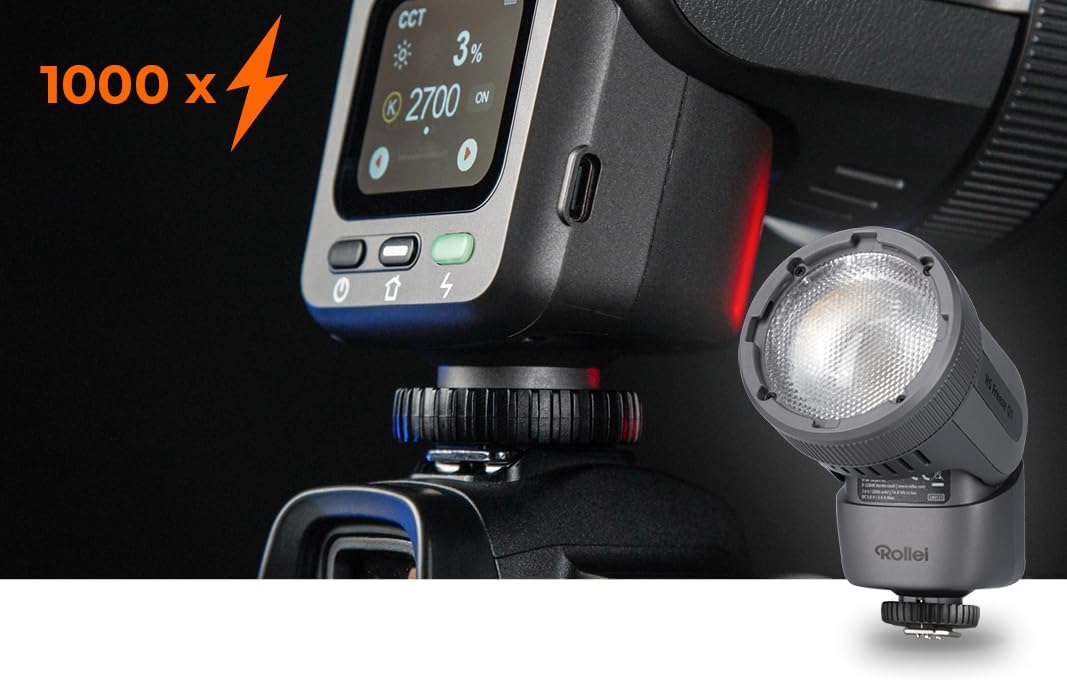
Slika 4.1: Prednja strana view of the HS Freeze Q1, highlighting the flash and LED light source.
Control Panel and Side View

Slika 4.2: Bočna strana view of the HS Freeze Q1, displaying the intuitive touch control screen and physical buttons for operation.
The device features a robust housing, a powerful flash head, and an integrated touch screen for easy control. The hot shoe mount ensures compatibility with various camera systems.
5. Podešavanje
5.1 Punjenje baterije
The HS Freeze Q1 is equipped with an internal lithium-ion battery. Before first use, fully charge the device.
- Connect the provided USB cable to the charging port on the HS Freeze Q1.
- Connect the other end of the USB cable to a compatible USB power adapter (e.g., 5V/3A) or a computer's USB port.
- The charging indicator on the screen will show the charging status. The device is fully charged when the indicator shows 100%.
5.2 Mounting on a Camera
The HS Freeze Q1 features a universal hot shoe mount for easy attachment to most cameras.
- Provjerite je li vaša kamera isključena.
- Slide the hot shoe foot of the HS Freeze Q1 into your camera's hot shoe slot.
- Tighten the locking ring or lever on the HS Freeze Q1 to secure it firmly in place.

Image 5.1: The HS Freeze Q1 securely mounted on a camera, ready for use.
6. Uputstvo za upotrebu
6.1 Uključivanje/isključivanje napajanja
Press and hold the power button (usually marked with a power symbol) on the device to turn it on or off. The screen will illuminate upon startup.
6.2 Navigating the Touch Control Interface
The HS Freeze Q1 features an intuitive touch screen for adjusting settings.
- Dodirnite: Odaberite opcije ili potvrdite postavke.
- Prevucite: Navigate through menus or adjust values (e.g., power levels, color temperature).

Image 6.1: User interacting with the touch screen to adjust settings on the HS Freeze Q1.
6.3 režima blica
The HS Freeze Q1 supports various flash modes for different photographic needs:
- TTL (Kroz objektiv) način rada: The flash automatically adjusts its output based on the camera's metering system for balanced exposure.
- Ručni način rada: Allows you to manually set the flash power output (e.g., 1/1 to 1/128). This provides precise control over lighting.
- HSS (Brza sinhronizacija): Enables flash synchronization at shutter speeds faster than the camera's native sync speed, useful for freezing action or overpowering ambient light.
- Sinhronizacija prve zavjese: Blic se aktivira na početku ekspozicije.
- Sinhronizacija druge zavjese: The flash fires just before the second curtain closes, creating a light trail behind moving subjects.

Image 6.2: The HS Freeze Q1 operating in continuous LED light mode, indicating 12W output.
6.4 Continuous LED Light
In addition to flash capabilities, the HS Freeze Q1 features a 12W bi-color LED continuous light.
- Activating LED Mode: Select the continuous light mode from the touch screen interface.
- Podešavanje svjetline: Swipe on the screen to increase or decrease the LED light intensity.
- Podešavanje temperature boje: The bi-color LED allows adjustment of color temperature (e.g., from warm to cool light) to match ambient conditions or creative preferences.

Image 6.3: The HS Freeze Q1 display showing adjustable color temperature and brightness settings for the continuous LED light.
7. Održavanje
7.1 Čišćenje
- Koristite meku, suhu krpu za čišćenje spoljašnjosti uređaja.
- For the screen, use a microfiber cloth specifically designed for electronics.
- Ne koristite tekuća sredstva za čišćenje ili rastvarače, jer mogu oštetiti završnu obradu ili unutrašnje komponente.
7.2 Skladištenje
- Store the HS Freeze Q1 in a cool, dry place, away from direct sunlight and extreme temperatures.
- Prilikom dužeg skladištenja, provjerite da li je baterija djelomično napunjena (oko 50%) kako biste produžili njen vijek trajanja.
- Use the provided transport bag for protection during storage and transport.
8. Otkrivanje problema
If you encounter issues with your Rollei HS Freeze Q1, refer to the following common problems and solutions:
| Problem | Mogući uzrok | Rješenje |
|---|---|---|
| Uređaj se ne uključuje. | Baterija je prazna. | Potpuno napunite bateriju pomoću priloženog USB kabla. |
| Blic se ne aktivira. | Incorrect camera settings or flash mode. | Check camera flash settings. Ensure the HS Freeze Q1 is securely mounted and in the correct mode (e.g., TTL or Manual). |
| LED light is dim or flickers. | Slaba baterija ili pogrešno podešavanje svjetline. | Recharge the battery. Adjust the brightness setting on the touch screen. |
| Ekran osjetljiv na dodir ne reaguje. | Privremeni softverski kvar. | Turn the device off and then on again. If the issue persists, contact customer support. |
If the problem persists after attempting these solutions, please contact Rollei customer support.
9. Specifikacije
| Feature | Detalj |
|---|---|
| Brand | Rollei |
| Model | HS Freeze Q1 (Model Number: 28834) |
| Tip | 2-in-1 Flash & Bi-color LED Continuous Light |
| Vodič broj | 26 |
| Continuous LED Power | 12W |
| Tehnologija povezivanja | Bežični |
| Vrsta montaže | Hot Shoe Mount |
| Vrsta baterije | Litijum-jonski (1 uključen) |
| Trajanje baterije | Do 2 dana (ovisno o korištenju) |
| Minimalna brzina zatvarača | 1/250s |
| Maksimalna brzina zatvarača | 1/200s (Standard Sync) |
| Brzina sinhronizacije blica | 1/200-1/250s (HSS supported) |
| Dimenzije (D x Š x V) | 15.8 x 10 x 12 cm |
| Težina | 700 grama |
| Boja | Crna |
| Kompatibilni uređaji | Various cameras with hot shoe flash mount |
10. Garancija i podrška
Rollei products are designed for reliability and performance. For warranty information and customer support, please refer to the official Rollei webstranicu ili kontaktirajte svog lokalnog distributera.
- Garantni period: Spare parts availability is stated as 2 years. Please check your purchase documentation for specific warranty terms.
- Online podrška: Posjetite www.rollei.com for product registration, FAQs, and support resources.
- Kontakt: For technical assistance or service inquiries, please refer to the contact information provided on the official Rollei website.