
Motorola XT2427-1
Motorola Moto G85 5G Korisnički priručnik
Model: XT2427-1 | Marka: Motorola
Uvod
The Motorola Moto G85 5G is a sophisticated smartphone designed for everyday elegance and robust performance. It features a stunning 6.67-inch 3D Curved pOLED display, a powerful 50 MP camera system, and a long-lasting 5000 mAh battery. This manual provides essential information to help you set up, operate, and maintain your device, ensuring an optimal user experience.
Device Overview
Familiarize yourself with the physical components of your Moto G85 5G.

Prednje i zadnje View: This image displays the overall design of the Motorola Moto G85 5G, highlighting its curved display and the dual camera setup on the rear. The device features a sleek, contoured side profile and a vibrant Cobalt Blue finish.

Front View: The front of the Moto G85 5G showcases its 6.67-inch 3D Curved pOLED display, designed for immersive visuals. The front camera is discreetly placed at the top center of the screen.

Nazad View: The rear of the device features the 50 MP main camera system with Optical Image Stabilisation (OIS) and a flash. The Motorola logo is centrally located, and the soft vegan leather finish is visible.
Ključne komponente:
- Prikaz: 6.67-inch FHD+ pOLED with 120 Hz refresh rate.
- zadnje kamere: 50 MP main sensor with OIS, macro, and ultrawide lenses.
- Prednja kamera: 32 MP Quad Pixel.
- Dugme za napajanje/senzor otiska prsta: Located on the side for convenient access and secure unlocking.
- Dugmad za jačinu zvuka: Pored dugmeta za napajanje služi za podešavanje nivoa zvuka.
- USB-C priključak: Za punjenje i prijenos podataka.
- Rešetke zvučnika: For stereo sound output.
- Ladica za SIM karticu: For inserting your SIM card(s).
Setup
1. Umetnite SIM karticu:
- Pronađite ladicu za SIM karticu sa strane uređaja.
- Umetnite alat za izbacivanje SIM kartice (obično se nalazi u kutiji) u malu rupu na ladici i lagano gurnite dok ladica ne iskoči.
- Stavite svoju Nano-SIM karticu (kartice) u utor sa zlatnim kontaktima okrenutim prema dolje.
- Pažljivo gurnite ladicu nazad u utor dok ne klikne na svoje mjesto.
2. Uključivanje:
Press and hold the Power button on the side of the phone until the Motorola logo appears on the screen.
3. Početna konfiguracija:
Follow the on-screen prompts to complete the initial setup, including selecting your language, connecting to a Wi-Fi network, signing in with your Google account, and setting up security features like fingerprint unlocking.
Operating
Upućivanje poziva:
- Otvorite Telefon app.
- Unesite broj telefona pomoću numeričke tastature ili odaberite kontakt iz adresara.
- Dodirnite ikonu poziva da biste započeli poziv.
Slanje poruka:
- Otvorite Poruke app.
- Dodirnite Započni chat dugme.
- Enter the recipient's name or phone number.
- Upišite poruku i dodirnite ikonu za slanje.
Internet konekcija:
- Wi-Fi: Idi na Postavke > Mreža i internet > Internet. Select your desired Wi-Fi network and enter the password if required.
- Mobilni podaci: Provjerite je li vaša SIM kartica aktivna i jesu li mobilni podaci omogućeni Postavke > Mobilna mreža.
Upotreba kamere
The Moto G85 5G features a powerful 50 MP main camera with Optical Image Stabilisation (OIS) and a 32 MP Quad Pixel front camera.
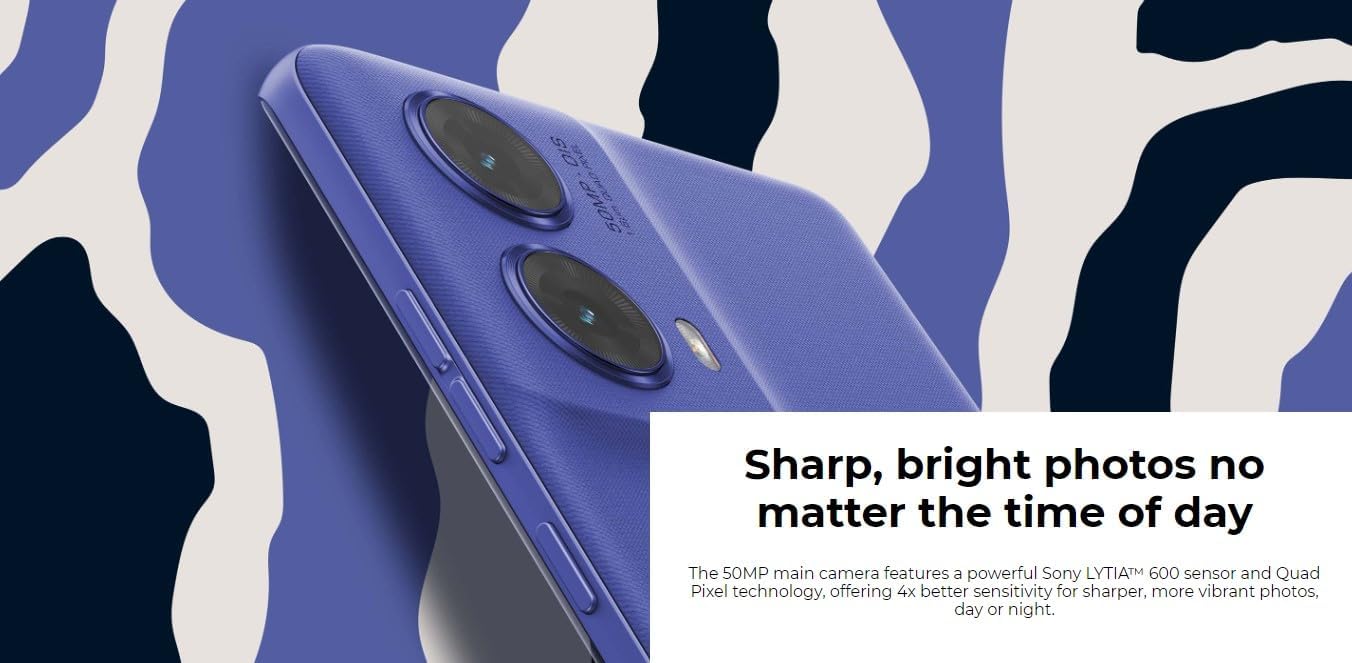
Sistem kamere: This image highlights the advanced 50MP camera system with Sony LYTIA 600 sensor, designed for sharp and bright photos in various lighting conditions. It includes versatile macro and ultrawide lenses.
Slikati:
- Otvorite Kamera app.
- Usmjerite kameru prema subjektu.
- Tap the shutter button to capture the photo.
- Utilize AI-driven features like Auto Enhance for optimized shots.
Video snimanje:
- In the Camera app, swipe to select Video način rada.
- Tap the record button to start and stop recording.
Displej i audio
Experience immersive visuals and rich audio with your Moto G85 5G.

Imerzivna zabava: This image showcases the vibrant 6.7-inch pOLED display with a 120Hz refresh rate, providing a smooth and visually rich experience for media consumption. It also highlights the Dolby Atmos enhanced stereo speakers.
- Prikaz: The 6.7-inch FHD+ pOLED display offers vibrant colors and deep blacks. The 120 Hz refresh rate ensures smooth scrolling and fluid animations.
- audio: Enjoy rich stereo sound enhanced by Dolby Atmos, providing a more immersive audio experience with four times more bass.
Performanse i baterija
The Moto G85 5G is engineered for smooth, responsive performance and extended battery life.

Power and Performance: This image illustrates the robust 5000 mAh battery with 30W TurboPower charging capability, providing up to 34 hours of use. It also highlights the Snapdragon processor and RAM Boost technology for optimized performance.
- procesor: Powered by a Snapdragon processor, ensuring efficient multitasking and smooth app usage.
- RAM: Generous RAM, complemented by RAM Boost technology, enhances responsiveness.
- baterija: A robust 5000 mAh battery provides up to 34 hours of use on a single charge.
- Punjenje: Supports 30W TurboPower charging for quick power-ups.
Sigurnost i privatnost
Your Moto G85 5G includes features to protect your data and manage device access.
- On-Display Fingerprint Unlocking: Securely unlock your device with a touch.
- Moto Secure: Access privacy controls and security settings to manage app permissions and data protection.
- Family Space: Tools for customizing experiences and managing usage for different users.
Održavanje
Ažuriranja softvera:
Redovno provjeravajte i instalirajte ažuriranja softvera kako biste osigurali da vaš uređaj ima najnovije funkcije, sigurnosne zakrpe i poboljšanja performansi. Idite na Postavke > Sistem > Ažuriranja sistema.
Čišćenje vašeg uređaja:
- Za čišćenje ekrana i kućišta telefona koristite meku krpu koja ne ostavlja dlačice.
- Izbjegavajte korištenje jakih kemikalija ili abrazivnih materijala.
- Za tvrdokorne mrlje, lagano dampOperite krpu vodom ili sredstvom za čišćenje ekrana namijenjenim za elektroniku.
Održavanje baterije:
- Izbjegavajte ekstremne temperature, jer mogu smanjiti vijek trajanja baterije.
- Koristite samo odobrene punjače i kablove.
- Za optimalni vijek trajanja baterije, izbjegavajte često potpuno pražnjenje baterije ili njeno duže držanje na 100% napunjenosti.
Rješavanje problema
Uređaj se ne uključuje:
- Ensure the battery is charged. Connect the device to its charger for at least 15 minutes.
- Pritisnite i držite dugme za napajanje 10-20 sekundi da biste prisilno ponovo pokrenuli računar.
Rušenje ili zamrzavanje aplikacija:
- Zatvorite i ponovo otvorite aplikaciju.
- Obrišite keš memoriju i podatke aplikacije u Postavke > Apps > [Naziv aplikacije] > Pohrana i keš memorija.
- Provjerite da li je aplikacija ažurirana na najnoviju verziju iz Google Play trgovine.
Loše trajanje baterije:
- Smanjite svjetlinu ekrana.
- Disable unused features like Wi-Fi, Bluetooth, or GPS when not needed.
- Identify and restrict background activity of power-consuming apps in Postavke > Baterija.
Specifikacije
| Feature | Detalj |
|---|---|
| Naziv modela | Moto G85 5G |
| Broj modela stavke | XT2427-1 |
| Operativni sistem | Android 14 |
| Veličina ekrana | 6.7 inča |
| Rezolucija ekrana | 2400 x 1080 |
| Refresh Rate | 120 Hz |
| Procesor | Snapdragon |
| RAM | 8 GB |
| Kapacitet memorije | 256 GB |
| Glavna kamera | 50 MP sa optičkom stabilizacijom slike |
| Prednja kamera | 32 MP četveropikselni |
| Kapacitet baterije | 5000 mAh |
| Punjenje | 30W TurboPower |
| Povezivanje | 4G LTE, 5G |
| Težina artikla | 14.9 unce |
| Dimenzije proizvoda | 6 x 4 x 2 inča |
Garancija i podrška
Za detaljne informacije o garanciji, molimo pogledajte garantni list koji ste dobili uz proizvod ili posjetite službenu stranicu za podršku kompanije Motorola. website. If you encounter any issues not covered in this manual, please contact Motorola customer support for assistance.
Online podrška: Posjetite Motorola prodavnica na Amazonu za često postavljana pitanja, vodiče za rješavanje problema i opcije kontakta.
Ask a question about this manual
Ask about setup, troubleshooting, compatibility, parts, safety, or missing instructions. Manuals+ will review the question and use this page’s manual context to help answer it.