
Makeid L1
Uputstvo za upotrebu mašine za izradu etiketa Makeid L1
Model: L1 | Marka: Makeid
Uvod
The Makeid L1 Label Maker Machine is a portable, wireless thermal printer designed for creating custom labels for home, school, and office use. It connects wirelessly to your smartphone via Bluetooth, allowing you to design and print labels with various fonts, templates, and icons using the dedicated MakeID-Life app. This manual provides comprehensive instructions for setting up, operating, and maintaining your L1 Label Maker.

Figure 1: Makeid L1 Label Maker Machine and example etikete.
Šta je u kutiji
Upon unboxing your Makeid L1 Label Maker, please ensure all the following items are present:
- Makeid L1 Label Maker Machine (Beige, 203dpi model)
- One 4-meter roll of label tape
- USB kabl za punjenje
- Korisnički priručnik (ovaj dokument)
Setup
1. Punjenje uređaja
Before first use, fully charge your Makeid L1 Label Maker. Connect the provided USB charging cable to the label maker and a compatible USB power source (e.g., computer USB port, wall adapter). The indicator light will show charging status.

Figure 2: Power on/off button and charging port location.
2. Umetanje trake s etiketama
The Makeid L1 supports various label tape widths and types. To load tape:
- Otvorite poklopac uređaja za etiketiranje.
- Insert the label tape roll into the designated slot, ensuring the tape feeds out correctly.
- Čvrsto zatvorite poklopac.
Figure 3: Instructions for opening the lid and replacing tape.

Slika 4: Pramples of compatible label tapes.
3. Preuzimanje aplikacije i Bluetooth veza
The Makeid L1 operates via the "MakeID-Life" app. Follow these steps to connect:
- Download the "MakeID-Life" app from your smartphone's app store (Google Play for Android, App Store for iOS).
- Provjerite je li Bluetooth omogućen na vašem pametnom telefonu.
- Open the MakeID-Life app and follow the on-screen prompts to connect to your L1 Label Maker. The app will typically detect the device automatically.

Figure 5: Steps for downloading the app and connecting via Bluetooth.
The app offers free access and does not require account registration. It complies with applicable data protection laws.
Uputstvo za upotrebu
1. Dizajniranje vaše etikete
The MakeID-Life app provides extensive customization options:
- Tekst: Enter your desired text. You can choose from multiple font styles and adjust size.
- Ikone i simboli: Access a library of over 600 icons and symbols to enhance your labels.
- Šabloni: Utilize over 400 pre-designed templates for various purposes.
- Posebne funkcije: Create barcodes, QR codes, tables, dates, borders, and patterns. The app also supports drawing/doodling.

Figure 6: App features for label design.

Figure 7: Customizing labels with drawings in the app.
2. Printing Your Label
Once your design is complete:
- Review priprema za štampuview in the app to ensure the label appears as desired.
- Select the number of copies if needed.
- Tap the "Print" button in the app. The label maker will begin printing.

Figure 8: Workflow from app download to printing.
3. Cutting the Label
The Makeid L1 features a built-in cutter for clean and precise label separation. After printing, simply press the cutter button located on the side of the device to cut the label. No scissors or external blades are required.

Figure 9: Built-in cutter for professional and safe label cutting.
4. Label Types and Applications
The L1 supports both continuous and die-cut label tapes, offering versatility for various labeling needs. Labels are waterproof, oil-proof, friction resistant, light resistant, and do not fade, ensuring durability.

Figure 10: Continuous vs. Die-Cut label printing.

Figure 11: Durable and crisp print labels.
Uobičajene primjene:
- Upravljanje kablovima: Organize charging cables, headphones, and other electronic wires.
- Organizacija ureda: Label files, fascikle, police i kancelarijski pribor.
- Kitchen Storage: Label spice jars, food containers, and pantry items.
- Lične stvari: Mark lunchboxes, water bottles, school supplies, and other personal belongings.
- Medical Reminders: Label pill organizers or medication bottles for clarity.
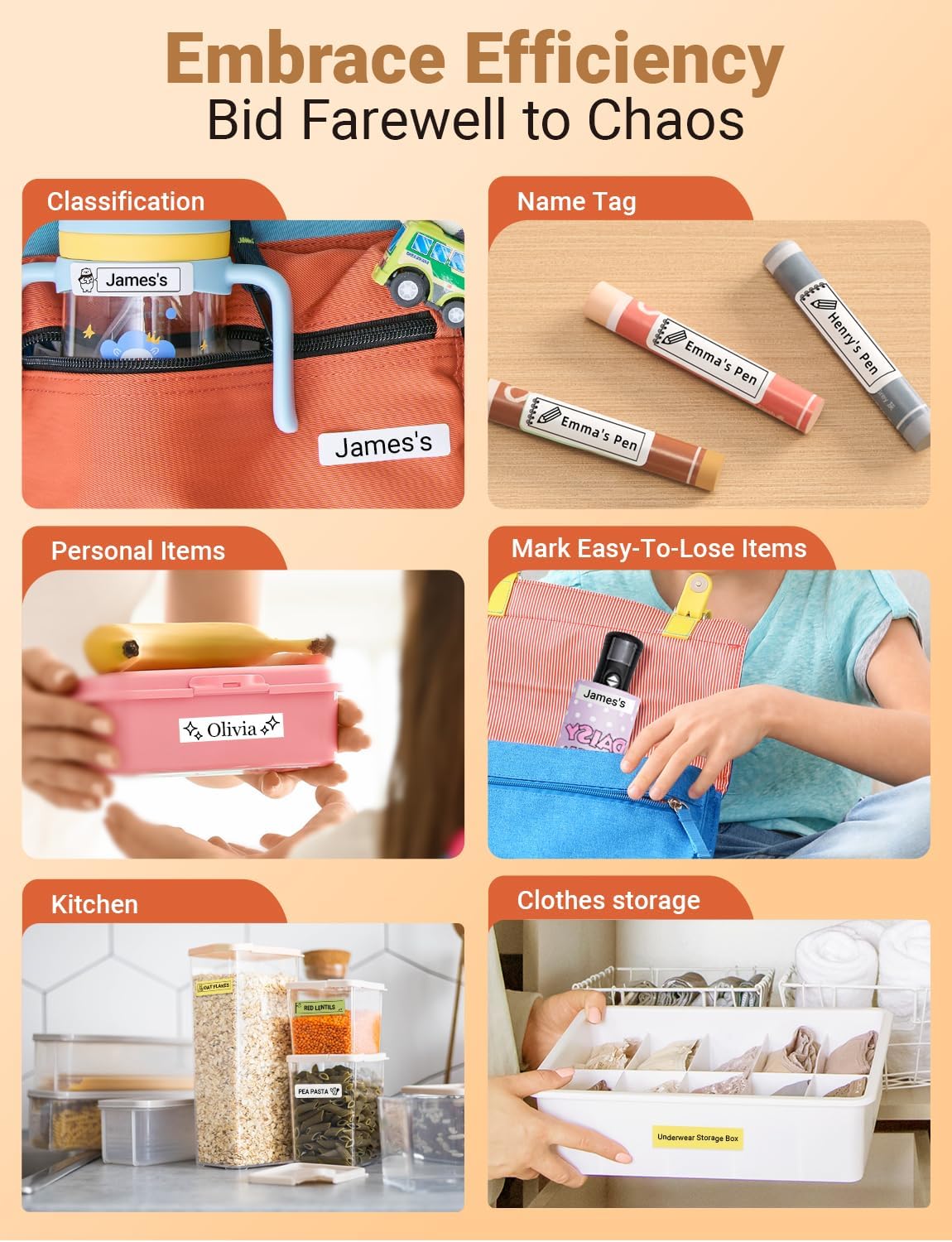
Slika 12: Pramples of how the label maker can be used for organization.

Figure 13: Diverse applications for the Makeid L1 label maker.
5. Zvanični video proizvoda
Video 1: Official MakeID L1 Portable Bluetooth Thermal Label Maker overview. This video demonstrates the product's features, ease of use, and various applications for organization in different settings.
Održavanje
To ensure the longevity and optimal performance of your Makeid L1 Label Maker:
- čišćenje: Regularly wipe the exterior of the device with a soft, dry cloth. For the print head, refer to the app's maintenance section or contact support for specific cleaning instructions to avoid damage.
- Održavanje baterije: Avoid completely draining the battery frequently. Charge the device when the battery is low. If storing for an extended period, charge it to about 50% and recharge every few months to preserve battery health.
- Skladištenje: Uređaj za etiketiranje čuvajte na hladnom i suhom mjestu, dalje od direktne sunčeve svjetlosti i ekstremnih temperatura.
Rješavanje problema
If you encounter issues with your Makeid L1 Label Maker, try the following common troubleshooting steps:
| Problem | Mogući uzrok | Rješenje |
|---|---|---|
| Uređaj se ne uključuje | Slaba baterija; Dugme za napajanje nije pravilno pritisnuto | Potpuno napunite uređaj. Pritisnite i držite dugme za napajanje nekoliko sekundi. |
| Povezivanje putem Bluetooth-a nije moguće | Bluetooth off; Device out of range; App issue | Ensure Bluetooth is on. Move device closer to phone. Restart app/phone. |
| Loš kvalitet štampe | Low battery; Dirty print head; Incorrect label type | Charge device. Clean print head (refer to manual/support). Ensure correct label tape is used. |
| Label not feeding/cutting | Tape jammed; Cutter obstructed | Open lid and check for tape jams. Clear any obstructions around the cutter. |
If these steps do not resolve the issue, please contact Makeid customer support for further assistance.
Specifikacije
| Feature | Detalj |
|---|---|
| Brand | Makeid |
| Naziv modela | L1 |
| Tehnologija štampe | Thermal |
| Rezolucija | 203 x 203 DPI (current model) |
| Tehnologija povezivanja | Bluetooth |
| Kompatibilni uređaji | Pametni telefoni (iOS i Android) |
| Maksimalna veličina medija | 1.6 inča |
| Veličina lista | 0.63 inča |
| Dimenzije proizvoda | 3.93 x 1.6 x 1.96 inča |
| Težina artikla | 4.4 unci (126 grama) |
| Baterija | 1 litijum-jonska baterija (uključena) |
| Posebne karakteristike | Continuous & Pre-cut Label Tapes, Waterproof, Oil-proof, Friction Resistant, Light Resistant, No Fading; Rich Font Icon Pattern, Portable, Inkless, Wireless, Rechargeable; Creative Print Functions: Barcode, Text, Picture, QR 2D Code, Table, Date, Border, Icon, Shape, Pattern, Template. |
Garancija i podrška
The Makeid L1 Label Maker Machine comes with a Doživotna garancija.
For technical support, warranty claims, or additional product information, please visit the official Makeid webweb-mjestu ili kontaktirajte njihovu korisničku službu. Više informacija i kontakt podatke možete pronaći na Makeid trgovina na Amazonu.