
1. Proizvod je gotovview
Haloview BT-M7 is a wireless monitor designed to provide enhanced visibility for your vehicle or trailer. It features a 7-inch display and supports 1080P video recording. This monitor is specifically designed for use with BT7 series cameras.
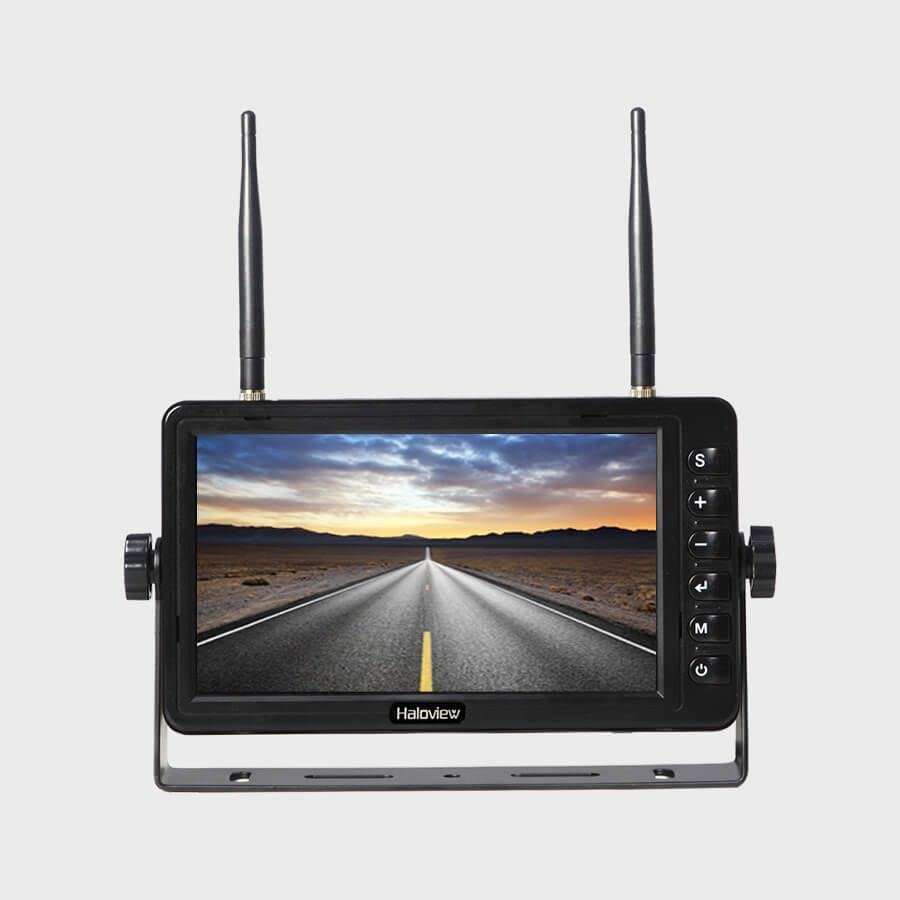
Figure 1: Haloview BT-M7 Wireless Monitor unit.
Ključne karakteristike:
- 1080P Video Recording Resolution: Seamless recording events with 1080P@30fps FHD Resolution Lens.
- 7-inčni ekran: Clear and bright screen for optimal viewing.
- Bežična povezanost: Provides a stable wireless connection to compatible cameras.
- Važna napomena o kompatibilnosti: This monitor is NOT compatible with 720P wireless cameras.
2. Podešavanje
2.1 Monitor Placement and Power
- Odaberite lokaciju: Place the BT-M7 monitor on your dashboard or another suitable flat surface within your vehicle's cabin. Ensure it does not obstruct your view na putu.
- Priključak za napajanje: Connect the monitor to your vehicle's 12V cigarette lighter socket using the provided power adapter. The adapter typically includes an on/off button for convenience.
- Optional Direct Wiring: For a more permanent installation, the system includes a wiring harness that allows direct integration into your vehicle's electrical system. Consult a professional for direct wiring installation if you are unsure.
2.2 Instalacija kamere
Haloview BT-M7 system supports multiple cameras for comprehensive coverage. Installation methods may vary slightly depending on the camera type (rear or side marker).
- stražnja kamera: Mount the rear camera securely on the back of your trailer or RV. For longer vehicles, an antenna extender may be necessary to ensure a strong signal to the monitor.
- Side Marker Cameras: These cameras are designed to replace existing side marker lights on your vehicle or trailer. Ensure proper wiring to integrate them with your vehicle's lighting system.
2.3 Pairing Cameras with the Monitor
To establish a wireless connection between your cameras and the BT-M7 monitor:
- Power on the monitor and the camera(s) you wish to pair.
- Na monitoru pritisnite MENU dugme za pristup glavnom meniju.
- Idite do PARENJE option using the arrow buttons and press OK.
- While the monitor is in pairing mode, press the pairing button on the camera's wireless repeater unit (usually located near the camera or its antenna). This typically needs to be done within a 20-second window.
- Once successfully paired, the camera's video feed will appear on the monitor. Repeat for additional cameras.
3. Uputstvo za upotrebu
3.1 Zamjena kamere Views
To cycle through the connected camera views, pritisnite SEL (Select) button on the monitor. Each press will switch to the next active camera feed or a multi-view display if configured.
3.2 Parking linije
The monitor can display adjustable parking lines for assistance with backing up. These lines can be turned on, off, or adjusted for specific camera views via the monitor's menu settings.
3.3 Video snimanje
The BT-M7 monitor supports video recording. Insert a compatible SD card into the designated slot on the monitor to enable recording functionality. Recorded footage can be played back directly on the monitor.
3.4 Audio nadzor
Some cameras may transmit audio. The monitor features a volume control in its menu settings, allowing you to listen to audio from the active camera feed.
4. Održavanje
Regular maintenance ensures optimal performance and longevity of your Haloview BT-M7 system.
- čišćenje: Periodically clean the monitor screen and camera lenses with a soft, damp krpom. Izbjegavajte abrazivna sredstva za čišćenje koja bi mogla ogrebati površine.
- Provjere veze: Regularly inspect all power and antenna connections for tightness and signs of wear or corrosion.
- Ažuriranja softvera: Check the Haloview službeni website for any available firmware updates for your monitor and cameras.
5. Otkrivanje problema
If you encounter issues with your BT-M7 monitor, try the following steps:
- Nema signala:
- Ensure all cameras and the monitor are powered on.
- Verify that the cameras are correctly paired with the monitor (refer to Section 2.3).
- Provjerite sve kablovske spojeve radi sigurnosti.
- Ensure no large metal objects are obstructing the wireless signal path between the camera and monitor.
- Loš kvalitet slike:
- Clean camera lenses and monitor screen.
- Check for any physical damage to the camera or its lens.
- Ensure the camera is within the effective range of the monitor.
- Monitor se ne uključuje:
- Check the power connection to the cigarette lighter socket or direct wiring.
- Provjerite da li je utičnica za napajanje vozila ispravna.
6. Specifikacije
| Feature | Detalj |
|---|---|
| Dimenzije proizvoda | 4.47 x 7.5 x 0.72 inča |
| Težina artikla | 2.75 funte |
| Proizvođač | Haloview |
| Broj modela stavke | BT-M7 |
| Veličina ekrana u stojećem položaju | 7 inča |
| Aspect Ratio | 16:9 |
| Rezolucija | 1080P (1920x1080), FHD 1080p, HD |
| Opis površine ekrana | Sjajni |
7. Garancija i podrška
For detailed warranty information, technical support, and service inquiries, please refer to the official Haloview webweb-mjesto ili direktno kontaktirajte njihovu korisničku službu. Sačuvajte račun kao dokaz o kupovini za reklamacije u slučaju garancije.