
1. Uvod
Thank you for choosing the Nokia GO EARBUDS 2+ TWS-122 ENC Black. These true wireless earbuds are designed to provide a high-quality audio experience with features like Environmental Noise Cancelling (ENC) for clear calls, balanced 10mm drivers for crisp sound, and a long-lasting battery. This manual will guide you through the setup, operation, and maintenance of your new earbuds.

Image 1.1: The Nokia GO EARBUDS 2+ TWS-122 ENC Black earbuds and their charging case. The earbuds are black, sleek, and designed for in-ear placement, while the charging case is compact and oval-shaped, also in black, with a subtle Nokia logo.
2. Šta se nalazi u kutiji
Provjerite da li su sve stavke prisutne u paketu:
- Nokia GO EARBUDS 2+ TWS-122 (Left and Right Earbuds)
- Futrola za punjenje
- USB kabel za punjenje tipa C
- Korisnički priručnik (ovaj dokument)
3. Proizvod je gotovview
Familiarize yourself with the components of your Nokia GO EARBUDS 2+.
Slušalice
- Kontrolno područje dodirom: Za upravljanje reprodukcijom, pozivima i glasovnim asistentom.
- mikrofon: For calls and Environmental Noise Cancelling (ENC).
- Kontakti za punjenje: Za punjenje unutar kućišta.
- LED indikator: Shows connection and battery status.
Futrola za punjenje
- Utori za slušalice: Sigurno drži i puni slušalice.
- Port za punjenje: USB Type-C priključak za punjenje kućišta.
- LED indikator: Prikazuje status punjenja kućišta.
4. Podešavanje
4.1. Punjenje slušalica i kutijice
- Stavite slušalice u kutijicu za punjenje. Provjerite da li su kontakti za punjenje poravnati.
- Connect the USB Type-C cable to the charging port on the case and the other end to a power source (e.g., USB wall adapter, computer USB port).
- The LED indicator on the case will show the charging status. A full charge typically takes approximately 1.5-2 hours.
- Once fully charged, disconnect the charging cable. The case provides up to 24 hours of additional playtime for the earbuds.
4.2. Uparivanje s uređajem (Bluetooth 5.2)
The Nokia GO EARBUDS 2+ utilize Bluetooth 5.2 for a stable and efficient connection.
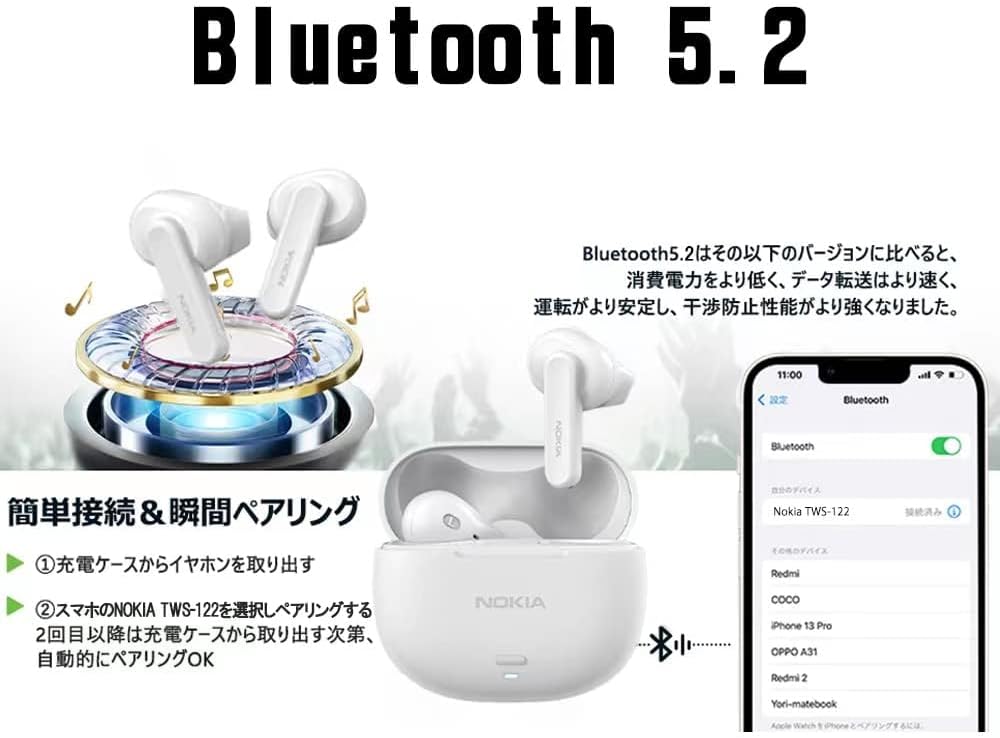
Image 4.1: This image illustrates the simple and instant pairing process using Bluetooth 5.2. It shows the earbuds in their charging case, a smartphone displaying Bluetooth settings with 'Nokia TWS-122' selected, and the earbuds connecting wirelessly to the phone.
- Početno uparivanje:
- Otvorite kutijicu za punjenje. Slušalice će automatski ući u način rada za uparivanje.
- Na svom uređaju (pametnom telefonu, tabletu itd.) omogućite Bluetooth i potražite dostupne uređaje.
- Select "Nokia TWS-122" from the list of found devices.
- Nakon povezivanja, slušalice će signalizirati uspješno uparivanje (npr. zvučni signal ili promjena LED diode).
- Automatsko ponovno povezivanje: Nakon početnog uparivanja, slušalice će se automatski povezati s posljednjim uparenim uređajem kada se izvade iz kućišta za punjenje, pod uvjetom da je Bluetooth omogućen na uređaju.

Image 4.2: This graphic highlights the benefits of Bluetooth 5.2 technology, including low latency for synchronized audio, strong anti-interference capabilities for stable connections, improved battery life for extended use, and high-speed data transmission.
5. Operativni
5.1. Nošenje slušalica
The earbuds feature an ergonomic hybrid design for a secure and comfortable fit. Gently insert each earbud into your ear canal and rotate slightly until it feels snug and stable. Ensure the microphone is facing downwards for optimal call clarity.
5.2. Dodirnite Kontrole
The Nokia GO EARBUDS 2+ feature multi-function touch controls on each earbud.

Image 5.1: This diagram illustrates the multi-function touch control area on the earbuds. It shows various touch gestures can be used to control power on/off, play/pause music, adjust volume, skip tracks, answer/reject calls, and activate voice assistants like Siri.
| Akcija | Funkcija |
|---|---|
| Jedan dodir (lijevo/desno) | Reproduciraj/pauziraj muziku, odgovori/prekini poziv |
| Dvostruki dodir (desno) | Next Track |
| Dvostruki dodir (lijevo) | Previous Track |
| Trostruki dodir (desno) | Volume Up |
| Trostruki dodir (lijevo) | Utišavanje zvuka |
| Dugi pritisak (2 sekundi) | Reject Call, Activate Voice Assistant (Siri, Google Assistant) |
| Dugi pritisak (5 sekundi) | Uključivanje/Isključivanje (kada nije u kućištu) |
5.3. Environmental Noise Cancelling (ENC)
The earbuds feature ENC technology to reduce environmental noise during calls, ensuring your voice is heard more clearly by the person on the other end. This feature is automatically active during phone calls.

Image 5.2: A man wearing the Nokia earbuds in a cafe setting, smiling and holding a cup. This image visually represents the effectiveness of the Environmental Noise Cancelling (ENC) feature, allowing for clear communication even in noisy environments.
6. Održavanje
6.1. Čišćenje
- Redovno čistite slušalice i kućište za punjenje mekom, suhom krpom koja ne ostavlja dlačice.
- Ne koristite abrazivna sredstva za čišćenje, alkohol ili hemijske rastvarače.
- Pažljivo očistite kontakte za punjenje i na slušalicama i na kutijici kako biste osigurali pravilno punjenje.
6.2. Skladištenje
- Kada se ne koriste, uvijek čuvajte slušalice u kutijici za punjenje kako biste ih zaštitili i održali napunjenima.
- Uređaj čuvajte na hladnom i suhom mjestu, dalje od ekstremnih temperatura i direktne sunčeve svjetlosti.
6.3. Vodootpornost (IPX4)
The Nokia GO EARBUDS 2+ are IPX4 water resistant, meaning they are protected against splashing water from any direction. This makes them suitable for workouts and light rain. However, they are not designed for swimming or submersion in water.

Image 6.1: This image shows the Nokia earbuds being splashed with water, illustrating their IPX4 water resistance rating. This feature ensures the earbuds are tough enough to withstand sweat and splashes from rain or active workouts.
7. Otkrivanje problema
Ako imate problema sa slušalicama, pogledajte sljedeća uobičajena rješenja:
| Problem | Moguće rješenje |
|---|---|
| Slušalice se ne uparuju | Ensure earbuds are charged. Turn off and on Bluetooth on your device. Forget "Nokia TWS-122" from your device's Bluetooth list and re-pair. |
| Nema zvuka iz jedne slušalice | Vratite obje slušalice u kutijicu, zatvorite je, a zatim je ponovo otvorite. Provjerite da li su obje slušalice napunjene. |
| Mala jačina zvuka | Adjust volume on both your device and using the earbud touch controls. Clean any debris from the earbud speaker mesh. |
| Problemi s punjenjem | Ensure the charging cable is securely connected. Clean the charging contacts on earbuds and case. Try a different USB port or power adapter. |
| Loš kvalitet poziva | Ensure the microphone is not obstructed. Move closer to your connected device. Reduce background noise if possible. |
8. Specifikacije
Detailed technical specifications for the Nokia GO EARBUDS 2+ TWS-122:
- Naziv modela: GO EARBUDS
- Broj modela stavke: TWS-122
- Brand: Nokia
- Vrsta slušalica: In-ear
- Tehnologija povezivanja: Bežični, Bluetooth
- Tehnologija bežične komunikacije: Bluetooth 5.2
- Earbud Drivers: Balanced 10 mm
- Kontrola buke: Aktivno poništavanje buke (ENC za pozive)
- Otpornost na vodu: IPX4 (Otporan na znoj i prskanje)
- Vrijeme igranja: Do 24 sata (sa futrolom za punjenje)
- baterija: 1 nestandardna baterija (uključena)
- Boja: Crna
- Dimenzije paketa: 12.4 x 10 x 4.2 cm
- Težina artikla: 150 g
- Uključene komponente: Kabel (USB tip-C)
9. Garancija i podrška
For warranty information and customer support, please refer to the warranty card included in your product packaging or visit the official Nokia support webSačuvajte dokaz o kupovini za slučaj reklamacije.
Online podrška: For further assistance, FAQs, and software updates, please visit the official Nokia support page: www.nokia.com/support