
Vtronix Classic America TWC-08CRD1-L0U-CA
Vtronix Classic America 8000 BTU Window Air Conditioner User Manual
Model: TWC-08CRD1-L0U-CA | Brand: Vtronix Classic America
Product Overview
The Vtronix Classic America 8000 BTU Window Air Conditioner is designed to provide efficient cooling for rooms up to 350 sq. ft. This unit features smart control capabilities, allowing operation via the Tuya Smart app and voice commands through Alexa. It includes energy-saving modes and a washable filter for easy maintenance.

Image: Front view of the Vtronix Classic America 8000 BTU Window Air Conditioner, showcasing the control panel and the included remote control.

Image: The air conditioner unit installed in a window within a living room setting, highlighting its cooling capacity of 8,000 BTU for areas up to 350 sq ft, and its WiFi connectivity.
Safety Information
Please read all instructions carefully before using this appliance. Keep this manual for future reference. Always follow basic safety precautions to reduce the risk of fire, electric shock, or injury.
- Ensure the unit is properly grounded.
- Do not operate the unit with a damaged cord or plug.
- Do not insert fingers or objects into the air inlet/outlet.
- Unplug the unit before cleaning or servicing.
- Keep flammable materials away from the unit.
- This appliance is not intended for use by persons (including children) with reduced physical, sensory or mental capabilities, or lack of experience and knowledge, unless they have been given supervision or instruction concerning use of the appliance by a person responsible for their safety.
Package Contents
Verify that all items are included in the package:
- Vtronix Classic America Window Air Conditioner Unit
- Handheld Remote and Batteries (2 AAA batteries included)
- User Manuals
- Installation Accessories (adjustable mounting hardware, side panels, foam seal, screws)

Image: A visual representation of all items included in the product package, such as the air conditioner unit, remote control, side panels, foam insulation, and various screws for installation.
Setup and Installation
This unit is designed for easy window installation. A comprehensive step-by-step installation manual is included in your package. Please refer to the dedicated Installation Manual (PDF) for detailed instructions specific to your window type and unit model.
Key steps generally include:
- Prepare the window opening, ensuring it meets the required dimensions.
- Install the top mounting rail and side panels.
- Carefully place the air conditioner unit into the window opening.
- Secure the unit using the provided mounting hardware and screws.
- Seal any gaps around the unit with the foam insulation to maximize efficiency.

Image: The air conditioner unit installed in a window, illustrating its airflow and key features such as room cooling, WiFi control, display options, easy-to-clean filter, and manual horizontal air swing.
Operating Instructions
Control Panel and Remote Control
The unit can be operated using the control panel on the front of the unit or the included handheld remote control. The remote control provides convenient access to all functions from a distance.
- Power Button: Turns the unit On/Off.
- Mode Button: Cycles through cooling, fan, and dehumidifier modes.
- Temperature Up/Down Arrows: Adjusts the desired temperature.
- Fan Speed Button: Selects fan speed (Low, Medium, High).
- Timer Button: Sets the auto On/Off timer.
- Sleep Mode: Adjusts temperature and fan speed for comfortable sleep and energy saving.
- Eco Mode: Optimizes energy consumption by cycling the compressor On/Off to maintain the set temperature.
Smart Control with Tuya App and Alexa
This air conditioner is WiFi enabled, allowing you to control it remotely using the Tuya Smart app on your smartphone or through voice commands with Alexa.
- Download the Tuya Smart App: Search for "Tuya Smart" in your device's app store (Google Play Store or Apple App Store). Caution: Ensure you download the official "Tuya Smart" app, as there are several apps with similar names.
- Register/Log In: Create an account or log in if you already have one.
- Add Device: Follow the in-app instructions to add your air conditioner. This typically involves putting the AC unit into pairing mode (refer to the unit's display or the full user manual for specific steps).
- Connect to WiFi: Connect the unit to your home WiFi network via the app.
- Link with Alexa (Optional): If desired, enable the "Tuya Smart" skill in the Alexa app and link your Tuya account to enable voice control.

Image: The air conditioner unit alongside a smartphone showing the Tuya Smart app, illustrating how to control the unit remotely.

Image: The air conditioner unit with its remote control, featuring the "Works with Alexa" logo, indicating voice control compatibility.
Video: This video demonstrates how to connect your Vtronix Classic America air conditioner to Wi-Fi for smart control, allowing you to operate it remotely before you arrive home.
Maintenance
Regular maintenance ensures optimal performance and longevity of your air conditioner.
Cleaning the Air Filter
The unit features a washable filter. It is recommended to clean the air filter every two weeks, or more frequently depending on usage and air quality.
- Turn off and unplug the air conditioner.
- Open the front panel and carefully slide out the air filter.
- Wash the filter with warm, soapy water. Rinse thoroughly.
- Allow the filter to air dry completely before reinserting it. Do not use hot water or harsh cleaners.
- Once dry, slide the filter back into its position and close the front panel.
General Cleaning
- Wipe the exterior casing with a soft, damp cloth.
- Do not use abrasive cleaners, wax, or polish.
- Ensure the drainage area is clear of debris.
Troubleshooting
Before contacting customer support, try these common troubleshooting steps:
| Problem | Possible Cause | Solution |
|---|---|---|
| Unit does not turn on. | No power, tripped circuit breaker, unit unplugged. | Check power outlet, reset circuit breaker, ensure plug is fully inserted. |
| Unit not cooling effectively. | Dirty air filter, blocked air vents, room too large, open windows/doors. | Clean air filter, clear obstructions, ensure room size is within capacity, close windows/doors. |
| Water dripping inside. | Unit not level, drain plug blocked. | Ensure unit is slightly tilted outwards for proper drainage, check and clear drain plug. |
| Remote control not working. | Dead batteries, obstruction between remote and unit. | Replace batteries, remove obstructions, ensure remote is pointed at the unit's receiver. |
| WiFi connection issues. | Incorrect WiFi password, router too far, app issues. | Verify WiFi password, move unit closer to router or use a range extender, restart app/unit. |
Specifications
| Brand Name | Vtronix Classic America |
| Model Info | TWC-08CRD1-L0U-CA |
| Cooling Power | 8000 British Thermal Units (BTU) |
| Coverage Area | Up to 350 Square Feet |
| Seasonal Energy Efficiency Ratio (SEER) | 10.9 |
| Voltage | 115 Volts (AC) |
| Wattage | 730 watts |
| Noise Level | 54 dB |
| Item Weight | 45 pounds |
| Product Dimensions | 16"D x 19"W x 14"H |
| Special Features | Cool Only, Dehumidifier, Remote Controlled, Washable Filter, WiFi Enabled (Works with Alexa and Google Assistant) |
| Certification | ENERGY STAR |
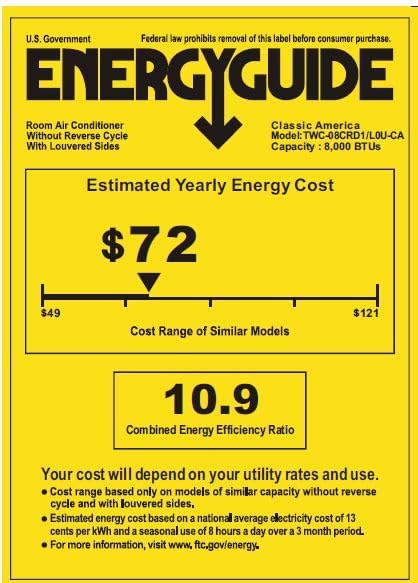
Image: The Energy Guide label for the air conditioner, detailing its estimated yearly energy cost and Combined Energy Efficiency Ratio (CEER).
Warranty and Support
For detailed warranty information, please refer to the full User Manual (PDF) provided with your product or visit the Vtronix Classic America website. Additional protection plans may be available for purchase.
For customer support, troubleshooting assistance, or to inquire about parts, please contact Vtronix Classic America customer service. Contact information can typically be found in the full user manual or on the brand's official website.
You can also refer to the User Manual (PDF) for more in-depth information.
Ask a question about this manual
Ask about setup, troubleshooting, compatibility, parts, safety, or missing instructions. Manuals+ will review the question and use this page’s manual context to help answer it.