
1. Uvod
The M5Stack Core2 is a versatile IoT development kit designed for rapid prototyping and deployment of various applications. It features an ESP32-D0WDQ6-V3 microcontroller, a 2-inch TFT LCD touch screen, and integrated Wi-Fi and Bluetooth connectivity. This manual provides essential information for setting up, operating, and maintaining your Core2 device.

Figure 1.1: M5Stack Core2 IoT Development Kit, showcasing svojim kompaktnim dizajnom i ekranom.
2. Šta se nalazi u kutiji
Provjerite da li se u vašem paketu nalaze sve dolje navedene stavke:
- 1 x M5Stack Core2 Unit
- 1 x USB Type-C Cable (20cm)
- 1 x imbus ključ

Figure 2.1: Contents of the M5Stack Core2 package, including the Core2 unit, USB-C cable, and hex wrench.

Figure 2.2: Visual representation of the shipping list for the M5Stack Core2.
3. Proizvod je gotovview
The M5Stack Core2 is built around the ESP32-D0WDQ6-V3 chip, offering robust performance for various applications. Key features include:
- Snažne performanse: Equipped with an ESP32-D0WDQ6-V3 microcontroller for high computing performance.
- Ekran na dodir: Features a 2-inch TFT LCD touch screen (320x240 resolution) for intuitive user interaction.
- Bežična povezanost: Integrated Wi-Fi and Bluetooth capabilities for seamless communication.
- Proširiva funkcionalnost: Multiple expansion ports (GPIO, I2C, SPI, UART) for connecting additional modules and sensors.
- Ugrađeni zvučnik: Za audio izlaz.
- Vibracioni motor: Pruža haptičku povratnu informaciju.
- mikrofon: Za audio ulaz.
- Utor za SD karticu: Za proširivu pohranu.
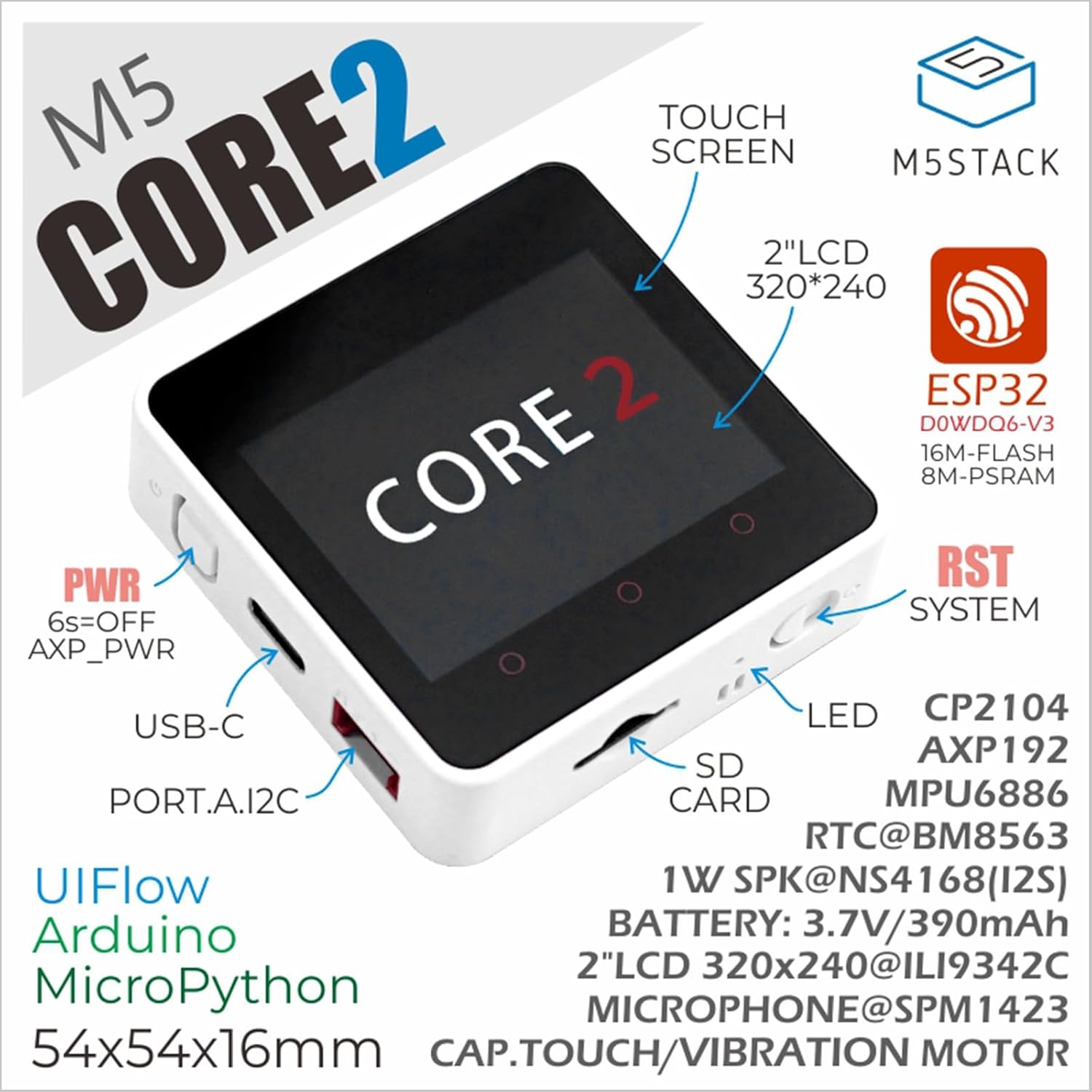
Figure 3.1: Annotated diagram of the M5Stack Core2, highlighting its main components and interfaces.

Figure 3.2: Key features of the M5Stack Core2, including memory and display type.
4. Specifikacije
The following table details the technical specifications of the M5Stack Core2:
| Specifikacija | Parametar |
|---|---|
| SoC | ESP32-D0WDQ6-V3, 240MHz dual core, 600 DMIPS, 520KB SRAM, Wi-Fi |
| Flash | 16MB |
| PSRAM | 8MB |
| Ulazni voltage | 5V @ 500mA |
| Interfejs domaćina | 1x tip-C, 1x GROVE (I2C+I/O+UART) |
| LED | Zelena lampica indikatora napajanja |
| Dugmad | Power button, RST button, screen virtual buttons x 3 |
| Upozorenje o vibracijama | Vibracioni motor |
| Težina artikla | 2.82 unci (približno 80 grama) |
| Dimenzije paketa | 3.19 x 2.28 x 0.87 inča |
| Baterije | 1 litijum-jonska baterija (uključena) |

Figure 4.1: M5Stack Core2 weight measurement.

Figure 4.2: M5Stack Core2 dimensions.
5. Podešavanje
To begin using your M5Stack Core2, follow these initial setup steps:
- Punjenje: Connect the M5Stack Core2 to a 5V USB power source using the provided USB Type-C cable. The device will begin charging.
- Uključeno: Press and hold the power button (usually located on the side) for approximately 6 seconds to turn on the device.
- Softversko okruženje: The Core2 supports various development environments, including UIFlow, Arduino, and MicroPython. Choose your preferred environment and set up the necessary drivers and IDE on your computer.
- First Program: Refer to the official M5Stack documentation for guides on uploading your first program or firmware to the Core2.
6. Uputstvo za upotrebu
The M5Stack Core2 is designed for flexible operation depending on your application. Here are general guidelines:
- Interakcija sa ekranom dodirom: Navigate menus and interact with applications using the 2-inch capacitive touch screen.
- Virtuelni dugmići: The three virtual buttons below the screen can be programmed for various functions within your applications.
- Fizička dugmad: The physical RST (Reset) button can be used to restart the device. The power button can be used for power cycling.
- Eksterni moduli: Connect compatible M5Stack modules and sensors to the GROVE port to expand functionality. Ensure proper connection and power supply for external modules.
- Upotreba SD kartice: Insert a microSD card into the designated slot for additional storage. Ensure the card is formatted correctly (e.g., FAT32).
7. Održavanje
Proper maintenance ensures the longevity and optimal performance of your M5Stack Core2:
- čišćenje: Za čišćenje uređaja koristite meku, suhu krpu. Izbjegavajte upotrebu tečnih sredstava za čišćenje ili abrazivnih materijala.
- Skladištenje: Uređaj čuvajte na hladnom i suhom mjestu, dalje od direktne sunčeve svjetlosti i ekstremnih temperatura.
- Održavanje baterije: Avoid fully discharging the battery frequently. If storing for extended periods, charge the battery to about 50-70% to preserve its lifespan.
- Ažuriranja firmvera: Regularly check the official M5Stack webstranica za ažuriranja firmvera kako biste osigurali da vaš uređaj ima najnovije funkcije i ispravke grešaka.
- fizička zaštita: While durable, avoid dropping the device or exposing it to excessive force or moisture.
8. Otkrivanje problema
This section addresses common issues you might encounter with your M5Stack Core2.
- Q1: What is the maximum supported capacity of the SD card, and why is there no response when the SD card is inserted?
- Theoretically, devices based on ESP32 support up to 16GB. We recommend using a SD card model SDSQUNC-016G-ZN6MA. Ensure the SD card is properly inserted and formatted.
- Q2: Using the battery in either of the battery ports on the USB unit or the Core2 forces the unit to stay powered on continuously. Any attempt to shut down using the side button causes the device to restart after.
- We have found that the reason is that the filter capacitor capacity of the USB 1.2 module is too large. If you still need to use batteries to power the Core2 + USB 1.2 solution, to avoid frequent restarts, the following two solutions can be adopted:
- Remove the filter capacitor.
- Replace it with a smaller capacity filter capacitor (10uF is recommended).
- Q3: How to extend the Core2 with an extension module?
- You must remove the original bottom and battery of the Core2, then you can stack another module extension.

Figure 8.1: Common questions and solutions for the M5Stack Core2.
9. Obim primjene
The M5Stack Core2 is suitable for a wide range of applications, including but not limited to:
- Pametni kućni uređaji: Control and monitor home automation systems.
- STEM obrazovanje: An excellent tool for learning about IoT, programming, and electronics.
- IoT Controller: Serve as a central controller for various Internet of Things projects.
- DIY projekti: Ideal for custom electronic projects and rapid prototyping.
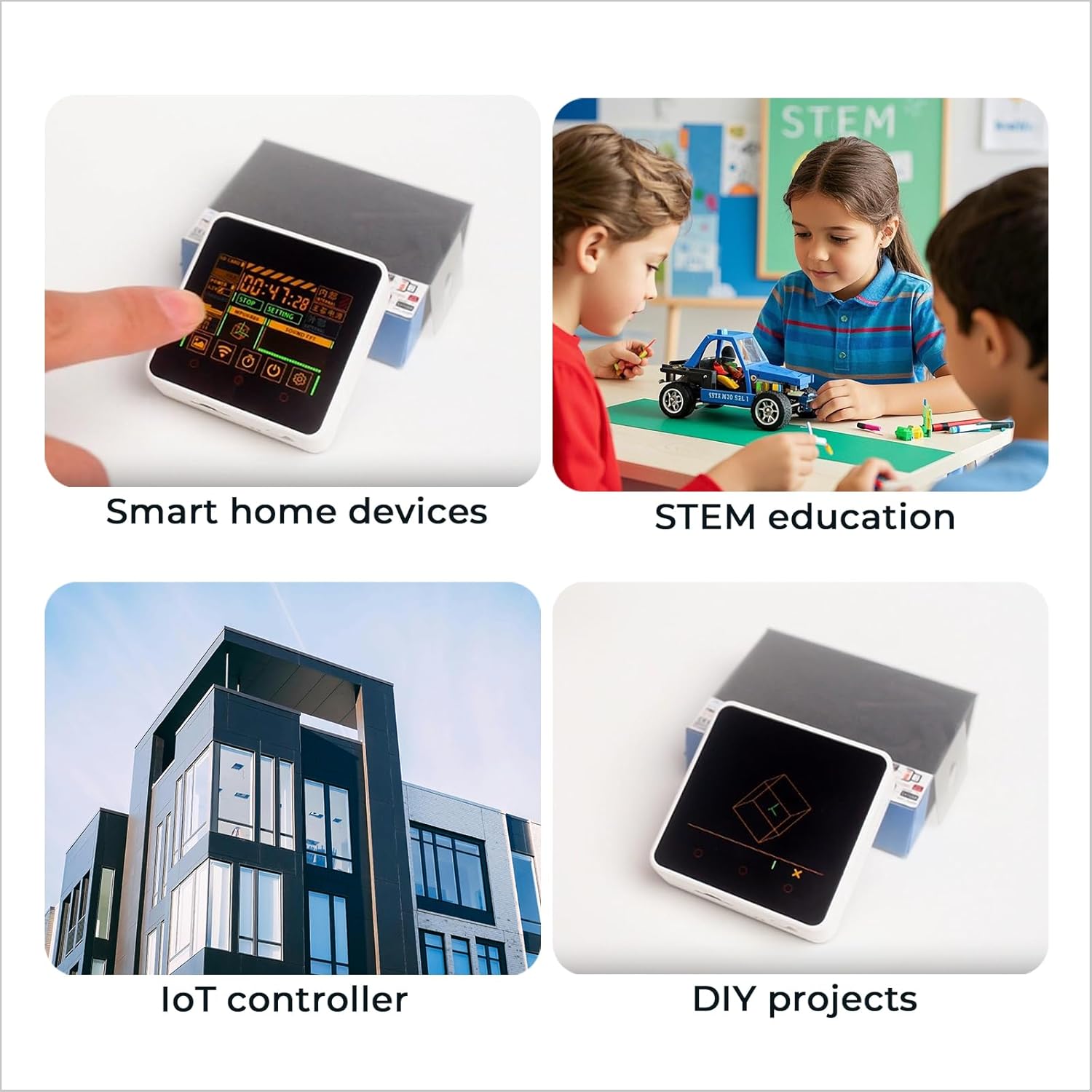
Slika 9.1: Pramples of M5Stack Core2 applications.

Figure 9.2: Further illustration of the M5Stack Core2's versatile applications.
10. Podrška i resursi
For more detailed tutorials, documentation, and community support, please visit the official M5Stack webstranica:

Figure 10.1: Guide to accessing online tutorials and documentation.

Figure 10.2: Official M5Stack websajt za podršku.


