
VINABTY BN59-01289A
VINABTY BN59-01289A Replacement Remote Control User Manual
For Samsung 6 Series MU6290 Smart 4K UHD TVs
Uvod
This manual provides instructions for the VINABTY BN59-01289A replacement remote control. This remote is designed to function with various Samsung 6 Series MU6290 Smart 4K UHD TV models without requiring any programming.
Please read this manual thoroughly to ensure proper use and to familiarize yourself with the remote's features and functions.
1. Podešavanje
1.1 Instalacija baterije
The VINABTY BN59-01289A remote control requires two AAA batteries for operation. Follow these steps to install the batteries:
- Pronađite poklopac odeljka za baterije na poleđini daljinskog upravljača.
- Pomaknite poklopac prema dolje ili pritisnite zasun (ako postoji) da biste otvorili pretinac.
- Umetnite dvije AAA baterije, pazeći da pozitivni (+) i negativni (-) terminali budu pravilno poravnati s indikatorima unutar odjeljka.
- Zatvorite poklopac odjeljka za baterije tako što ćete ga vratiti na mjesto dok ne klikne sigurno.
Napomena: This remote control does not require any programming or pairing with your Samsung TV. It is ready for use once batteries are installed.

Slika 1.1: Prednja strana view of the VINABTY BN59-01289A remote control, showing its button layout.
2. Uputstvo za upotrebu
The VINABTY BN59-01289A remote control provides full functionality for compatible Samsung Smart 4K UHD TVs. Below is a guide to the main buttons and their functions.

Image 2.1: A user operating the remote control to navigate the Smart Hub menu on a Samsung TV.
2.1 Funkcije dugmadi
- Snaga (●): Uključuje ili isključuje TV.
- Izvor: Mijenja ulazni izvor (npr. HDMI 1, HDMI 2, TV).
- Numerička tastatura (0-9): Direktno unosi brojeve kanala ili druge numeričke unose.
- PRE-CH: Vraća se na prethodni kanal.
- Volumen (+/-): Podešava nivo jačine zvuka televizora.
- Isključi zvuk: Isključuje ili uključuje zvuk televizora.
- Channel (CH ▲/▼): Mijenja TV kanal gore ili dolje.
- CH LISTA: Prikazuje listu kanala.
- E-PRIRUČNIK: Accesses the electronic manual (if supported by the TV).
- Početna (⌂): Opens the Smart Hub or main menu.
- spavanje: Sets the TV's sleep timer.
- Postavke: Otvara meni postavki televizora.
- Info (i): Prikazuje informacije o trenutnom programu ili ulazu.
- Navigacijski tasteri (◀ ▲ ▶ ▼): Kreće kroz menije i opcije.
- Unesite/OK: Potvrđuje odabir.
- Povratak (↶): Vraća se na prethodni ekran ili meni.
- Izlaz: Izlazi iz trenutnog menija ili aplikacije.
- Dugmad u boji (A, B, C, D): Provide access to specific functions within certain applications or menus (functions vary by TV model and app).
- P.VELIČINA: Podešava veličinu/omjer slike.
- CC/DVD: Activates Closed Captions or controls DVD functions (if connected).
- REC: Initiates recording (if supported by the TV and connected storage).
- Kontrole reprodukcije (◀◀, ▶, ■, ▶▶): Control media playback (rewind, play/pause, stop, fast forward).
3. Održavanje
3.1 Zamjena baterije
Replace the AAA batteries when the remote's response becomes sluggish or stops working. Always replace both batteries at the same time with new ones. Do not mix old and new batteries, or different types of batteries.
3.2 Čišćenje
Za čišćenje daljinskog upravljača koristite meku, suhu krpu. Nemojte koristiti tekuća sredstva za čišćenje, sprejeve ili abrazivne materijale, jer mogu oštetiti površinu daljinskog upravljača ili unutrašnje komponente.
4. Otkrivanje problema
- Daljinski ne reaguje:
- Ensure the batteries are correctly installed with the correct polarity.
- Zamijenite stare baterije novim AAA baterijama.
- Provjerite ima li prepreka između daljinskog upravljača i infracrvenog prijemnika televizora.
- Usmjerite daljinski upravljač direktno prema televizoru.
- Određeni tasteri ne rade:
- This may indicate a faulty button. If other buttons work, contact customer support.
- TV se ne uključuje/isključuje:
- Provjerite je li TV priključen u ispravnu utičnicu.
- Try using the power button on the TV itself to rule out a TV issue.
5. Specifikacije
| Feature | Detalj |
|---|---|
| Broj modela | BN59-01289A |
| Brand | VINABTY |
| Kompatibilnost | Samsung 6 Series MU6290 Smart 4K UHD TVs (e.g., UN40MU6290, UN43MU6290, UN49MU6290, UN50MU6290, UN55MU6290, UN65MU6290, UN75MU6290, TM1240A, MU6070) |
| Izvor napajanja | 2 x AAA baterije (nisu uključene) |
| Dimenzije | 7 x 2 x 0.5 inča (17.78 x 5.08 x 1.27 cm) |
| Težina artikla | 1.98 unce (56 grama) |
| Posebna karakteristika | Nije potrebno programiranje |

Image 5.1: The remote control displaying its approximate dimensions.
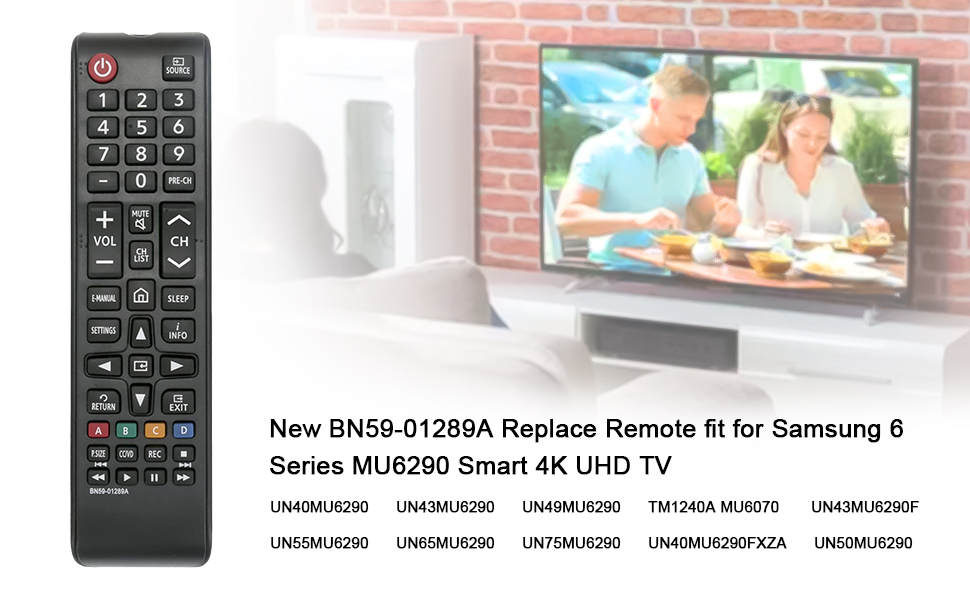
Image 5.2: Visual representation of the remote control and a list of compatible Samsung TV models.
6. Garancija i podrška
For warranty information or technical support regarding your VINABTY BN59-01289A replacement remote control, please refer to the documentation provided with your purchase or contact the seller directly. Specific warranty terms may vary.
Ask a question about this manual
Ask about setup, troubleshooting, compatibility, parts, safety, or missing instructions. Manuals+ will review the question and use this page’s manual context to help answer it.