
Canon 0931C002
Canon EOS-1D X Mark II DSLR Camera User Manual
Model: 0931C002
1. Uvod
The Canon EOS-1D X Mark II is a professional-grade DSLR camera designed for high-performance photography and videography. It offers immense power, phenomenal speed, and a remarkable combination of innovation and refinement. This camera is built to perform brilliantly, swiftly, and stunningly in various demanding shooting environments, from the stadium to the studio.
Key features include blazingly fast continuous shooting (up to 14 fps, or 16 fps in Live View), an improved 61-point AF system for clean, sharp images even in dim light, and highly-detailed 4K video recording at up to 60 fps with smooth AF. Its powerful sensor and expandable ISO range ensure superb low-light performance.
2. Šta se nalazi u kutiji
Provjerite da li se u vašem paketu nalaze sve dolje navedene stavke:
- Samo tijelo kamere
- Eyecup EG
- Poklopac kamere RF-3
- Packing cover
- Wide Strap L7

Figure 2.1: Canon EOS-1D X Mark II camera body, battery, and charger.
3. Podešavanje
3.1. Ugradnja i punjenje baterije
The Canon EOS-1D X Mark II uses a Lithium Ion battery. Ensure the battery is fully charged before first use.
- Otvorite poklopac pretinca za bateriju koji se nalazi na dnu kamere.
- Insert the battery with the contacts facing the correct direction, as indicated by the diagram inside the compartment.
- Čvrsto zatvorite poklopac odeljka za baterije.
- To charge, connect the battery to the provided charger and plug the charger into a power outlet. The charging indicator will show the status.
3.2. Umetanje memorijske kartice
The EOS-1D X Mark II features dual memory card slots, supporting both CFast 2.0 and CF (CompactFlash) cards for high-speed data recording.
- Pronađite poklopac utora za memorijsku karticu sa strane fotoaparata.
- Open the cover. You will see two slots: one for CFast 2.0 (labeled '1' or 'CFast') and one for CF (labeled '2' or 'CF').
- Insert the CFast card into slot 1 and the CF card into slot 2, ensuring they are oriented correctly.
- Close the memory card slot cover firmly until it clicks into place.

Slika 3.1: Pozadi view of the camera with memory card slots open, showing CFast and CF card compatibility.
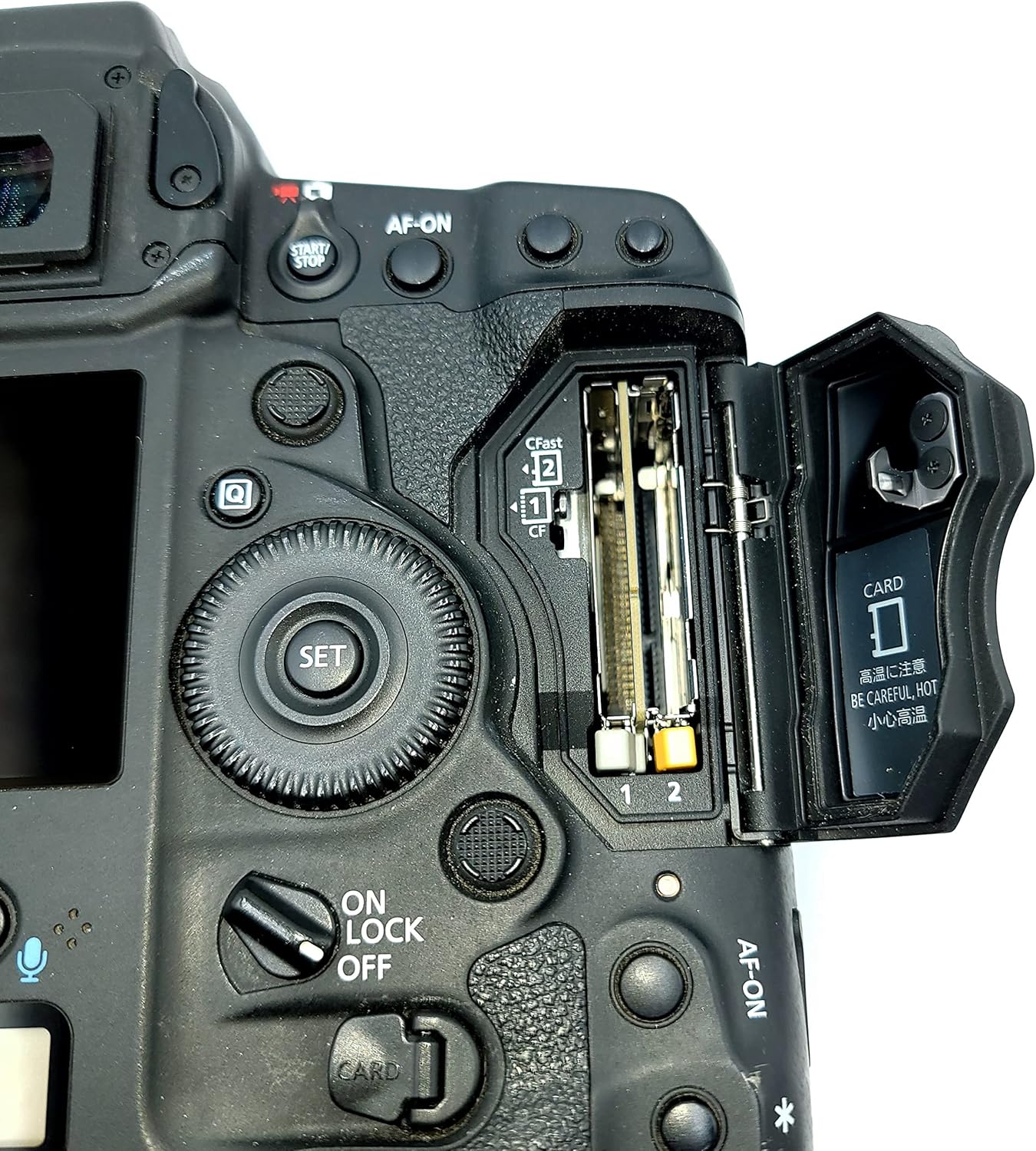
Slika 3.2: Detaljno view of the dual memory card slots, indicating CFast 2.0 and CF compatibility.
3.3. Pričvršćivanje objektiva
To attach a Canon EF lens:
- Skinite poklopac tijela s fotoaparata i stražnji poklopac objektiva s objektiva.
- Align the red or white index mark on the lens with the corresponding index mark on the camera body.
- Montirajte objektiv okretanjem u smjeru kazaljke na satu dok ne klikne na svoje mjesto.
4. Upravljanje kamerom
4.1. Uključivanje / isključivanje napajanja
Locate the power switch on the camera body. Slide it to the "ON" position to power on the camera. Slide it to "OFF" to power off.
4.2. Osnovni načini snimanja
The EOS-1D X Mark II offers various shooting modes to suit different photographic needs. Refer to the camera's mode dial or menu for selection.
- Program AE (P): The camera automatically sets the shutter speed and aperture for optimal exposure.
- AE s prioritetom zatvarača (Tv): You set the shutter speed, and the camera automatically sets the aperture.
- AE s prioritetom otvora blende (Av): You set the aperture, and the camera automatically sets the shutter speed.
- Ručna ekspozicija (M): You set both the shutter speed and aperture.
- Sijalica (B): For long exposures where the shutter remains open as long as the shutter button is pressed.
4.3. Autofocus Performance
The camera incorporates a 61-point High Density Reticular AF II system with 41 cross-type points, offering enhanced precision and tracking. The AF system's low-intensity limit has been improved to EV -3, and all 61 AF points are compatible down to f/8. For video recording, Dual Pixel CMOS AF provides high-speed, precise autofocus during Live View still and movie recording.
4.4. ISO osjetljivost
The EOS-1D X Mark II delivers a standard ISO range of 100–51200, expandable to ISO 50 (L) and up to 409600 (H3). This wide range allows for excellent low-light performance with reduced noise.
4.5. Video snimanje
The camera is capable of recording 4K (Motion JPEG) video at up to 60 fps and Full HD video at 120 fps for smooth slow-motion effects. It supports recording to CFast cards for high data rates. An 8.8-Megapixel still image can be selected and saved from 4K video frames.

Slika 4.1: Prednja strana view of the Canon EOS-1D X Mark II DSLR Camera.

Slika 4.2: Pozadi view of the Canon EOS-1D X Mark II, showing the LCD and control layout.
5. Održavanje
5.1. Čišćenje kamere
Regular cleaning helps maintain camera performance and longevity.
- Za brisanje kućišta fotoaparata koristite meku krpu koja ne ostavlja dlačice.
- For the LCD screen, use a screen-specific cleaner and cloth.
- Use a blower brush to remove dust from the lens and sensor (if exposed). Avoid touching the sensor directly.
5.2. Skladištenje
When not in use, store the camera in a dry, cool place, away from direct sunlight and extreme temperatures. Use a desiccant to prevent mold and mildew, especially in humid environments.
5.3. Ažuriranja firmvera
Periodically check the Canon website for firmware updates to ensure your camera has the latest features and bug fixes. Follow the instructions provided by Canon carefully during the update process.
6. Otkrivanje problema
6.1. Uobičajeni problemi i rješenja
| Problem | Mogući uzrok | Rješenje |
|---|---|---|
| Kamera se ne uključuje. | Baterija je prazna ili nepravilno umetnuta. | Potpuno napunite bateriju i provjerite je li pravilno umetnuta. |
| Slike su mutne. | Incorrect focus, camera shake, or low shutter speed. | Check AF mode, use a faster shutter speed, or use a tripod. |
| Greška memorijske kartice. | Kartica je puna, oštećena ili nekompatibilna. | Format the card (backup data first), try a different card, or check compatibility. |
For more complex issues, please refer to the official Canon support resources or contact customer service.
7. Specifikacije
- Dimenzije proizvoda: 7.72 x 6.2 x 6.6 inča
- Težina artikla: 10.6 unci
- ASIN: B01B6OTTIM
- Broj modela stavke: 0931C002
- Baterije: Potrebna 1 litijum-jonska baterija (uključena)
- Proizvođač: Canon
- Režimi snimanja: 10
- Vrsta kontrole ekspozicije: automat
- Boja: crna
- Rezolucija video snimanja: 4K (4096 x 2160) up to 60 fps, Full HD (1080p) up to 120 fps
- Vrsta zumiranja: Optički zum
- Senzor: 20.2 Megapixel Full-Frame CMOS Sensor
- ISO opseg: 100–51200 (expandable to 50-409600)
- AF sistem: 61-point High Density Reticular AF II with 41 cross-type points
- Brzina kontinuiranog snimanja: Up to 14 fps (up to 16 fps in Live View)
- Utori za memorijske kartice: Dual (CFast 2.0 and CF)
- Povezivanje: Built-in GPS, Wi-Fi (via optional WFT-E8A accessory)
- Karoserija: Durable magnesium alloy with dust- and weather-resistance
8. Jamstvo i podrška
For detailed warranty information and technical support, please visit the official Canon webweb-mjesto ili pogledajte garantni list koji ste dobili uz proizvod.
You can also download the full user manual in PDF format from the following link: Canon EOS-1D X Mark II User Manual (PDF)
Manufacturer Contact Information: Please refer to the product packaging or official Canon webstranicu za najnovije kontakt podatke.
Ask a question about this manual
Ask about setup, troubleshooting, compatibility, parts, safety, or missing instructions. Manuals+ will review the question and use this page’s manual context to help answer it.