
1. Uvod
Welcome to the user manual for your Alcatel One Touch Watch. This guide provides essential information to help you set up, operate, and maintain your smartwatch, ensuring you get the most out of its features. The Alcatel One Touch Watch is designed to seamlessly integrate with your Android or iOS smartphone, offering a range of functionalities from health tracking to phone control.

Slika 1: Front view of the Alcatel One Touch Watch, displaying a digital clock face with date.
2. Šta se nalazi u kutiji
Upon opening your Alcatel One Touch Watch package, please ensure all the following items are present:
- Alcatel One Touch Watch (SM02-2AALUS5)
- Kratki vodič
- Charging Cable (optional, integrated into the watch strap)
3. Vodič za postavljanje
3.1. Početno punjenje
Before first use, fully charge your Alcatel One Touch Watch. The watch features a built-in USB charging connector within its strap, eliminating the need for a separate charging dangle.
- Locate the USB connector at the end of the watch strap.
- Plug the USB connector into any standard USB power source (e.g., computer USB port, USB wall adapter).
- The watch display will indicate charging status. A full charge typically takes approximately one hour.
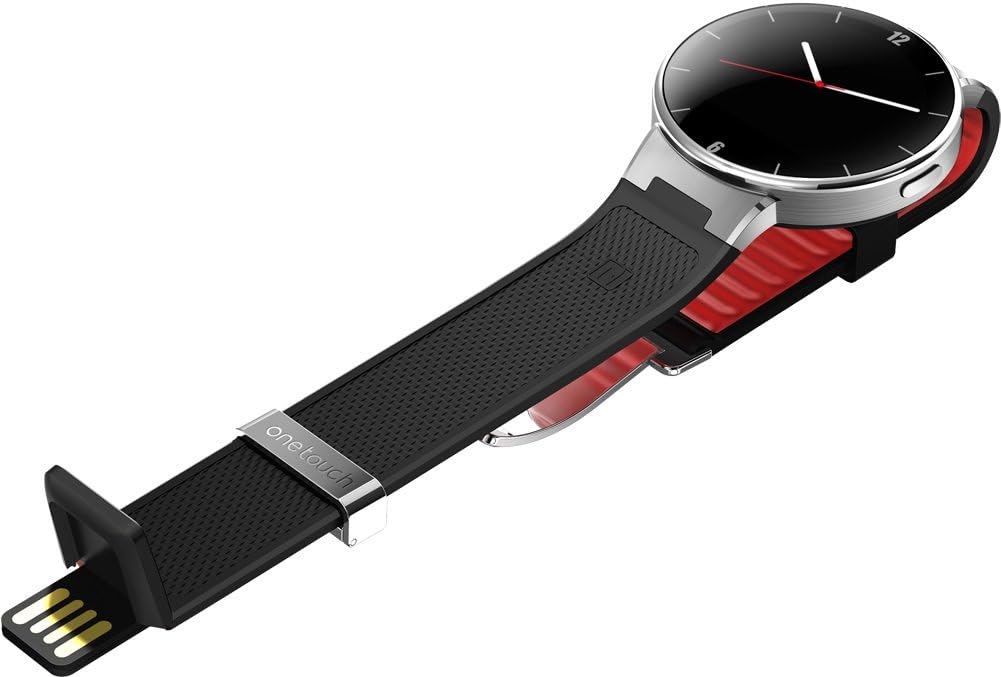
Slika 2: The Alcatel One Touch Watch strap revealing the integrated USB charging connector.
3.2. Uparivanje sa vašim pametnim telefonom
The Alcatel One Touch Watch is compatible with both Android and iOS smartphones. To unlock its full functionality, you must pair it with your device.
- Preuzmite prateću aplikaciju: Traži the "Alcatel Move" app (or similar official Alcatel smartwatch app) on your smartphone's app store (Google Play Store for Android, Apple App Store for iOS) and install it.
- Omogući Bluetooth: Provjerite je li Bluetooth omogućen na vašem pametnom telefonu.
- Otvorite aplikaciju: Launch the Alcatel Move app on your smartphone.
- Slijedite uputstva na ekranu: The app will guide you through the pairing process. This typically involves selecting your watch from a list of available Bluetooth devices and confirming a pairing code on both your watch and phone.
- NFC Pairing (Optional): The watch may support NFC for easier initial pairing. If your phone has NFC, you might be prompted to tap the watch to your phone to initiate the connection. The watch will remain connected via Bluetooth after the initial NFC pairing.
Napomena: Maintain your watch and phone within Bluetooth range for a stable connection. If connection issues occur, try "forgetting" the watch in your phone's Bluetooth settings and re-pairing through the Alcatel Move app.
4. Upravljanje satom
4.1. Osnovna navigacija
The Alcatel One Touch Watch features a touch-sensitive display and physical buttons for navigation.
- Ekran na dodir: Prevucite prstom lijevo, desno, gore ili dolje za navigaciju kroz menije i obavještenja. Dodirnite za odabir stavki.
- Bočno dugme: Typically used to wake the screen, return to the home screen, or access the app menu.
- "Back" Spot: A specific area on the watch (often unmarked) functions as a 'back' button. Be precise when tapping to avoid unintended actions like activating "Find Phone."

Slika 3: Side view of the watch, highlighting the physical button on the right side of the casing.
4.2. Praćenje aktivnosti
Monitor your health and fitness with the built-in activity tracker.
- Koraci: Tracks your daily step count.
- Kalorije: Procjenjuje potrošene kalorije na osnovu vaše aktivnosti.
- spavanje: Monitors your sleep patterns. Ensure the sleep tracking feature is activated, often through the companion app.
- Otkucaji srca: Mjeri vaš otkucaj srca.
Detailed activity data and historical trends can be viewed within the Alcatel Move companion app on your smartphone.
4.3. Phone Control and Notifications
Stay connected and control your phone directly from your wrist.
- Obavještenja: Receive alerts for calls, texts, emails, and other app notifications. You can decline incoming calls directly from the watch.
- Kontrola muzike: Reprodukujte, pauzirajte, preskačite pjesme i podešavajte jačinu zvuka za muziku koja se reprodukuje na vašem pametnom telefonu.
- Kontrola kamere: Daljinski aktivirajte okidač kamere vašeg pametnog telefona.
- Finder telefona: Use your watch to make your paired smartphone ring, helping you locate it.
4.4. Prilagodba
Personalizirajte lice sata kako bi odgovaralo vašem stilu.
- Lica za gledanje: The Alcatel Move app offers a variety of pre-designed watch faces.
- Prilagođeni satovi: You can often create your own watch faces using personal photos or graphics through the companion app.
5. Održavanje i njega
To ensure the longevity and optimal performance of your Alcatel One Touch Watch, follow these care guidelines:
- čišćenje: Obrišite ekran sata i remen mekom krpomamp krpu. Izbjegavajte jake hemikalije ili abrazivne materijale.
- Otpornost na vodu i prašinu: The watch is designed to be water and dust resistant, making it suitable for daily wear and activities like running. However, it is not intended for swimming or diving. Avoid exposing it to high-pressure water or prolonged submersion.
- temperatura: Avoid exposing the watch to extreme temperatures (very hot or very cold) as this can affect battery life and internal components.
- Skladištenje: Kada se sat ne koristi duži period, čuvajte ga na hladnom i suhom mjestu.

Slika 4: The Alcatel One Touch Watch being worn during a cycling activity, demonstrating its suitability for active use.
6. Otkrivanje problema
If you encounter issues with your Alcatel One Touch Watch, refer to the following common problems and solutions:
- Sat se ne povezuje s telefonom:
-
- Provjerite je li Bluetooth omogućen i na vašem satu i na telefonu.
- Verify the Alcatel Move app is running on your phone.
- Pokušajte ponovo pokrenuti i sat i telefon.
- In your phone's Bluetooth settings, "forget" the watch and then re-pair it through the Alcatel Move app.
- Ensure the watch battery is not critically low.
- Obavještenja se ne prikazuju:
-
- Check app notification settings on your phone to ensure they are enabled for the Alcatel Move app.
- Confirm the watch is successfully paired and connected to your phone.
- Ensure the watch is not in "Do Not Disturb" mode.
- Weather app not updating or finding location:
-
- Ensure your phone has an active internet connection and location services are enabled.
- Verify that the Alcatel Move app has permission to access your location.
- Sometimes, a brief delay is normal for the weather app to synchronize.
- Sleep tracking not working:
-
- Confirm that sleep tracking is activated within the Alcatel Move app settings.
- Ensure the watch is worn correctly and comfortably during sleep.
- Accidental "Find Phone" activation:
-
- Be precise when interacting with the watch's touch screen, especially near the "back" function area.
- Familiarize yourself with the exact location of the "back" function to avoid accidental taps.
For further assistance, refer to the official Alcatel support resources or the full PDF user manual available online.
7. Specifikacije
Key technical specifications for the Alcatel One Touch Watch (Model: SM02-2AALUS5):
| Feature | Detalj |
|---|---|
| Broj modela | SM02-2AALUS5 |
| Kompatibilnost operativnog sistema | Android, iOS |
| Veličina ekrana | 1.59 inča |
| Povezivanje | Bluetooth, USB (za punjenje) |
| GPS | Nema GPS-a |
| Posebne karakteristike | Phone Finder, Activity Tracker (Steps, Calories, Sleep, Heart Rate), Phone Notifications, Music Control, Camera Control |
| Unos ljudskog interfejsa | Dugmad, ekran osjetljiv na dodir |
| Otpornost na vodu i prašinu | Yes (Rugged & Durable) |
| Težina artikla | 8 unce |
| Dimenzije proizvoda | 5.2 x 5.2 x 3.9 inča |

Slika 5: Pozadi view of the Alcatel One Touch Watch, displaying the heart rate sensor and regulatory markings.
8. Garancija i podrška
For detailed warranty information, please refer to the warranty card included with your product or visit the official Alcatel website. For technical support, frequently asked questions, or to download the full user manual in PDF format, please visit the Alcatel support portal.
PDF verzija korisničkog priručnika dostupna je ovdje: Alcatel One Touch Watch User Manual (PDF)