
1. prekoview
The Casio AE1000W Digital Watch is designed for durability and functionality, offering a range of features suitable for daily wear and travel. This manual will guide you through its various functions and ensure optimal use.
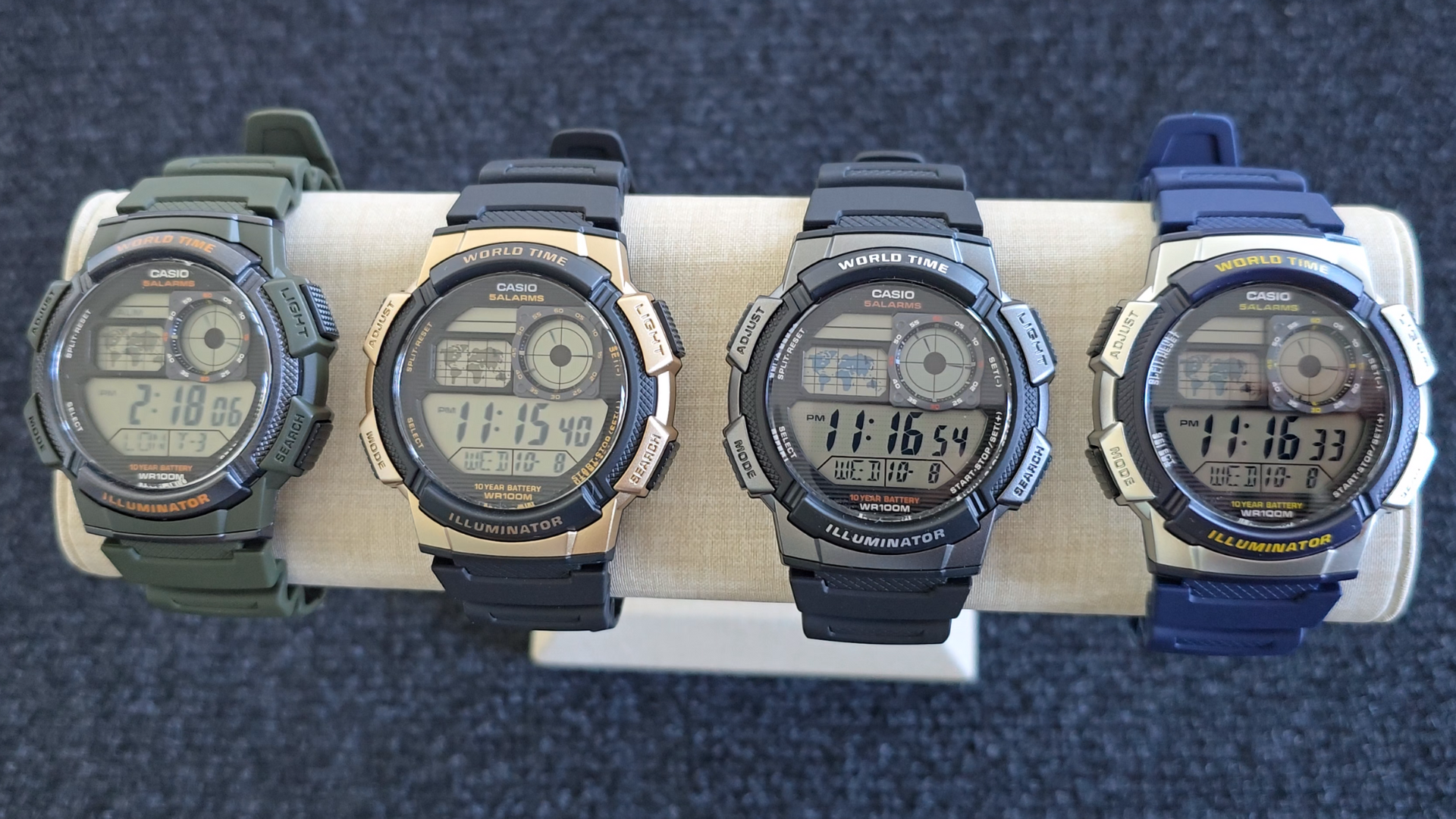
Image: Casio AE1000W Digital Watch series in various color options.
2. Ključne karakteristike
- Svjetsko vrijeme: Displays current time in 48 cities (31 time zones) with a world map indicator.
- Multi Alarms: Features five independent daily alarms.
- Štoperica: 1/100-second stopwatch with measuring modes: elapsed time, split time, 1st-2nd place times.
- Tajmer odbrojavanja: Measuring unit: 1 second, Countdown range: 24 hours.
- LED svjetlo: Illuminates the watch face for easy reading in low light conditions.
- Otpornost na vodu: 100 meters (330 feet) suitable for swimming and snorkeling.
- 10-godišnji vek trajanja baterije: Dugotrajna baterija za dugotrajnu upotrebu.
- kvarcni mehanizam: Osigurava precizno mjerenje vremena.
- Glass Crystal: Durable watch face protection.

Image: Emblem highlighting the 10-year battery life feature.
3. Podešavanje
3.1 Početno podešavanje vremena i datuma
- U režimu mjerenja vremena, pritisnite i držite ADJUST dugme dok pozivni broj grada ne počne treptati.
- Koristite TRAŽI i MODE buttons to select your desired city code (Home City).
- Pritisnite ADJUST button to move to the DST (Daylight Saving Time) setting. Use TRAŽI to toggle DST On/Off.
- Pritisnite ADJUST again to cycle through the settings: 12/24-hour format, Seconds, Hour, Minute, Year, Month, Day. Use TRAŽI i MODE da promenite vrednosti.
- Kada su sva podešavanja tačna, pritisnite dugme ADJUST dugme za izlazak iz režima podešavanja.
4. Uputstvo za upotrebu
4.1 Navigacija kroz režime
Pritisnite MODE button to cycle through the different modes: Timekeeping, World Time, Alarm, Stopwatch, and Countdown Timer.
4.2 Funkcija svjetskog vremena
In World Time Mode, the watch displays the current time in 48 cities across 31 time zones. The world map indicator visually highlights the selected time zone.
- Uđite u režim svjetskog vremena pritiskom na MODE dugme.
- Koristite TRAŽI button to scroll through the different city codes. The time for the selected city will be displayed, and the corresponding area on the world map will be highlighted.
- To swap your Home City time with a World Time City, press and hold the ADJUST button while in World Time Mode.
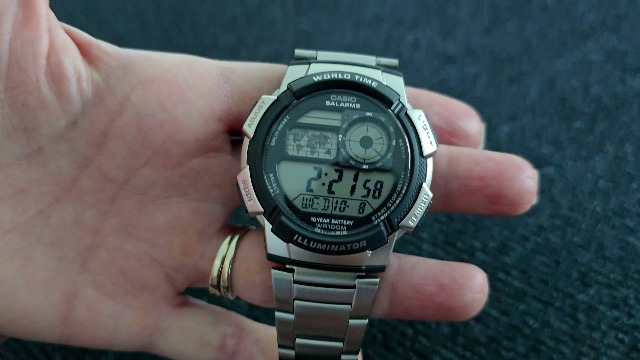
Slika: Front view of the Casio AE1000W watch, showing the digital display and world map.
4.3 Alarmi
The watch features five daily alarms. You can set each alarm independently.
- Uđite u alarmni režim pritiskom na MODE button until "ALM" appears.
- Koristite TRAŽI button to cycle through the five alarms (AL1 to AL5) and the Hourly Vremenski signal (SIG).
- To set an alarm, select the desired alarm (e.g., AL1) and press and hold the ADJUST dugme dok cifre sati ne počnu treptati.
- Koristi TRAŽI i MODE da podesite sat i minut.
- Pritisnite ADJUST da potvrdite i izađete.
- To turn an alarm On/Off, select the alarm and press the ADJUST dugme nakratko.
4.4 Štoperica
The stopwatch measures elapsed time, split times, and 1st-2nd place times.
- Uđite u način rada štoperice pritiskom na MODE button until "STW" appears.
- Pritisnite START/STOP/SET(+) za pokretanje i zaustavljanje štoperice.
- Pritisnite SPLIT/RESET to record split times or reset the stopwatch to zero.
4.5 Tajmer za odbrojavanje
Tajmer za odbrojavanje može se podesiti do 24 sata.
- Uđite u režim odbrojavanja pritiskom na MODE button until "TMR" appears.
- Da biste podesili vrijeme odbrojavanja, pritisnite i držite ADJUST dugme dok cifre sati ne počnu treptati.
- Koristi TRAŽI i MODE da podesite sat i minut.
- Pritisnite ADJUST za potvrdu.
- Pritisnite START/STOP/SET(+) za pokretanje i zaustavljanje odbrojavanja.
4.6 LED pozadinskog osvjetljenja
Pritisnite LIGHT button to illuminate the watch face for a few seconds, making it easy to read in the dark.
5. Održavanje
- čišćenje: Wipe the watch with a soft, dry cloth. For water-resistant models, you can rinse it with fresh water after exposure to saltwater.
- Otpornost na vodu: While water-resistant to 100M, avoid operating buttons underwater to prevent water ingress.
- baterija: The watch features a 10-year battery. When the display becomes dim or functions become erratic, it may be time for a battery replacement by a qualified technician.
- temperatura: Izbjegavajte izlaganje sata ekstremnim temperaturama, direktnoj sunčevoj svjetlosti tokom dužeg perioda ili jakim magnetnim poljima.
6. Otkrivanje problema
- Netačno vrijeme: Ensure your Home City is correctly set and Daylight Saving Time (DST) is adjusted as needed. Refer to Section 3.1.
- Dugmad ne reagiraju: Check if the watch is in a specific setting mode. Exit any setting mode by pressing the ADJUST button. If the issue persists, a full reset may be required (refer to the full Casio manual for advanced reset procedures).
- Ekran je taman: This may indicate a low battery. While rated for 10 years, environmental factors can affect battery life. Consider professional battery replacement.
7. Specifikacije
| Feature | Detalj |
|---|---|
| Brand | Casio |
| Broj modela | AE-1000W-1BVCF |
| Dimenzije proizvoda | 2.4 x 4.09 x 3.78 inča |
| Težina artikla | 1.41 unce |
| Materijal | Smola |
| Baterije | 1 litijum metalna baterija (uključena) |
| Otpornost na vodu | 100 metara (330 stopa) |
| Pokret | Kvarc |
| Display Type | Digitalni sa LC analognim displejem |
8. Garancija i podrška
Za informacije o garanciji i korisničku podršku, molimo vas da se obratite službenom Casio servisu. webweb-mjesto ili direktno kontaktirajte njihovu korisničku službu. Sačuvajte račun kao dokaz o kupovini za reklamacije u slučaju garancije.
Online podrška: Posjetite Casio podrška Website for FAQs, manuals, and service center locations.