
1. পণ্য শেষview
The HomeSpot JY538 Wireless Neckband Speaker provides a personal audio experience with advanced features. It is designed for comfort and versatility across various activities, delivering immersive sound without the isolation of traditional headphones.
মূল বৈশিষ্ট্য
- Immersive 3D Audio with aptX HD and LC3 codecs for high-fidelity sound.
- Auracast Receiver for seamlessly joining public or shared Bluetooth audio broadcasts.
- একক চার্জে 50 ঘন্টা পর্যন্ত একটানা প্লেব্যাক।
- Lightweight, ergonomic neckband design for comfortable, hands-free wear.
- Fast Bluetooth pairing for instant connection to devices with low latency.
বাক্সে কি আছে
- HomeSpot HS-JY538 Wireless Neckband Speaker x 1
- চার্জিং ক্যাবল x 1
- ব্যবহারকারীর ম্যানুয়াল x 1
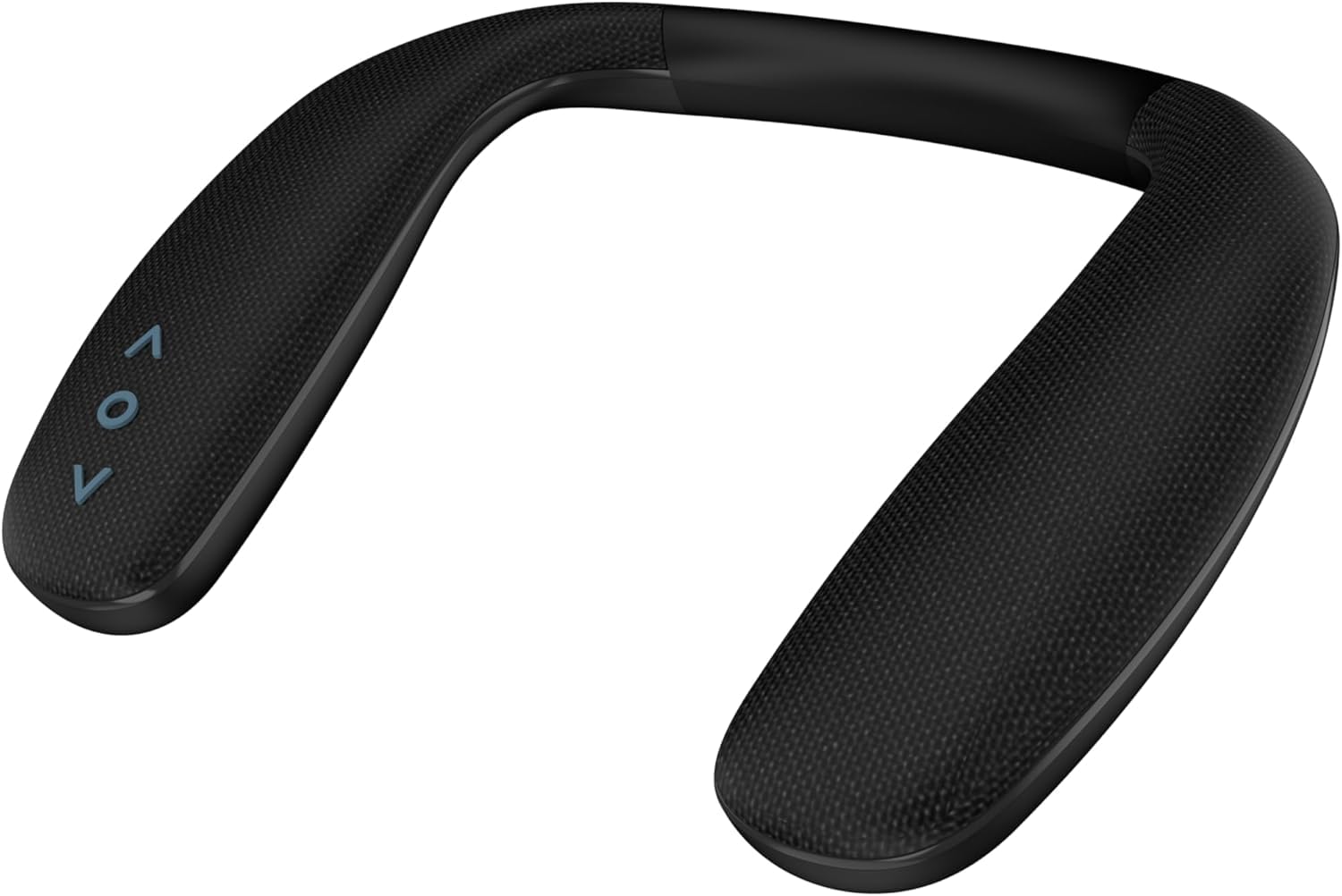
Image 1.1: The HomeSpot JY538 Wireless Neckband Speaker, showcasinএর এরগনোমিক ডিজাইন।
Image 1.2: An illustration of the advanced Qualcomm chip, highlighting the speaker's core audio technology.
2. নিরাপত্তা তথ্য
Please read and follow all safety instructions carefully to prevent damage to the device or personal injury.
- স্পিকারকে চরম তাপমাত্রা, সরাসরি সূর্যালোক বা উচ্চ আর্দ্রতার সংস্পর্শে আনবেন না।
- Keep the device away from water or other liquids. It is not waterproof.
- Do not attempt to disassemble, modify, or repair the speaker yourself. Refer all servicing to qualified personnel.
- শিশু এবং পোষা প্রাণীদের নাগালের বাইরে রাখুন।
- শুধুমাত্র প্রদত্ত চার্জিং কেবল বা একটি প্রত্যয়িত সমতুল্য কেবল ব্যবহার করুন।
- স্থানীয় নিয়ম অনুসারে ব্যাটারি এবং ইলেকট্রনিক উপাদানগুলি নষ্ট করুন।
3. শুরু করা
3.1 ডিভাইস চার্জ করা
Before first use, fully charge your HomeSpot JY538 speaker.
- প্রদত্ত USB চার্জিং কেবলটিকে স্পিকারের চার্জিং পোর্টের সাথে সংযুক্ত করুন৷
- USB কেবলের অন্য প্রান্তটি একটি সামঞ্জস্যপূর্ণ USB পাওয়ার উৎসের সাথে সংযুক্ত করুন (যেমন, ওয়াল অ্যাডাপ্টার, কম্পিউটার USB পোর্ট)।
- The LED indicator will illuminate to show charging status. It will change color or turn off when fully charged.
সম্পূর্ণ চার্জে ৭ ঘন্টা পর্যন্ত প্লেব্যাক সময় পাওয়া যায়।

Image 3.1: Visual representation of the speaker's 50-hour battery life, suitable for extended use.
3.2 পাওয়ারিং অন/অফ
- ক্ষমতায় ON: Press and hold the Power button for approximately 3 seconds until the LED indicator lights up.
- ক্ষমতায় বন্ধ: Press and hold the Power button for approximately 3 seconds until the LED indicator turns off.
3.3 Bluetooth Classic Pairing
Connect your speaker to a Bluetooth-enabled device for audio playback.
- স্পিকার বন্ধ আছে তা নিশ্চিত করুন।
- Press and hold the Power button for approximately 5 seconds until the LED indicator flashes blue and red alternately. This indicates the speaker is in pairing mode.
- On your device (e.g., smartphone, tablet, laptop), enable Bluetooth and search for available devices.
- Select "HomeSpot JY538" from the list of found devices.
- Once connected, the LED indicator on the speaker will turn solid blue.
3.4 Auracast Connection
The JY538 speaker can receive audio from Auracast broadcasts, offering unlimited connectivity in compatible environments.
- স্পিকার চালু আছে তা নিশ্চিত করুন।
- In an environment with an active Auracast broadcast (e.g., public venues, airports, gyms), the speaker will automatically detect and connect to the broadcast.
- Follow any on-screen prompts on your broadcasting device or the Auracast source if required to join the stream.

Image 3.2: Diagram illustrating the dual receiver mode, showing both Bluetooth Classic (one-to-one or two) and Auracast (one-to-many) connectivity options.
4. অপারেটিং নির্দেশাবলী
4.1 মৌলিক নিয়ন্ত্রণ
- পাওয়ার বোতাম: Short press to play or pause audio.
- ভলিউম আপ (+): Short press to increase the volume level.
- শব্দ কম (-): Short press to decrease the volume level.
- কল পরিচালনা: When connected to a smartphone, a short press of the Power button can answer or end an incoming call.
4.2 Audio Modes (3D Surround Sound)
The HomeSpot JY538 features immersive 3D surround sound. This mode is typically active by default, enhancing your audio experience. Refer to your connected device's audio settings for further customization if available.
৩.৩ মাইক্রোফোন ব্যবহার করা
The integrated microphone allows for hands-free communication. Ensure the speaker is connected to your phone via Bluetooth to use this feature for calls or voice commands.
4.4 Wearing the Speaker
Place the neckband speaker comfortably around your neck. The speakers are precisely angled to deliver personal, directional sound towards your ears, optimizing the audio experience.

Image 4.1: Individuals wearing the neckband speaker during various activities, demonstrating its comfortable and versatile design.
5. রক্ষণাবেক্ষণ
Proper maintenance ensures the longevity and optimal performance of your speaker.
- ক্লিনিং: Use a soft, dry, lint-free cloth to clean the speaker. Do not use abrasive cleaners, solvents, or chemical sprays.
- স্টোরেজ: Store the speaker in a cool, dry place away from direct sunlight and extreme temperatures when not in use for extended periods.
- হ্যান্ডলিং: Avoid dropping the speaker or subjecting it to strong impacts, which can damage internal components.
6. সমস্যা সমাধান
If you encounter issues with your HomeSpot JY538 speaker, refer to the following troubleshooting guide.
- ক্ষমতা নেই:
- Ensure the battery is charged. Connect the speaker to a power source and check if the charging indicator lights up.
- Press and hold the Power button for 3 seconds to confirm it's powered on. - কোন শব্দ নেই:
- Verify the speaker is powered on and successfully connected to your device via Bluetooth or Auracast.
- Adjust the volume on both the speaker and your connected device.
- Ensure the correct audio output is selected on your device.
- If using Auracast, confirm the broadcast is active and you are within range. - পেয়ারিং সমস্যা:
- Ensure the speaker is in Bluetooth pairing mode (LED flashing blue/red).
- Disable and re-enable Bluetooth on your device.
- Move the speaker closer to your device to ensure it's within range (33 feet).
- Clear previous Bluetooth connections for "HomeSpot JY538" on your device and attempt pairing again. - খারাপ অডিও গুণমান:
- Ensure the speaker is within the optimal Bluetooth range (up to 33 feet) of your connected device.
- Reduce interference by moving away from other wireless devices or strong electromagnetic fields.
- Check the quality of the audio source. Low-quality audio files or streams may result in poor output. - মাইক্রোফোন কাজ করছে না:
- Ensure the speaker is properly connected to your phone via Bluetooth.
- Check your phone's audio settings to confirm the speaker is selected as the input/output device for calls.
7. স্পেসিফিকেশন
| ব্র্যান্ড | হোমস্পট |
| মডেল নম্বর | JY538 |
| স্পিকার সর্বোচ্চ আউটপুট শক্তি | 10 ওয়াট |
| ফ্রিকোয়েন্সি রেসপন্স | 20 KHz |
| সংযোগ প্রযুক্তি | ব্লুটুথ |
| অডিও আউটপুট মোড | স্টেরিও |
| স্পিকার টাইপ | পোর্টেবল স্পিকার |
| অতিরিক্ত বৈশিষ্ট্য | 50 Hrs Play Time, Auracast Receiver, Low Latency |
| রঙ | কালো |
| জলরোধী | মিথ্যা |
| সর্বোচ্চ পরিসীমা | 33 ফুট |
| ব্লুটুথ রেঞ্জ | 33 ফুট |
| অডিও লেটেন্সি | 40 মিলিসেকেন্ড |
| ইনপুট ভলিউমtage | 5 ভোল্ট |
| আইটেমের মাত্রা (D x W x H) | 3"D x 2"W x 2"H |
| আইটেম ওজন | 200 গ্রাম |
| ব্যাটারির সংখ্যা | ১টি নন-স্ট্যান্ডার্ড ব্যাটারি (অন্তর্ভুক্ত) |
| অডিও চ্যানেলের সংখ্যা | 2.0 |
| প্রতিবন্ধকতা | 32 ওহম |
| সামঞ্জস্যপূর্ণ ডিভাইস | Desktop, Gaming Console, Laptop, Smartphone, Tablet |
| অডিও ড্রাইভার সাইজ | 40 মিলিমিটার |
8. ওয়্যারেন্টি এবং সমর্থন
8.1 ওয়ারেন্টি তথ্য
The HomeSpot JY538 Wireless Neckband Speaker is covered by a ১ বছরের প্রস্তুতকারকের ওয়ারেন্টি from the date of purchase. This warranty covers defects in materials and workmanship under normal use. Please retain your proof of purchase for any warranty claims.
The warranty does not cover damage caused by misuse, accident, unauthorized modification, or exposure to water.
8.2 গ্রাহক সহায়তা
For technical assistance, troubleshooting, or warranty inquiries, please visit the official HomeSpot website or contact their customer support team through the contact information provided on their website. Please have your product model number (JY538) and proof of purchase ready when contacting support.