
1. ভূমিকা
The DAWEI S1 Veterinary Ultrasound Machine is a portable B-ultrasound scanner designed for pregnancy diagnosis and general health monitoring in various animals. Its compact and robust design makes it suitable for both farm and clinical environments. This manual provides essential information for the safe and effective operation, maintenance, and troubleshooting of your S1 unit.
2. পণ্য শেষview
The DAWEI S1 features a 5.6-inch LED HD display and a user-friendly interface. It is designed for comfortable handheld operation, weighing approximately 950g. The device is protected by a drop-resistant soft rubber body, enhancing durability in various working conditions.
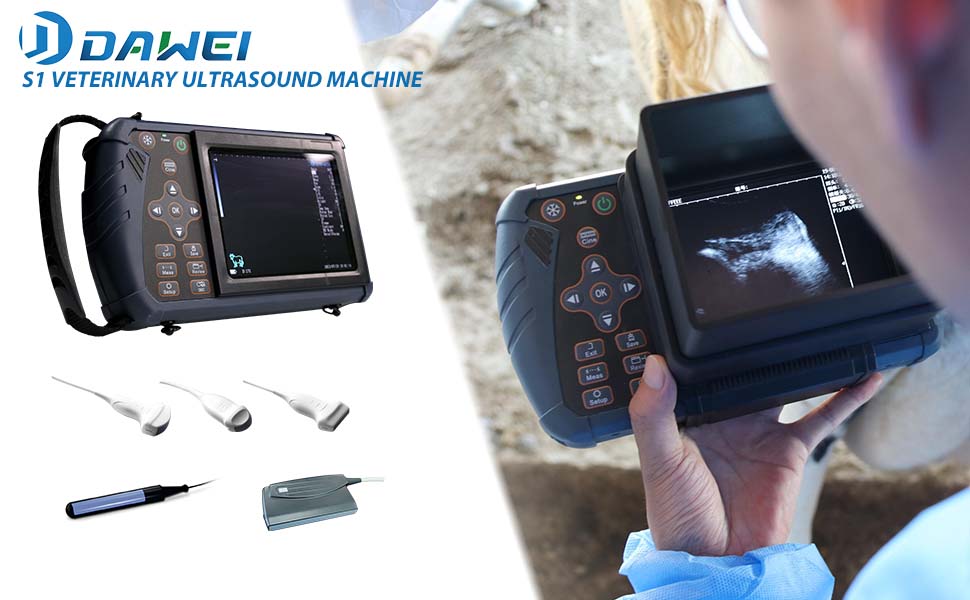
চিত্র 2.1: ওভারview of the DAWEI S1 Veterinary Ultrasound Machine.

Figure 2.2: The DAWEI S1 in handheld use, highlighting its portability.

চিত্র 2.3: বিস্তারিত view of the S1 control panel.

Figure 2.4: The standard 3.5MHz Convex Probe.
মূল বৈশিষ্ট্য:
- প্রদর্শন: 5.6-inch LED HD Display
- ওজন: Approximately 950g (device only)
- অনুসন্ধান: Standard 3.5MHz Convex Probe (frequency range 2.5MHz - 5.0MHz)
- প্রদর্শন মোড: B, BB, 4B, BM, M
- ফোকাস: Electronic focus with adjustable frequency range
- সঞ্চয়স্থান: 32GB permanent storage for images and playback
- ব্যাটারি লাইফ: More than 4 working hours
- স্থায়িত্ব: Drop-resistant soft rubber body
3. সেটআপ
৪.১ প্যাকিং এবং প্রাথমিক পরিদর্শন
Carefully unpack all components from the carrying case. Verify that all items listed in the packing list are present and undamaged. If any items are missing or damaged, contact customer support immediately.

Figure 3.1: DAWEI S1 package contents including the main unit, convex probe, charger, power cable, and carrying strap.
3.2 ডিভাইস চার্জ করা
Before first use, fully charge the device. Connect the charger to the charging port on the S1 unit and plug it into a power outlet. The charging indicator will show the charging status. A full charge typically provides over 4 hours of continuous operation.
৪.৩ প্রোব সংযুক্ত করা
Gently align the probe connector with the probe interface on the S1 unit. Push firmly until it clicks into place. Ensure the connection is secure to prevent signal loss during operation. The S1 supports various probes, including convex, micro-convex, linear, and rectal probes, though the S1+ConvexProbe variant includes the convex probe as standard.

Figure 3.2: Various probes compatible with the S1 unit.
৫.২ বহনকারী স্ট্র্যাপ সংযুক্ত করা
For extended use or mobility, attach the adjustable carrying strap to the designated points on the S1 unit. Adjust the strap length for comfortable and secure carrying, distributing the weight effectively.

Figure 3.3: Components of the adjustable carrying strap.

Figure 3.4: User operating the S1 with the carrying strap.
4. অপারেটিং নির্দেশাবলী
4.1 পাওয়ারিং অন/অফ
ডিভাইসটি চালু করতে, টিপুন এবং ধরে রাখুন শক্তি button located on the control panel until the screen illuminates. To power off, press and hold the শক্তি button again until the device shuts down.
৫.২ ইন্টারফেস নেভিগেট করা
The S1 features a simple and intuitive interface. Use the directional buttons (উপর নিচ ডান বাম) to navigate through menus and adjust settings. Press the OK button to confirm selections. The প্রস্থান করুন button returns to the previous screen or main menu.

চিত্র 4.1: প্রাক্তনample of the ultrasound display interface with various parameters.
4.3 Selecting Display Modes
The S1 offers five display modes: B, BB, 4B, BM, and M. These modes can be selected via the main menu or dedicated buttons (if available) to suit different diagnostic needs. The B-mode is commonly used for general imaging and pregnancy diagnosis.
৪.২ ছবির সেটিংস সামঞ্জস্য করা
ব্যবহার করুন সেটআপ button to access image settings such as gain, frequency, depth, and focus. Adjust these parameters to optimize image quality for the specific animal and examination area. The electronic focus and adjustable frequency range of the convex probe (2.5MHz - 5.0MHz) allow for precise imaging.
৬.৩ পরিমাপ সম্পাদন করা
The S1 includes measurement functions for distance, perimeter, area, and obstetrics. Press the পরিমাপের button to activate the measurement tools. Follow the on-screen prompts to perform measurements. The device supports specific measurement packages for various animals:
- Swine: Gestational sac diameter (GSD), Crown-rump length (CRL), Thoracic Diameter (TD), Backfat Thickness & Lean Meat Percentage
- Ovine: Crown-rump length (CRL), Thoracic Diameter (TD)
- ক্যানাইন: Head circumference (HD), Crown-rump length (CRL), Gestational sac diameter (GSD), Biparietal Diameter (BD)
- বিড়াল Head circumference (HD), Biparietal Diameter (BD)
- Bovine: Thoracic Diameter (TD), Crown-rump length (CRL), Biparietal diameter (BPD)
- Equine: Biparietal diameter (BPD), Crown-rump length (CRL), Gestational sac diameter (GSD)
4.6 Saving and Reviewing ইমেজ
চাপুন সংরক্ষণ করুন button to store current images. The S1 has 32GB of permanent storage. Use the Review button to access saved images and playback. The device supports 255 frames movie playback, including continuous playback or frame-by-frame view.
5. রক্ষণাবেক্ষণ
5.1 Cleaning the Device and Probe
After each use, clean the probe and the main unit. Use a soft cloth dampened with a mild disinfectant solution. Avoid harsh chemicals or abrasive materials that could damage the screen or casing. Ensure no liquid enters the device ports.
5.2 ব্যাটারি যত্ন
To prolong battery life, avoid fully discharging the battery frequently. Store the device in a cool, dry place when not in use. If storing for an extended period, ensure the battery is partially charged (around 50%).
5.3 স্টোরেজ
Store the DAWEI S1 and its accessories in the provided carrying case to protect them from dust, moisture, and physical damage. Avoid extreme temperatures.
6. সমস্যা সমাধান
This section addresses common issues you might encounter with your DAWEI S1 unit. For problems not listed here, please contact customer support.
| সমস্যা | সম্ভাব্য কারণ | সমাধান |
|---|---|---|
| ডিভাইস চালু হয় না | ব্যাটারির চার্জ কম; পাওয়ার বোতামটি সঠিকভাবে চাপা হয়নি | Charge the device; Press and hold the Power button for 3-5 seconds |
| স্ক্রিনে কোনও চিত্র নেই | Probe not connected; Incorrect mode selected; Gain too low | Ensure probe is securely connected; Select appropriate display mode; Increase gain settings |
| দরিদ্র চিত্রের গুণমান | Incorrect frequency/depth; Insufficient coupling gel; Dirty probe surface | Adjust frequency and depth settings; Apply adequate coupling gel; Clean probe surface thoroughly |
| ডিভাইসটি জমে যায় অথবা প্রতিক্রিয়াহীন হয়ে যায় | Software glitch; Overheating | Restart the device; Allow device to cool down if warm |
7. স্পেসিফিকেশন
| বৈশিষ্ট্য | স্পেসিফিকেশন |
|---|---|
| মডেল | DAWEI S1 |
| প্রদর্শন | 5.6-inch LED HD Display |
| ডিভাইসের ওজন | প্রায়. 950 গ্রাম (2.1 পাউন্ড) |
| Probe Type (Standard) | Convex Probe |
| Probe Frequency | ২৩.৫ মেগাহার্টজ - ৬০০০ মেগাহার্টজ |
| প্রদর্শন মোড | B, BB, 4B, BM, M |
| ফোকাস | Electronic Focus, Frequency Adjustable |
| অভ্যন্তরীণ স্টোরেজ | 32GB (permanent storage) |
| ব্যাটারির ধরন | 1 লিথিয়াম আয়ন ব্যাটারি (অন্তর্ভুক্ত) |
| ব্যাটারি লাইফ | More than 4 working hours |
| লক্ষ্য শ্রোতা | Cattle, Pigs, Goats, Horses, Sheep, Cats, Dogs |
| প্যাকেজের মাত্রা | 20.5 x 14.25 x 6.75 ইঞ্চি |
| প্যাকেজের ওজন | 9.4 পাউন্ড |
8. ওয়্যারেন্টি এবং সমর্থন
8.1 ওয়ারেন্টি তথ্য
The DAWEI S1 Veterinary Ultrasound Machine comes with a 2 বছরের ওয়ারেন্টি ক্রয়ের তারিখ থেকে। এই ওয়ারেন্টিটি স্বাভাবিক ব্যবহারের সময় উৎপাদন ত্রুটি এবং ত্রুটিগুলি কভার করে। ওয়ারেন্টি দাবির জন্য দয়া করে আপনার ক্রয়ের প্রমাণপত্রটি সংরক্ষণ করুন।
8.2 গ্রাহক সহায়তা
DAWEI is committed to providing professional after-sales service and product training. If you have any questions about your product, require technical assistance, or need to initiate a warranty claim, please contact DAWEI customer support. Contact information can typically be found on the manufacturer's webসাইট বা অন্তর্ভুক্ত ডকুমেন্টেশন।