
1. Въведение
This manual provides detailed instructions for the safe and effective use of the CEM ILDM-150 Laser Distance Measure. The ILDM-150 is a precision instrument designed for accurate distance, area, and volume measurements, featuring Bluetooth connectivity for data transfer and management via the Meterbox Pro application. Please read this manual thoroughly before operating the device to ensure proper functionality and safety.

Figure 1.1: CEM ILDM-150 Laser Distance Measure and included accessories.
2. Характеристики на продукта
The CEM ILDM-150 Laser Distance Measure offers a range of features designed for efficiency and accuracy:
- Висока точност: Utilizes a Class II Laser with 1mW output, providing accuracy up to ±1/16 inch (1.5mm) over a measuring range of up to 229 feet (70 meters).
- Множество режими на измерване: Supports single distance, continuous measurement, area, volume, and Pythagorean (three-point) calculations.
- Превключване на единици: Easily switch between meters (M), inches (In), and feet (Ft).
- Bluetooth 4.0 свързаност: Seamlessly transfer measured data to a smartphone or tablet using the Meterbox Pro application for analysis and sharing.
- Съхранение на данни: Stores up to 99 groups of measurement data, with manual deletion capability.
- LCD подсветка: Large backlit screen for improved visibility in low-light conditions.
- Настройка за заглушаване: Option to turn the measurement beep on or off for use in quiet environments.
- Издръжлив дизайн: IP54 rated for water and dust resistance, featuring a hard rubber body for enhanced grip and protection.
- Енергоспестяващ: Automatic shut-down after 150 seconds of inactivity to conserve battery life.
- Индикация за ниска батерия: Предупреждава потребителя, когато батериите се нуждаят от смяна.

Фигура 2.1: Надview of CEM ILDM-150 key features.
3. Информация за безопасност
The CEM ILDM-150 is a Class II laser product. Adhere to the following safety guidelines:
- Не се взирайте директно в лазерния лъч.
- Не насочвайте лазерния лъч към хора или животни.
- Avoid using optical instruments (e.g., binoculars, telescopes) to view лазерния лъч.
- Пазете устройството далеч от деца.
- Не се опитвайте да модифицирате или разглобявате устройството.
- Използвайте само определени батерии.
4. Първи стъпки (Настройка)
4.1 Съдържание на опаковката
След отваряне на опаковката, проверете дали всички елементи са налични:
- CEM ILDM-150 Laser Distance Measure
- 1.5V AAA Batteries (Note: While typically included, please check the packaging upon receipt as specifications may vary.)
- Преносима чанта
- Ръководство за потребителя
- Каишка за ръка
- Опаковъчна кутия
4.2 Инсталиране на батерията
The ILDM-150 requires 1.5V AAA batteries for operation.
- Намерете капака на отделението за батерии на задната страна на устройството.
- Плъзнете капака отворен в посоката, посочена със стрелката.
- Insert the AAA batteries, ensuring correct polarity (+/-) as marked inside the compartment.
- Затворете здраво капака на отделението за батерията.
4.3 Включване/изключване
- За включване: Натиснете MEAS бутон. Дисплеят ще светне.
- За изключване: Натиснете и задръжте CLR/OFF button for approximately 2 seconds. The device will also automatically shut down after 150 seconds of inactivity.
5. Инструкции за работа
5.1 Основни измервания
За да извършите измерване на едно разстояние:
- Насочете лазера към целевата повърхност.
- Натиснете MEAS натиснете бутона веднъж. Лазерът ще се активира.
- Натиснете MEAS Натиснете отново бутона, за да извършите измерването. Резултатът ще се покаже на екрана.
5.2 Превключване на устройства
To change the measurement unit (M/In/Ft):
- Натиснете единица button repeatedly until the desired unit is displayed.
5.3 Backlight and Mute Settings
- The backlight automatically activates when the device is in use.
- To toggle the measurement beep (mute/unmute), refer to the specific button or menu option in your device's interface, typically indicated by a speaker icon.
5.4 Разширени режими на измерване
The ILDM-150 supports various measurement functions:
- Измерване на площта: Press the Area/Volume button once. Follow the on-screen prompts to measure length and width. The device will calculate and display the area.
- Измерване на обема: Press the Area/Volume button twice. Follow the on-screen prompts to measure length, width, and height. The device will calculate and display the volume.
- Pythagorean Measurement (Indirect Measurement): Use this mode to calculate distances indirectly (e.g., height of a building). Press the Pythagorean button. Follow the on-screen prompts to take the required measurements (e.g., hypotenuse and one leg). The device will calculate the unknown side.
- Непрекъснато измерване (проследяване): Натиснете MEAS button and hold it down. The device will continuously measure and display the distance as you move it, showing real-time minimum and maximum values. Release the button to stop.
- Събиране и изваждане: After taking a measurement, use the '+' or '-' buttons to add or subtract subsequent measurements from the current total.

Figure 5.1: Multiple measurement modes supported by the ILDM-150.
5.5 Tailstock Function
The multi-functional tailstock allows for measurements from corners or edges, ensuring accuracy when the device cannot be placed flush against a surface.

Figure 5.2: Multi-functional use of the tailstock.
6. Bluetooth свързаност и приложение
The ILDM-150 features Bluetooth 4.0 for seamless data transfer to your smartphone or tablet via the Meterbox Pro application.
6.1 Installing Meterbox Pro
- Търсене на "Meterbox Pro" in your device's app store (iOS App Store or Google Play Store).
- Изтеглете и инсталирайте приложението.
6.2 Сдвояване на устройството
- Уверете се, че Bluetooth е активиран на вашия смартфон/таблет.
- Power on the ILDM-150.
- Open the Meterbox Pro application. The app should automatically detect and connect to the ILDM-150.
- A Bluetooth icon on the ILDM-150's display will indicate a successful connection.

Figure 6.1: Bluetooth connectivity with Meterbox Pro app.
6.3 Пренос и управление на данни
Once connected, measurements taken with the ILDM-150 can be transferred to the Meterbox Pro app. The app allows you to:
- View and organize measurement data.
- Create reports or charts.
- Share data via email, social media, or other applications.

Figure 6.2: Convenient data analysis and sharing via Meterbox Pro.
6.4 Data Storage on Device
The device can store up to 99 groups of historical data values.
- Извикване на данни: Use the memory buttons (e.g., up/down arrows) to scroll through stored measurements.
- Изтриване на данни: Натиснете CLR button to manually delete the currently displayed data.
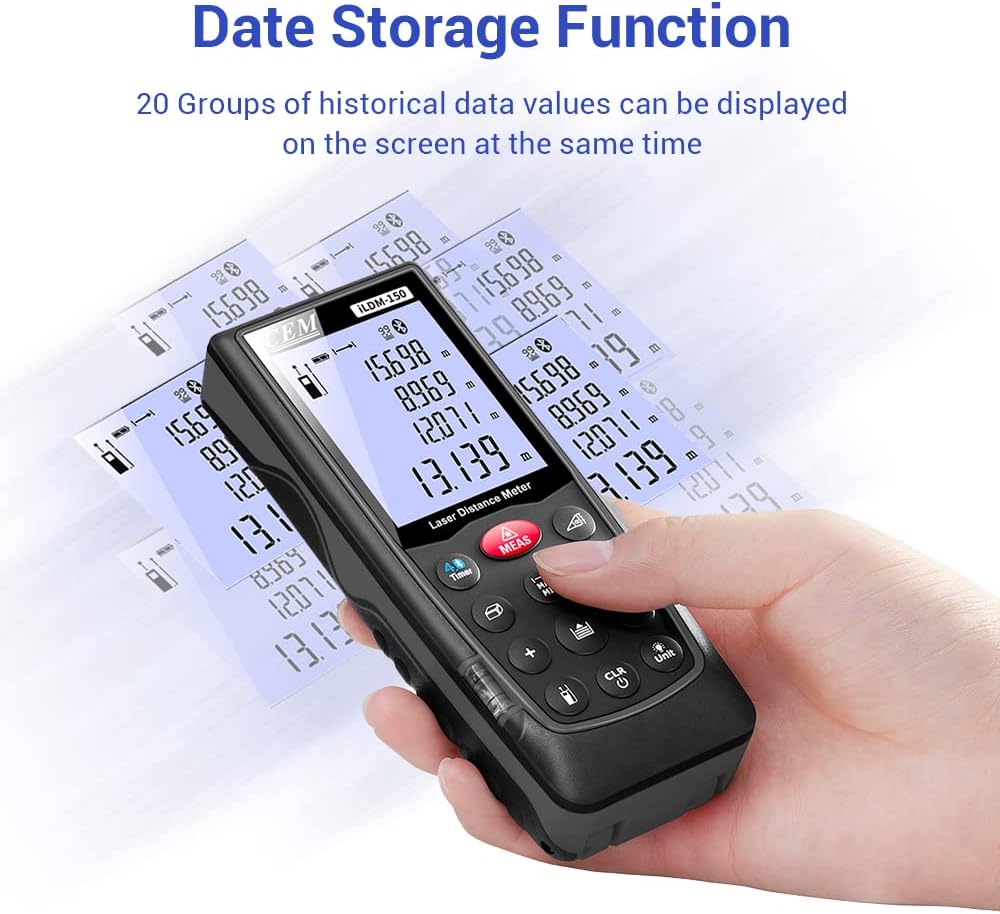
Figure 6.3: On-device data storage and display.
7. Поддръжка и грижа
Proper maintenance ensures the longevity and accuracy of your ILDM-150.
- Почистване: Използвайте мек, damp cloth to clean the device. Do not use abrasive cleaners or solvents. Pay special attention to the laser lens, cleaning it gently with a lens cloth if necessary.
- Съхранение: Съхранявайте устройството в преносимата му чанта на хладно и сухо място, когато не го използвате. Избягвайте екстремни температури и пряка слънчева светлина.
- Грижа за батерията: Извадете батериите, ако устройството няма да се използва за продължителен период от време, за да предотвратите протичане.
- Защита от удар: Въпреки че е издръжливо, избягвайте изпускането на устройството или подлагането му на силни удари.

Figure 7.1: The ILDM-150 features IP54 water and dust protection.
8. Отстраняване на проблеми
If you encounter issues with your CEM ILDM-150, refer to the following table for common problems and solutions:
| проблем | Възможна причина | Решение |
|---|---|---|
| Устройството не се включва. | Low or dead batteries; Incorrect battery installation. | Replace batteries; Ensure correct polarity. |
| Неточни измервания. | Laser lens dirty; Unstable measurement surface; Device not held steady; Measurement taken over reflective or transparent surfaces. | Clean laser lens; Ensure stable placement; Use a target plate for difficult surfaces. |
| Bluetooth връзката е неуспешна. | Bluetooth off on smartphone; Device out of range; App not running. | Enable Bluetooth; Ensure device is within 10m range; Restart Meterbox Pro app. |
| Дисплеят е тъмен или нечетлив. | Low battery; Extreme temperature. | Replace batteries; Operate within specified temperature range. |
| Устройството се изключва неочаквано. | Auto-off feature activated; Low battery. | This is normal after 150 seconds of inactivity; Replace batteries if low battery indicator is on. |
9. Технически спецификации
Detailed specifications for the CEM ILDM-150 Laser Distance Measure:
| Спецификация | Стойност |
|---|---|
| Марка | CEM |
| Име на модела | ILDM-150 |
| Номер на част | CEM ILDM-150 |
| Цвят | черно 1 |
| Обхват на измерване | 229 фута или 70 метра |
| точност | ±1/16 inch (1.5mm) |
| Лазерен клас | Клас II, <1 mW |
| Международна оценка за защита | IP54 (Waterproof, Dust-proof) |
| Материал | Double Injection Molding Machine, Plastic |
| Тегло на артикула | 203 грама |
| Тип батерия | Алкални (AAA) |
| Автоматично изключване | 150 секунди (приблизително) |
| Памет на данни | 99 групи |
| Bluetooth версия | 4.0 |
| Размери на артикула (Д x Ш x В) | 5.31 x 2.09 x 1.18 инча |
| UPC | 887327150034 |
| производител | Shenzhen Everbest Machinery Industry Co.,Ltd. |
| Дата на първа наличност | 9 юли 2018 г |

Figure 9.1: Dimensions of the ILDM-150.
10. Гаранция и поддръжка
10.1 Гаранционна информация
The CEM ILDM-150 Laser Distance Measure comes with a Гаранция 12 месеца from the date of purchase. This warranty covers defects in materials and workmanship under normal use. It does not cover damage caused by misuse, accidents, unauthorized modifications, or improper maintenance.
10.2 Поддръжка на клиенти
For technical assistance, warranty claims, or further inquiries, please contact CEM customer support through their official website or the contact information provided with your purchase documentation. Please have your model number (ILDM-150) and purchase date ready when contacting support.