
Phezer P15
Ръководство на потребителя за ръчен мастиленоструен принтер Phezer P15
Модел: P15
1. Въведение
This manual provides detailed instructions for the safe and efficient operation of your Phezer P15 Handheld Inkjet Printer. The P15 is a versatile, portable inkjet printer designed for marking various surfaces with text, numbers, QR codes, barcodes, production dates, times, and logos. It features a 4.3-inch LCD touch screen and an independent operating system, eliminating the need for external apps or computers.

The Phezer P15 Handheld Inkjet Printer with its intuitive 4.3-inch touch screen interface.
2. Съдържание на пакета
Before starting, please verify that all items are present in your package.
- Phezer P15 Handheld Inkjet Printer (main unit)
- Ръководство за потребителя
- Зарядно устройство
- USB Driver Touch Pen
- Литиева батерия
- Поддържаща плоча
- (Note: Ink cartridge is NOT included and must be purchased separately.)

Included components in the Phezer P15 package.
3. Настройка
- Заредете батерията: Insert the provided lithium battery into the printer. Connect the charger to the printer and a power outlet to ensure the battery is fully charged before first use.
- Инсталиране на касета с мастило: Open the ink cartridge compartment. Carefully insert a compatible ink cartridge (not included) into the designated slot until it clicks into place. Ensure the nozzle is clean and free from protective covers.
- Включване: Press and hold the power button until the screen illuminates and the system starts.
- Screen Calibration (if needed): If the touch screen is unresponsive or inaccurate, perform a calibration. Turn off the printer, then press and hold the screen with the touch pen while turning the printer back on. Follow the on-screen prompts to tap the calibration points (Top Left -> Top Right -> Bottom Right -> Bottom Left -> Middle).
Video demonstrating how to recalibrate the screen of the Phezer Inkjet Printer.
4. Операция
4.1. Creating and Editing Print Content
The P15 printer allows direct input and editing of content via its 4.3-inch LCD touch screen.
- Въвеждане на текст: Използвайте екранната клавиатура, за да въведете текст.
- Content Types: The printer supports various content types including text, numbers, QR codes, barcodes, production dates, times, and custom logos.
- Корекции: Modify font, size, spacing, rotation, and style directly on the device.
- Спестяване Files: Save your created print jobs for future use.

The Phezer P15 supports printing various content types, including dates, fonts, logos, serial numbers, QR codes, and barcodes.
4.2. Printing on Various Surfaces
The P15 is designed for printing on a wide range of materials.
- Supported Surfaces: Print on paper, boards, carton, stone, pipe, cable, metal, glass, plastic, and cloth.
- Printing Angle: Supports 360-degree all-round printing.
- Print Height & Length: Adjustable print height from 2mm to 12.7mm, with unlimited print length.
- Using the Support Plate: For stable and precise printing on smaller or irregularly shaped objects, utilize the included support plate. Place the object within the plate's guides and move the printer along the surface.

The Phezer P15 printer offers wide application across various materials.

The printer supports 360-degree all-round coding for versatile application.

Utilizing the fixed positioning plate for consistent printing results.
5. Поддръжка
- Ink Cartridge Protection: When the ink cartridge is not in use, always cover it with its protective cap to prevent drying and clogging.
- Почистване на дюзите: If you experience blurry printing, missing lines, or whitelines, gently wipe the ink cartridge nozzle with a soft tissue or soft cloth. Do not use harsh chemicals or abrasive materials.
- Грижа за екрана: Keep the touch screen clean. Use the provided touch pen for interaction to avoid scratches or damage.

Important maintenance tips for your Phezer P15 printer.
6. Отстраняване на проблеми
- Сензорен екран, който не реагира: If the touch screen becomes insensitive or unresponsive, turn off the printer. Press and hold the screen with the touch pen, then turn the printer back on. Start the touchscreen calibration process as described in Section 3.
- Poor Print Quality (Blurry, Missing Lines, Whitelines): This often indicates a clogged or dirty nozzle. Gently wipe the ink cartridge nozzle with a soft, lint-free cloth. Ensure the ink cartridge is properly seated.
- Принтерът не се включва: Check if the battery is properly inserted and fully charged. Connect the printer to the charger to confirm it's receiving power.
7. Спецификации
| Характеристика | Спецификация |
|---|---|
| Размери на продукта | 2.36" Д x 3.54" Ш x 8.86" В |
| Тип контролер | Android |
| Максимален размер на носителя | A9 |
| Печатни медии | Fabric, Labels |
| Макс. входящ капацитет на листа | 10 |
| Максимална скорост на копиране (черно-бяло) | 70 ppm |
| Максимална резолюция на цветен печат | 600 dpi |
| Максимална разделителна способност на черно-бял печат | 600 dpi |
| Двустранен печат | не |
| Max copy resolution color | 600 dpi |
| Максимална резолюция на копиране черно-бяло | 600 dpi |
| Дуплекс | Симплекс |
| Хардуерен интерфейс | USB |
| Цвят на мастилото | Black, White, Red, Yellow, Blue, Green, Invisible, UV |
| Допълнителни функции на принтера | Само печат |
| Контролен метод | App (Note: Printer operates independently, but some features might be managed via an app if available) |
| Брой процесори | 4 |
| Общо USB портове | 1 |
| Серия на моделите | P15 |
| Вид мастило за принтер | Water-based, Solvent-based |
| Тегло на артикула | 1.19 паунда (0.54 килограма) |
| Номер на модела на артикула | P15-Plus-NOINK |
| Батерии | Необходими са 1 9V батерии. (включени) |
| производител | Фезер |
| Марка | Фезер |
| Технология за свързване | USB |
| Печатна технология | Мастиленоструен |
| Специална функция | Internal Memory, Lightweight, Portable, Touch Screen |
| Цвят | черен |
| Име на модела | P15-Plus-NOINK |
| Изход на принтер | Едноцветен |
| Максимална скорост на печат (цветен) | 70 ppm |
| Максимална скорост на печат, монохромен | 70 ppm |
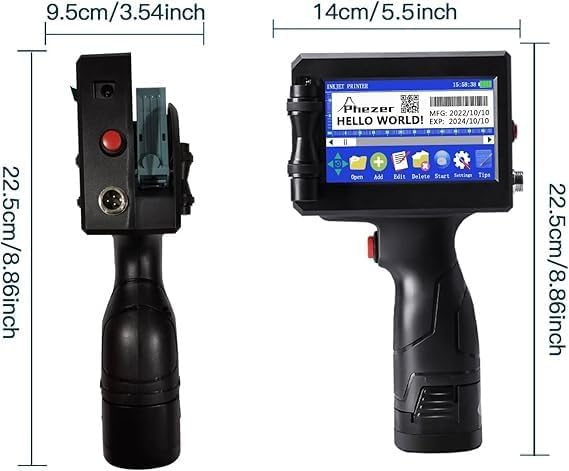
Physical dimensions of the Phezer P15 printer.
8. Гаранция и поддръжка
For warranty information, please refer to the documentation included with your purchase or contact Phezer customer support.
Свързване с поддръжката:
If you require assistance or have questions regarding your Phezer P15 printer, you can contact the seller directly through the Amazon platform.
- Visit the product page on Amazon.
- Locate the "Sold by" section, usually near the "Add to Cart" button.
- Click on the seller's name, "Phezer Coding and Marking Solution".
- On the seller's page, you will find an option to "Ask a question" or contact them directly.

Guide on how to contact Phezer support through Amazon.
You can also visit the official Phezer webсайт за повече информация: www.phezer.com
Ask a question about this manual
Ask about setup, troubleshooting, compatibility, parts, safety, or missing instructions. Manuals+ will review the question and use this page’s manual context to help answer it.