
Miops Miops
Miops Smart Digital Camera Trigger User Manual
Model: Miops
Въведение
The Miops Smart Digital Camera Trigger is an advanced device designed to expand the capabilities of your DSLR or mirrorless camera. It offers various triggering modes, including lightning, sound, laser, and timelapse, allowing photographers to capture unique moments with precision. This manual provides detailed instructions for setup, operation, and maintenance to ensure optimal performance of your Miops device.
Информация за безопасност
- Не излагайте устройството на вода или прекомерна влага.
- Избягвайте екстремни температури.
- Не се опитвайте сами да разглобявате или ремонтирате устройството. Обърнете се към квалифициран сервизен персонал.
- Да се пази от деца.
- Use only specified charging cables and power sources.
Съдържание на пакета
Проверете дали всички елементи са налични в пакета:
- Miops Smart Digital Camera Trigger device
- USB кабел за зареждане
- Camera connection cable (specific to your camera model, may be sold separately)
- Ръководство за бърз старт

Фигура 1: Miops Smart Digital Camera Trigger product box, showing the device and key features.
Продуктът е свършилview
The Miops Smart Trigger features a compact design with an LCD screen and intuitive controls. It connects wirelessly to your smartphone via Bluetooth for advanced control and mode selection.

Фигура 2: The Miops Smart Digital Camera Trigger device shown alongside a DSLR camera, illustrating its compact size and purpose.
Настройка
1. Зареждане на устройството
Before first use, fully charge your Miops device using the provided USB cable. Connect the cable to the device's charging port and a standard USB power adapter (not included) or a computer USB port. The charging indicator will show the charging status.
2. Свързване с вашата камера
Connect the Miops device to your camera's remote port using the appropriate camera connection cable. Ensure the cable is securely plugged into both the Miops unit and your camera.
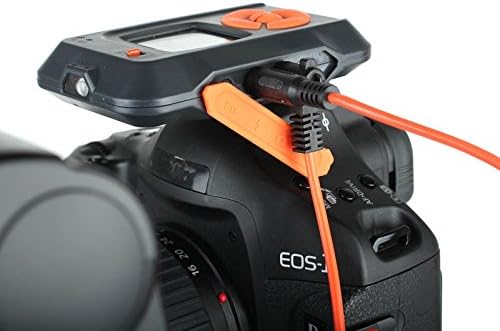
Фигура 3: The Miops device connected to a camera's remote port using a dedicated cable, ready for operation.
3. Инсталиране и сдвояване на приложение
- Download the Miops app from your smartphone's app store (iOS or Android).
- Turn on the Miops device.
- Активирайте Bluetooth на вашия смартфон.
- Open the Miops app and follow the on-screen instructions to pair with your device. The app will search for available Miops devices.
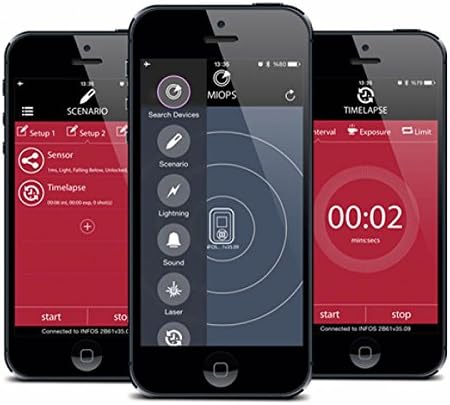
Фигура 4: Screenshots of the Miops smartphone application interface, demonstrating its intuitive design for controlling the trigger.
Режими на работа
The Miops Smart Trigger offers various modes for different photographic scenarios, controllable via the mobile app.
Светкавичен режим
This mode is designed to capture lightning strikes. The device detects sudden changes in light and triggers the camera instantly. Adjust sensitivity settings in the app for optimal performance.

Фигура 5: Бившample photograph captured using the Miops Smart Trigger's lightning mode, showing multiple lightning bolts over a city.
Режим на звука
The sound mode triggers the camera when a sound above a set threshold is detected. Ideal for capturing breaking objects, balloons popping, or other sound-activated events.
Лазерен режим
Utilizes a laser beam to detect movement. When the laser beam is broken, the camera is triggered. Useful for wildlife photography or capturing fast-moving subjects.
Timelapse Mode
Allows you to set intervals and exposure times for creating stunning timelapse sequences. Configure the number of shots, interval, and exposure duration directly from the app.

Фигура 6: The Miops device mounted on a camera, demonstrating its use in capturing high-speed events, such as shattering glass.

Фигура 7: A high-speed photograph illustrating the Miops trigger's capability to capture precise moments, such as an egg breaking upon impact.
Поддръжка
- Почистване: Използвайте мека, суха кърпа за почистване на устройството. Не използвайте течни почистващи препарати или разтворители.
- Съхранение: Съхранявайте устройството на хладно и сухо място, далеч от пряка слънчева светлина и екстремни температури.
- Батерия: For long-term storage, ensure the battery is partially charged (around 50%) to preserve its lifespan.
Отстраняване на неизправности
| проблем | Възможна причина | Решение |
|---|---|---|
| Устройството не се включва. | Ниска батерия. | Заредете устройството напълно. |
| Не може да се сдвои със смартфон. | Bluetooth is off; device not in pairing mode; interference. | Ensure Bluetooth is on; restart both devices; try pairing in a different location. |
| Камерата не се задейства. | Incorrect cable connection; camera settings; trigger sensitivity. | Check cable connection; ensure camera is in remote trigger mode; adjust sensitivity in the app. |
Спецификации
| Характеристика | детайл |
|---|---|
| Марка | Miops |
| Име на модела | Miops |
| Технология за свързване | Bluetooth |
| Съвместими устройства | Камера |
| Специални функции | Digital display, Rechargeable |
| Максимален обхват | 10 метра |
| Тип батерия | Необходима е 1 литиево-йонна батерия |
Гаранция и поддръжка
For warranty information and technical support, please refer to the official Miops webсайта или се свържете с отдела за обслужване на клиенти. Запазете доказателството си за покупка за гаранционни рекламации.
производител: Miops