
Въведение
This manual provides instructions for the proper use and care of your OM SYSTEM OLYMPUS Stylus 120 35mm Camera. Please read this manual thoroughly before using the camera to ensure optimal performance and longevity.

Фигура 1: Отпред view of the OM SYSTEM OLYMPUS Stylus 120 camera, showing the lens, flash, and viewтърсач.
Настройка
1. Инсталиране на батерията
The Stylus 120 requires one Lithium Ion battery. To install:
- Намерете капака на отделението за батерии в долната част на камерата.
- Плъзнете ключалката на капака, за да отворите отделението.
- Поставете литиево-йонната батерия според индикаторите за полярност (+/-) вътре в отделението.
- Затворете плътно капака на отделението за батерии, докато се щракне.
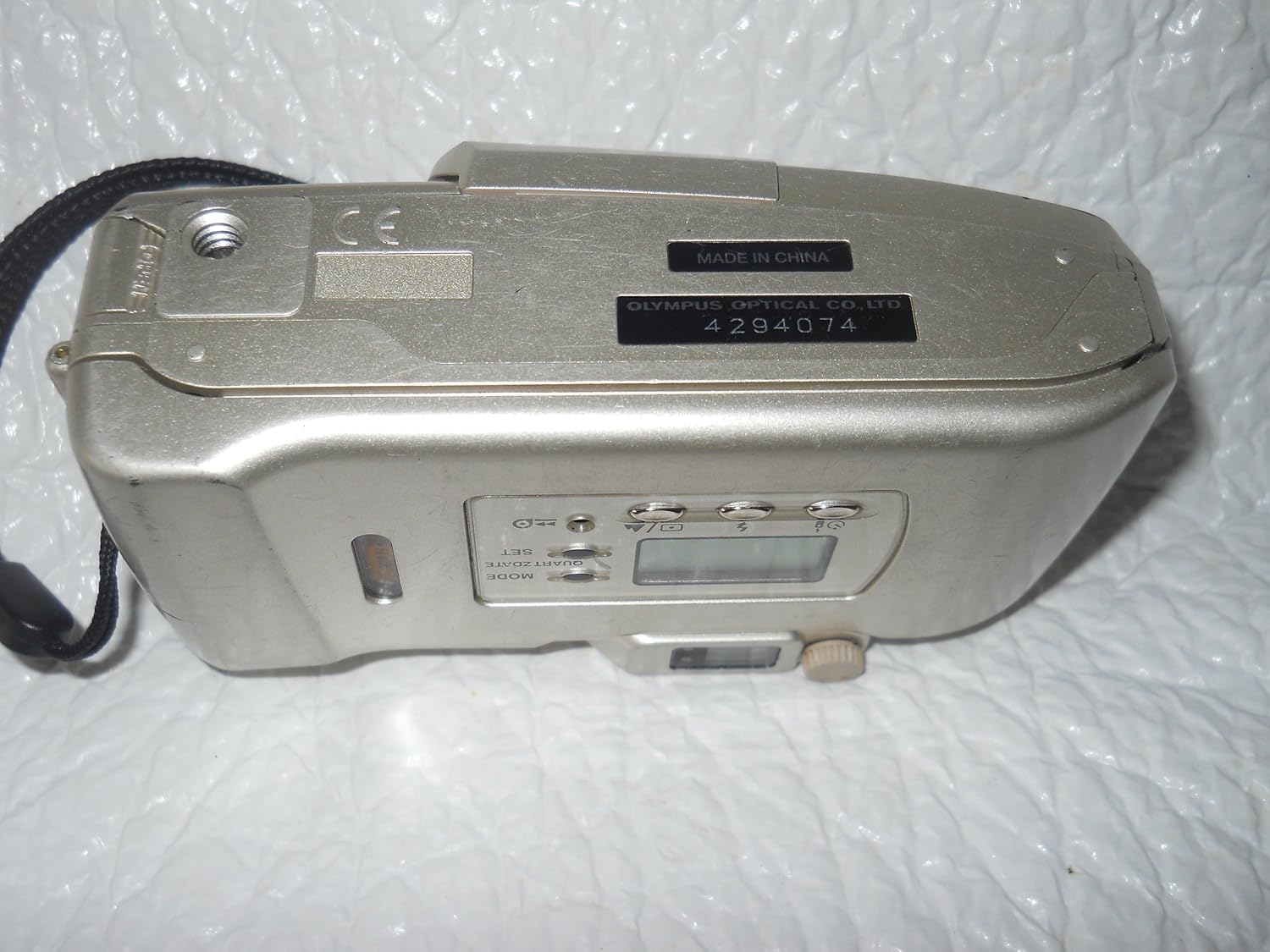
Фигура 2: Отдолу view of the camera, indicating the battery and film compartment area.
2. Зареждане на филм
The camera features automatic film loading. To load a 35mm film roll:
- Open the camera back cover by sliding the release latch.
- Поставете касетата с филм в камерата за филм.
- Extend the film leader to the orange mark.
- Close the camera back cover firmly. The camera will automatically advance the film to the first frame.
3. Закрепване на каишката на камерата
Thread the included camera strap through the strap eyelet located on the side of the camera. Secure the strap to prevent accidental drops.
4. Настройка на дата и час
The camera includes a quartz date/time imprint function. Refer to the display on the back of the camera:
- Натиснете РЕЖИМ button to cycle through date/time display options.
- Използвайте НАБОР бутон за регулиране на стойностите.

Фигура 3: Задна част view of the camera, showing the LCD display and control buttons for mode and settings.
Работа с камерата
1. Включване/изключване
To power on the camera, slide the lens barrier open. To power off, slide the lens barrier closed.
2. Функция за мащабиране
The camera features a 38-120mm zoom lens. Use the zoom lever (marked 'W' for Wide and 'T' for Telephoto) located on the top of the camera to adjust the focal length.
- Slide towards 'T' to zoom in (telephoto).
- Slide towards 'W' to zoom out (wide-angle).

Фигура 4: Страна view of the camera with the zoom lens extended, showing the 'W' and 'T' zoom controls.
3. Система за автофокус
The Stylus 120 utilizes an 11-point multi-wide autofocus system. This system automatically detects and focuses on subjects, even if they are off-center. To focus, gently press the shutter button halfway down. The focus indicator in the viewвизьорът ще потвърди фокуса.
4. Режими на светкавица
The camera features a 6-mode variable power flash with red-eye reduction and auto color balancing. Use the flash mode button (often indicated by a lightning bolt icon) to cycle through available modes:
- Автоматична светкавица: Flash fires automatically in low light.
- Намаляване на ефекта на червените очи: Задейства предварителна светкавица за намаляване на ефекта на червените очи.
- Запълваща светкавица: Светкавицата се задейства независимо от околната светлина.
- Светкавицата е изключена: Светкавицата е деактивирана.
- Other modes may include Night Scene or Slow Sync.
5. Правене на снимка
- Включете камерата.
- Кадрирайте обекта си, използвайки viewтърсач.
- Adjust zoom as desired.
- Press the shutter button halfway to activate autofocus and exposure.
- Press the shutter button fully to take the picture. The film will automatically advance to the next frame.
6. Самоснимачка
To use the electronic self-timer, press the self-timer button (usually indicated by a clock icon). The self-timer lamp will blink, and the shutter will release after a set delay (typically 10 seconds).
7. Превъртане на филма назад
When the film roll is complete, the camera will automatically rewind the film back into the cartridge. You can also manually rewind the film by pressing the film rewind button (if available, consult the camera's specific markings).
Поддръжка и грижа
1. Почистване на камерата
- Използвайте мека кърпа без власинки, за да почистите корпуса на фотоапарата.
- For the lens, use a lens brush or a specialized lens cleaning cloth and solution. Avoid touching the lens surface with your fingers.
- Do not use organic solvents or strong chemical cleaners.
2. All-Weather Design
The Stylus 120 features an all-weather, splash-proof design, offering protection against light rain or splashes. However, it is not designed for underwater use or submersion. Avoid exposing the camera to heavy rain, sand, or extreme temperatures.
Отстраняване на неизправности
1. Camera Shake Indicator
The camera is equipped with an innovative camera shake indicator. If this indicator illuminates, it suggests that camera movement may cause blur. To prevent blurry images:
- Hold the camera more steadily.
- Use a tripod if possible.
- In low light, the camera may automatically select a faster shutter speed to compensate.

Фигура 5: Страна view highlighting the area where the camera shake indicator might be located.
2. Често срещани проблеми
- Камерата не се включва: Проверете инсталирането на батерията и се уверете, че е достатъчно заредена.
- Филмът не се движи напред: Ensure film is loaded correctly and the back cover is securely closed.
- Светкавицата не се задейства: Проверете настройките на режима на светкавицата. Уверете се, че светкавицата не е настроена на „Светкавица изключена“.
Спецификации
| Характеристика | детайл |
|---|---|
| Име на модела | Олимпус стилус 120 |
| Обектив | 38-120mm вариообектив |
| Тип филмов формат | 35 мм |
| Система за автофокус | 11-point Multi-Wide Autofocus |
| Светкавица | 6-mode Variable Power Flash with Red-Eye Reduction and Auto Color Balancing |
| Специални функции | All-Weather (Splash-proof), Compact Design, Camera Shake Indicator, Quartz Date/Time Imprint |
| Източник на захранване | 1 литиево-йонна батерия |
| Размери (Д x Ш x В) | 1.6 x 4.6 x 2.4 инча |
| Тегло на артикула | 8 унции |
| Включени компоненти | Camera Body & Lens & Accessories (Strap) |