
1. паview
The Philips TAZ2200 is a versatile portable sound machine designed for enjoying various audio formats. It features a top-loading CD player, a front-loading cassette player, FM radio, Bluetooth 6.0 connectivity, USB playback, and a 3.5mm audio input. Equipped with dynamic bass boost and 6W stereo speakers, it delivers rich sound. The unit can be powered by AC mains or batteries and includes a carrying handle for portability.
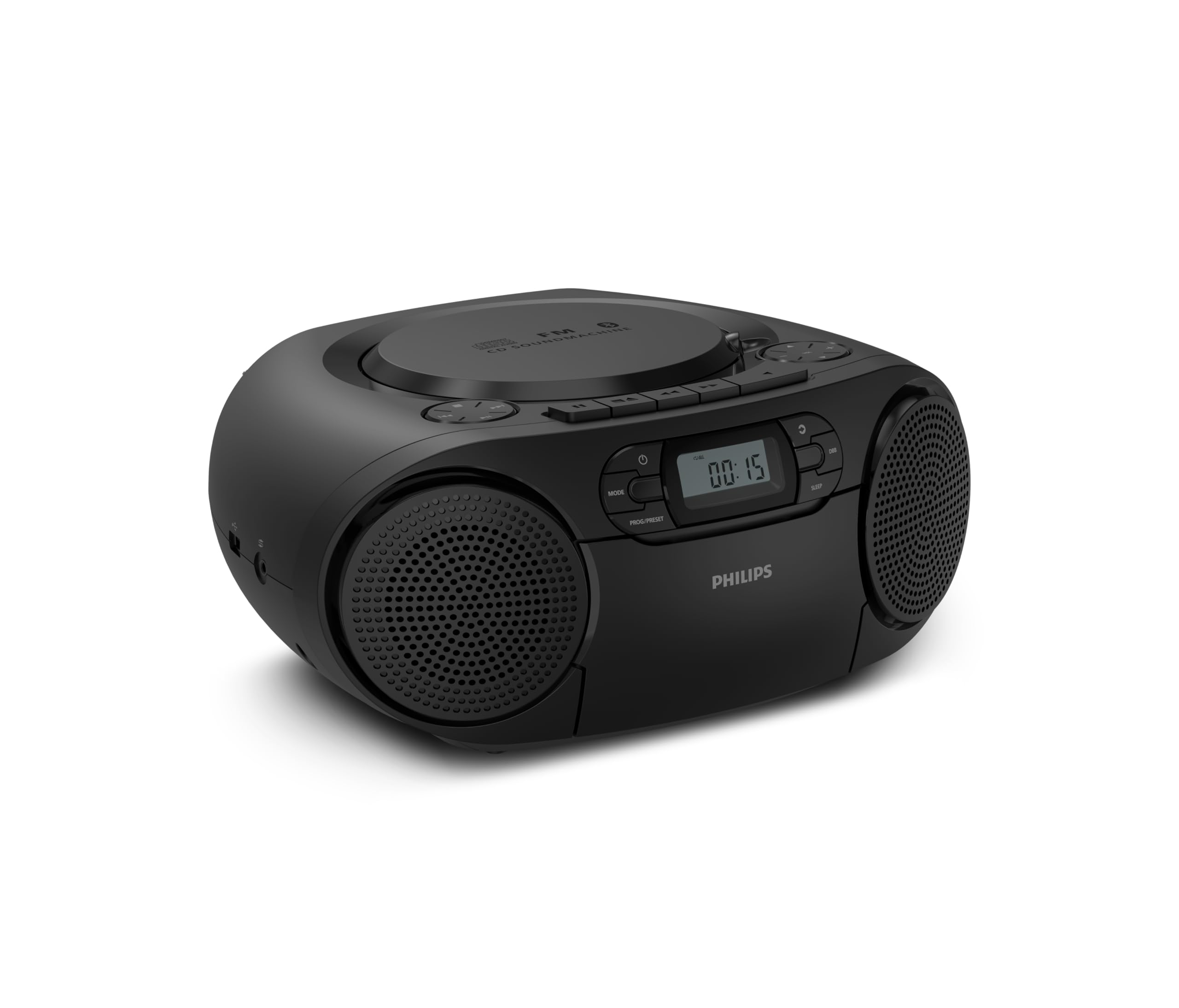
Фронт view of the Philips TAZ2200 CD Soundmachine, showing the main display and control buttons.
2. Інфармацыя па бяспецы
Please read these safety instructions carefully before using your device and keep them for future reference. Incorrect use may result in hazards.
- Крыніца харчавання: Выкарыстоўвайце толькі пазначаны адаптар сілкавання або батарэйкі. Пераканайцеся, што гучнасцьtagе адпавядае патрабаванням агрэгата.
- Вада і вільгаць: Не падвяргайце прыладу ўздзеянню дажджу, вільгаці, кропель або пырскаў. Не стаўце на прыладу прадметы, напоўненыя вадкасцю, такія як вазы.
- Вентыляцыя: Ensure adequate ventilation. Do not block any ventilation openings. Maintain a minimum distance around the unit for sufficient ventilation.
- Цяпло: Не размяшчайце прыладу побач з крыніцамі цяпла, такімі як радыятары, абагравальнікі, пліты або іншыя прыборы (у тым ліку ampLifiers), якія вырабляюць цяпло.
- батарэі: Follow correct polarity when inserting batteries. Do not mix old and new batteries, or different types of batteries. Remove batteries if the unit is not used for a long period.
- Уборка: Перад чысткай адключыце прыладу ад электрычнай разеткі. Выкарыстоўвайце мяккую сухую тканіну. Не выкарыстоўвайце вадкія або аэразольныя ачышчальнікі.
- Абслугоўванне: Не спрабуйце самастойна абслугоўваць гэты прадукт. Звярніцеся да ўсіх абслугоўванняў кваліфікаванага абслуговага персаналу.
3. Што ў скрынцы
Пасля распакавання пераканайцеся, што ўсе пералічаныя ніжэй прадметы наяўныя:
- Philips TAZ2200 CD Soundmachine
- Сілавы кабель
- Кароткае кіраўніцтва
- Гарантыйны буклет
- Пашпарт бяспекі
4. Элементы кіравання і сувязі
Элементы кіравання на пярэдняй панэлі
The front panel features the main display, power button, mode selection, program/preset buttons, and dynamic bass boost (DBB) control. Playback controls for CD and USB are also located here.

Падрабязны пярэдні край view showing the display, power, mode, program/preset, and DBB buttons.
Бакавыя і заднія падключэнні
The side of the unit provides a USB port for digital audio playback and a 3.5mm audio input jack for connecting external devices.

Збоку view illustrating the USB port and Audio Input jack.
The top of the unit houses the CD compartment and additional playback controls, while the rear features the AC power input and the FM antenna.

Топ view showing the CD compartment and associated controls.

Тыл view displaying the AC power input and the telescopic FM antenna.
5. Настройка
5.1 Крыніца харчавання
Пераменнае сілкаванне
- Пераканайцеся, што прылада выключана.
- Connect the supplied power cable to the AC IN socket on the rear of the sound machine.
- Plug the other end of the power cable into a wall power outlet.
Магутнасць батарэі
For portable use, the unit can operate on 6 x C-type batteries (not included).
- Адкрыйце вечка адсека для батарэй, размешчаную ў ніжняй частцы прыбора.
- Insert 6 C-type batteries, ensuring correct polarity (+/-) as indicated inside the compartment.
- Надзейна зачыніце крышку батарэйнага адсека.
5.2 Рэгуляванне антэны
For optimal FM radio reception, fully extend the telescopic antenna located at the rear of the unit. Adjust its position and angle to achieve the clearest signal.
6. Інструкцыя па эксплуатацыі
6.1 Агульныя дзеянні
- Уключэнне/выключэнне харчавання: Націсніце УЛАДА для ўключэння або выключэння прылады.
- Рэгулятар гучнасці: Выкарыстоўвайце ГУЧНАСЦЬ + or ТОМ - кнопкі для рэгулявання ўзроўню гучнасці.
- Дынамічнае ўзмацненне басоў (DBB): Націсніце DBB button to activate or deactivate the dynamic bass boost feature for enhanced bass sound.
- Выбар рэжыму: Націсніце РЭЖЫМ button repeatedly to switch between CD, Cassette, FM Radio, Bluetooth, USB, and Audio Input modes.
6.2 Прайграванне кампакт-дыскаў
- Адкрыйце вечка адсека для кампакт-дыскаў у верхняй частцы прылады.
- Place a CD (CD, CD-R, or CD-RW) with the label side facing up onto the spindle.
- Зачыніце вечка аддзялення для CD.
- Націсніце РЭЖЫМ , каб выбраць рэжым кампакт-дыска.
- Націсніце ПРАЙГРАЦЬ/Паўза кнопку, каб пачаць прайграванне.
- Выкарыстоўвайце ПРАПУСЦІЦЬ кнопкі (|< or >>|) для прапускання трэкаў.
- Націсніце і ўтрымлівайце |< or >>| to search within a track.
- Націсніце СТОП кнопку, каб спыніць прайграванне.
6.3 Прайграванне касеты
- Open the cassette compartment door on the front of the unit.
- Устаўце касету адкрытым краем уверх.
- Зачыніце дзверцы адсека для касеты.
- Націсніце РЭЖЫМ кнопку, каб выбраць рэжым касеты.
- Націсніце ГУЛЬНЯ кнопку, каб пачаць прайграванне.
- Выкарыстоўвайце ХУТКАЯ ПЕРАМАДКА or НАЗАД кнопкі для хуткага перамотвання стужкі наперад або назад.
- Націсніце СТОП кнопку, каб спыніць прайграванне.
6.4 FM -радыё
- Націсніце РЭЖЫМ кнопку, каб выбраць рэжым FM-радыё.
- Аўтаматычнае сканаванне: Націсніце і ўтрымлівайце PROG/PRESET кнопку для аўтаматычнага сканавання і захавання даступных FM-станцый.
- Ручная настройка: Націсніце ЦЮНІНГ кнопкі (|< or >>|) to manually tune to a desired frequency.
- Захаванне налад: After tuning to a station, press PROG/PRESET once, then use |< or >>| каб выбраць нумар зададзеных налад, і націсніце PROG/PRESET яшчэ раз для пацверджання.
- Успамінаючы прасеты: У рэжыме FM націсніце PROG/PRESET repeatedly to cycle through saved preset stations.
6.5 Прайграванне праз Bluetooth
- Націсніце РЭЖЫМ Націсніце кнопку, каб выбраць рэжым Bluetooth. На дысплеі з'явіцца надпіс «BT» і ён будзе міргаць, што паказвае на рэжым спалучэння.
- На прыладзе з падтрымкай Bluetooth (смартфоне, планшэце) уключыце Bluetooth і знайдзіце даступныя прылады.
- Select "Philips TAZ2200" from the list of devices.
- Once paired, the unit will emit a confirmation sound, and 'BT' will stop flashing.
- Start playing audio on your connected device. The sound will be streamed to the sound machine.
6.6 Прайграванне з USB
- Insert a USB flash drive into the USB port on the side of the unit.
- Націсніце РЭЖЫМ кнопка для выбару рэжыму USB.
- Прылада аўтаматычна выявіць і пачне прайграваць сумяшчальны аўдыёзапіс file(MP3, WAV, WMA).
- Выкарыстоўвайце элементы кіравання прайграваннем (ПРАЙГРАЦЬ/Паўза, ПРАПУСЦІЦЬ, СТОП) as you would for CD playback.
6.7 Audio Input (AUX)
- Connect one end of a 3.5mm audio cable (not included) to the AUDIO IN jack on the side of the sound machine.
- Connect the other end of the audio cable to the headphone jack or audio output of your external device (e.g., MP3 player, turntable).
- Націсніце РЭЖЫМ button to select Audio Input mode.
- Start playing audio on your external device. The sound will be played through the sound machine.
7. Тэхнічнае абслугоўванне
- Ачыстка прылады: Працярыце знешнія паверхні прылады мяккай, злёгку змочанай губкайamp тканіна. Не выкарыстоўвайце абразіўныя ачышчальнікі або растваральнікі.
- Сыход за CD-плэерам: Keep the CD compartment clean. If the lens is dirty, use a specialized CD lens cleaner. Avoid touching the lens.
- Сыход за касетным плэерам: Перыядычна чысціце галоўкі стужкі і прыціскныя ролікі ватным тампонам, злёгку працёртымampз ізапрапілавым спіртам.
- Замена батарэі: If using batteries, replace all 6 C-type batteries when the unit's performance diminishes or if the unit will not be used for an extended period.
- захоўванне: Калі прылада не выкарыстоўваецца, захоўвайце яе ў чыстым, сухім месцы, удалечыні ад прамых сонечных прамянёў і экстрэмальных тэмператур.
8. Выпраўленне непаладак
If you encounter any issues with your Philips TAZ2200, please refer to the table below for common problems and solutions.
| праблема | Магчымая прычына | Рашэнне |
|---|---|---|
| Няма ўлады | Сеткавы кабель не падключаны; батарэйкі разраджаныя або няправільна ўстаўленыя. | Праверце падключэнне да сеткі пераменнага току; заменіце батарэйкі або пераканайцеся ў правільнай палярнасці. |
| Няма гуку | Занадта нізкі гук; выбраны няправільны рэжым; падключаны навушнікі. | Increase volume; Select the correct source mode (CD, FM, BT, etc.); Disconnect headphones. |
| Кампакт-дыск не прайграваецца | CD inserted incorrectly; CD is dirty or scratched; CD format not supported. | Insert CD with label side up; Clean or replace CD; Ensure CD is CD-R/RW compatible. |
| Cassette not playing | Cassette inserted incorrectly; Tape is damaged. | Insert cassette correctly; Try a different cassette. |
| Дрэнны прыём FM | Антэна няправільна выцягнутая або размешчаная; слабы сігнал. | Цалкам высуньце і адрэгулюйце тэлескапічную антэну; паспрабуйце перанесці прыладу ў іншае месца. |
| Bluetooth не падключаецца | Unit not in pairing mode; Bluetooth device too far; Device already paired with another unit. | Ensure unit is in Bluetooth mode and flashing; Move device closer; Disconnect from other devices. |
| Праблемы з прайграваннем USB | USB-назапашвальнік няправільна ўстаўлены; несумяшчальны file фармат; USB-назапашвальнік пашкоджаны. | Зноў устаўце USB-назапашвальнік; пераканайцеся files are MP3, WAV, or WMA; Try a different USB drive. |
9. Тэхнічныя характарыстыкі
| Асаблівасць | Спецыфікацыя |
|---|---|
| Марка | ФІЛІПС |
| Нумар мадэлі | ТАЗ2200/10 |
| Тэхналогія падлучэння | Bluetooth 6.0, USB, Audio Input (3.5mm) |
| Тып дынаміка | Stereo (2 speakers) |
| Выходная магутнасць | 6 Вт (макс.) |
| Носьбіты, якія падтрымліваюцца | CD, CD-R, CD-RW, Cassette, USB (MP3, WAV, WMA) |
| Радыё цюнэр | Digital FM with 20 presets |
| Крыніца харчавання | AC (wired), 6 x C-type batteries (not included) |
| Памеры (ДхШхВ) | 24.5 х 28.5 х 12.5 см |
| Вага | 1.35 кілаграма |
| Колер | Серабро |
10. Гарантыя і падтрымка
10.1 Гарантыя на выраб
This Philips TAZ2200 CD Soundmachine comes with a Гарантыя 2 год з даты пакупкі. Калі ласка, захавайце пацвярджэнне пакупкі для прэтэнзій па гарантыі. Гарантыя распаўсюджваецца на вытворчыя дэфекты і няспраўнасці пры нармальных умовах выкарыстання.
10.2 Падтрымка кліентаў
For technical assistance, troubleshooting beyond this manual, or warranty service, please refer to the contact information provided in the warranty booklet included with your product. You can also visit the official Philips support website for your region for further assistance and FAQs.