
1. Прадукт скончыўсяview
The G-Shock Casio GD010 digital watch is engineered for durability and functionality, designed to withstand demanding conditions while providing essential timekeeping features. This timepiece incorporates bio-based resin components and a CORDURA re/cor band, reflecting a commitment to environmental considerations.
This manual provides detailed instructions for setting up, operating, maintaining, and troubleshooting your GD010 watch.
Асноўныя характарыстыкі
- Shock Resistant Construction: Designed to endure impacts and vibrations.
- Структура ахоўнага экрана з вугляроднага стрыжня: Enhances durability and protection for the internal module.
- Воданепранікальнасць на глыбіні 200 метраў: Suitable for swimming, snorkeling, and diving (non-SCUBA).
- Доўгі тэрмін службы батарэі: Approximately 10 years on a CR2025 battery.
- Bio-based Resin Components: Case and bezel made with environmentally conscious materials.
- CORDURA re/cor Band: Durable strap made from recycled PET plastic fiber.
- Лічбавай дысплей: Clear and easy-to-read time and function information.
- Некалькі функцый: Includes alarm, chronograph (stopwatch), and timer.

Image 1.1: The G-Shock GD010 watch, showcasing its core features including shock resistance, Carbon Core Guard structure, and a 10-year battery life.
2. Пачатак працы: Налада
Функцыі кнопак
Your GD010 watch features several buttons for navigation and function control. Familiarize yourself with their locations and primary roles.

Малюнак 2.1: Збоку view of the G-Shock GD010, illustrating the location of the control buttons.
- НАЛАДКА (уверсе злева): Выкарыстоўваецца для ўваходу і выхаду з рэжымаў налад, а таксама для пацверджання налад.
- РЭЖЫМ (унізе злева): Cycles through the watch's various modes (Timekeeping, Stopwatch, Timer, Alarm).
- REVERSE (Top Right): Used to decrease values or move backward through options during setting.
- FORWARD / START (Bottom Right): Used to increase values or move forward through options during setting. Also used to start/stop stopwatch or timer.
- LIGHT (Center Bottom): Уключае падсветку для падсветкі.
Пачатковая ўстаноўка часу і даты
- У рэжыме адліку часу націсніце і ўтрымлівайце НАЛАДЗІЦЬ кнопку, пакуль не пачне міргаць код горада, што паказвае рэжым наладкі.
- Выкарыстоўвайце ЗВАРОТ і НАПЕРАД buttons to select your desired Home City Code. This will automatically set the correct time zone.
- Націсніце РЭЖЫМ button to cycle through the settings: DST (Daylight Saving Time) → 12/24-hour format → Seconds → Hour → Minute → Year → Month → Day.
- For each setting, use the ЗВАРОТ і НАПЕРАД кнопкі для змены значэння.
- Пасля таго, як усе параметры будуць настроены, націсніце кнопку НАЛАДЗІЦЬ кнопку для выхаду з рэжыму налад.
3. Кіраванне гадзіннікам
The GD010 offers various modes for different functions. Press the РЭЖЫМ кнопку для пераключэння паміж імі.
Рэжым падліку часу
Гэта рэжым па змаўчанні, які адлюстроўвае бягучы час, дзень тыдня і дату.
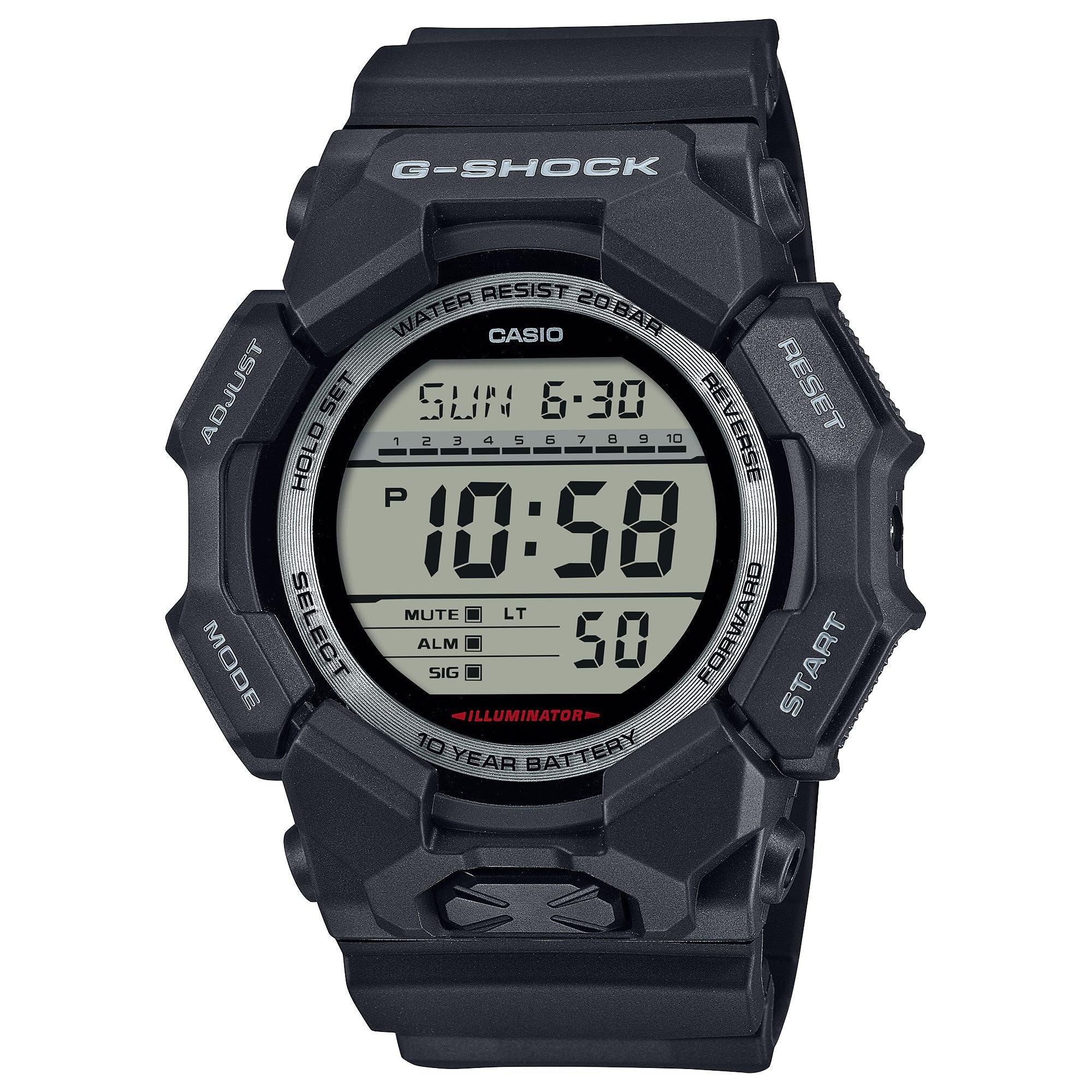
Image 3.1: The G-Shock GD010 watch face in Timekeeping Mode.
Выкарыстанне секундамера (хранографа)
- У рэжыме адліку часу націсніце кнопку РЭЖЫМ button until "STW" or "STOPWATCH" appears on the display.
- Націсніце FORWARD / START кнопку, каб запусціць секундамер.
- Націсніце FORWARD / START зноў націсніце кнопку, каб спыніць секундамер.
- Каб скінуць секундамер да нуля, націсніце кнопку ЗВАРОТ кнопку, пакуль секундамер спынены.
Ўстаноўка таймера зваротнага адліку
- У рэжыме адліку часу націсніце кнопку РЭЖЫМ button until "TMR" or "TIMER" appears.
- Націсніце і ўтрымлівайце НАЛАДЗІЦЬ button until the current timer setting starts to flash.
- Выкарыстоўвайце РЭЖЫМ кнопку, каб выбраць наладу гадзін або хвілін.
- Выкарыстоўвайце ЗВАРОТ і НАПЕРАД кнопкі, каб усталяваць патрэбны час адліку часу.
- Націсніце НАЛАДЗІЦЬ кнопку для выхаду з рэжыму налад.
- Націсніце FORWARD / START button to start the countdown. An alarm will sound when the timer reaches zero.
Функцыі сігналізацыі
- У рэжыме адліку часу націсніце кнопку РЭЖЫМ button until "ALM" or "ALARM" appears.
- Націсніце і ўтрымлівайце НАЛАДЗІЦЬ button until the alarm time starts to flash.
- Выкарыстоўвайце РЭЖЫМ кнопку, каб выбраць наладу гадзін або хвілін.
- Выкарыстоўвайце ЗВАРОТ і НАПЕРАД кнопкі, каб усталяваць патрэбны час будзільніка.
- Націсніце НАЛАДЗІЦЬ кнопку для выхаду з рэжыму налад.
- Каб уключыць/выключыць будзільнік, націсніце кнопку FORWARD / START button while in Alarm Mode (without holding ADJUST).
Кіраўніцтва па воданепранікальнасці
Your GD010 watch is rated for 200-meter water resistance. This means it is suitable for recreational diving (excluding saturation diving), swimming, snorkeling, and water sports.
- Do not operate buttons while the watch is submerged in water or wet.
- Avoid exposing the watch to hot water, steam, or extreme temperature changes, as this can compromise water resistance.
- Пасля кантакту з салёнай вадой старанна прамыйце гадзіннік прэснай вадой і вытрыце насуха.
4. Догляд і абслугоўванне
Агульны догляд
- Рэгулярна працірайце гадзіннік мяккай сухой тканінай, каб выдаліць бруд і вільгаць.
- Avoid exposing the watch to strong chemicals, solvents, or detergents, as these can damage the resin materials.
- Захоўвайце гадзіннік у прахалодным, сухім месцы, удалечыні ад прамых сонечных прамянёў і экстрэмальных тэмператур, калі ён не выкарыстоўваецца.
- The watch's resin components and band are designed for durability, but prolonged exposure to UV light may cause discoloration over time.
Замена батарэі
The GD010 watch is equipped with a CR2025 battery, providing an approximate battery life of 10 years. When the display becomes dim or functions become erratic, it may be time for a battery replacement.
Battery replacement should ideally be performed by a qualified watch technician to ensure proper sealing and maintain water resistance. Attempting to replace the battery yourself may void the warranty and compromise the watch's water resistance.
Уборка
To clean your watch, use a soft cloth dampened with mild soap and water. Gently wipe the case and band. For stubborn dirt, a soft brush can be used. Rinse thoroughly with fresh water and dry completely with a soft cloth.
5. Кіраўніцтва па ліквідацыі непаладак
If you encounter issues with your GD010 watch, refer to the following common problems and their solutions.
| праблема | Магчымая прычына | Рашэнне |
|---|---|---|
| Дысплей пусты або цьмяны. | Нізкі акумулятар. | Заменіце батарэйку (CR2025). Звярніцеся да прафесійнага гадзіннікавага майстра. |
| Час няправільны. | Incorrect time zone or manual setting error. | Зноў адрэгулюйце параметры часу і даты, як апісана ў раздзеле 2. |
| Кнопкі не рэагуюць. | Watch is wet, or internal module error. | Ensure the watch is dry. If the problem persists, a reset may be required (consult support), or professional service. |
| Сігналізацыя не гучыць. | Alarm is turned off or volume is too low (if adjustable). | Verify the alarm is set to ON in Alarm Mode. Check watch settings for alarm volume if applicable. |
If the problem persists after attempting these solutions, please contact G-Shock customer support for further assistance.
6. Тэхнічныя характарыстыкі прадукту
| Назва мадэлі | GD010 |
| Нумар мадэлі | ГД010-1 |
| Памер корпуса (Д× Ш× В) | 54.9 × 51.9 × 16.1 мм |
| Вага | 73 г (прыблізна 2.57 унцый) |
| Case and Bezel Material | Bio-based Carbon / Bio-based Resin |
| Тып матэрыялу раменьчыка | Resin (CORDURA re/cor) |
| Будаўніцтва | Shock Resistant, Carbon Core Guard structure |
| Воданепранікальнасць | Воданепранікальнасць 200 метраў |
| Электразабеспячэнне | CR2025 (1 Lithium Metal battery, included) |
| Прыблізны тэрмін службы батарэі | 10 гады |
| Крышталь | Мінеральнае шкло |
| Тып дысплея | Лічбавы |
| Тып руху | Японскі кварц |
| Дадатковыя магчымасці | Alarm, Chronograph, Timer |
| Тып зашпількі | Спражка |
| Колер паласы | Чорны |
| Колер цыферблата | Чорны |
7. Гарантыя і падтрымка кліентаў
Інфармацыя аб гарантыі
Your G-Shock GD010 watch comes with a Абмежаваная гарантыя. The terms and conditions of this warranty cover manufacturing defects under normal use. Please refer to the warranty card included with your purchase for specific details regarding coverage duration, exclusions, and how to make a claim. Keep your proof of purchase for warranty validation.
Зварот у службу падтрымкі кліентаў
For technical assistance, warranty service, or any other inquiries regarding your G-Shock GD010 watch, please contact G-Shock customer support.
- Visit the official G-Shock website for support contact information, FAQs, and service center locations.
- Have your watch model number (GD010-1) and proof of purchase ready when contacting support.