
1. Прадукт скончыўсяview
The ATK N9 Tri-Mode Gaming Headset is designed for gamers requiring flexible connectivity, clear audio, and reliable communication across multiple devices. It supports 3.5 mm wired, 2.4G wireless, and Bluetooth connections, allowing seamless switching between gaming consoles, PC, and mobile devices. Stereo-tuned dynamic drivers deliver balanced sound, enhancing in-game audio cues such as footsteps, gunfire, and environmental effects. The detachable noise-canceling microphone improves voice clarity for team communication, online gaming, and voice calls. Its over-ear design, with soft ear cushions and an adjustable headband, ensures a comfortable fit for extended gaming sessions. The headset is compatible with PS5, PS4, PC, Nintendo Switch, and mobile devices. For Xbox Series X|S, audio and microphone functions are supported via the 3.5 mm wired connection.

2. Змесціва ўпакоўкі
Праверце, ці ўсе пералічаныя ніжэй прадметы ўваходзяць у вашу ўпакоўку:
- ATK N9 Pro/White Gaming Headset
- Здымны мікрафон з шумапрыглушэннем
- Зарадны кабель USB-C
- Аўдыёкабель 3.5 мм
- 2.4G Wireless USB Adapter
- Кіраўніцтва карыстальніка (гэты дакумент)

3. Пачатковая налада
3.1. Зарадка гарнітуры
Before first use, fully charge the headset using the provided USB-C charging cable. Connect the USB-C end to the headset's charging port and the USB-A end to a compatible USB power source (e.g., PC, wall adapter). The LED indicator will show charging status.
3.2. Падключэнне мікрафона
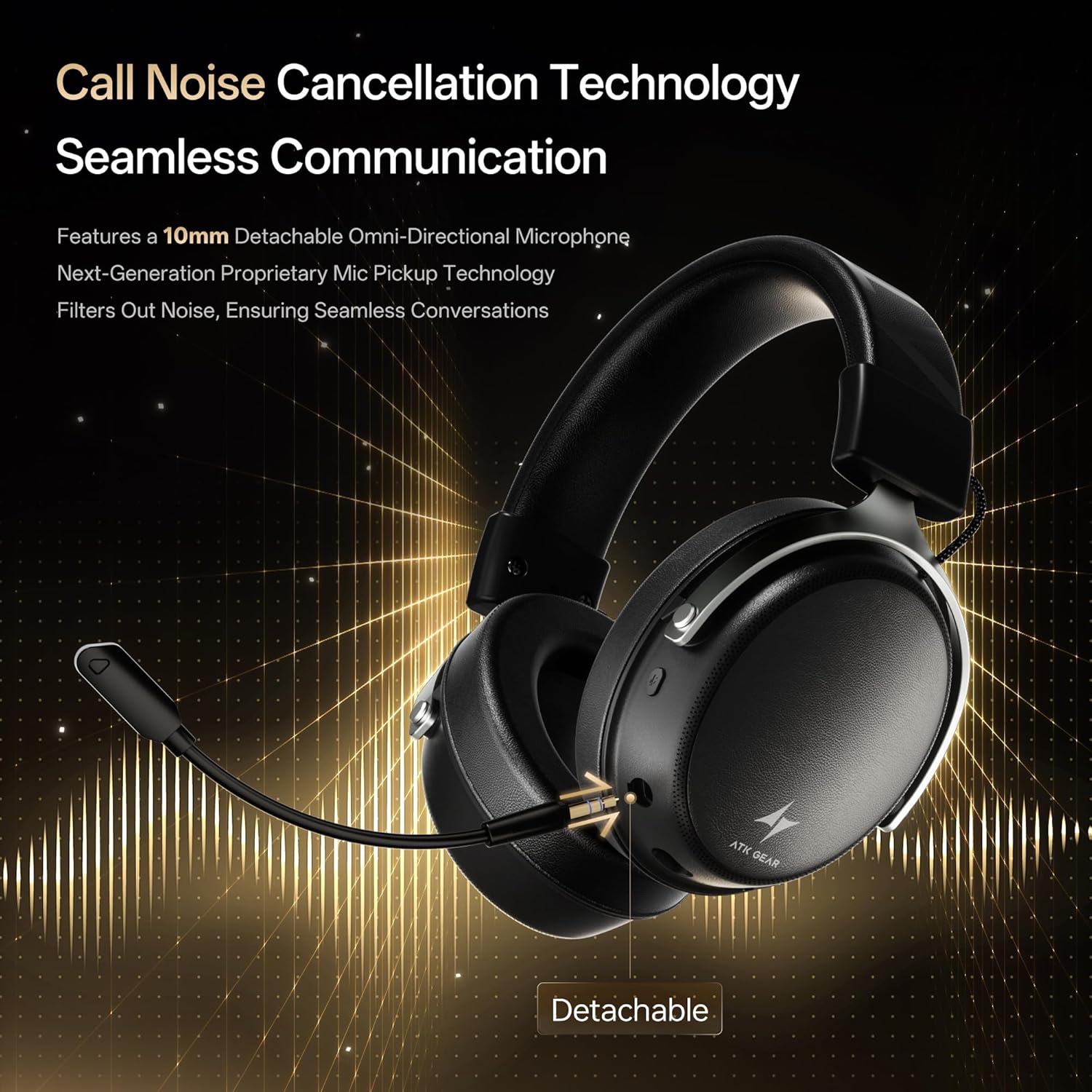
Insert the detachable boom microphone into the microphone port on the left earcup until it clicks into place. Ensure it is securely connected for optimal voice pickup.
3.3. Параметры падключэння
The ATK N9 Pro/White headset offers three connectivity modes:
- Бесправадны рэжым 2.4G: For PC, PS4, PS5, and Nintendo Switch (docked mode).
- Plug the 2.4G wireless USB adapter into an available USB port on your device.
- Уключыце гарнітуру.
- Switch the headset to 2.4G mode using the mode switch. The headset will automatically pair with the adapter.
- Adjust audio output settings on your device if necessary to select the headset.
- Рэжым Bluetooth: For mobile devices, PC, and Nintendo Switch (handheld mode).
- Power on the headset and switch to Bluetooth mode. The LED indicator will flash, indicating pairing mode.
- On your device, go to Bluetooth settings and select "ATK N9 Pro" from the list of available devices.
- Once connected, the LED indicator will show a steady light.
- Правадны рэжым 3.5 мм: For Xbox Series X|S, PS4, PS5, PC, Nintendo Switch, and mobile devices.
- Падключыце адзін канец аўдыёкабеля 3.5 мм да раздыма 3.5 мм на гарнітуры.
- Connect the other end to the 3.5mm audio port on your device (e.g., controller, PC audio jack).
- Гарнітура будзе працаваць у правадным рэжыме, абыходзячы бесправадныя функцыі.

4. Інструкцыя па эксплуатацыі
4.1. Кіраванне гарнітурай
The ATK N9 Pro/White headset features intuitive controls located on the earcups:
- Кнопка харчавання: Press and hold to power on/off. Short press for play/pause (in 2.4G/Bluetooth mode).
- Пераключальнік рэжымаў: Toggle between 2.4G wireless, Bluetooth, and wired modes.
- Кола павелічэння/памяншэння гучнасці: Павярніце, каб рэгуляваць гучнасць гуку.
- Кнопка адключэння мікрафона: Націсніце, каб адключыць/уключыць мікрафон.
- Spatial Audio Button: Press to activate/deactivate 3D Spatial Audio.
- Mic Monitoring Button: Press to enable/disable microphone monitoring (sidetone).
4.2. Выкарыстанне мікрафона
The detachable noise-canceling microphone is designed for clear communication. Position the microphone approximately 1-2 inches from your mouth for optimal voice pickup. Use the microphone mute button on the headset to quickly mute your voice when needed.
4.3. Рэгуляванне пасадкі
The headset features an adjustable headband and soft ear cushions for comfort. Extend or retract the headband to achieve a snug yet comfortable fit. The earcups are designed to fully enclose your ears for passive noise isolation and comfort during long gaming sessions.
5. Тэхнічныя характарыстыкі
| Асаблівасць | Спецыфікацыя |
|---|---|
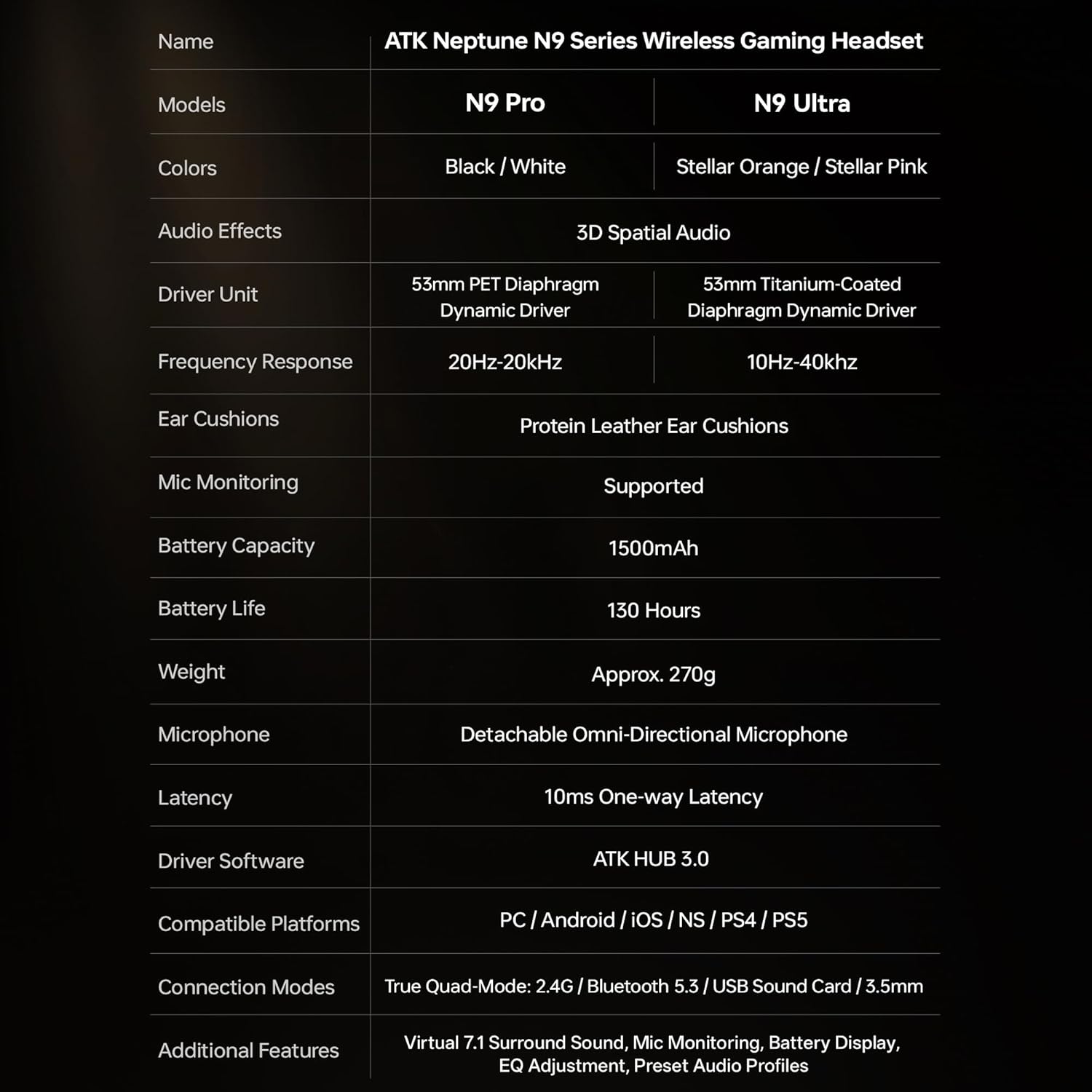
| Назва мадэлі | ATK N9 Pro |
| Сувязь | 3.5mm Wired, 2.4G Wireless, Bluetooth 5.3 |
| Тып драйвера | Дынамічны драйвер |
| Памер драйвера | 53 мм |
| Дыяпазон частот | 20 Гц - 20 000 Гц |
| Імпеданс | 64 Ом |
| Мікрафон | Detachable Noise-Canceling Omni-Directional |
| Ёмістасць батарэі | 1500 мАг |
| Тэрмін службы батарэі | Да 130 гадзін |
| Затрымка (2.4G) | 10 Milliseconds (one-way) |
| Вага | 270 грам |
| Размяшчэнне вушэй | Над вухам |
| Сумяшчальныя прылады | PS5, PS4, PC, Nintendo Switch, Mobile Devices, Xbox Series X|S (wired) |
| Дадатковыя магчымасці | 3D Spatial Audio, Mic Monitoring, Volume Control |

6. Догляд і абслугоўванне
- Уборка: Для чысткі гарнітуры выкарыстоўвайце мяккую сухую тканіну. Пазбягайце выкарыстання агрэсіўных хімічных рэчываў або абразіўных матэрыялаў.
- захоўванне: Захоўвайце гарнітуру ў прахалодным, сухім месцы, удалечыні ад прамых сонечных прамянёў і экстрэмальных тэмператур.
- Сыход за батарэяй: Каб падоўжыць тэрмін службы батарэі, пазбягайце частай поўнай разрадкі гарнітуры. Рэгулярна зараджайце яе, нават калі яна не выкарыстоўваецца працяглы час.
- Воданепранікальнасць: Гарнітура не воданепранікальная. Пазбягайце кантакту з вадкасцямі.
7. Выпраўленне непаладак
7.1. No Audio / Low Volume
- Ensure the headset is powered on and connected in the correct mode (2.4G, Bluetooth, or 3.5mm wired).
- Праверце кола рэгулявання гучнасці на гарнітуры і налады гучнасці вашай прылады.
- For wireless modes, ensure the headset is paired correctly and selected as the audio output device in your system settings.
- If using 3.5mm wired, ensure the cable is fully inserted into both the headset and the device.
7.2. Мікрафон не працуе
- Пераканайцеся, што мікрафон надзейна падключаны да гарнітуры.
- Праверце, ці націснута кнопка адключэння мікрафона на гарнітуры.
- Verify that the headset microphone is selected as the input device in your device's sound settings.
- For Xbox Series X|S, ensure you are using the 3.5mm wired connection for microphone support.
7.3. Праблемы з падключэннем
- Бесправадная сувязь 2.4G: Ensure the USB adapter is firmly plugged in. Try a different USB port.
- Bluetooth: Ensure the headset is in pairing mode. Forget the device on your phone/PC and re-pair. Keep the headset within the 5-meter Bluetooth range.
- Агульнае: Power cycle both the headset and your connected device.
8. Гарантыя і падтрымка
8.1. Інфармацыя аб гарантыі
The ATK N9 Pro/White Gaming Headset comes with a 6-месячная гарантыя з даты пакупкі. Гэтая гарантыя распаўсюджваецца на вытворчыя дэфекты і дэфекты вырабу пры нармальным выкарыстанні. Яна не распаўсюджваецца на пашкоджанні, выкліканыя няправільным выкарыстаннем, аварыямі, несанкцыянаванымі мадыфікацыямі або звычайным зносам.
8.2. Падтрымка кліентаў
For further assistance, technical support, or warranty claims, please contact ATK customer service through the retailer where the product was purchased or visit the official ATK webсайт для кантактнай інфармацыі службы падтрымкі.