
Уводзіны
The iLive Cinema Pop-up Movie Kit is a comprehensive portable entertainment solution designed to transform any space into a personal cinema. This kit includes a 720p projector, a 120-inch ultra-bright projector screen, an adjustable tripod, and a powerful Bluetooth 5.0 speaker system. Enjoy crisp images and rich audio for both indoor and outdoor movie nights.
Што ўключана
- Праектар 720p
- 120-inch Anti-Wrinkle Polyester Projector Screen (16:9 aspect ratio, 1.3 gain)
- Professional-Grade Tripod with integrated bubble level (360-degree pan, ±180-degree tilt, 41.73-inch max height, 4 kg capacity)
- Bluetooth 5.0 Speaker System (dual 4-inch full-range speakers, 16W peak output, LED light effects, rechargeable battery)
- Пульт дыстанцыйнага кіравання
- Сілавы кабель
- Кабель HDMI
- Аўдыёкабель 3.5 мм
- Кабель USB
- Сумка для пераноскі
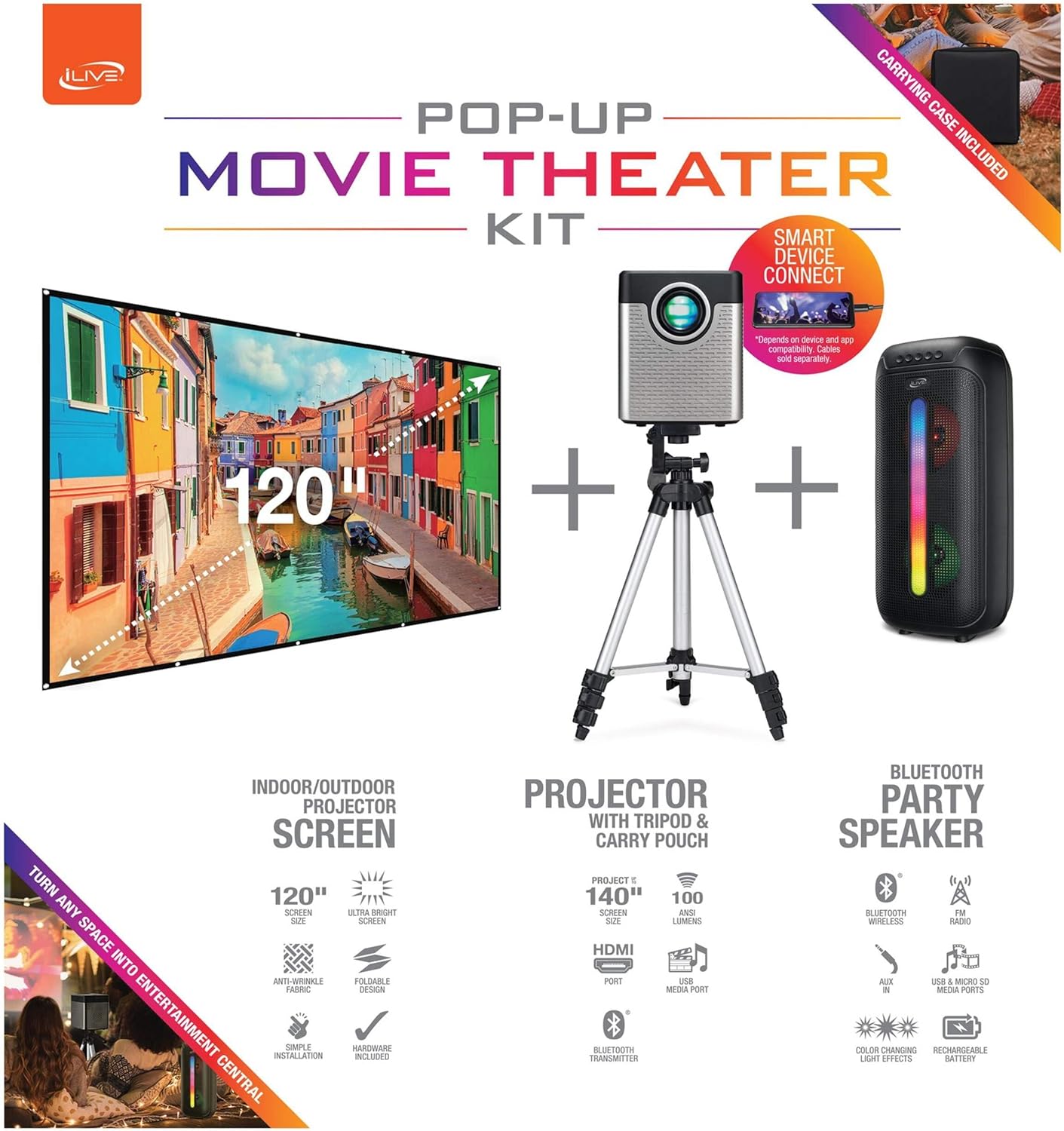
Figure 1: Diagram of the iLive Cinema Pop-up Movie Kit components.

Figure 2: The complete kit packed in its carrying case.
Настройка
- Распакуйце кампаненты: Carefully remove all items from the carrying case.
- Зборка штатыва: Extend the legs of the tripod and secure them. Adjust the height to your desired viewing level. The integrated bubble level assists in ensuring a stable and level base.
- Mount Projector: Securely attach the projector to the tripod mount. Ensure it is stable and facing the desired projection area.
- Set Up Screen: Unfold the 120-inch anti-wrinkle screen. If using the tripod, attach the screen to the tripod frame using the provided fasteners. Ensure the screen is taut and wrinkle-free for optimal viewing. For alternative mounting, use the grommets along the screen's edges with appropriate wall hooks (not included).
- Пасада спікера: Place the Bluetooth speaker in a location that provides optimal sound distribution for your viewінг вобласці.
- Падключыце харчаванне: Падключыце кабель сілкавання да праектара і адпаведнай разеткі.
- Падключэнне прылад (неабавязкова): Connect your media source (e.g., laptop, gaming console, Blu-ray player) to the projector using an HDMI or USB cable. For external audio, use the 3.5mm audio input or connect wirelessly via Bluetooth to the speaker.

Figure 3: Projector mounted on the tripod.

Малюнак 4: Выпample outdoor setup with the projector and screen.
Інструкцыя па эксплуатацыі
Эксплуатацыя праектара
- Уключэнне/выключэнне харчавання: Націсніце кнопку харчавання на праектары або пульце дыстанцыйнага кіравання, каб уключыць або выключыць прыладу.
- Крыніца ўводу: Use the remote control to select the desired input source (HDMI, USB, etc.).
- Рэгуляванне фокусу: Паварочвайце кольца факусоўкі на аб'ектыве праектара, пакуль выява не стане выразнай.
- Карэкцыя трапецеідальных скажэнняў: If the projected image appears trapezoidal, use the keystone correction feature (manual or automatic, if available) to adjust the image to a rectangular shape. The projector supports vertical keystone correction.
- Суадносіны бакоў: Select between 16:9 and 4:3 aspect ratios based on your content and preference.
- Адлегласць праекцыі: The projector has a flexible projection range of 2.6 to 12.5 feet. Adjust the distance to achieve the desired screen size.
Праца дынаміка Bluetooth
- Уключэнне/выключэнне харчавання: Press and hold the power button on the speaker to turn it on or off.
- Спалучэнне праз Bluetooth: Activate Bluetooth on your device (e.g., smartphone, tablet). Пошук the iLive speaker in the list of available devices and pair.
- Рэгулятар гучнасці: Адрэгулюйце гучнасць з дапамогай элементаў кіравання на дынаміку або падключанай прыладзе.
- Святлодыёдныя светлавыя эфекты: The speaker features LED light effects. Refer to the speaker's specific controls for adjusting or disabling these effects.
- Сапраўднае бесправадное стэрэа (TWS): If you have two iLive Bluetooth speakers, you can pair them together for a True Wireless Stereo experience. Follow the instructions provided with the speaker for TWS pairing.
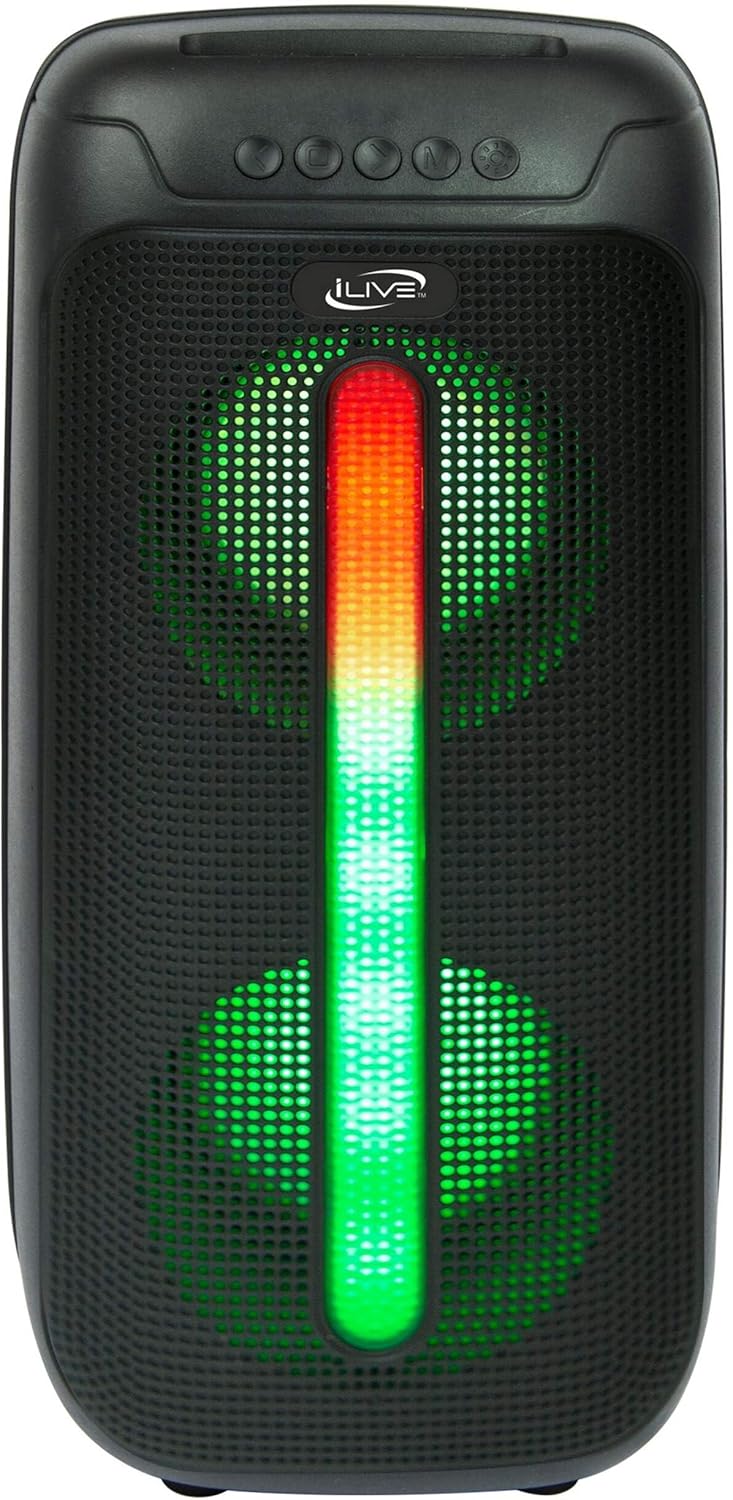
Figure 5: iLive Bluetooth 5.0 Speaker.
Тэхнічнае абслугоўванне
- Аб'ектыў праектара: Use a soft, lint-free cloth to gently clean the projector lens. Avoid abrasive materials or harsh chemicals.
- Projector Vents: Ensure the projector's ventilation openings are clear of dust and debris to prevent overheating.
- Ачыстка экрана: The anti-wrinkle polyester screen can be gently wiped with a damp cloth if necessary. Allow it to air dry completely before folding or storing.
- Сыход за дынамікам: Keep the speaker dry and clean. Avoid exposing it to extreme temperatures or direct sunlight.
- захоўванне: When not in use, store all components in the provided carrying case in a cool, dry place to protect them from dust and damage.
Ліквідацыю непаладак
- Няма выявы на экране:
- Ensure the projector is powered on and the lens cap is removed.
- Праверце, ці выбрана правільная крыніца ўваходнага сігналу на праектары.
- Праверце надзейнасць усіх кабельных злучэнняў (HDMI, USB).
- Размытая выява:
- Адрэгулюйце кольца факусоўкі на аб'ектыве праектара.
- Ensure the projection distance is within the recommended range (2.6-12.5 ft).
- Distorted Image (Trapezoidal):
- Use the keystone correction feature to adjust the image geometry.
- Ensure the projector is placed on a level surface or the tripod is properly adjusted.
- Няма гуку з дынаміка:
- Пераканайцеся, што дынамік уключаны і зараджаны.
- Verify Bluetooth pairing or 3.5mm audio cable connection.
- Праверце ўзровень гучнасці як на дынаміку, так і на падлучанай прыладзе.
- Праблемы спалучэння Bluetooth:
- Пераканайцеся, што дынамік знаходзіцца ў рэжыме спалучэння.
- Перамясціце дынамік бліжэй да прылады.
- Disconnect and re-pair the device.
Тэхнічныя характарыстыкі
| Асаблівасць | Спецыфікацыя |
|---|---|
| Нумар мадэлі | THE2024BDL |
| Дазвол дысплея | 1280 x 720 (720p) |
| Тып дысплея | святлодыёд |
| Яркасць | 3000 люмен |
| Каэфіцыент кантраснасці | 1000:1 |
| Суадносіны бакоў | 16:9, 4:3 |
| Жыццё крыніцы святла | 20,000 гадзін |
| Дыяпазон праекцыі | 2.6 - 12.5 Feet |
| Максімальны памер выявы | 120 цалі |
| Сувязь | HDMI, USB, 3.5mm Audio, Bluetooth 5.0 |
| Выхад на дынамік | 16W Peak (Dual 4-inch drivers) |
| Speaker Battery Life | Да 4 гадзін (пры гучнасці 50%) |
| Асаблівасці штатыва | Integrated bubble level, 360-degree pan, ±180-degree tilt, 41.73-inch max height, 4 kg capacity |
| Падтрымка кадавання відэа | H.264, H.265 |
| Метад кантролю | Пульт дыстанцыйнага кіравання |
Афіцыйныя відэа пра прадукт
Афіцыйных відэа прадаўцоў для гэтага прадукту пакуль няма.
Гарантыя і падтрымка
For warranty information or technical support, please contact iLive customer service at 1-888-999-4215. Please have your model number (THE2024BDL) and proof of purchase ready when contacting support.