
1. Уводзіны
Thank you for choosing the Generic 20-180X70 High Power Binoculars. This manual provides detailed instructions for the proper setup, operation, and maintenance of your binoculars. Please read this manual thoroughly before using the product to ensure optimal performance and longevity.
These binoculars are designed for a wide range of outdoor activities, including stargazing, bird watching, hiking, travel, and viewing sporting events. They feature high magnification, a durable construction, and user-friendly adjustments for a clear viewвопыту.
2. Асаблівасці прадукту
- Adjustable Eye Distance and Focusing Wheel: Easy and quick adjustment for focal length and interpupillary distance, suitable for both adults and children.
- High Resolution Optics: Features 20-180x magnification (real extension 10-60x) and a 70mm objective lens diameter for bright, magnified, and clear optical performance.
- Non-slip and Anti-vibration Design: Constructed with natural rubber material for a secure grip and enhanced durability.
- Fully Coated Lenses: Lenses are fully coated for improved brightness and light transmission, adapting to various lighting conditions (not for total darkness).
- Воданепранікальны дызайн: Built to withstand different climates and outdoor conditions.
- Партатыўны і кампактны: Foldable design allows for easy storage and transport in a bag or pocket.
- BAK4 Prism: High-quality BAK4 prism for bright and clear images, correcting inverted views.
3. Components and Parts Identification
Familiarize yourself with the main components of your binoculars:

Image 3.1: Binocular Components. This image displays the key parts of the binoculars, including the diopter adjustment, eyepieces, main body, tripod interface, natural rubber grip, and objective lenses.
- Акуляры: Куды вы глядзіце view малюнак.
- Рэгуляванне дыёптрый: Located on one eyepiece, used to compensate for differences in vision between your eyes.
- Кола факусоўкі: Central wheel used to adjust the focus for both eyes simultaneously.
- Аб'ектыўныя лінзы: Вялікія лінзы ў пярэдняй частцы бінокля, якія збіраюць святло.
- Інтэрфейс штатыва: A threaded socket, usually under a cap, for mounting the binoculars on a tripod.
- Гумавая браня: The protective rubber coating providing grip and shock absorption.
4. Усталёўка і першае выкарыстанне
- Распакаванне: Carefully remove the binoculars and all accessories from the packaging. Check for any damage.
- Attach Neck Strap: Securely attach the provided neck strap to the binoculars' strap lugs.
- Рэгуляванне міжзрэнкавай адлегласці: Hold the binoculars up to your eyes. Adjust the distance between the two barrels by moving them closer or further apart until you see a single, clear circular field of view.
- Рэгуляванне дыёптрый:
- Close your right eye. Look through the left eyepiece and rotate the central focusing wheel until the image is sharp.
- Close your left eye. Look through the right eyepiece (with the diopter adjustment ring) and rotate the diopter ring until the image is sharp. Do not use the central focusing wheel for this step.
- Now, with both eyes open, the image should be clear. For subsequent use, you will only need to adjust the central focusing wheel.
5. Інструкцыя па эксплуатацыі
Once the initial setup is complete, using your binoculars is straightforward:
- Факусоўка:
- Point the binoculars at the object you wish to observe.
- Rotate the central focusing wheel until the image appears sharp and clear.
- Функцыя маштабавання: These binoculars feature a variable magnification. To adjust the zoom, locate the zoom lever or ring (often near the right eyepiece) and rotate it to increase or decrease magnification. Re-focus after adjusting the zoom.

Image 5.1: High Zoom Function. This image illustrates the high zoom capability of the binoculars, showing how distant objects can be magnified for detailed viewінж.
- Выкарыстанне са штатывам: Для пашыранага viewing periods or at high magnifications, using a tripod is recommended for stability. Remove the cap from the tripod interface (usually at the front hinge) and screw the binoculars onto a compatible tripod adapter.
Агульныя прымянення:

Image 5.2: Outdoor/Travel Use. Binoculars are ideal for enhancing travel experiences by providing detailed views of distant landscapes, wildlife, and historical sites.

Image 5.3: Stargazing. These binoculars can be used for observing celestial objects, allowing users to view stars, galaxies, and star clusters in the night sky.
6. Догляд і абслугоўванне
Правільны догляд забяспечыць даўгавечнасць і прадукцыйнасць вашага бінокля:
- Чыстка лінзаў:
- Use the provided lens cleaning cloth or a soft, lint-free cloth.
- Gently brush off any dust or debris from the lens surfaces.
- For stubborn smudges, use a small amount of lens cleaning fluid applied to the cloth, not directly to the lens.
- Пазбягайце дакранацца да паверхні лінзаў пальцамі.
- Ачыстка цела: Працірайце корпус бінокля мяккай губкайamp тканіна. Пазбягайце выкарыстання агрэсіўных хімічных рэчываў або абразіўных матэрыялаў.
- захоўванне: Store the binoculars in a cool, dry place, away from direct sunlight and extreme temperatures. Use the protective case when not in use to prevent dust and scratches.
- Воданепранікальнасць: While waterproof, avoid submerging the binoculars in water. If they get wet, wipe them dry immediately.
7. Выпраўленне непаладак
Калі ў вас узніклі праблемы з біноклем, звярніцеся да наступных распаўсюджаных праблем і іх рашэнняў:
| праблема | Магчымая прычына | Рашэнне |
|---|---|---|
| Размыты малюнак | Няправільная факусоўка або налада дыёптрый. | Adjust the central focusing wheel. Re-adjust the diopter if necessary (refer to Section 4). |
| Double image or two circles | Interpupillary distance not set correctly. | Adjust the distance between the barrels until a single circular field of view is seen (refer to Section 4). |
| Dark or dim image | Low light conditions, dirty lenses, or lens caps still on. | Ensure lens caps are removed. Clean lenses if dirty (refer to Section 6). Note that binoculars are not designed for total darkness. |
| Difficulty adjusting zoom | Механізм можа быць тугім або заблакіраваным. | Apply gentle, even pressure. Do not force. If persistent, contact customer support. |
8. Тэхнічныя характарыстыкі прадукту
| Асаблівасць | Дэталь |
|---|---|
| мадэль | 20-180x70 |
| Magnification (Extension) | 20-180X (Real extension: 10-60x) |
| Дыяметр лінзы аб'ектыва | 70 мм |
| Матэрыялы | Metallic lens barrel body, non-slip rubber outer coating |
| Пакрыццё лінзаў | Green film, high contrast, three-dimensional mesh square broadband |
| Тып прызмы | БАК4 |
| Фокусная сістэма | Central focus |
| Поле в View (FOV) | 63° (78FT/1000YDS) |
| Выхад з дыяметра вучня | 4 мм |
| Eye Relief (Pupillary exit distance) | 18 мм |
| Найменшая адлегласць факусоўкі | 15 м |
| Колер | Чорны |
| Памер прадукту | 37.5cm (height), 23.5cm (width) |
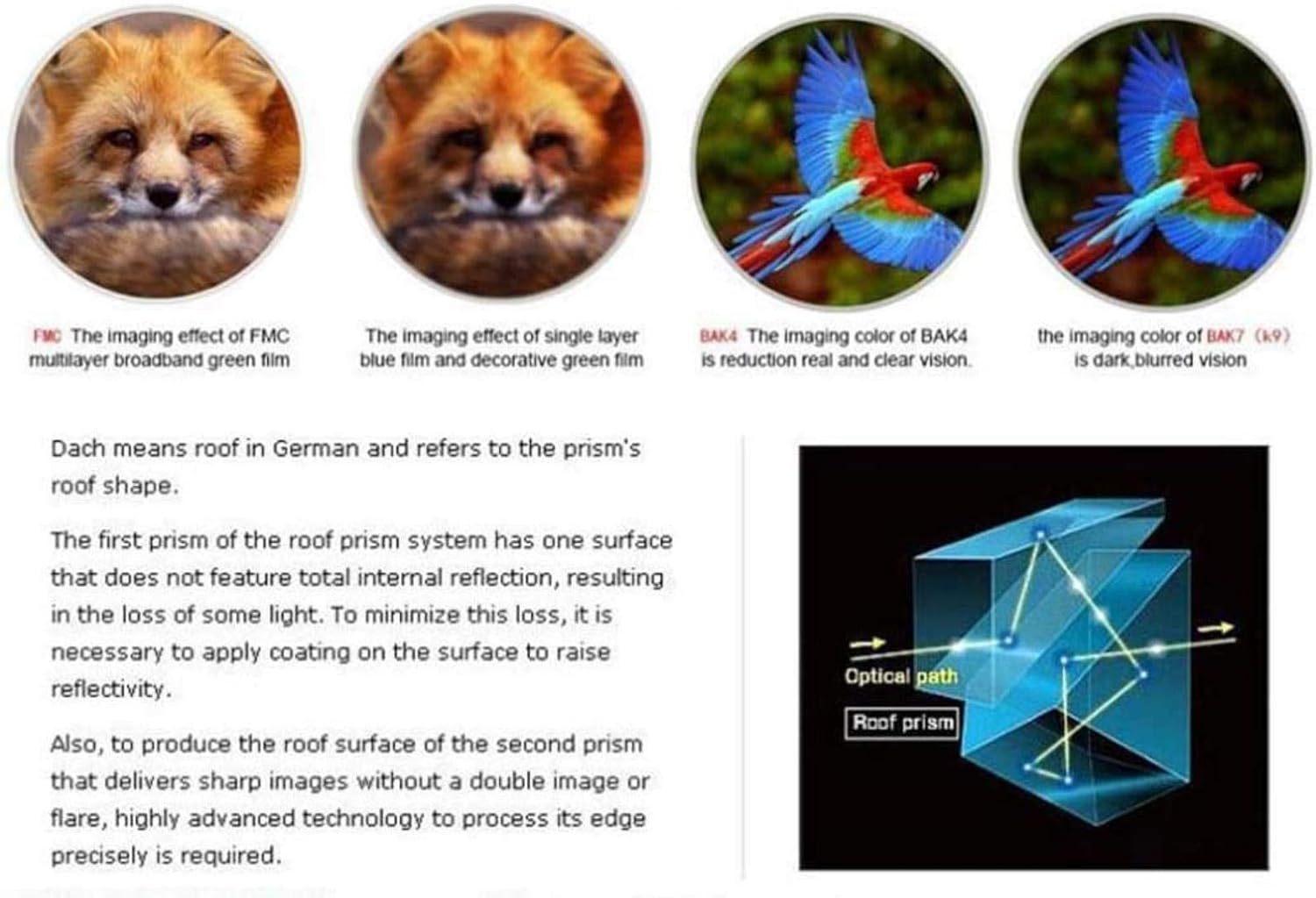
Image 8.1: Optical Path and Lens Coatings. This image shows the internal optical path of a roof prism and compares the visual quality achieved with different lens coatings, highlighting the superior clarity of BAK4 prisms and FMC multilayer broadband green film.

Image 8.2: BAK4 Prism. This image displays a BAK4 prism, which is known for its high-quality optical properties, contributing to bright and clear images in binoculars.
9. Гарантыя і падтрымка кліентаў
For warranty information or if you require further assistance, please refer to the retailer's return policy or contact the seller directly through the platform where the purchase was made. Keep your purchase receipt as proof of purchase.
For general inquiries or technical support, please consult the product listing page or the seller's contact information.