
1. Уводзіны
Thank you for choosing the Attoe F-18 Wireless Vertical Gaming Mouse. This ergonomic mouse is designed to provide a comfortable user experience, reducing wrist strain during extended use, while offering advanced features for gaming and productivity. It features tri-mode connectivity (2.4GHz wireless, Bluetooth 5.0, and wired USB-C), 12 programmable buttons, a 5-direction rocker, and adjustable DPI up to 24000.

Image 1.1: Attoe F-18 Wireless Vertical Gaming Mouse with USB receiver.
2. Змесціва ўпакоўкі
- Attoe F-18 Vertical Gaming Mouse
- Зарадны кабель USB-C
- USB-прыёмнік 2.4 ГГц
- Кіраўніцтва карыстальніка
3. Налада і падключэнне
3.1 Зарадка мышы
The Attoe F-18 mouse is equipped with a built-in 800mAh ternary lithium battery. Before first use, or when the low battery warning activates, charge the mouse using the provided USB-C cable.
- Connect the USB-C end of the cable to the mouse and the USB-A end to a power source (e.g., computer USB port, USB wall adapter).
- During charging, the four indicator lights on the mouse will illuminate in sequence.
- All four lights will turn off when the mouse is fully charged.
- A red light flashing quickly indicates the battery level has dropped to 25%, signaling the need for charging.

Image 3.1: Illustration of the 800mAh battery and charging indicators.
3.2 Падключэнне мышы
The Attoe F-18 supports three connection modes: 2.4GHz Wireless, Bluetooth 5.0, and Wired USB-C.
3.2.1 Бесправадное злучэнне 2.4 ГГц
- Уключыце мыш з дапамогай выключальніка харчавання, размешчанага ўнізе.
- Press the bottom Bluetooth button briefly to select 2.4G mode (red indicator light).
- Remove the USB receiver from its storage slot on the bottom of the mouse.
- Insert the USB receiver into an available USB port on your computer. The mouse will automatically connect.

Image 3.2: Steps for connecting via 2.4GHz USB wireless.
3.2.2 Bluetooth 5.0 Падключэнне
- Уключыце мыш з дапамогай выключальніка харчавання, размешчанага ўнізе.
- Press the bottom Bluetooth button briefly to select Bluetooth mode (blue indicator light). The mouse can pair with up to two Bluetooth devices.
- На вашым камп'ютары або прыладзе ўключыце Bluetooth і пачніце пошук новых прылад.
- Select "F-18" or "Attoe Mouse" from the list of available devices to pair.
3.2.3 Wired USB-C Connection
Connect the mouse directly to your computer using the provided USB-C cable. The mouse will function as a wired device and charge simultaneously.
3.3 Усталёўка праграмнага забеспячэння (толькі для Windows)
To customize the 12 programmable buttons and macro settings, download the dedicated software driver. This software is compatible with Windows operating systems only; Mac OS lacks programming features.
- Refer to the product packaging or manufacturer's webсайт са спасылкай для запампоўкі праграмнага забеспячэння.
- Download and run the installer. If your security program flags the installer, approve the action (e.g., select "Trust") to proceed.
- Выконвайце інструкцыі на экране, каб завяршыць усталёўку.
- Once installed, launch the software to customize button functions, lighting, and macros. Programmable data is saved directly to the mouse, so settings persist even when connected to a new computer.

Image 3.3: Screenshot of the custom driver programming software interface.
4. Інструкцыя па эксплуатацыі
4.1 Эрганамічны дызайн
The vertical design of the Attoe F-18 mouse promotes a natural handshake position, which helps alleviate wrist pain, shoulder fatigue, and tendinitis often associated with traditional horizontal mice. This design is ideal for right-handed users and supports various hand sizes for comfortable extended use.

Image 4.1: Visual comparison of vertical mouse grip versus common horizontal mouse grip.
4.2 Button Functions and 5-Direction Rocker
The mouse features 12 programmable buttons, including a unique 5-direction rocker for enhanced control.
- Кнопкі налева/направа: Стандартныя клікі мышшу.
- Кола пракруткі: Для вертыкальнай пракруткі і функцыі сярэдняга кліку.
- Кнопкі «Наперад»/«Назад»: Located on the left side for navigation.
- Кнопка DPI: Adjusts sensitivity (see section 4.3).
- 5-Direction Rocker: Located near the thumb, this rocker replaces five traditional keys (W, A, S, D, and Space/Click) for agile in-game navigation. It allows movements forward, backward, left, right, and a central click.
- BT/2.4G Button: For switching between connectivity modes.
All buttons, except the BT/2.4G button, can be customized using the programming software.

Image 4.2: Close-up of the 5-way joystick, curved buttons, and side function keys.

Image 4.3: Keystroke analysis chart detailing button assignments.
4.3 Рэгуляванне DPI
The mouse features 5 adjustable DPI presets (1600/2400/3200/4800/24000) powered by a high-precision PMW3325 sensor. Press the DPI button to cycle through the settings. The DPI indicator lights will change to reflect the current setting:
- 1st light: 1600 DPI
- 2nd light: 2400 DPI
- 3rd light: 3200 DPI
- 4th light: 4800 DPI
- All 4 lights: 24000 DPI

Image 4.4: DPI indicators and RGB lighting on the mouse.
4.4 RGB-асвятленне
The side RGB strips feature 5 dynamic effects (Neon, Marquee, Streamer, etc.) to enhance your gaming atmosphere. Lighting modes can be customized via the software.
4.5 Device/Mode Switching
Каб пераключацца паміж падлучанымі прыладамі або рэжымамі:
- Briefly press the Bluetooth button on the bottom of the mouse.
- The indicator light will show red for 2.4GHz mode and blue for Bluetooth mode.
- The mouse can switch between up to two paired Bluetooth devices and one 2.4GHz receiver connection.

Image 4.5: Diagram illustrating the device/mode switching function on the mouse bottom.
5. Тэхнічнае абслугоўванне
To ensure the longevity and optimal performance of your Attoe F-18 mouse, follow these maintenance guidelines:
- Уборка: Выкарыстоўвайце мяккую сухую тканіну для працірання паверхні мышы. Для ўстойлівага бруду злёгкуampПрацярыце тканіну вадой або мяккім ачышчальным растворам. Пазбягайце агрэсіўных хімічных рэчываў або абразіўных матэрыялаў.
- захоўванне: When not in use for extended periods, turn off the mouse to conserve battery life. Store it in a cool, dry place away from direct sunlight and extreme temperatures.
- Супрацьслізготныя накладкі: Ensure the protective film is removed from the Teflon anti-slip pads on the bottom of the mouse for smooth movement.
6. Выпраўленне непаладак
If you encounter issues with your Attoe F-18 mouse, refer to the following common solutions:
- Мышка не рэагуе:
- Пераканайцеся, што мыш уключана.
- Праверце ўзровень зарада батарэі і пры неабходнасці зарадзіце яе.
- Verify the correct connection mode (2.4GHz, Bluetooth, or Wired) is selected.
- For 2.4GHz, ensure the USB receiver is securely plugged into a working USB port. Try a different USB port.
- For Bluetooth, ensure Bluetooth is enabled on your device and the mouse is paired correctly.
- If using wired mode, ensure the USB-C cable is properly connected.
- Cursor lag or erratic movement:
- Пераканайцеся, што мыш знаходзіцца на чыстай паверхні, якая не блішчыць.
- Interference can affect wireless performance. Move the mouse closer to the receiver or try a different USB port for the receiver.
- Check for other wireless devices operating on the same frequency.
- Пераканайцеся, што акумулятар дастаткова зараджаны.
- Праграмуемыя кнопкі не працуюць:
- Ensure the customization software is installed and running on a Windows PC.
- Verify that the buttons have been correctly programmed and saved within the software.
- Remember that Mac OS does not support programming features for this mouse.
- DPI не змяняецца:
- Press the DPI button firmly to cycle through the settings. Observe the indicator lights.
7. Тэхнічныя характарыстыкі
| Асаблівасць | Спецыфікацыя |
|---|---|
| Марка | Attoe |
| Нумар мадэлі | Ф-18 |
| Тэхналогія падлучэння | Бесправадная сувязь 2.4 ГГц, Bluetooth 5.0, правадны USB-C |
| Тэхналогія выяўлення руху | Аптычны (датчык PMW3325) |
| Ўзроўні DPI | 1600 / 2400 / 3200 / 4800 / 24000 |
| Колькасць кнопак | 12 (праграмуемых) |
| Ёмістасць батарэі | 800mAh Ternary Lithium Battery |
| Памеры прадукту | 4.3 х 2.8 х 0.04 цалі (110 х 72 х 76.5 мм) |
| Вага прадмета | 3.88 унцый (105 ± 5 г) |
| Тэрмін службы кнопкі | ≥20 мільёны клікаў |
| Scroll Wheel Lifespan | ≥1.2 million rotations |
| Эфектыўная далёкасць | ≥10м |
| Аперацыйная Voltagе/Ток | 3.7 В === 15 мА |
| 2.4GHz Rolling Rate | 125-1000 Гц |
| Bluetooth Rolling Rate | 133 Гц |
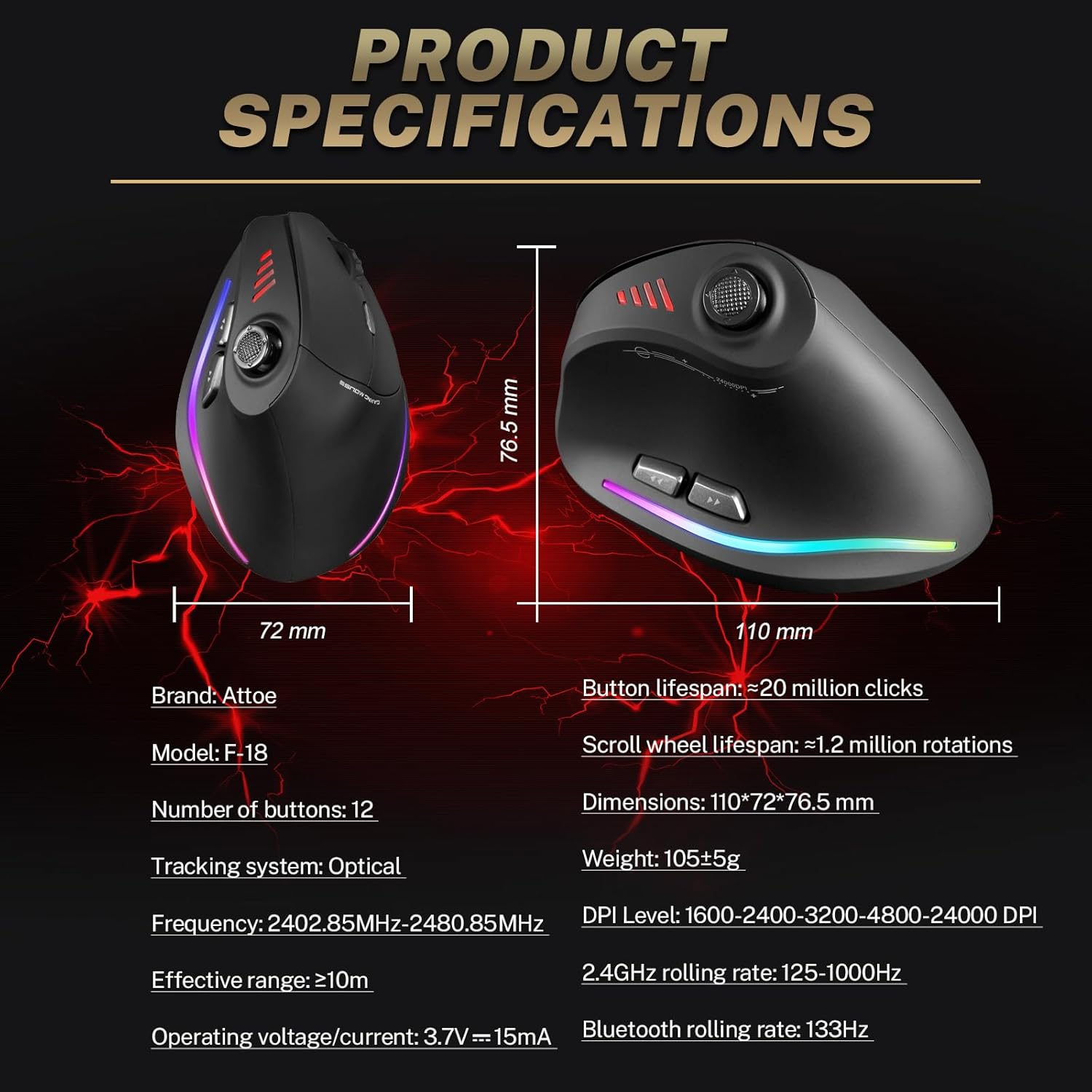
Image 7.1: Diagram showing product dimensions and key specifications.
8. Гарантыя і падтрымка
For warranty information or technical support, please refer to the documentation included with your product or visit the official Attoe website. If you require further assistance, contact Attoe customer service.