
1. Прадукт скончыўсяview
The Attoe AK680 is a wired mechanical gaming keyboard designed for performance and customization. It features a compact 60% layout, RGB backlighting, hot-swappable switches, and durable double-shot PBT keycaps. This manual provides essential information for setting up, operating, and maintaining your keyboard.

Figure 1: Attoe AK680 Mechanical Gaming Keyboard.
2. Змесціва ўпакоўкі
Праверце наяўнасць усіх прадметаў у камплекце:
- Attoe AK680 Mechanical Gaming Keyboard
- USB-кабель C
- Здымальнік клавішнай шапкі
- Switch Puller (often integrated with keycap puller or separate)
- Кіраўніцтва карыстальніка (гэты дакумент)
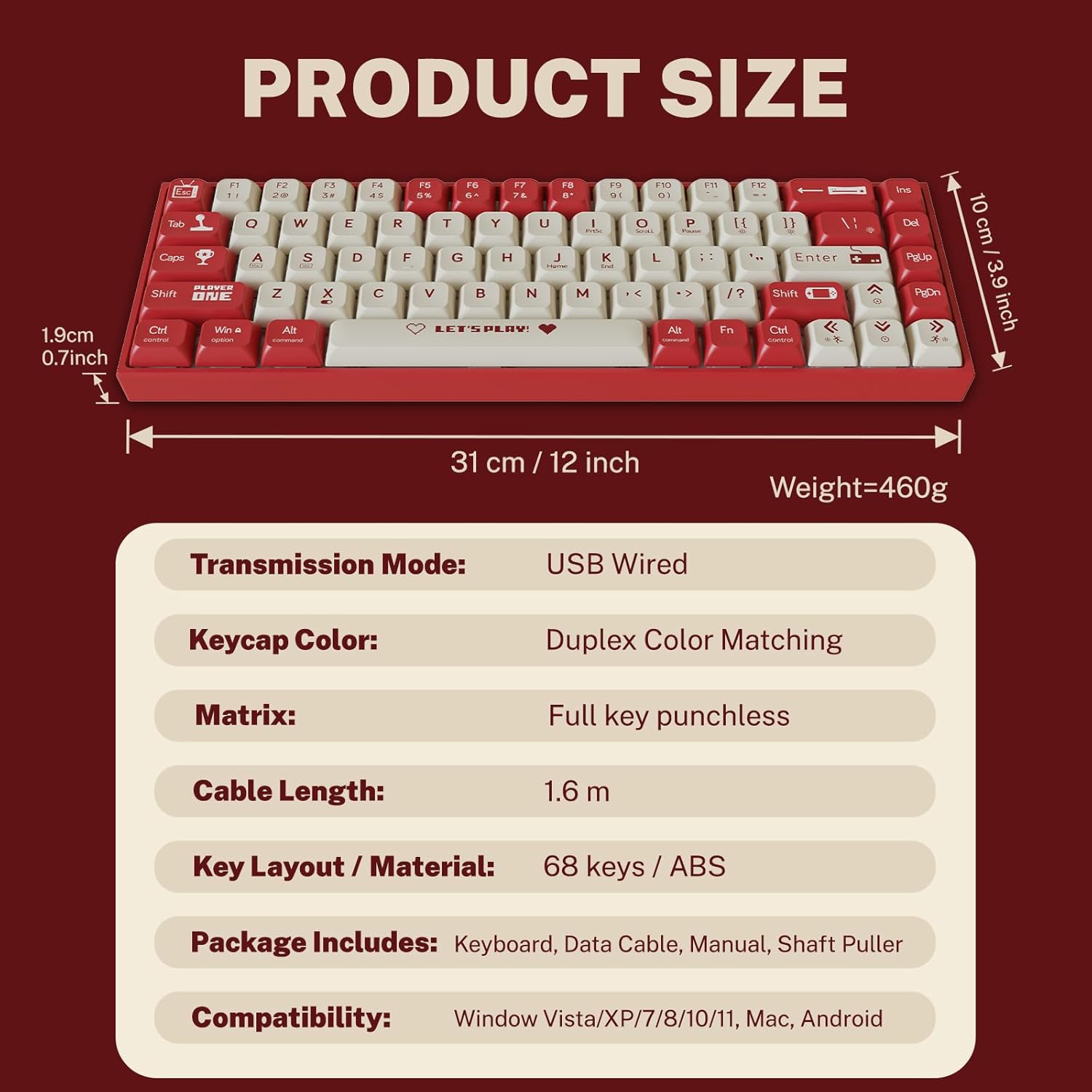
Малюнак 2: Змест упакоўкі і памеры прадукту.
3. Інструкцыі па ўсталёўцы
3.1 Падключэнне клавіятуры
- Знайдзіце порт USB-C на задняй або бакавой панэлі клавіятуры.
- Падключыце адзін канец кабеля USB-C, які ўваходзіць у камплект, да порта USB-C клавіятуры.
- Connect the other end of the USB-A connector to an available USB port on your computer.
- Клавіятура будзе аўтаматычна распазнана вашай аперацыйнай сістэмай. Для базавай функцыянальнасці звычайна не патрабуюцца дадатковыя драйверы.
3.2 Сумяшчальнасць сістэмы
The Attoe AK680 keyboard is compatible with the following operating systems:
- Windows Vista / XP / 7 / 8 / 10 / 11
- macOS
- Android

Figure 3: Multi-system compatibility of the keyboard.
4. Інструкцыя па эксплуатацыі
4.1 Асноўныя функцыі клавіятуры
The AK680 features a 68-key layout, providing essential keys while maintaining a compact form factor. All keys support anti-ghosting, ensuring accurate input even during rapid key presses.

Figure 4: The 68-key layout for efficient use.
4.2 Падсвятленне RGB
The keyboard features 16.8 million color RGB backlighting with various effects. Specific key combinations (often involving the Fn key) are used to cycle through lighting modes, adjust brightness, and change colors. Refer to the quick start guide or product page for detailed key combinations for lighting control.

Figure 5: RGB Backlighting in operation.
4.3 Перамыкачы з магчымасцю гарачай замены
The AK680 supports hot-swappable 3-pin and 5-pin mechanical switches. This allows you to easily change switches without soldering, customizing the typing feel to your preference. Use the included switch puller for safe removal and installation.
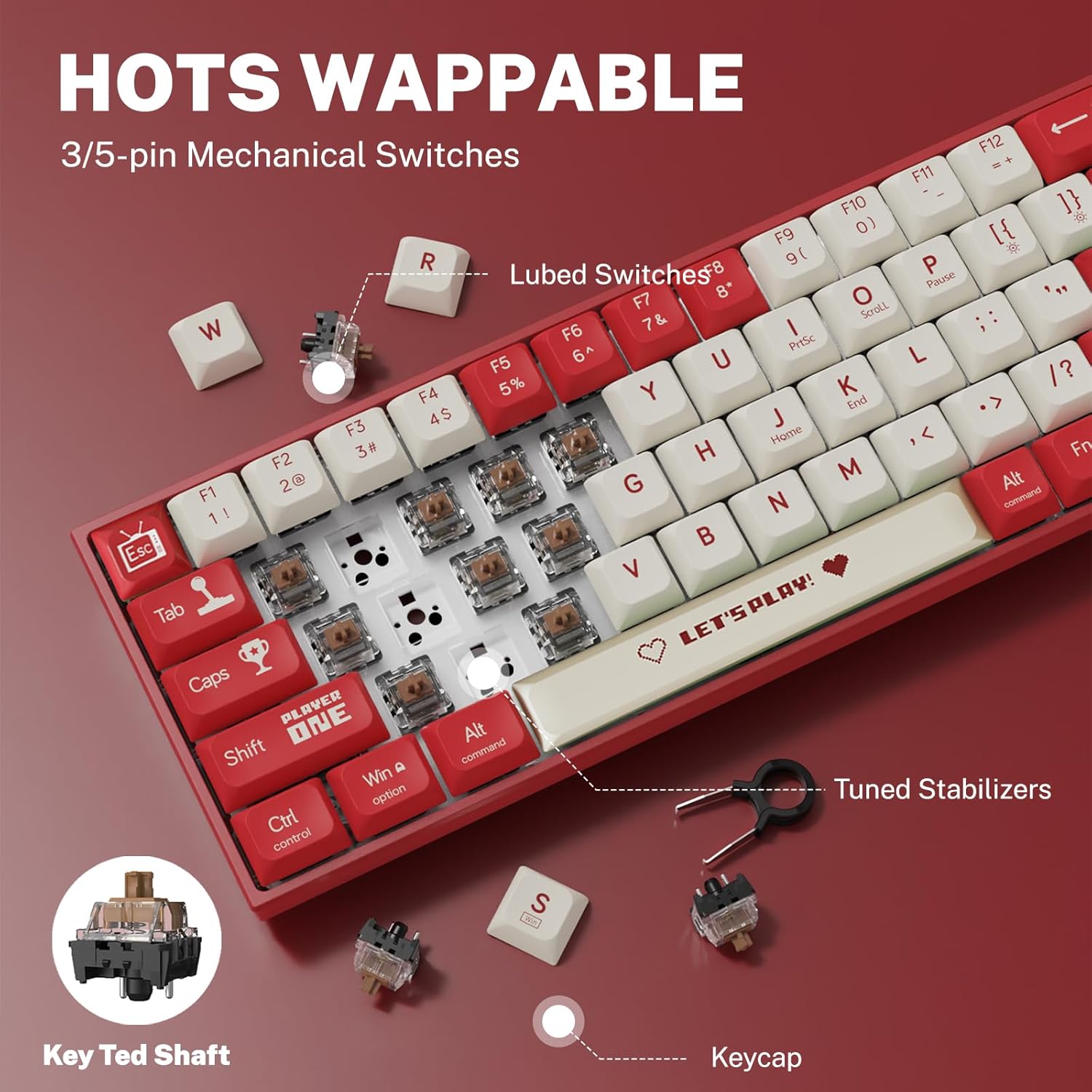
Figure 6: Hot-swappable switch mechanism.
5. Тэхнічнае абслугоўванне
5.1 Чыстка клавіятуры
- Генеральная ўборка: Выкарыстоўвайце мяккую сухую тканіну для працірання паверхні клавіятуры. Для выдалення ўстойлівага бруду злёгкуampen тканіна з вадой або мяккім неабразіўным ачышчальнікам.
- Паміж клавішамі: Выкарыстоўвайце сціснутае паветра, каб выдаліць пыл і смецце паміж клавішамі.
- Ачыстка клавіш: For thorough cleaning, remove keycaps using the provided keycap puller. Wash keycaps with mild soap and water, rinse thoroughly, and ensure they are completely dry before reattaching.
5.2 Replacing Keycaps and Switches
The AK680's hot-swappable design allows for easy replacement of keycaps and switches.
- Зняцце клавіш: Use the keycap puller to gently grip and lift keycaps straight up.
- Зняцце перамыкачоў: After removing the keycap, use the switch puller to carefully grip the top and bottom clips of the switch and pull it straight out.
- Усталёўка выключальнікаў: Align the new switch's pins with the holes on the PCB. Press down firmly until the switch clicks into place. Ensure pins are not bent.
- Усталёўка каўпачкоў клавіш: Align the keycap with the switch stem and press down gently until it is seated securely.

Figure 7: Components of a mechanical switch and tools for maintenance.
6. Выпраўленне непаладак
- Клавіятура не адказвае:
- Пераканайцеся, што кабель USB-C надзейна падключаны як да клавіятуры, так і да кампутара.
- Паспрабуйце падключыць клавіятуру да іншага USB-порта на вашым кампутары.
- Праверце клавіятуру на іншым кампутары, каб выключыць праблемы, характэрныя для сістэмы.
- Ключы не рэгіструюцца:
- Remove the keycap and switch for the affected key. Reinstall the switch, ensuring it is properly seated and its pins are not bent.
- Clean any debris that might be obstructing the switch mechanism.
- RGB Backlighting Not Working:
- Check if the backlighting is turned off or set to minimum brightness using the keyboard's function keys.
- Пераканайцеся, што клавіятура атрымлівае дастаткова харчавання ад порта USB.
7. Тэхнічныя характарыстыкі
| Асаблівасць | Дэталь |
|---|---|
| Нумар мадэлі | АК680 |
| Марка | Attoe |
| Тып злучэння | Правадны (USB-C) |
| Колькасць ключоў | 68 ключоў |
| Ключавыя тэхналогіі | Mechanical Shaft (Red/Teal Shaft), Hot-Swappable (3-pin/5-pin) |
| Матэрыял клавішы | Падвойны стрэл ПБТ |
| Падсвятленне | RGB (16.8 мільёнаў колераў) |
| Анты-прывіды | Поўная падтрымка клавіш |
| Даўжыня кабеля | 1.6 метраў |
| Памеры прадукту | 12 х 3.9 х 0.7 цалі (31 х 10 х 1.9 см) |
| Вага прадмета | 1.01 фунта (460 г) |
| Сумяшчальнасць | Windows Vista/XP/7/8/10/11, macOS, Android |
| Воданепранікальнасць | IPX4 rated protection (splash resistant) |
8. Гарантыя і падтрымка
Attoe provides a Гарантыя 12 месяцаў for the AK680 Mechanical Gaming Keyboard from the date of purchase.
If you encounter any problems or have questions regarding your product, please contact Attoe customer service. We are committed to providing the best service and will respond within 24 hours to assist you.
For support, please refer to the contact information provided with your purchase or visit the official Attoe webсайт.