
Уводзіны
Thank you for choosing the zelotes T80 Ergonomic Gaming Mouse. This wired optical mouse is designed for both gaming and office use, offering adjustable DPI, customizable LED lighting, and a comfortable ergonomic design for extended use. Please read this manual carefully to ensure proper setup and operation of your new mouse.
Асаблівасці прадукту
- 7 Buttons & Quick Fire Button: Includes forward, backward, and a rapid fire (double click) button for enhanced control in gaming and productivity.
- 5 рэгуляваных узроўняў DPI: Easily switch between 1000/1600/2400/3200/7200 DPI to match your speed and precision needs.
- 7 LED Backlit Modes: Personalize your setup with various lighting effects.
- Эрганамічны дызайн: Crafted for comfort with skin-friendly material, sweat-resistant, and anti-slip features to prevent fatigue during long sessions.
- Шырокая сумяшчальнасць: Compatible with Windows 11/10/8/7 and Mac OS, suitable for various applications including MMD, FPS games, and office tasks.
Змест пакета
- 1 x zelotes T80 Wired Gaming Mouse
- 1 х Інструкцыя па эксплуатацыі
Настройка
- Распакуйце: Carefully remove the mouse and its accessories from the packaging.
- Зняць ахоўную плёнку: Before use, please remove the protective film from the mouse's foot pads.
- Падключыць: Plug the USB cable of the zelotes T80 Gaming Mouse into an available USB port on your computer (PC or Laptop).
- Ўстаноўка драйвера: The mouse is plug-and-play. Your operating system will automatically detect and install the necessary drivers. No additional software installation is typically required for basic functionality.
Інструкцыя па эксплуатацыі
Тлумачэнні кнопак
The zelotes T80 mouse features 7 buttons for versatile control:
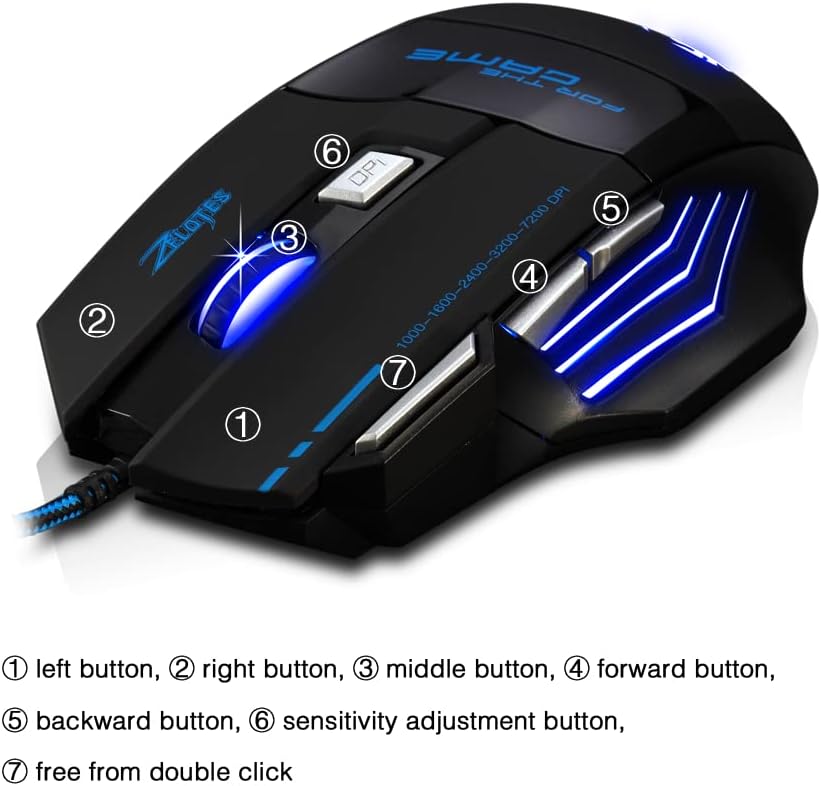
- Левая кнопка (1): Стандартная функцыя левага кліку.
- Правая кнопка (2): Стандартная функцыя правай кнопкі мышы.
- Middle Button / Scroll Wheel (3): Scrolls up/down. Pressing it acts as a middle-click.
- Forward Button (4): Перамяшчаецца наперад web браўзэры або file даследчыкі.
- Backward Button (5): Пераходзіць назад у web браўзэры або file даследчыкі.
- Кнопка DPI (6): Adjusts mouse sensitivity (DPI) and changes LED colors.
- Rapid Fire Button (7): Functions as a double-click of the left button, useful for continuous firing in games.
Рэгуляванне DPI
The mouse offers 5 adjustable DPI levels to suit different tasks and preferences:
- 1000 DPI
- 1600 DPI
- 2400 DPI
- 3200 DPI
- 7200 DPI
Націсніце Кнопка DPI (6) to cycle through these sensitivity levels. Each change will be indicated by a corresponding LED color change.
Кіраванне святлодыёдным асвятленнем
The mouse features 7 LED lighting modes. To change the LED color, long press the DPI button (6). The LED will flash rapidly 7 times and then remain constant on the selected color.

Тэхнічнае абслугоўванне
- Уборка: Use a soft, dry cloth to clean the mouse surface. For stubborn dirt, a slightly damp можна выкарыстоўваць тканіну, сачыце за тым, каб вадкасць не патрапіла ўнутр мышы.
- Сыход за кабелем: Пазбягайце рэзкіх выгібаў або празмернага нацягвання USB-кабеля, каб пазбегнуць пашкоджанняў.
- захоўванне: Захоўвайце мыш у сухім, прахалодным месцы, удалечыні ад прамых сонечных прамянёў і экстрэмальных тэмператур.
Ліквідацыю непаладак
Мыш не рэагуе
- Пераканайцеся, што кабель USB надзейна падключаны да спраўнага порта USB.
- Паспрабуйце падключыць мыш да іншага USB-порта на вашым кампутары.
- Праверце мыш на іншым камп'ютары, каб вызначыць, у чым праблема: у мышцы ці ў камп'ютары.
LED Lights Not Working/Changing
- Праверце, ці правільна падключана мыш да кампутара.
- Ensure you are long-pressing the DPI button to cycle through colors. A short press changes DPI.
DPI не змяняецца
- Ensure you are short-pressing the DPI button to cycle through DPI levels.
- If the issue persists, try reconnecting the mouse.
Тэхнічныя характарыстыкі
| Асаблівасць | Дэталь |
|---|---|
| Нумар мадэлі | Т80 |
| Гузікі | 7 (with scroll wheel) |
| Рэгуляваны DPI | 1000/1600/2400/3200/7200 DPI |
| Святлодыёднае асвятленне | 7 рэжыму асвятлення |
| Сувязь | Правадной USB |
| Сістэма сачэння | Аптычны |
| Эрганамічны дызайн | так |
| Пераключыць жыццё | 5 мільёнаў цыклаў |
| Памеры | 130x105x45 мм |
| Вага | 160 ± 5г |
| Даўжыня кабеля USB | 1.5м |
| Сумяшчальнасць | Win11, Win10, Win8, Win7, Mac OS |
Гарантыя і падтрымка
For warranty information and technical support, please refer to the product packaging or contact zelotes customer service through the retailer where the product was purchased. Keep your purchase receipt for warranty claims.