
1. Прадукт скончыўсяview
The CHOEZON TXG26UBF Console Table is designed to provide a functional and space-saving surface with integrated charging capabilities. This narrow table is suitable for placement behind sofas, in entryways, or hallways, offering convenient access to power outlets and USB ports.

Image 1.1: The CHOEZON 62.99" Console Table with a rustic brown top and black metal frame, shown in a living room setting.
Асноўныя характарыстыкі:
- Дызайн, які эканоміць месца: With a width of 5.9 inches, this slim console table fits well in narrow spaces.
- Інтэграваная зарадная станцыя: Includes 2 standard AC outlets, 1 USB-A port, and 1 Type-C port for convenient device charging.
- Універсальнае размяшчэнне: Functions as a console table, sofa table, entryway table, or display table.
- Трывалая канструкцыя: Made from particleboard and a metal frame for stability.
- Рэгуляваныя ножкі: Equipped with 6 adjustable feet to ensure stability on uneven surfaces.
- Камплект супраць перакульвання: Includes hardware to secure the table to a wall for enhanced safety.
2. Тэхнічныя характарыстыкі
| Асаблівасць | Дэталь |
|---|---|
| Марка | CHOEZON |
| Нумар мадэлі | TXG26UBF |
| Памеры прадукту (Д х Ш х У) | 62.99" x 5.9" x 32.3" |
| Матэрыял каркаса | Метал |
| Верхні тып матэрыялу | ДСП |
| Колер | Рустычны карычневы, чорны |
| Станцыя падзарадкі | 2 AC Outlets, 1 USB-A Port, 1 Type-C Port |
| Асаблівасці | Adjustable Legs, Anti-Tip Device, Sturdy Metal Frame |
| Уключаныя кампаненты | Кіраўніцтва па зборцы, інструмент для ўстаноўкі |

Image 2.1: Detailed dimensions of the console table, showing length, width, and height.
3. Інструкцыя па зборцы
The CHOEZON Console Table is designed for straightforward assembly. All necessary tools and a detailed illustrated guide are included with your purchase. Please follow the steps below and refer to the provided assembly guide for specific part identification.
- Распакуйце кампаненты: Carefully unbox all parts and verify against the parts list in your assembly guide. Ensure all pieces are present and undamaged.
- Вызначыць часткі: Each component is labeled with a letter or number. Match these labels with the corresponding steps in the instruction manual.
- Зборка рамы: Connect the metal frame components using the provided screws and tools. Do not fully tighten screws until the entire frame is assembled to allow for minor adjustments.
- Прымацаваць стальніцу: Secure the particleboard tabletop to the assembled metal frame.
- Усталяваць зарадную станцыю: Place the power strip into its designated slot on the tabletop. The power strip can be installed on the side or in the middle based on your preference.
- Адрэгулюйце ножкі: Screw in the adjustable feet at the bottom of the table legs. Adjust them as needed to ensure the table is level and stable on your floor.
- Замацуйце з дапамогай камплекта супраць перакульвання: For safety, especially in households with children or pets, attach the anti-tip kit to the table and secure it to a wall.
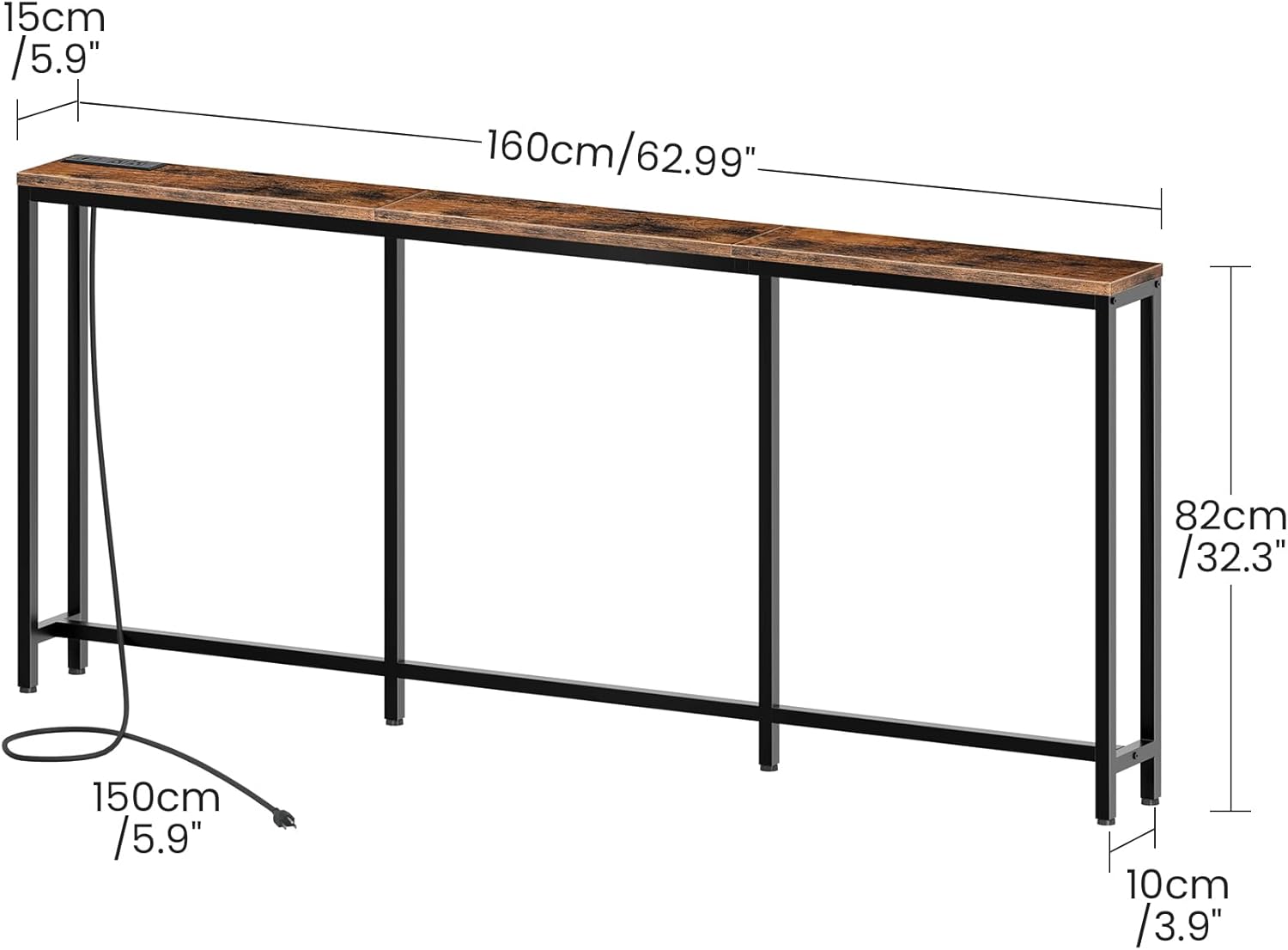
Image 3.1: The charging station can be installed in the middle or on either side of the table.

Image 3.2: Detail showing the anti-tip kit for wall attachment and the adjustable feet for leveling.
Відэа зборкі:
Video 3.1: A short demonstration of the CHOEZON Narrow Console Table with Power Outlet, highlighting its features and ease of use.
4. Operating Instructions (Charging Station)
Інтэграваная зарадная станцыя забяспечвае зручны доступ да энергіі для вашых электронных прылад.
- Падключэнне да сілкавання: Plug the table's power cord into a standard wall outlet.
- Разеткі пераменнага току: Use the two standard AC outlets (125V/12A) for devices requiring wall adapters, such as lamps or laptops.
- Парты USB: Utilize the USB-A port (5V/2A) and the Type-C port (5V/2A) to charge compatible smartphones, tablets, and other USB-powered devices.

Image 4.1: Detail of the built-in charging station, showing the two AC outlets, one USB-A port, and one Type-C port.
5. Тэхнічнае абслугоўванне
To ensure the longevity and appearance of your console table, follow these simple maintenance guidelines:
- Уборка: Wipe the table surface and frame with a soft, damp тканіна. Пазбягайце абразіўных ачышчальнікаў або агрэсіўных хімікатаў, якія могуць пашкодзіць пакрыццё.
- Разлівы: Promptly clean any spills to prevent staining, especially on the particleboard surface.
- агляд: Перыядычна правярайце ўсе шрубы і злучэнні, каб пераканацца, што яны зацягнуты. Пры неабходнасці падцягвайце.
- Пазбягайце лішняга вагі: Do not place excessively heavy objects on the table to prevent damage or instability.
6. Інфармацыя па бяспецы
Please read and adhere to the following safety precautions to prevent injury or damage:
- Камплект супраць перакульвання: Always secure the table to the wall using the provided anti-tip kit to prevent accidental tipping, especially in homes with children or pets.
- Размеркаванне вагі: Distribute weight evenly across the tabletop. Avoid placing heavy objects on one side.
- Электрабяспека: Do not overload the charging station. Ensure that devices plugged into the AC outlets and USB ports do not exceed the specified voltagе і ampузроставыя межы.
- Толькі для выкарыстання ў памяшканні: This table is designed for indoor use. Do not expose it to outdoor elements or excessive moisture.
- Стабільная паверхня: Place the table on a flat, stable surface. Use the adjustable feet to compensate for uneven flooring.
7. Выпраўленне непаладак
If you encounter any issues with your CHOEZON Console Table, please refer to the following common solutions:
- Хістанне стала:
- Пераканайцеся, што ўсе шрубы надзейна зацягнуты.
- Adjust the leveling feet at the bottom of each leg until the table is stable.
- Пераканайцеся, што стол размешчаны на роўнай паверхні.
- Зарадная станцыя не працуе:
- Праверце, ці надзейна падключаны галоўны шнур сілкавання да спраўнай разеткі.
- Ensure the power strip is correctly installed and connected within the table.
- Test the outlets/ports with a different device to rule out device-specific issues.
- Avoid overloading the charging station.
- Адсутныя дэталі або пашкоджаныя кампаненты:
- Refer to the parts list in your assembly guide.
- Contact CHOEZON customer support for assistance (see Section 8).
8. Гарантыя і падтрымка
For warranty information, replacement parts, or further assistance, please contact CHOEZON customer support. You can find more information and contact details on the official CHOEZON store page: