
1. Прадукт скончыўсяview
The zelotes C-12 Professional Wired Gaming Mouse is designed for high-performance gaming and office use. It features an ergonomic design, 12 programmable buttons, adjustable DPI settings, multi-modes RGB backlighting, and a customizable weight system.

Image 1.1: The zelotes C-12 Professional Wired Gaming Mouse, showcasing its ergonomic shape and customizable RGB lighting.
Змест пакета:
- 1 x zelotes C-12 Gaming Mouse
- 1 х Інструкцыя па эксплуатацыі
- 1 кампакт-дыск з праграмным забеспячэннем
- 1 x Foot Pad Set
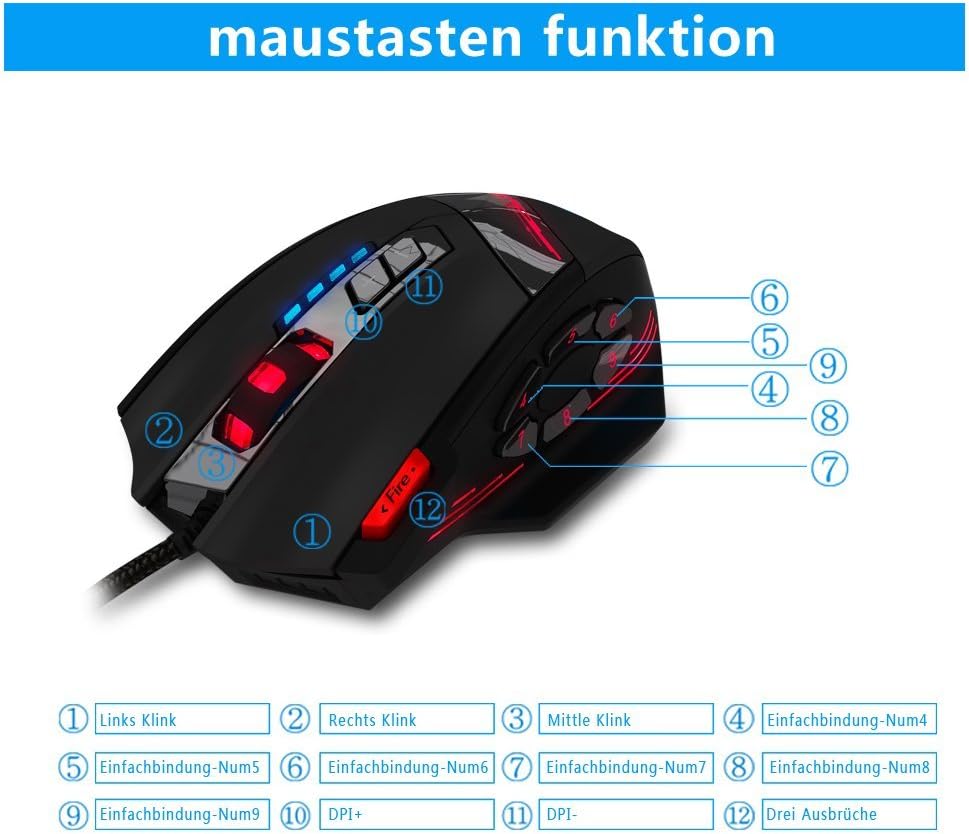
Image 1.2: The complete package contents of the zelotes C-12 Gaming Mouse.
2. Настройка
2.1 Падключэнне мышы
Connect the USB cable of the zelotes C-12 Gaming Mouse to an available USB port on your computer. The mouse is plug-and-play for basic functionality.
2.2 Усталёўка праграмнага забеспячэння (неабавязкова)
For full customization of buttons, DPI, and lighting, install the provided software from the included CD. Insert the CD into your computer's optical drive and follow the on-screen instructions. If your computer does not have an optical drive, please visit the official zelotes website to download the latest software driver.
Note: The programming software is not fully compatible with Mac operating systems.
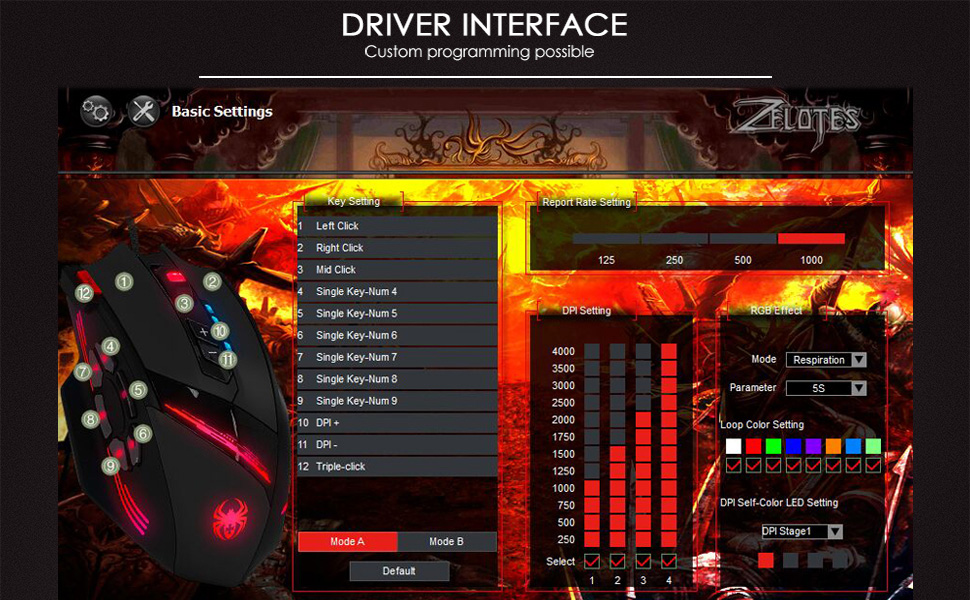
Image 2.1: The software interface for customizing the zelotes C-12 Gaming Mouse.
2.3 Weight Tuning
The mouse includes 8 removable weight blocks, each weighing 2.5 grams, located in a compartment on the underside of the mouse. To adjust the mouse's weight:
- Акуратна павярніце і зніміце круглую вечка на ніжняй частцы мышы.
- Add or remove the 2.5g weight blocks as desired to achieve your preferred mouse feel.
- Replace the circular cover by twisting it back into place.
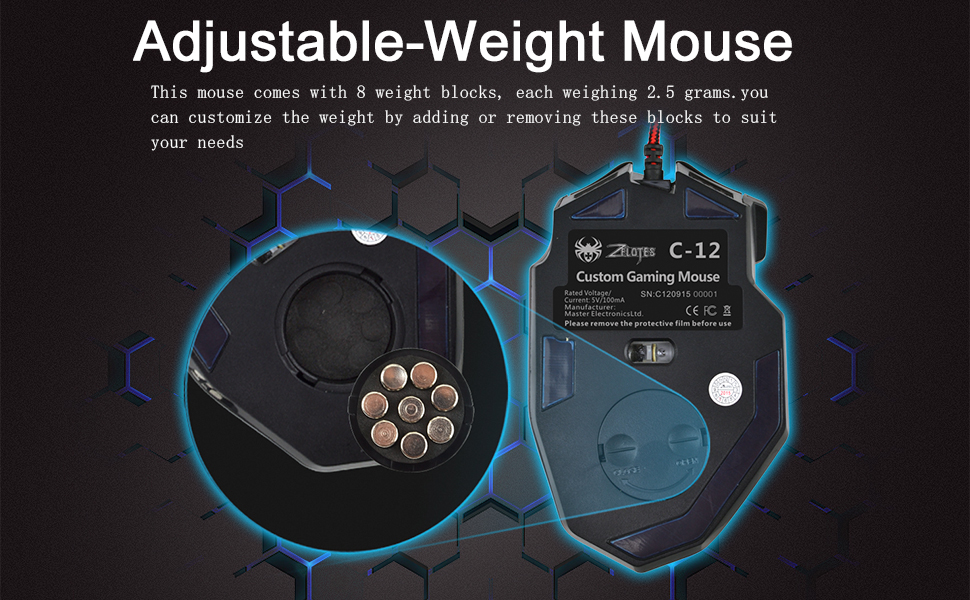
Image 2.2: Adjusting the weight of the zelotes C-12 mouse by adding or removing the 2.5g blocks.
Video 2.1: A demonstration of the weight tuning feature and programmable buttons on the zelotes C-12 Gaming Mouse.
3. Інструкцыя па эксплуатацыі
3.1 Функцыі кнопак
The zelotes C-12 mouse features 12 programmable buttons. The default functions are:
- Пстрыкніце левай кнопкай мышы (Кнопка 1)
- Пстрыкніце правай кнопкай мышы (Кнопка 2)
- Сярэдні пстрычка / Кола пракруткі (Кнопка 3)
- Бакавыя кнопкі (Buttons 4-9): Default to various functions, customizable via software.
- DPI+ (Button 10): Increases DPI sensitivity.
- DPI- (Button 11): Decreases DPI sensitivity.
- пажар Кнопка (Button 12): Default to triple-click, customizable via software.

Image 3.1: Labeled diagram of the zelotes C-12 mouse buttons.
3.2 Рэгуляванне DPI
The mouse offers 4 default DPI levels: 1000/1500/2000/4000 DPI. You can cycle through these levels using the dedicated DPI+ and DPI- buttons. For finer control and to reach up to 8000 DPI, use the included software.
3.3 RGB-асвятленне
The mouse features multi-modes RGB backlighting, including 7-color cycle breathing and monochromatic constant bright modes. Lighting effects can be customized through the software to match your preferences.
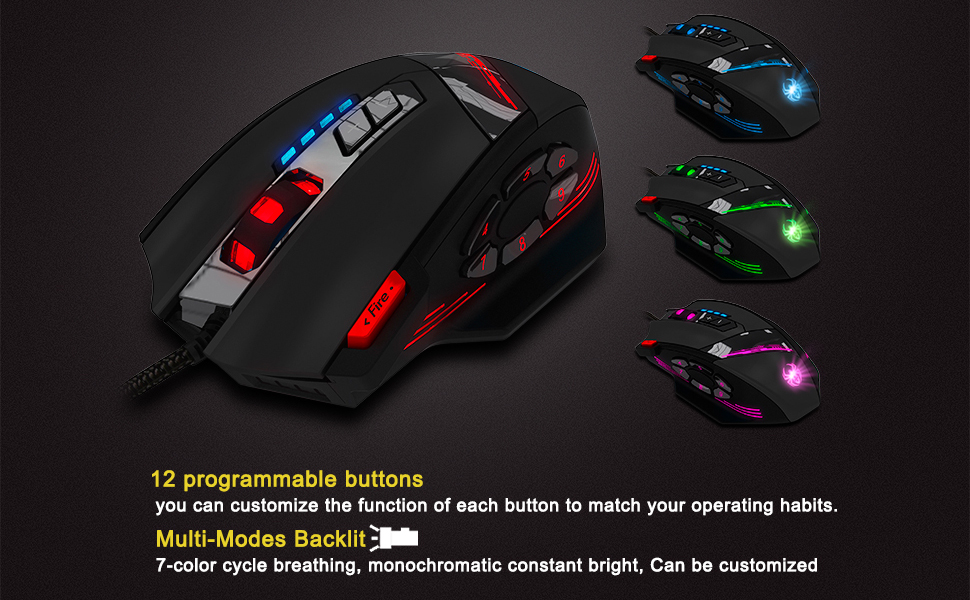
Image 3.2: The zelotes C-12 mouse showcasing its multi-color RGB lighting options.
3.4 Эрганамічны дызайн
The mouse is designed for comfort during extended use, featuring a sweat-resistant and anti-slip rubber surface. Its ergonomic shape helps prevent wrist fatigue.

Image 3.3: The ergonomic design of the zelotes C-12 mouse provides a comfortable grip.
4. Тэхнічнае абслугоўванне
To ensure the longevity and optimal performance of your zelotes C-12 Gaming Mouse, follow these maintenance guidelines:
- Уборка: Выкарыстоўвайце мяккую сухую тканіну для працірання паверхні мышы. Для выдалення ўстойлівага бруду злёгку працярыцеampПрацярыце тканіну вадой або мяккім ачышчальным растворам. Пазбягайце агрэсіўных хімічных рэчываў або абразіўных матэрыялаў.
- Сыход за датчыкам: Трымайце аптычны датчык на ніжняй частцы мышы чыстым і без пылу або смецця. Пры неабходнасці выкарыстоўвайце ватовы тампон або сціснутае паветра.
- Кабельнае кіраванне: Пазбягайце рэзкіх выгібаў або празмернага нацягвання USB-кабеля, каб пазбегнуць пашкоджанняў.
- захоўванне: Калі мыш не выкарыстоўваецца, захоўвайце яе ў чыстым, сухім месцы, удалечыні ад экстрэмальных тэмператур.
5. Выпраўленне непаладак
5.1 Мыш не рэагуе
- Пераканайцеся, што USB-кабель надзейна падлучаны да кампутара.
- Паспрабуйце падключыць мыш да іншага порта USB.
- Test the mouse on another computer to rule out a computer-specific issue.
- Перазагрузіце кампутар.
5.2 DPI or Button Settings Not Changing
- Ensure the zelotes C-12 software is correctly installed and running.
- Check if the settings are saved within the software after making changes.
- For Mac users, note that the programming software has limited compatibility. Basic DPI changes via mouse buttons should still function.
5.3 RGB-падсветка не працуе або працуе няправільна
- Verify lighting settings within the zelotes C-12 software.
- Пераканайцеся, што мыш правільна падключана і атрымлівае харчаванне.
5.4 Mouse Movement Is Erratic
- Ачысціце аптычны датчык у ніжняй частцы мышы.
- Пераканайцеся, што вы выкарыстоўваеце мыш на адпаведнай паверхні (напрыклад, кілімку для мышы). Пазбягайце моцна бліскучых або празрыстых паверхняў.
6. Тэхнічныя характарыстыкі
| Асаблівасць | Апісанне |
|---|---|
| Марка | zelotes |
| Назва мадэлі | С-12 |
| Тэхналогія падлучэння | Правадной USB |
| Тэхналогія выяўлення руху | Optical (A3050 Gaming Chip) |
| Налады DPI | 1000/1500/2000/4000 (Adjustable up to 8000 DPI via software) |
| Колькасць кнопак | 12 праграмуемых кнопак |
| Настройка вагі | 8 x 2.5g removable weights |
| Рука арыентацыі | Правша |
| Сумяшчальнасць аперацыйнай сістэмы | Win11, Win10, Win8, Win7, Mac OS (limited software compatibility for Mac) |
| Памеры (Д х Ш х У) | 130 мм х 81.5 мм х 39.8 мм |
| Стаўка апытання | 125-1000 Гц |
| Даўжыня кабеля | 1.8м |
| Матэрыял | Пластык (матавае пакрыццё) |

Image 6.1: Detailed technical specifications and dimensions of the zelotes C-12 Gaming Mouse.
7. Інфармацыя аб гарантыі
The zelotes C-12 Professional Wired Gaming Mouse comes with a 1-гадовая гарантыя вытворцы з даты пакупкі. Гэтая гарантыя распаўсюджваецца на дэфекты матэрыялаў і вырабу пры нармальным выкарыстанні. Яна не распаўсюджваецца на пашкоджанні, выкліканыя няправільным выкарыстаннем, аварыяй, несанкцыянаванай мадыфікацыяй або знешнімі прычынамі.
Калі ласка, захавайце доказы пакупкі для прэтэнзій па гарантыі.
8. Падтрымка
For further assistance, technical support, or warranty inquiries, please refer to the contact information provided with your product packaging or visit the official zelotes webсайт.