
Уводзіны
Welcome to the DOOGEE Blade10 Power user manual. This guide provides essential information for setting up, operating, maintaining, and troubleshooting your new rugged smartphone. The Blade10 Power is designed for durability and high performance, featuring a large battery, advanced camera, and robust protection against environmental elements.
Што ў скрынцы
Carefully unpack your DOOGEE Blade10 Power and ensure all items are present:
- 1 x DOOGEE Blade10 Power Smartphone
- 1 кабель USB Type-C
- 1 х адаптар сілкавання
- 1 x Pre-applied Screen Protector Film
- 1 x Thickened Screen Protector Film
- 1 х ўпаковачная скрынка
- 1 х Кіраўніцтва карыстальніка (гэты дакумент)

Image: Package contents for the DOOGEE Blade10 Power.
Настройка
1. Усталёўка SIM-карты і TF-карты
The DOOGEE Blade10 Power supports dual SIM cards and one TF (microSD) card for expanded storage. Locate the SIM card tray on the side of the device. Use the provided SIM ejector tool to open the tray. Insert your Nano-SIM cards and TF card into the designated slots as shown in the diagram. Ensure the tray is securely closed to maintain water and dust resistance.
2. Пачатковая зарадка і ўключэнне
Before first use, fully charge your device using the provided USB Type-C cable and power adapter. Connect the adapter to a power outlet and the cable to the phone's USB-C port. The charging indicator will show the charging status. Once charged, press and hold the Power button (usually on the side) until the DOOGEE logo appears to power on the device.
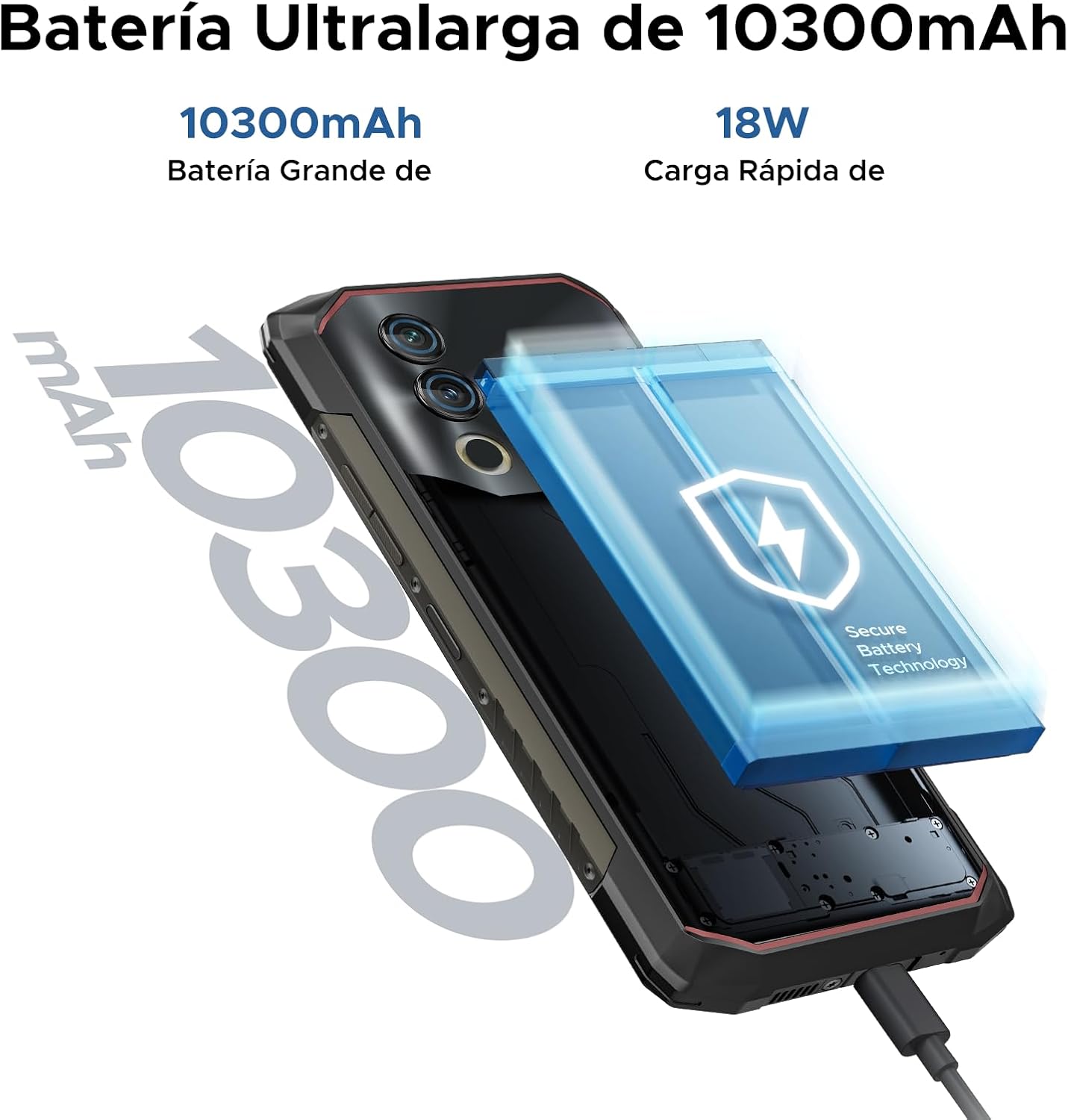
Image: The 10300mAh battery and 18W fast charging feature of the Blade10 Power.
Інструкцыя па эксплуатацыі
Базавая навігацыя
Your DOOGEE Blade10 Power runs on Android 14, offering an intuitive user experience. Use gestures for navigation: swipe up from the bottom for the app drawer, swipe down from the top for notifications and quick settings, and tap icons to open applications.
Security Features: Fingerprint and Face ID
For enhanced security and quick access, set up Fingerprint Recognition and Face ID. The fingerprint sensor is located on the side of the device. Navigate to Налады > Бяспека > Разблакіроўка адбіткам пальца or Распазнаванне асобы to register your biometrics. The device offers ultra-fast unlocking in approximately 0.19 seconds.

Image: Facial Recognition and Side Fingerprint Sensor.
Функцыянальнасць NFC
The integrated NFC (Near Field Communication) allows for quick and secure mobile payments with Google Pay and easy data transfer with compatible devices. Enable NFC in Налады > Падлучаныя прылады > NFC.
Precise Navigation
The device supports multiple global navigation satellite systems including GPS, Glonass, Galileo, and Beidou, ensuring accurate positioning for navigation and location-based services.
Customizable Button and Gesture Control
Utilize the customizable button for quick access to frequently used functions or apps. Explore Smart Gesture Controls in settings for additional convenient interactions.
Glove Mode
For users who need to operate the phone while wearing gloves, the Glove Mode feature ensures precise recognition of finger movements, providing a fluid and uninterrupted user experience. Activate this mode in Settings > Smart Assistant > Glove Mode.

Image: Glove Mode in action, allowing touch interaction while wearing gloves.
Асаблівасці камеры
The DOOGEE Blade10 Power is equipped with a 50MP AI main camera and an 8MP front camera, designed to capture clear and vibrant images and videos.
Задняя камера
The 50MP main camera, enhanced with AI, delivers high-resolution photos with rich detail and accurate colors. It supports various modes including HDR and Panorama for diverse photographic scenarios. Rear flashes provide illumination in low-light conditions.
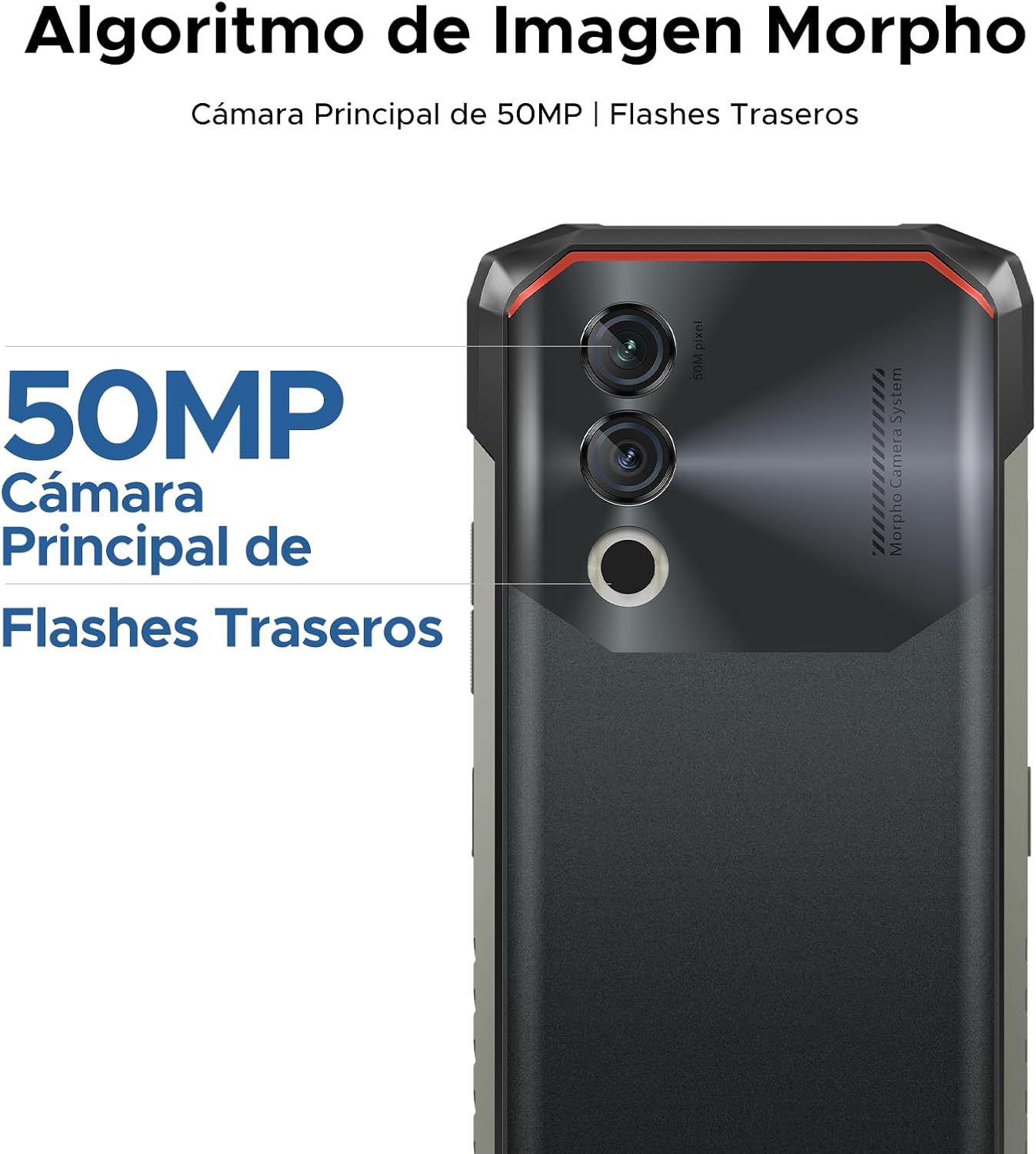
Image: 50MP Main Camera and Rear Flashes.
Пярэдняя камера
The 8MP front camera is ideal for selfies and video calls, capturing clear images.

Малюнак: Examples of photos taken with the 8MP Ultra Sharp Front Camera.
Рэжымы фатаграфіі
Explore various photography modes to enhance your shots:
- Панарама: Capture wide landscapes.
- Партрэтны рэжым: Стварайце прафесійныя фатаграфіі з размытым фонам.
- Прафесійны рэжым: Manual control over camera settings for advanced users.
- Рэжым HDR: Improve dynamic range in challenging lighting conditions.

Image: Photography modes: Panorama, Portrait, Pro, and HDR.
Запіс відэа
Record videos in 1080P at 30 frames per second, ensuring smooth and detailed footage.
Асаблівасці дысплея
The DOOGEE Blade10 Power features a 6.6-inch HD+ IPS display for a clear and immersive visual experience.
- Памер: 6.6-inch Fullview Дысплей
- дазвол: 720*1612 HD+
- Частата абнаўлення: 90Hz for smooth scrolling and gaming
- Колеры: 16.7 мільёна кветак
- Яркасць: 380cd/m² for visibility in various lighting conditions
- Каэфіцыент кантраснасці: 1500:1
- Суадносіны экрана і цела: 84%

Image: 6.6-inch Ultra Sharp Notch-less Screen with 90Hz refresh rate.
Widevine L1 Support
With Widevine L1 certification, you can enjoy high-quality streaming content from platforms like Netflix and Amazon Prime Video in full HD resolution, without restrictions.

Image: Real 90Hz Smoothness and Widevine L1 Support.
Прадукцыйнасць і захоўванне
The Blade10 Power is engineered for smooth performance and ample ёмістасць для захоўвання.
Працэсар
Powered by an Octa-Core T615 processor, the device offers improved performance for multitasking and gaming. This processor provides a 19% improvement in single-core CPU performance, 5% in multi-core CPU performance, and 35% in GPU performance.

Image: Powerful Octa-core T615 Processor.
RAM and Storage
The phone features up to 24GB of RAM (6GB physical + 18GB expanded virtual RAM) and 256GB of internal storage. This ample memory ensures smooth operation across multiple applications. Storage can be further expanded up to 2TB using a TF (microSD) card, allowing you to store a vast amount of photos, videos, and files.
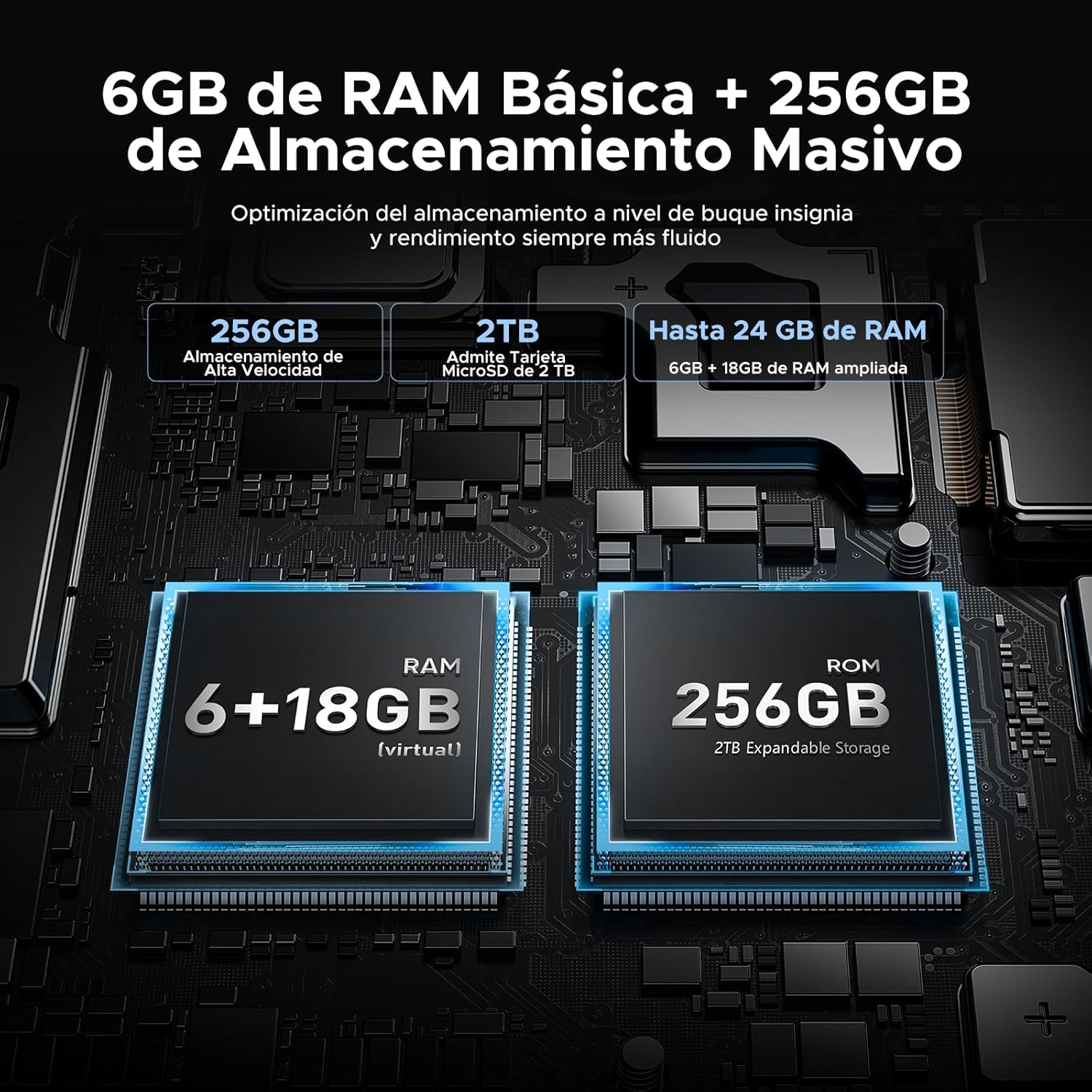
Image: 24GB RAM + 256GB Massive Storage with 2TB Expansion.
Трываласць і абарона
The DOOGEE Blade10 Power is built to withstand harsh environments, featuring IP68/IP69K and MIL-STD-810H certifications.
- IP68: Water and dust resistant, capable of immersion in water up to 1.5 meters for 30 minutes.
- IP69K: Устойлівы да ўздзеяння струменяў вады пад высокім ціскам і высокай тэмпературай.
- MIL-STD-810H: Military-grade durability against drops, shocks, and extreme temperatures. Withstands drops from up to 1.5 meters.
Its 360° comprehensive protection ensures reliable performance even in challenging outdoor or work environments.

Image: IP68, IP69K, and MIL-STD-810H certifications for drop, dust, and water resistance.
Надзейная канструкцыя
The phone's construction includes a high-resistance cover, aviation-grade titanium alloy, aviation-grade alloy material, TPU protection, and a composite board, all contributing to its exceptional durability.

Выява: Падрабязная view of the phone's layered construction for enhanced durability.
Android 14 Features
The DOOGEE Blade10 Power runs on the latest Android 14 operating system, offering enhanced stability, fluidity, and overall performance compared to previous versions.
- Рэжым факусоўкі: Helps you concentrate by pausing distracting apps.
- Super Clipboard: Advanced clipboard features for managing copied content.
- Lift to Wake: Automatically wakes the screen when you lift the phone.
- Dual System Mode: Run two separate environments for work and personal use.
- Screen Enhancement: Optimized display settings for better viewінж.
- Pocket Mode: Prevents accidental touches when the phone is in your pocket.
- Screen Sensors: Improved sensor management for various functionalities.
- Кантроль прыватнасці: Enhanced privacy settings to manage app permissions and data access.
- Раздзелены экран: Multitask efficiently by using two apps simultaneously.

Image: More Information About Android 14 features.
Тэхнічнае абслугоўванне
To ensure the longevity and optimal performance of your DOOGEE Blade10 Power, follow these maintenance guidelines:
- Уборка: Regularly wipe the screen and body with a soft, damp тканіна. Для выдалення ўстойлівага бруду выкарыстоўвайце мяккі мыльны раствор. Перад зарадкай або падключэннем аксесуараў пераканайцеся, што ўсе парты сухія.
- Ўздзеянне вады: While the phone is waterproof, avoid prolonged immersion in saltwater or chlorinated water. If exposed, rinse with fresh water and dry thoroughly. Ensure all port covers are sealed before water exposure.
- тэмпература: Avoid exposing the phone to extreme temperatures (very hot or very cold) for extended periods, as this can affect battery life and internal components.
- Абнаўленні праграмнага забеспячэння: Keep your phone's software updated to the latest version to benefit from performance improvements, security patches, and new features. Check for updates in Налады > Сістэма > Абнаўленне сістэмы.
- Сыход за батарэяй: Avoid completely draining the battery frequently. For optimal battery health, try to keep the charge between 20% and 80%.
Ліквідацыю непаладак
If you encounter issues with your DOOGEE Blade10 Power, refer to the following common troubleshooting steps:
Прылада не ўключаецца
- Ensure the battery is charged. Connect the phone to the charger for at least 30 minutes.
- Націсніце і ўтрымлівайце кнопку харчавання на працягу 10-15 секунд, каб прымусова перазагрузіць кампутар.
Экран не рэагуе
- Перазагрузіце прыладу, утрымліваючы кнопку харчавання.
- Калі экран фізічна пашкоджаны, звярніцеся ў службу падтрымкі кліентаў.
Poor Call Quality / Low Speaker Volume
- Праверце налады гучнасці падчас размовы.
- Ensure the speaker and microphone are not obstructed by dirt or debris. Clean gently if necessary.
- Test with headphones to determine if the issue is with the phone's speaker/mic or the network.
Збоі або завісанні праграм
- Зачыніце і зноў адкрыйце праблемную праграму.
- Ачысціце кэш і дадзеныя праграмы ў Налады > Праграмы > [Назва праграмы] > Памяць > Ачысціць кэш/Ачысціць даныя.
- Пераканайцеся, што праграма абноўлена да апошняй версіі.
- Калі праблема не знікне, выдаліце і пераўсталюйце праграму.
Network Connectivity Issues (Wi-Fi/Mobile Data)
- Уключыце і выключыце Wi-Fi або мабільныя дадзеныя.
- Перазагрузіце маршрутызатар, калі ўзніклі праблемы з Wi-Fi.
- Check your SIM card insertion and ensure it's active with your carrier.
- Reset network settings in Налады > Сістэма > Параметры скіду > Скінуць налады Wi-Fi, мабільнай сувязі і Bluetooth.
Скід да заводскіх налад (апошні сродак)
If other troubleshooting steps fail, you may consider a factory reset. This will erase all data on your phone, so ensure you back up important information first. Go to Налады > Сістэма > Параметры скіду > Сцерці ўсе даныя (скід да заводскіх налад).
Тэхнічныя характарыстыкі
Below are the detailed technical specifications for the DOOGEE Blade10 Power smartphone:
| Асаблівасць | Спецыфікацыя |
|---|---|
| Нумар мадэлі | Blade 10 Power |
| Памеры | 17.85 х 8.31 х 1.79 см |
| Вага | 560 г |
| Аперацыйная сістэма | Android 14 |
| Працэсар | Octa-Core T615 (1.8 GHz) |
| АЗП | 24 ГБ (6 ГБ фізічнай + 18 ГБ віртуальнай) |
| Унутраная памяць | 256 ГБ |
| Сховішча з магчымасцю пашырэння | Да 2 ТБ (карта TF) |
| Памер дысплея | 6.6 цалі |
| Тып дысплея | HD+ IPS |
| Дазвол дысплея | 720 x 1612 пікселяў |
| Частата абнаўлення | 90 Гц |
| Асноўная камера | 50 МП |
| Пярэдняя камера | 8 МП |
| Запіс відэа | 1080p пры 30 кадрах у секунду |
| Ёмістасць батарэі | 10300 мАг (Li-Ion) |
| Зарадка | 18W Fast Charging, USB Type-C, OTG Support |
| Сеткавыя тэхналогіі | 4G LTE |
| Слоты для SIM-карт | Дзве SIM |
| Сувязь | NFC, GPS (Glonass, Galileo, Beidou) |
| Бяспека | Face ID, Side Fingerprint Sensor |
| Даўгавечнасць | IP68, IP69K, MIL-STD-810H (Waterproof, Dustproof, Shockproof) |
Гарантыя і падтрымка
DOOGEE is committed to providing quality products and customer satisfaction.
- 30-дзённая гарантыя вяртання грошай: If you are not satisfied with your purchase, you may be eligible for a refund within 30 days.
- 2-гадовая абмежаваная гарантыя: Your DOOGEE Blade10 Power comes with a 2-year limited warranty covering manufacturing defects. Please retain your proof of purchase.
- 24/7 Інтэрнэт-падтрымка: For any technical assistance or inquiries, DOOGEE offers 24/7 online support. Please visit the official DOOGEE webсайт для кантактнай інфармацыі і рэсурсаў падтрымкі.

Image: After-sales Support details.
Афіцыйныя відэа пра прадукт
No relevant official product videos from the seller were found for embedding in this manual.