
1. Уводзіны
This manual provides instructions for the Attoe Wireless Bluetooth Mouse, Model MXY0614. This device features dual-mode connectivity (Bluetooth and 2.4G wireless), a transparent design with RGB backlighting, and a rechargeable battery. Please read this manual carefully before use to ensure proper operation and maintenance.
2. Змесціва ўпакоўкі
Праверце наяўнасць усіх прадметаў у камплекце:
- 1 x Attoe Wireless Bluetooth Gaming Mouse
- 1 х кабель для зарадкі (тыпу C)
- 1 х Інструкцыя па эксплуатацыі

Малюнак 2.1: Змест пакета
3. Асаблівасці прадукту
- Магнітная верхняя вечка: The top cover is secured by strong magnetic adsorption, allowing for easy access to the USB receiver and precise alignment.
- RGB-падсветка: Features an RGB water-cooled light band for customizable lighting effects.
- Дысплей батарэі: Four indicator lights show the remaining battery level.
- Акумулятарная: Built-in 400mAh lithium polymer battery, charged via Type-C port. Full charge takes approximately 2-3 hours.
- Двухрэжымнае падключэнне: Supports both Bluetooth (BT) and 2.4G wireless modes.
- Аўтаматычны сон: Automatically enters deep sleep mode after 10 minutes of inactivity to conserve power.
- Шырокая сумяшчальнасць: Compatible with Windows 2000/XP/win7/win8/win10, Vista 32-bit, IOS, Linux, and Mac OS.
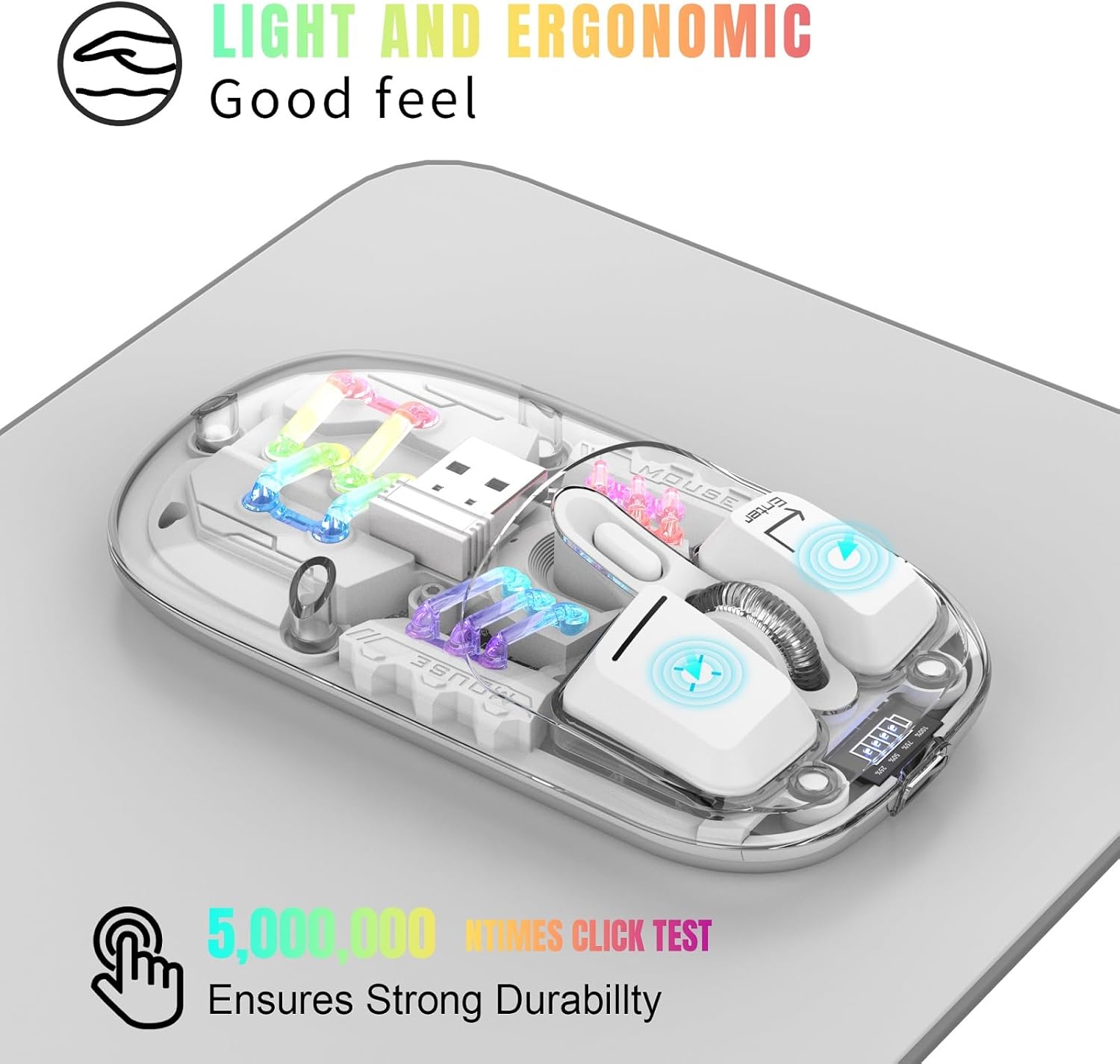
Figure 3.1: Ergonomic Design and RGB Lighting

Малюнак 3.2: Магнітная верхняя вечка
4. Прадукт скончыўсяview

Figure 4.1: Mouse Components and Controls
The diagram above identifies the key components and controls of the mouse, including the left and right buttons, scroll wheel, DPI adjustment, battery indicator, Type-C charging port, and the location of the 2.4G USB receiver.
5. Інструкцыі па ўсталёўцы
5.1. Бесправадное злучэнне 2.4G
- Зніміце верхнюю магнітную крышку мышы.
- Take out the USB 2.4G receiver from its storage slot.
- Устаўце USB-прыёмнік у даступны USB-порт на вашым кампутары або прыладзе.
- Flip the mouse over and locate the mode switch on the bottom. Slide the switch to the "2.4G" position.
- The mouse will automatically connect to your device. No additional software is required.
5.2. Злучэнне Bluetooth
- Flip the mouse over and locate the mode switch on the bottom. Slide the switch to the "BT" position.
- Press and hold the left, middle (scroll wheel), and right buttons simultaneously for 3 seconds to enter Bluetooth pairing mode. The RGB lights will flash to indicate pairing mode.
- На вашай прыладзе (камп'ютары, ноўтбуку, планшэце) адкрыйце налады Bluetooth.
- Пошук new Bluetooth devices and select "BT5.0 Mouse" or a similar name from the list.
- Confirm the pairing on your device. The mouse's RGB lights will stop flashing once successfully paired.

Figure 5.1: Dual Mode Connectivity
Video 5.1: Demonstrating the connection process and features of the Transparent Gaming Mouse.
6. Інструкцыя па эксплуатацыі
6.1. Кіраванне RGB-падсветкай
- Пераключыць светлавы рэжым: Click the dedicated light mode switch button (refer to Figure 4.1) to cycle through 11 different RGB lighting effects.
- Уключэнне/выключэнне святла: Long press the light mode switch button for 3 seconds to turn the RGB lights on or off.
6.2. Рэгуляванне DPI
The mouse features adjustable DPI settings. Click the DPI button (refer to Figure 4.1) to cycle through available DPI levels (e.g., 800, 1200, 1600 DPI). Each click will change the cursor sensitivity.
6.3. Зарадка мышы
- Падключыце зарадны кабель Type-C, які ўваходзіць у камплект, да зараднага порта на пярэдняй панэлі мышы.
- Падключыце другі канец кабеля да крыніцы харчавання USB (напрыклад, USB-порт кампутара, насценны адаптар USB).
- The battery display lights will indicate charging status. A full charge typically takes 2-3 hours.
- The 4 small lights on the battery display indicate the remaining battery level.
6.4. Функцыя аўтаматычнага сну
To conserve battery life, the mouse will automatically enter a deep sleep mode if left unused for more than 10 minutes. To wake the mouse, simply move it or press any button.
7. Тэхнічнае абслугоўванне
- Трымайце мыш у чысціні, праціраючы яе мяккай сухой тканінай. Пазбягайце выкарыстання агрэсіўных хімічных рэчываў або абразіўных матэрыялаў.
- Пераканайцеся, што порт зарадкі Type-C не мае пылу і смецця.
- Захоўвайце USB-прыёмнік унутры мышы, калі ён не выкарыстоўваецца, каб прадухіліць яго страту.
- Пазбягайце ўздзеяння экстрэмальных тэмператур або прамых сонечных прамянёў на мыш.
8. Выпраўленне непаладак
- Мышка не рэагуе: Ensure the mouse is charged. Check the mode switch (2.4G or BT) is correctly set. For 2.4G, ensure the USB receiver is properly inserted. For Bluetooth, re-enter pairing mode and re-pair with your device.
- Перарывістае падключэнне: Ensure the mouse is within the 10-meter wireless range. Avoid obstructions between the mouse and the receiver/device.
- RGB-лямпы не працуюць: Check if the lights are turned off by long-pressing the light mode switch. Ensure the mouse has sufficient battery.
- Рух курсора няўстойлівы: Ачысціце аптычны датчык у ніжняй частцы мышы. Пераканайцеся, што вы выкарыстоўваеце мыш на прыдатнай паверхні.
9. Тэхнічныя характарыстыкі
| Асаблівасць | Спецыфікацыя |
|---|---|
| Нумар мадэлі | MXY0614 |
| Сувязь | Bluetooth (BT) + 2.4G Wireless |
| Гузікі | 4 buttons (Left, Right, Scroll Wheel/Middle, DPI) |
| DPI | 1600 DPI (рэгуляванае) |
| Намінальны выпtagе/Ток | Пастаянны ток 5 В/400 мА |
| Адлегласць бесправаднога злучэння | 10 метраў |
| Пераключыць жыццё | 20 мільёнаў цыклаў |
| акумулятар | Built-in 400mAh Lithium Polymer (Rechargeable) |
| Порт для зарадкі | Тып-C |
| Вага прадукту | 40 г (1.41 унцыі) |
| Памеры прадукту | 113 х 58 х 25mm (4.45 х 2.28 х 0.98 цаляў) |
| Сумяшчальнасць | Windows 2000/XP/win7/win8/win10, Vista 32-bit, IOS, Linux, Mac OS |

Малюнак 9.1: Памеры вырабу
10. Гарантыя і падтрымка
For any questions or issues regarding your Attoe Wireless Bluetooth Mouse, please contact our after-sales service. We are committed to providing a satisfactory resolution.
Contact information for support can typically be found on the product packaging or the official Attoe webсайт.