
Makeid L1
Makeid L1 Label Maker Machine User Manual
Model: L1 | Brand: Makeid
Уводзіны
This manual provides detailed instructions for the setup, operation, maintenance, and troubleshooting of your Makeid L1 Portable Wireless Sticker Label Maker Machine. Please read this manual thoroughly before using the device to ensure proper function and longevity.
Што ў скрынцы
Праверце наяўнасць усіх кампанентаў у камплекце:
- Makeid L1 Label Maker Machine
- 4-meter roll of label tape
- USB кабель для зарадкі
- Кіраўніцтва карыстальніка (гэты дакумент)
Прадукт скончаныview
Familiarize yourself with the key components of your Makeid L1 Label Maker.

выява: Скончанаview of the Makeid L1 Label Maker, highlighting the power button, the lid for tape replacement, and the integrated cutter for crisp labels.
- Кнопка харчавання: Located on the side, used to turn the device on/off.
- Вечка: Opens to access the tape compartment for loading and replacing label rolls.
- Убудаваны разак: Ensures clean and precise cuts of printed labels.
- Выхадны слот для этыкетак: Дзе з'яўляюцца друкаваныя этыкеткі.
- Порт для зарадкі: USB port for recharging the device.
Настройка
1. Зарадка прылады
Before first use, ensure the label maker is fully charged. Connect the provided USB charging cable to the device's charging port and a compatible USB power source (e.g., computer USB port, USB wall adapter). The indicator light will show charging status (refer to device specific light indicators for full/charging status).
2. Loading Label Tape
The Makeid L1 supports various label tape widths (9mm, 12mm, 16mm) and types (continuous, die-cut, transparent, white, colored, pattern). Ensure the tape is correctly oriented.
- Open the lid of the label maker.
- Insert the label roll into the compartment, ensuring the tape feeds out from the bottom and through the output slot.
- Надзейна зачыніце вечка.
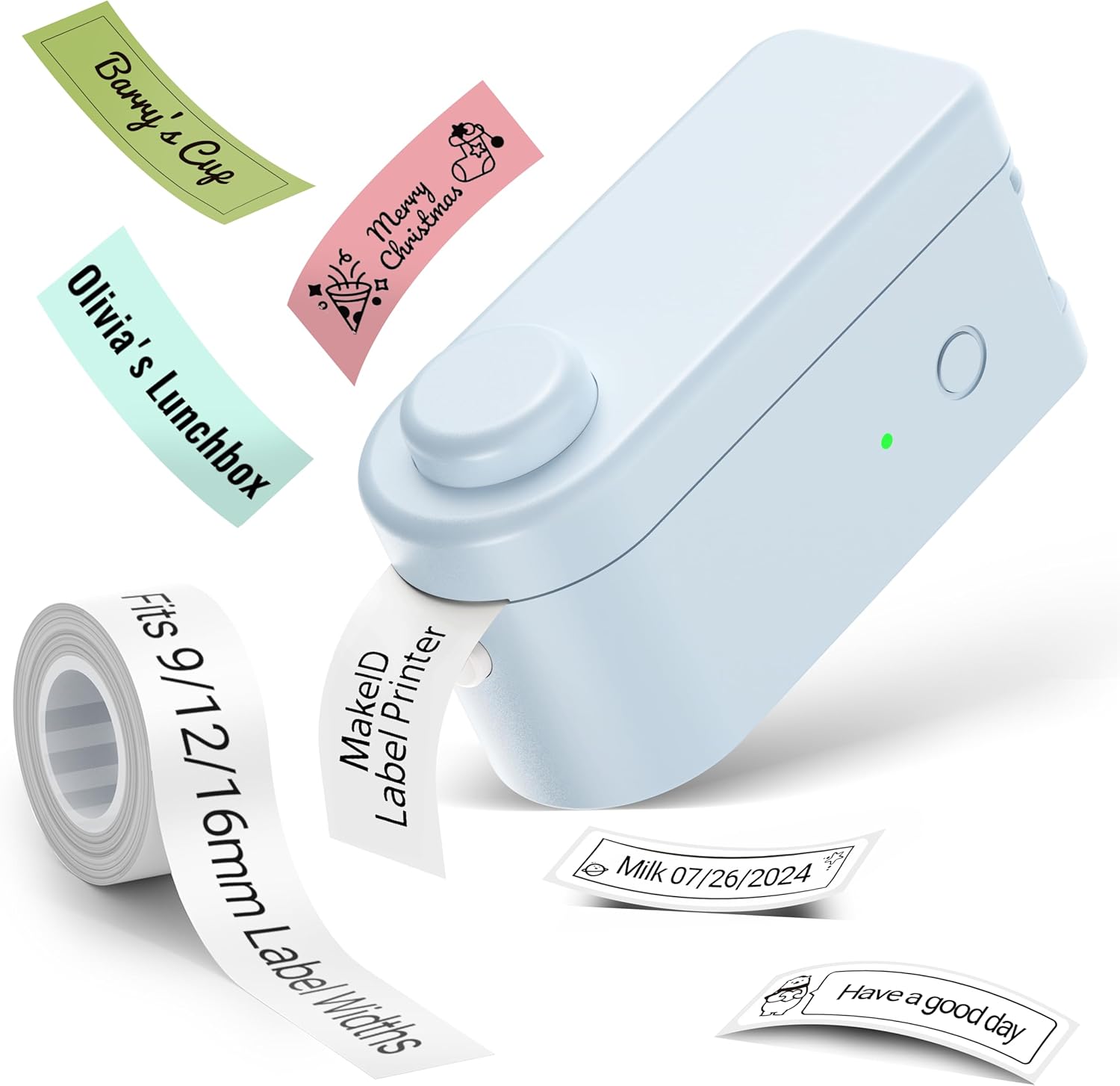
выява: The Makeid L1 Label Maker demonstrating the label tape roll and examples of printed labels, including continuous and die-cut types.
3. Загрузка і ўстаноўка праграмы
The Makeid L1 operates via a dedicated mobile application. Пошук "MakeID-Life" on your device's app store.

выява: Screenshots showing the "Get it on Google Play" and "Download on the App Store" buttons, indicating where to find the MakeID-Life application.
4. Спарванне Bluetooth
The label maker connects to your smartphone via Bluetooth.
- Пераканайцеся, што Bluetooth уключаны на вашым смартфоне.
- Turn on the Makeid L1 Label Maker by pressing the power button. The indicator light will flash, indicating it's ready for pairing.
- Open the "MakeID-Life" app. The app will automatically search for nearby devices.
- Select "L1" from the list of available devices to connect. Once connected, the indicator light on the label maker will become solid.

выява: A visual guide demonstrating the three steps for Bluetooth connection: turning on Bluetooth, selecting the L1 model within the app, and confirming the device connection.
Інструкцыя па эксплуатацыі
1. Designing Your Label
The "MakeID-Life" app offers extensive customization options:
- Увод тэксту: Увядзіце патрэбны тэкст.
- Шрыфты: Choose from 88 different font styles.
- Значкі і сімвалы: Access over 600 icons and various symbols.
- Шаблоны: Utilize over 400 pre-designed templates for various purposes (e.g., kitchen, office, school).
- Borders & Frames: Add decorative borders.
- Іншыя функцыі: Create barcodes, QR codes, tables, dates, and patterns.
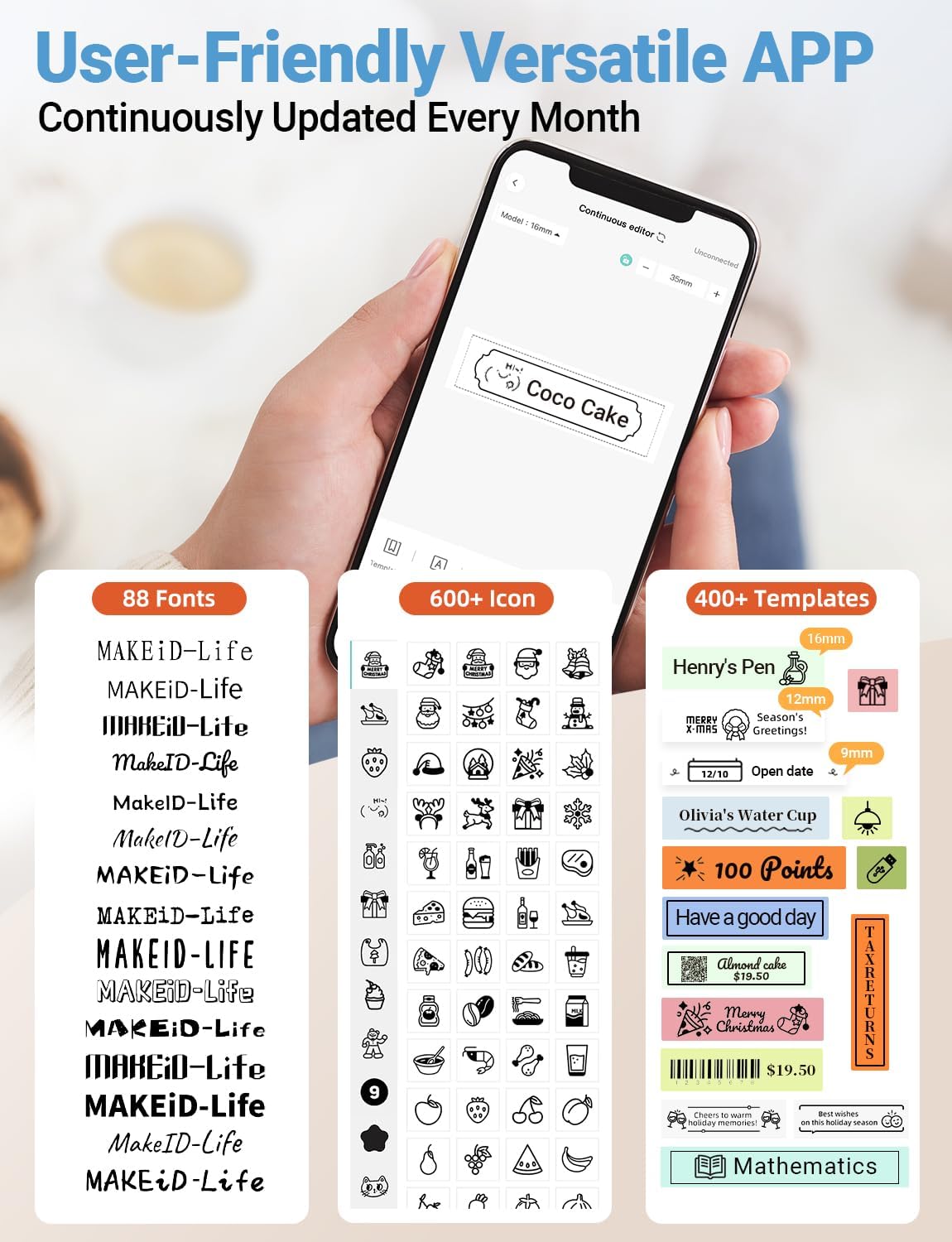
выява: Падрабязны view of the MakeID-Life app interface, showcasing the wide selection of 88 fonts, over 600 icons, and more than 400 templates available for label customization.
2. Друк этыкетак
Once your design is complete in the app:
- Review your label design on the app screen.
- Tap the "Print" button within the app.
- The label will be thermally printed and emerge from the output slot.
3. Cutting Labels
The Makeid L1 features a built-in cutter for clean edges.
- After printing, gently pull the label forward slightly.
- Press the cutting button (refer to the Product Overview image for location) to cleanly cut the label.

выява: Illustration of the Makeid L1's built-in cutter, demonstrating how it provides professional and safe cutting of labels, eliminating messy torn edges.
4. Types of Label Printing
The L1 supports two primary types of label printing:
- Бесперапынныя пазнакі: Ideal for custom lengths, allowing you to print text of any length and cut it precisely.
- Die-Cut Labels: Pre-sized labels with specific shapes, perfect for consistent labeling of items like jars or files.

выява: Visual representation of continuous labels, which can be cut to any length, and die-cut labels, which are pre-shaped for specific applications.
Тэхнічнае абслугоўванне
Чыстка друкавальнай галоўкі
To ensure optimal print quality, periodically clean the thermal print head.
- Turn off the label maker and disconnect it from the power source.
- Open the lid and remove the label tape.
- Gently wipe the print head with a soft, lint-free cloth dampачышчайце ізапрапілавым спіртам. Не выкарыстоўвайце ваду або абразіўныя ачышчальнікі.
- Allow the print head to dry completely before reinserting the tape and closing the lid.
Захоўванне
Store the label maker in a cool, dry place away from direct sunlight and extreme temperatures. Remove the label tape if storing for extended periods.
Ліквідацыю непаладак
Звярніцеся да табліцы ніжэй, каб азнаёміцца з распаўсюджанымі праблемамі і іх рашэннямі.
| праблема | Магчымая прычына | Рашэнне |
|---|---|---|
| Прылада не ўключаецца. | Нізкі акумулятар. | Зарадзіце прыладу з дапамогай USB-кабеля, які ўваходзіць у камплект. |
| Немагчыма падключыцца праз Bluetooth. | Bluetooth is off on phone; device not in pairing mode; app issue. | Ensure Bluetooth is enabled on your phone. Turn the label maker off and on again to re-enter pairing mode. Restart the "MakeID-Life" app. |
| Дрэнная якасць друку / бляклыя адбіткі. | Print head dirty; incorrect label tape; low battery. | Clean the print head. Ensure you are using Makeid compatible thermal label tape. Charge the device. |
| Label tape not feeding. | Tape incorrectly loaded; tape jammed. | Open the lid and re-insert the label tape correctly, ensuring it's not jammed. |
| Этыкеткі рэжуцца не вельмі акуратна. | Cutter blade dull or obstructed. | Ensure no debris is obstructing the cutter. If issues persist, contact customer support. |
Тэхнічныя характарыстыкі
Detailed technical specifications for the Makeid L1 Label Maker Machine:
| Асаблівасць | Дэталь |
|---|---|
| Марка | Makeid |
| Назва мадэлі | L1 |
| Тэхналогія падлучэння | Bluetooth |
| Тэхналогія друку | Цеплавы |
| Вывад на прынтэр | Манахромны |
| дазвол | 203 x 203 DPI (also 300 x 300 DPI for other variants) |
| Максімальны памер носьбіта | 0.63 цалі (16 мм) |
| Сумяшчальныя прылады | Смартфоны (Android і iOS) |
| Метад кантролю | дадатак |
| Абсталяванне інтэрфейсу | USB |
| Крыніца харчавання | 1 літый-іённы акумулятар (у камплекце) |
| Памеры прадукту | 3.93" Г х 1.6" Ш х 1.96" В (10 х 4.06 х 4.98 см) |
| Вага прадмета | 4.4 унцыі (126 грама) |
| Асаблівасці | Continuous & Pre-cut Label Tapes, Waterproof, Oil-proof, Friction Resistant, Light Resistant, No Fading, Rich Font Icon Pattern, Portable, Inkless, Wireless, Rechargeable, Creative Print Functions (Barcode, Text, Picture, QR 2D Code, Table, Date, Border, Icon, Shape, Pattern, Template) |
Гарантыя і падтрымка
The Makeid L1 Label Maker comes with a Пажыццёвая гарантыя. For technical support, warranty claims, or further assistance, please contact Makeid customer service through the official Makeid webсайт або кантактную інфармацыю, указаную на ўпакоўцы прадукту.
Каб атрымаць дадатковыя рэсурсы і адказы на часта задаваныя пытанні, наведайце Makeid Store on Amazon.
Інфармацыя па бяспецы
- Не разбірайце і не спрабуйце адрамантаваць прыладу самастойна.
- Захоўвайце прыладу далей ад вады і высокай вільготнасці.
- Use only original or certified compatible label tapes and charging cables.
- Захоўваць у месцах, недаступных дзецям.
- Пазбягайце ўздзеяння на прыладу экстрэмальных тэмператур або прамых сонечных прамянёў.