
1. Уводзіны і большview
The UGREEN Uno 65W GaN USB-C Charger is a compact and efficient multi-port charging device. Utilizing advanced GaN (Gallium Nitride) technology, it offers high power output in a smaller form factor, reducing energy loss and heat generation during operation. This charger features an interactive LED display that indicates the charging status, providing a clear visual cue.
Equipped with two USB-C ports and one USB-A port, it supports various fast charging protocols, making it compatible with a wide range of devices including laptops, tablets, and smartphones. Integrated multiple safety features protect against short circuits, overcharging, overheating, and overvoltage, ensuring safe and reliable charging.

Image 1.1: UGREEN Uno 65W GaN USB-C Charger, showcasinг яго кампактны дызайн.
2. Інфармацыя па бяспецы
- Не падвяргайце зарадную прыладу ўздзеянню вадкасцей, вільгаці або экстрэмальных тэмператур.
- Пазбягайце падзення або моцных удараў зараднай прылады.
- Do not disassemble, modify, or attempt to repair the charger. This may void the warranty and pose safety risks.
- Ensure proper ventilation when using the charger. Do not cover it with clothing or other materials.
- Выкарыстоўвайце з зараднай прыладай толькі сумяшчальныя кабелі і прылады.
- Захоўваць у месцах, недаступных дзецям.
- Адключайце зарадную прыладу ад разеткі, калі яна не выкарыстоўваецца, або падчас навальніцы.
3. Змесціва ўпакоўкі
Калі ласка, праверце ўпакоўку на наяўнасць наступных прадметаў:
- UGREEN Uno 65W GaN USB-C Charger (Model CD361)
- Кіраўніцтва карыстальніка
4. Асаблівасці прадукту
- Максімальная выхадная магутнасць 65 Вт: Забяспечвае магутнасць да 65 Вт для хуткай зарадкі сумяшчальных прылад.
- GaNFast Technology: High-efficiency power conversion (95%) for reduced heat and compact size.
- Дызайн з некалькімі портамі 3-у-1: Features 2 USB-C ports and 1 USB-A port for simultaneous charging of multiple devices.
- Святлодыёдны дысплей: An interactive LED screen indicates the current charging status.
- Удасканаленая сістэма бяспекі: Built-in protections against short circuits, overcharging, overheating, and overvoltage.
- Removable Magnetic Feet: Provides stability and a unique aesthetic.
- Шырокая сумяшчальнасць: Supports a wide range of devices including laptops, tablets, and smartphones from various brands.

Малюнак 4.1: Падрабязны view of the charger's ports, magnetic feet, and LED display.
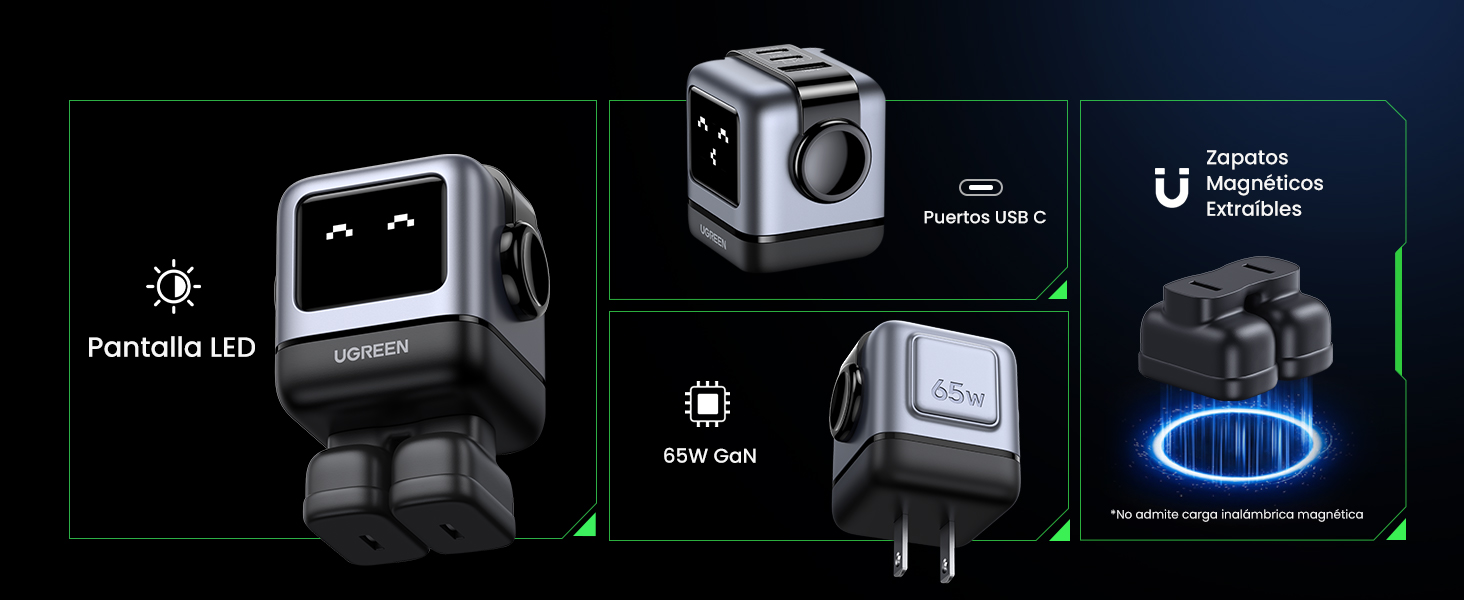
Image 4.2: The charger's LED display showing charging status.
5. Настройка
- Распакуйце зарадную прыладу: Carefully remove the UGREEN Uno 65W GaN USB-C Charger from its packaging.
- Attach Magnetic Feet (Optional): If desired, attach the removable magnetic feet to the bottom of the charger for added stability.
- Падключыце да разеткі: Plug the charger into a standard wall power outlet (AC 100-240V, 50/60Hz).
- Гатовы да выкарыстання: The charger is now ready to connect your devices.
6. Інструкцыя па эксплуатацыі
6.1 Падключэнне прылад
- Use a compatible USB-C to USB-C cable for devices that support USB-C charging.
- Use a compatible USB-A to [device connector] cable for devices that charge via USB-A.
- Connect the appropriate cable to one of the charger's ports (2x USB-C, 1x USB-A).
- Падключыце іншы канец кабеля да прылады.
6.2. Размеркаванне магутнасці
The charger intelligently distributes power based on the connected devices and their charging requirements:
- Выкарыстанне аднаго порта: When only one USB-C port is used, it can deliver up to 65W (e.g., charging a MacBook Air M2 from 0% to 51% in approximately 30 minutes).
- Выкарыстанне некалькіх партоў: When multiple ports are in use, the 65W total power is dynamically distributed. For example, if both USB-C ports are used, one might provide 45W for a laptop and the other 20W for a mobile device.
- Порт USB-A: The USB-A port provides standard charging output, typically up to 18W, depending on the device.
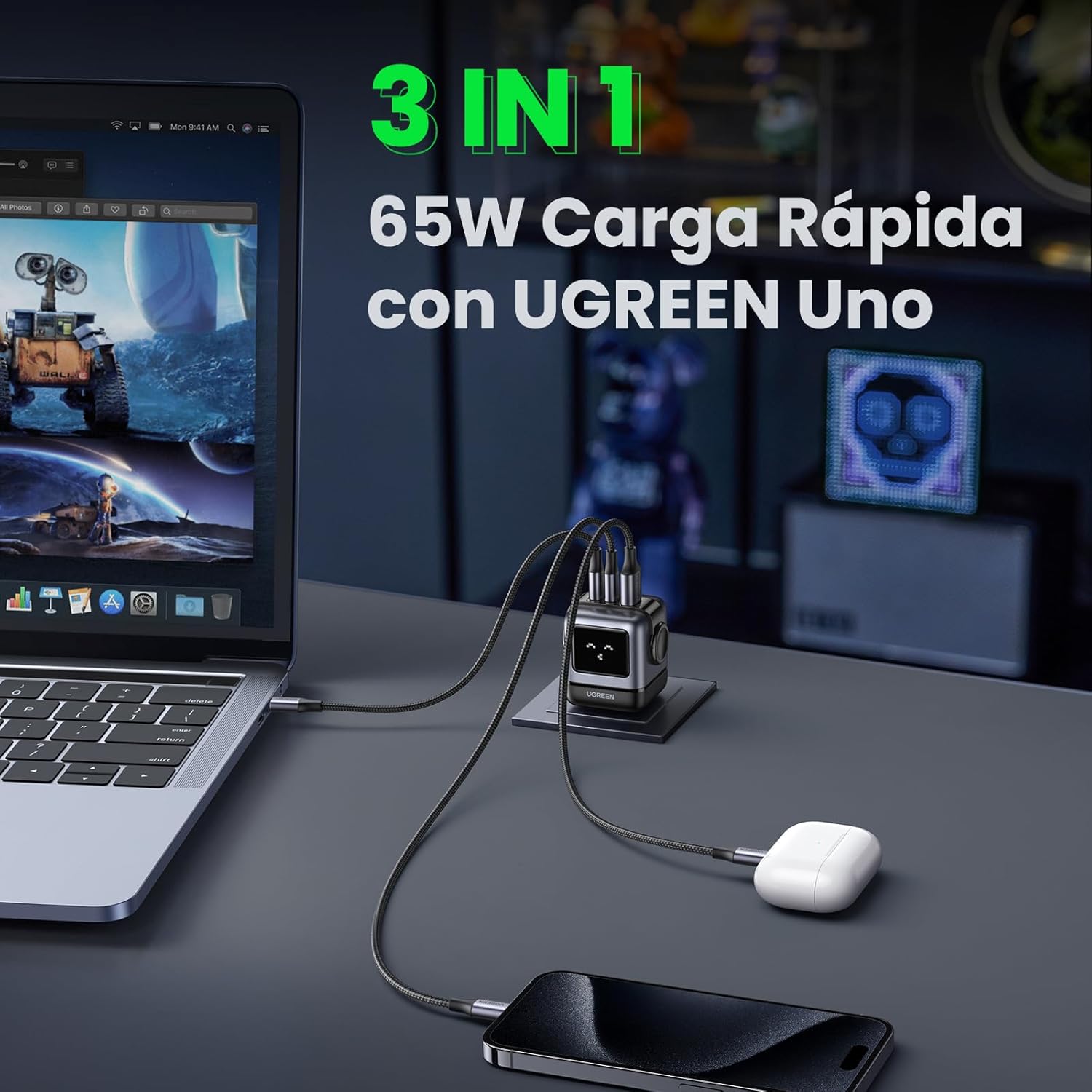
Image 6.1: The charger simultaneously charging a laptop, smartphone, and earbuds.
6.3 LED Display Indications
The LED display on the charger provides visual feedback on its operational status:
- Зарадка: The LED display will show an animation or specific icon indicating that a device is actively charging.
- Цалкам зараджана: Once a connected device reaches full charge, the LED display will change to indicate completion.
- У халастым рэжыме: When no devices are connected or charging, the display may show a standby indicator.

Image 6.2: Comparison of the LED display during charging and when fully charged.
Заўвага: The charger is not compatible with 60W fast charging for the Samsung S26 Ultra; it will charge at a maximum of 45W PPS for this device.
7. Тэхнічнае абслугоўванне
- Уборка: Адключыце зарадную прыладу ад разеткі перад чысткай. Выкарыстоўвайце мяккую сухую тканіну для працірання паверхні. Не выкарыстоўвайце вадкія ачышчальнікі або аэразолі.
- захоўванне: Захоўвайце зарадная прылада ў прахалодным, сухім месцы, удалечыні ад прамых сонечных прамянёў і экстрэмальных тэмператур.
- Сыход за кабелем: Пазбягайце празмернага згінання або скручвання зарадных кабеляў, бо гэта можа іх пашкодзіць.
8. Выпраўленне непаладак
| праблема | Магчымая прычына | Рашэнне |
|---|---|---|
| Прылада не зараджаецца. | 1. Charger not plugged in. 2. Cable is faulty. 3. Device is incompatible or port is damaged. | 1. Ensure the charger is securely plugged into a live power outlet. 2. Try a different charging cable. 3. Test with another device or try a different port on the charger. |
| Павольная зарадка. | 1. Using a non-fast charging cable. 2. Multiple devices connected, distributing power. 3. Device does not support fast charging. 4. Device requires higher PPS than provided (e.g., S26 Ultra). | 1. Use a high-quality, fast-charging compatible cable. 2. Disconnect other devices to allow maximum power to a single device. 3. Verify your device supports fast charging. 4. Note that some devices may not achieve their absolute maximum charging speed if they require specific PPS profiles not fully supported by the charger. |
| Зарадная прылада цёплая. | Нармальная праца, асабліва падчас зарадкі высокай магутнасці. | The charger is designed with thermal protection. If it becomes excessively hot, disconnect it and allow it to cool. Ensure adequate ventilation. |
| LED display not working or showing incorrect status. | Часовы збой праграмнага забеспячэння або праблемы з харчаваннем. | Unplug the charger from the wall outlet, wait a few seconds, and plug it back in. If the issue persists, contact customer support. |
9. Тэхнічныя характарыстыкі
| Асаблівасць | Дэталь |
|---|---|
| Марка | УГРЭЕН |
| Нумар мадэлі | CD361 |
| Тып раздыма | USB Type-C |
| Сумяшчальныя прылады | Game consoles, Laptops, Smartphones, Tablets (e.g., iPhone 8-17 Series, Galaxy S10-S24 Series, Pixel 8/7/6, MacBook Air/Pro, iPad Pro/Air/mini, Watch 8/7, HomePod, AirPods Pro) |
| Уваходны кнtage | 240 Volts (AC 100-240V) |
| Ampэраж | 3.25 Ampэрэс |
| Усяго партоў USB | 3 (2x USB-C, 1x USB-A) |
| Максімальная выхадная магутнасць | 65 ват |
| Выхадны ток | 5 Ampэрэс |
| Выхад Voltage | 5 вольт |
| Крыніца харчавання | Правадная электрычная |
| Дыяпазон частот | 50-60 Гц |
| Асноўны тып раздыма харчавання | 2-pin (North America Type A) |
| Партатыўны | так |
| Вага прадмета | 146 грам |
| Знешні матэрыял | GaN |
| Формаў-фактар | Robot-shaped |
10. Гарантыя і падтрымка
10.1 Інфармацыя аб гарантыі
This UGREEN product is covered by an Гарантыя 18 месяцаў з даты пакупкі. Гэтая гарантыя распаўсюджваецца на вытворчыя дэфекты і праблемы, якія ўзніклі ў выніку нармальнага выкарыстання. Яна не распаўсюджваецца на пашкоджанні, выкліканыя няправільным выкарыстаннем, няшчаснымі выпадкамі, несанкцыянаванымі мадыфікацыямі або стыхійнымі бедствамі.
Калі ласка, захавайце доказы пакупкі для прэтэнзій па гарантыі.
10.2 Падтрымка кліентаў
For technical support, warranty claims, or any questions regarding your UGREEN Uno 65W GaN USB-C Charger, please contact UGREEN customer service through the following channels:
- Афіцыйны UGREEN Webсайт: Наведайце www.ugreen.com каб атрымаць адказы на часта задаваныя пытанні, рэсурсы падтрымкі і кантактную інфармацыю.
- Падтрымка па электроннай пошце: Глядзіце раздзел кантактаў на афіцыйным сайце webсайт для адпаведнага адраса электроннай пошты.
- Падтрымка інтэрнэт-крам: If purchased from an online retailer, you may also contact their customer service for assistance.